
Kira Generator
Overview
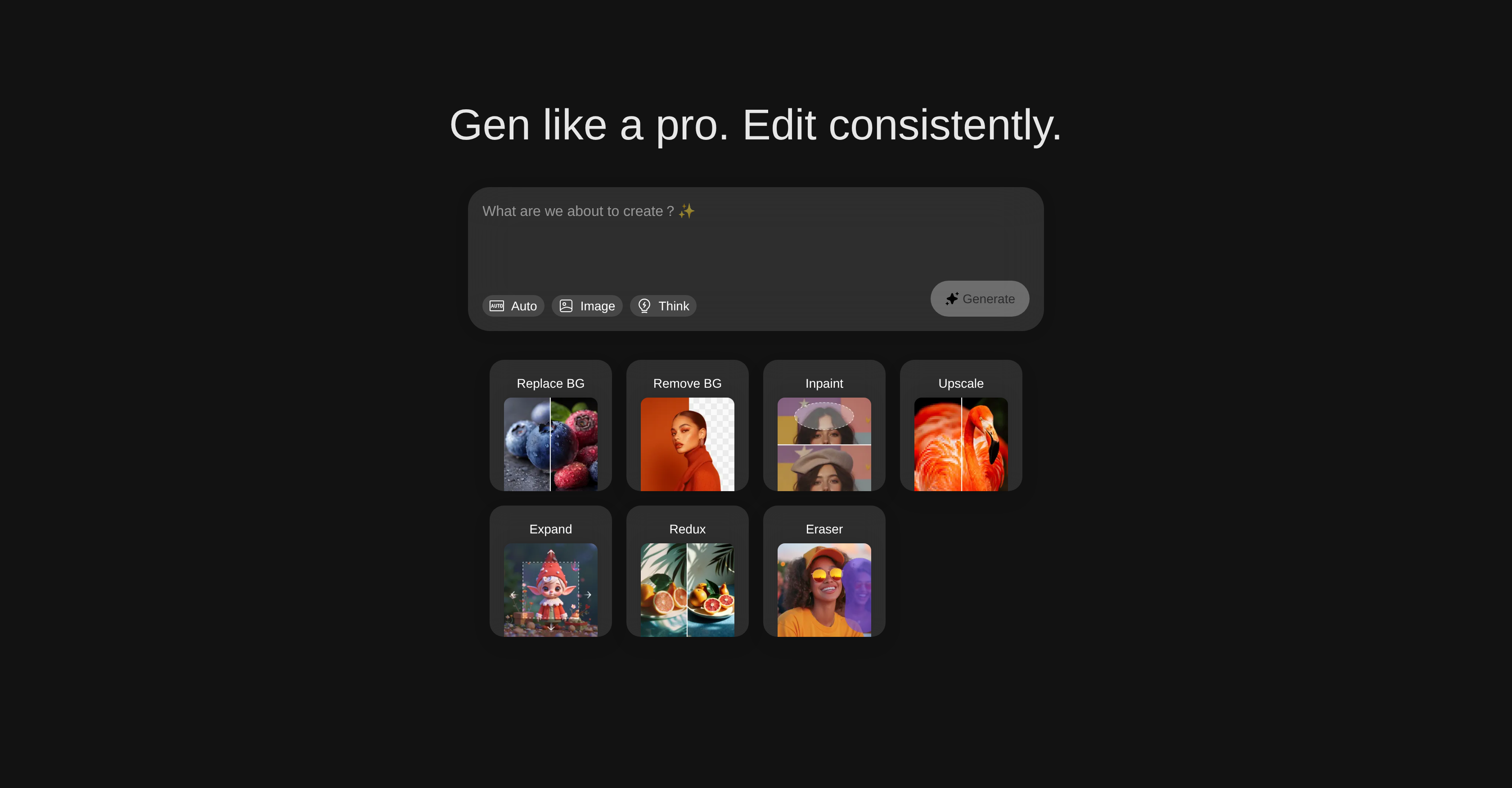
- Transform any photo's setting instantly with automated background replacement and removal
- Eliminate unwanted objects and repair damaged areas while preserving original image quality
- Generate completely new images from scratch using AI-powered creation tools
- Increase image resolution dramatically without pixelation for sharper, print-ready results
- Extend image canvas size automatically while maintaining aspect ratio and quality
- Simplify visually complex images to enhance clarity and focus on key elements
Pros & Cons
Pros
- Generates new images
- Enhances existing images
- Automated image editing
- Background replacement feature
- Background removal feature
- Inpaint function
- Reduces pixelation
- Expand canvas feature
- Visual simplification
- Element deletion tool
- Intelligent design
- Professional-grade output
- Consistent results
- Eliminate manual tweaks
- Image resolution increase
- Efficient image repair
- Damage repair of images
- Removing unwanted elements
- Maintenance of image integrity
- Reducing visual complexity
- Image structure preservation
- Professional image editing
- Digital art creation
- Photo enhancing capabilities
- Advanced image techniques
Cons
- No collaborative feature
- Limited format support
- May over-simplify complex images
- No explicit batch processing
- No direct printing options
- No mobile version
- Possibly high learning curve
- No off-line capability
- No preset customization
- No layers support
Reviews
Rate this tool
Loading reviews...
❓ Frequently Asked Questions
With Kira Generator, you are capable of performing a wide range of image editing tasks such as replacing and removing backgrounds using 'Replace BG' and 'Remove BG', repairing damaged parts or removing unwanted elements from an image with 'Inpaint', enhancing image resolution with 'Upscale', extending the canvas size of images with 'Expand', reducing or simplifying the visual complexity of an image with 'Redux' and deleting specific elements from an image with 'Eraser'. Moreover, you can create new images from scratch and enhance existing ones.
Kira Generator's 'Replace BG' function allows users to alter the backdrop of an image. You can use this function to substitute the current background of an image with a new one, completely transforming the visual context of the image.
Yes, Kira Generator has the capacity to create new images from scratch. As a sophisticated AI-powered tool, it is not limited to just editing images but also capable of generating images.
Kira Generator enhances existing images using several bespoke tools. These include background editing features ('Replace BG' and 'Remove BG'), image repair with 'Inpaint', resolution enhancement with 'Upscale', visual complexity reduction with 'Redux', unwanted object removal with 'Eraser', and canvas size extension with 'Expand'. These features allow users to modify existing images to a professional-grade quality.
The 'Inpaint' function within Kira Generator aids in repairing damaged parts of an image or removing unwanted elements. This feature works by maintaining the integrity of the overall picture, ensuring that even with significant alterations, the final edit appears clean and cohesive.
Kira Generator's 'Upscale' feature is useful for enhancing image resolution and reducing pixelation. This allows users to increase the quality and detail in their images, resulting in sharper, more defined visuals.
'Expand' in Kira Generator is a feature that helps extend the canvas size of images. This feature allows users to enhance the size of their image without compromising on the aspect ratio or the quality of the image.
The 'Redux' feature in Kira Generator helps in efficiently reducing or simplifying the visual complexity of an image. This can be helpful when you have an overly complicated image that you wish to simplify in order to enhance its visual clarity.
The 'Eraser' tool in Kira Generator allows users to delete specific elements from an image. This feature is great for those who need to remove or modify individual components of an image, whilst maintaining the overall structure and integrity of the image.
Yes, Kira Generator is indeed suitable for professional image editing. Its range of able features, including background editing, image repair, resolution enhancement, visual complexity reduction, and specific element deletion, offers a comprehensive and professional-grade editing suite for users.
No prior experience in image editing is required to use Kira Generator. The tool provides an automated approach to image editing processes, which simplifies the user experience and makes it accessible for beginners and experienced users alike.
Kira Generator maintains the overall picture integrity when removing unwanted elements using sophisticated AI algorithms. Functions like 'Inpaint' and 'Eraser' are crafted to preserve the overall composition of the image, ensuring that edits blend seamlessly into the original image.
Kira Generator can be used by anyone needing image editing and creation, from professional designers and photographers to casual users and enthusiasts. Its AI-driven features and intuitive interface make it a versatile tool suitable for a wide array of users.
Kira Generator ensures consistent results through its use of AI algorithms. Its intelligent design means that irrespective of the image or the editing tasks undertaken, users can expect consistently high-quality results across all operations.
The 'Remove BG' feature in Kira Generator allows users to eliminate the background of an image altogether. Through its intelligent algorithms, it can identify the background elements and remove them while preserving the primary focus of the image.
Artificial Intelligence plays a crucial role in Kira Generator's functionality. AI algorithms underpin all processes, from background removal and replacement to image repair and simplification. These algorithms help deliver more accurate results, by enhancing the perception of visual context and improving decision-making in image alterations.
Yes, you can extend the canvas of your images using Kira Generator. The 'Expand' feature aids to extend the canvas size of images, allowing you more space to add visual elements without disturbing the quality or aspect ratio of the original image.
Yes, Kira Generator offers image resolution improvement through the 'Upscale' feature. This feature enhances image resolution while reducing pixelation, ensuring a sharper, more defined image output.
You can change an image's background with Kira Generator using the 'Replace BG' feature. This function allows users to alter the backdrop of an image, transforming the visual context and appearance of the picture.
Yes, Kira Generator can simplify the visual complexity of an image. This is done via the 'Redux' feature, which helps in reducing or simplifying the visual intricacy of an image, making it easier to interpret and understand.
Pricing
Pricing model
Freemium
Paid options from
$9.99
Billing frequency
One-time