LangWatch
Overview
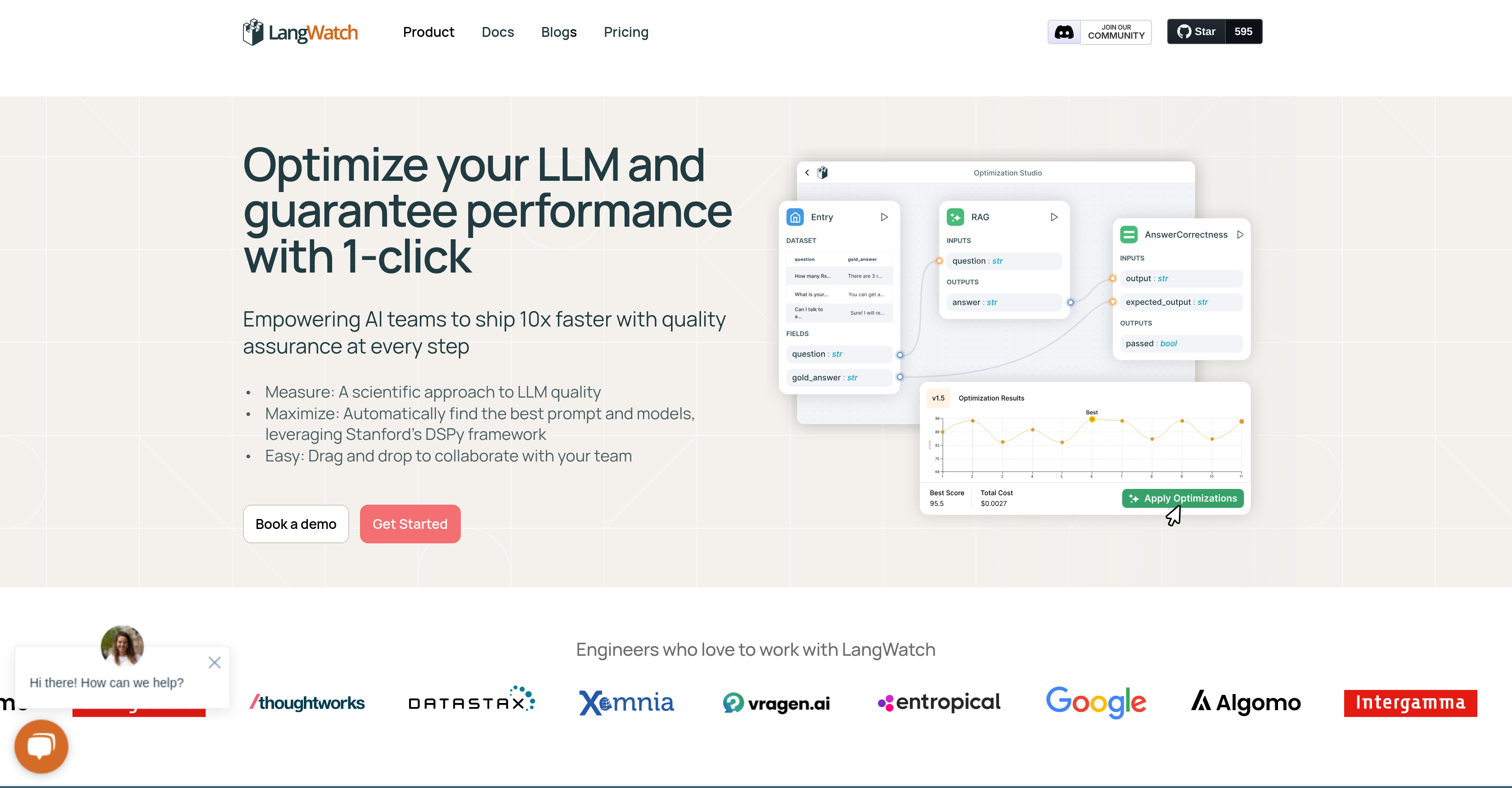
- Ship AI features faster by automatically discovering optimal prompts and models instead of manual experimentation
- Collaborate across teams with drag-and-drop workflows that enable domain experts and developers to work together
- Maintain quality standards with versioned experiments that track performance across pipelines, prompts, and models
- Monitor optimization progress visually through real-time analytics dashboards that measure quality, latency, and cost
- Debug performance issues efficiently with tools to identify and fix message and output errors
- Manage datasets systematically with collaborative tools that establish quality indicators and standards
- Reduce development costs by automating manual optimization work that typically requires extensive tweaking
- Ensure model compatibility by working seamlessly with any LLM model and optimizer framework
Pros & Cons
Pros
- Optimizes Language Model applications
- Speeds up quality assurance
- Best prompts and models finder
- Stanfords DSPy framework integration
- Enables team collaboration
- Drag and drop feature
- Analytics dashboard for monitoring
- Continual progress stimulation
- Reduces manual work
- Applicable to various fields
- Measurable quality, assurance, latency, cost
- Message and output debugging
- Keeps track of versioned experiments
- Facilitates full dataset management
- Compatible with all LLM models
- Tracks optimization progress visually
- One-click LLM performance optimization
- Prompt discovery
- Auto-optimization
- Legal, sales, customer service tools
- Healthcare and financial analysis
- Latency reduction
- Allows domain experts involvement
- Enterprise-grade controls
- Self-hosted deployment
- GDPR compliant
- Role-based access controls
- Custom models integration
- API-accessible tools integration
- Datasets and cost tracking
- Annotations
- Topic, events, custom graph analytics
- Jailbreak detection
- Optimization studio integration
- Supports all LLMs
- Features chain of thought prompting technique
- Structured vibe-checking
- Safety and compliance tools
- Performance measurement tools
Cons
- Requires familiarity with DSPy
- No mention of mobile support
- Potential privacy issues (domain experts)
- Uncertain compatibility with non-LLM models
- No built-in app integration
- May have learning curve
Reviews
Rate this tool
Loading reviews...
❓ Frequently Asked Questions
LangWatch's primary function is to optimize Language Model applications (LLMs). It leverages Stanford's DSPy framework to automatically discover the best prompts and models, replacing manual work and quickening the process significantly. LangWatch's functionalities aim to smooth out quality assurance and hasten the rate of shipping by providing features like intuitive analytics dashboards, model discovery, auto-optimization, debugging, versioned experiments, and full dataset management.
Yes, LangWatch is not just designed for developers. It accommodates domain experts from various fields including Legal, Sales, Customer Services, HR, Health, and Finance to be actively involved in the process, enabling a wider scope of application.
LangWatch's DSPy framework, developed by Stanford, aids in the automatic discovery of the best prompts and models. It ensures seamless optimization of LLMs and is a critical component in LangWatch's operational scheme as it aids in quickening manual work involved in prompt and model selection.
Yes, LangWatch exhibits full compatibility with all LLM models and optimizers including the DSPy framework. This offers flexibility and versatility to LangWatch users by allowing them to switch and adjust their LLM models as per requirements.
LangWatch's drag and drop feature acts as a powerful tool for team collaboration. It simplifies the process of shared working spaces, allowing users to easily manage, share, and work together on different aspects of LLM optimization, enhancing overall project productivity.
The analytics dashboard in LangWatch serves as an intuitive tool for project monitoring and evaluation. It provides vital insights related to system performance, model efficiency, and progress tracking. The dashboard's comprehensive data view aids in making informed decisions and guiding optimization efforts.
LangWatch contributes to latency reduction by automating many manual tasks involved in optimizing LLMs. This includes automatically discovering the best prompts and models, which significantly speeds up the process, thereby reducing latency.
Versioned experiments in LangWatch are instrumental in recording and tracking the performance of various pipelines, prompts, and models. This offers a historical perspective on best performers and facilitates comparative analysis, which is crucial in continuous improvement and progress.
Yes, LangWatch allows debugging of messages and outputs. This feature enables users to identify and rectify any performance issues or errors, ensuring smooth functioning of their LLM applications.
LangWatch significantly reduces manual work by automating critical parts of LLM optimization process. It automatically finds the best prompt or model, which typically requires a lot of manual tweaking and experimentation. The use of the DSPy framework allows the same quality of outcomes but in a fraction of the standard time.
LangWatch ensures quality assurance by incorporating a scientific approach to measure LLM quality. All aspects including quality, latency, and costs are quantifiable metrics within the LangWatch system. Concept of versioned experiments and full dataset management also plays a vital role in maintaining high quality standards.
LangWatch offers full dataset management that facilitates collaboration and sets quality standards. As part of dataset management, users can collaborate, share and establish quality indicators for their datasets, making the process more systematic and organized.
LangWatch turbocharges the speed of shipping by automating and streamlining the process of LLM optimization. By automatically finding the right prompts or models and smoothing out quality assurance, it eliminates laborious manual work, thereby accelerating the development process.
Users can visually track optimization progress using the LangWatch DSPy Visualizer. This functionality enables them to monitor developments in real time and makes the optimization process more efficient.
The LLM Optimizer in LangWatch is a feature that aids in simplifying the optimization of LLM performance. It leverages Stanford's DSPy framework to implement efficient and effective optimisation strategies. It works by finding the right prompts or models automatically, greatly accelerating the optimization process.
Yes, LangWatch is not limited to developers alone. It can incorporated by domain experts from various fields such as Legal, Sales, Customer Services, HR, Health and Finance. This makes LangWatch a versatile tool that encourages cross-disciplinary collaboration.
LangWatch's automatic discovery of best prompts and models is facilitated by leveraging Stanford's DSPy Framework. It allows the system to locate the best performing elements in an automated way, removing the need for time-consuming manual searches and adjustments.
Indeed, LangWatch has the functionality to measure cost among other crucial parameters such as quality, assurance, and latency. This aids in effective cost management and helps in understanding the expense dynamics of LLM optimization.
When LangWatch refers to full compatibility with LLM models, it means that the platform can work seamlessly with all types of LLM models and optimizers, including the DSPy framework. This offers flexibility to the users, allowing them to work with any LLM model of their choice.
LangWatch helps facilitate LLM application optimization by providing a platform that automatically discovers the most suitable prompts and models, ensuring continual progress. Features such as quality assurance, drag and drop for collaboration, analytics dashboard, prompt discovery, auto-optimization, debugging, versioned experiments, and dataset management work in concert to create a powerful tool for optimizing LLM applications.
Pricing
Pricing model
Paid
Paid options from
$61/month
Billing frequency
Monthly
Related Videos
Running AI Agent Simulations with LangWatch
LangWatch•112 views•Jun 23, 2025