

Layup
Eliminate hours of manual document review: AI data extraction, classification, and analysis run automatically as each document arrives.
Listing not yet reviewed by our editors · How we check
Overview
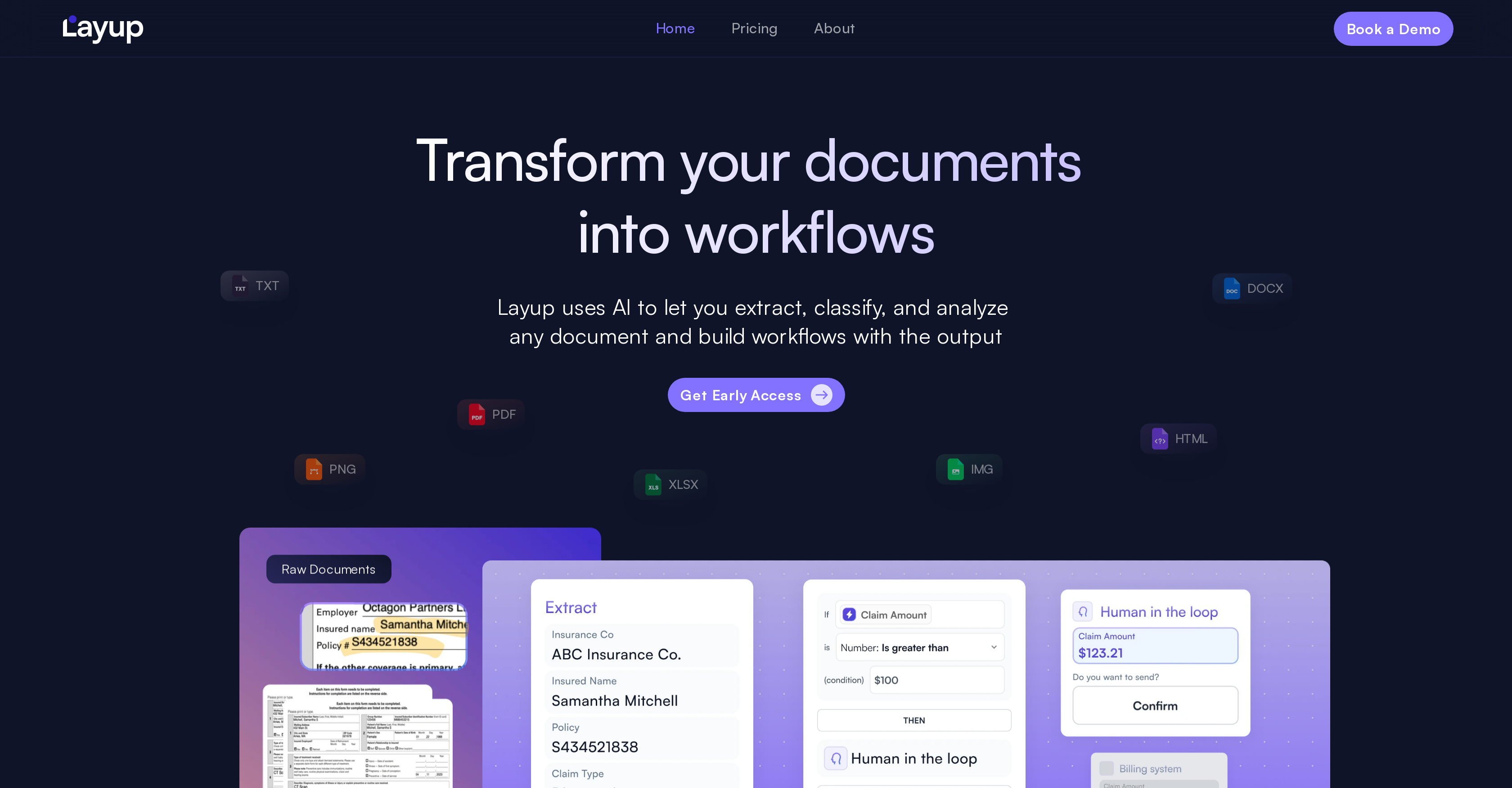
- Eliminate hours of manual document review: AI data extraction, classification, and analysis run automatically as each document arrives.
- Process every file type your teams receive in one place: unstructured data from PDF, DOCX, XLSX, TXT, HTML, PNG, and image files becomes clean, structured data.
- Make strategic decisions from raw paperwork: extracted data flows straight into customizable workflows that produce actionable insights instead of static files.
- Automate document processing without replacing your stack: Layup integrates with your existing systems and services for end-to-end workflow automation.
- Ship document intelligence inside your own product: embed Layup with a single line of code to convert unstructured data streams into structured outputs for your users.
- Keep sensitive documents under your control: on-premises deployment runs Layup in your own cloud, with granular user and team permissions and rigorous data security standards built toward SOC II compliance.
- Align entire teams on the same document workflows: multiplayer collaboration lets colleagues build and run workflows together in a single interface.
- Standardize quality across every review: reusable workflow templates capture your organization's growing knowledge base and improve with each use.
- Handle high document volumes without slowdowns: scalable deployment keeps processing consistent whether you handle hundreds or thousands of files.
- Give non-technical staff full access to automation: a no-code, consumer-grade interface lets anyone on the team build and run document workflows without IT support.
- Resolve issues and request changes fast: priority support provides direct lines to Layup's engineering team and founders.
Pros & Cons
From the listing; not yet checked by our editors.
Pros
- Converts unstructured documents to workflows
- Extracts, classifies, analyzes data
- Supports diverse file formats
- Automates document processing
- Cost-effective solution
- Direct data feed into workflows
- Generates strategic, actionable insights
- Can be integrated into systems
- Embeddable into products
- Offers granular permissioning
- On-premises solutions available
- Strict adherence to data security
- Multiplayer support for collaboration
- Creates, enriches workflow templates
- Scalable deployment
- Large document volume processing
- Automates document review
- End-to-end document automation
- No-code interface
- Consumer-grade design
- Designed for non-IT users
- Flexibility for deployment
- Transforms raw data into output
- Simplify work processing
- Tracks document-derived trends
- SOC II compliance (pending)
- Allows detailed permission assigning
- Facilitates external product embedding
- Supports workflow template creation
- Promotes inter-team collaboration
- On-prem for secure data processing
- Fast customer support
- Direct line to engineering team
Cons
- Unclear pricing
- No OCR or parsing tools
- No out-of-the-box integrations
- Limited file format support
- Dependent on data quality
- Potential latency with large volumes
- Possible complex customization
- No explicit multi-language support
- Requires technical setup
- Limited permission management details
Alternatives to Layup
Tools that share the most tags with Layup.
- AODocs
Automate complex document processes end-to-end with generative AI, eliminating manual tasks and human error
Not listed
Not listed
Not yet checked
- Send AI
Eliminate manual data entry entirely with custom AI models that automatically extract specific entities from your documents
Not listed
Not listed
Not yet checked
- TidyDocs
Find any invoice or receipt in seconds with intelligent search that works as you type, powered by AI that extracts vendor, date, and amount from any document
Freemium · from $19/month
$19/month
Not yet checked
- The Drive AI
Find any document instantly without manual searching through AI-powered content-based file search
Freemium · from $19.99/month
$19.99/month
Not yet checked
- Safe Appeals
Transform scattered files into a coherent project in minutes by dropping PDFs, research papers, and notes into a unified workspace where everything is automatically organized and indexed.
Paid · from $30
$30
Not yet checked
- Bit.ai
Transform scattered documents into a centralized knowledge base that your entire team can access instantly through powerful search capabilities
Freemium · from $8/month
$8/month
Not yet checked
Reviews
Rate this tool
Loading reviews...
Frequently asked questions
What is Layup?
Layup is an AI-powered tool that optimizes workflow by transforming unstructured documents into structured ones. It automatically reviews, processes, and analyzes data from assorted documents, converting them into actionable insights as a part of customizable workflows. Additionally, Layup facilitates integration with existing systems, embeds into products, and supports multiplayer collaboration.
How does Layup convert documents into structured workflows?
Layup employs AI algorithms to extract, classify, and analyze data from unstructured documents. This data is then fed into customizable workflows, enabling an automated, efficient, and cost-effective alternative to traditional manual document review and processing. The ultimate goal is to transform raw, often unusable data, into valuable, actionable insights fit for strategic decision-making.
What file formats are supported by Layup?
Layup supports a variety of file formats, including XLSX, PNG, TXT, IMG, DOCX, HTML, and PDF, making it a versatile and convenient tool for any organization working with diverse document types.
How does Layup extract, classify, and analyze data?
The AI algorithms employed by Layup extract data from documents, irrespective of the format. Afterwards, it classifies and analyzes this data, turning raw, unstructured information into classified, analyzed pieces. This process is entirely automated, making it significantly more efficient and cost-effective compared to manual data extraction and classification methods.
Can Layup be incorporated into my organization's existing systems?
Yes, Layup is designed to be integrated into your organization's existing systems. Its versatile design allows it to work in harmony with the services you already utilize, streamlining operations and enhancing overall efficiency.
Is it possible to embed Layup into a product?
Absolutely. You have the option to seamlessly plug Layup into your product. This means wherever streams of unstructured data exist within your product, Layup can be there to convert it into structured, useful information.
What security measures does Layup offer?
Layup offers multiple security measures. It conforms to rigorous data security standards and is aiming for SOC II compliance. Additionally, it allows granular permissioning for users and teams to ensure data integrity. It also offers on-premises solutions, allowing you to run Layup in your own cloud for maximum flexibility and control.
How does multiplayer support work within Layup?
Layup offers multiplayer support, making collaboration on workflows possible across your team and organization through a single interface. This collaborative approach to data analysis and decision-making enhances communication and synergy within the organization.