The Drive AIv1.2.0
Overview
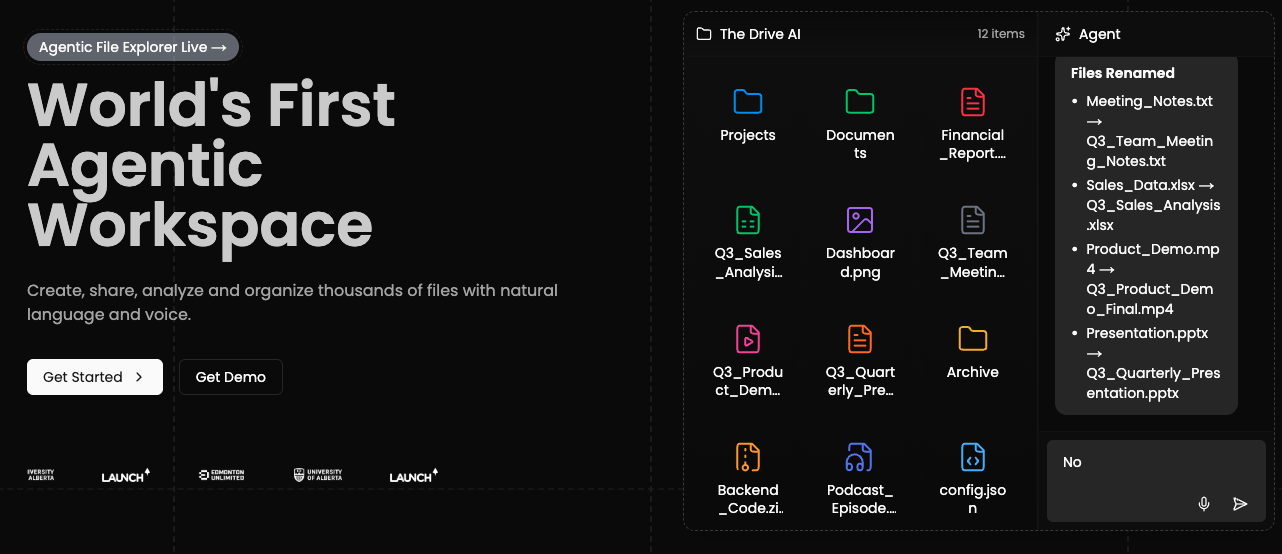
- Find any document instantly without manual searching through AI-powered content-based file search
- Ask questions directly to your PDFs, DOCX files, and research papers for immediate answers
- Generate new content like resumes, reports, and lists using your existing files as reference material
- Organize all file types including photos, recipes, and code snippets in one searchable workspace
- Understand complex concepts from research papers explained in simple language through AI analysis
- Manage projects and code more efficiently by storing and accessing all development resources together
Pros & Cons
Pros
- File management using natural language
- Auto organizaiton
- Content generation from files
- Ability to ask questions to files
- Supports various file types (PDF, DOCX, TXT, website links, YouTube video)
- Folder-based grouping
- Contextual editor for generating content
- Useful applications in multiple fields (students, professionals, researchers, developers, fathers)
- Free version available
- Option to upgrade for more features
- File storing capacity
- Efficient document search
- Allows asking questions to folders
- Helps draft paragraphs, lists
- Helps with efficient project management for developers
- Can store and recognize image files
- Supports multiple media (Videos, Links)
- Assists in writing resumes and cover letters
- Ability to handle thousands of documents
- Assists in understanding complex concepts
- Manage code snippets for software developers
- Audio recording within the platform
- Tool is highly user-friendly
- Interactive user interface
- Indexed files for efficient search
- Suitable for family and personal productivity
- Learning aid for students
- Accessible online (web-based)
- Handles multiple types of text documents
- Useful for job seekers
- Content-specific file search
- Creates drafts based on contextual understanding
- Availability of premium plans
- Specific software development aids
- Assists in home management tasks
- Can handle academic resources
- Helps in personal document organization
- Supports storing music/audio files
- Auto organization of files
- Storing and tracking of website links
Cons
- No offline mode available
- No API for developers
- Limited version control
- No direct file import
- No automatic file syncing
Reviews
Rate this tool
Loading reviews...
❓ Frequently Asked Questions
TheDrive is an AI-powered platform that provides a smarter way of organizing files and creating a knowledge base. It is designed to streamline business operations or enhance personal productivity by allowing users to build a knowledge base based on their file directory. TheDrive encompasses applications in various fields, aiding everyone from students to professionals, researchers, software developers, and even dads.
TheDrive employs AI technology to generate content based on the files users upload. By indexing the user-uploaded content, it allows for efficient file management, enables users to ask questions related to their files, and assists in writing new content based on them.
TheDrive can index several types of files including PDF, DOCX, TXT, website links, and YouTube videos. Nevertheless, it can store all types of files even though it only indexes these specific ones.
Users can ask questions to individual files or folders stored on TheDrive. The platform's AI will answer your questions based on the content inside those files.
Absolutely, TheDrive has an editor that comprehends the context of your documents and helps you build drafts, paragraphs, lists, and more. It encourages the creation of new content based on the stored files.
Many people can benefit from using TheDrive. Students, job seekers, professionals, researchers, software developers, and dads can all leverage the platform to store, manage, and generate content.
Yes, TheDrive offers premium plans alongside its free version. Users can upgrade to these premium plans if they wish to avail more features.
Various fields have applications on TheDrive. It is specifically suitable for students, professionals, researchers, software developers, and even dads for their varied needs including storing notes, searching documents based on content, understanding complex concepts, managing projects and code, and storing family related data like recipes or photos.
Indeed, students can use TheDrive to store their notes, books, papers, and YouTube videos. They can also ask questions related to these resources and TheDrive's AI will answer based on the content of the notes.
Yes, professionals can leverage TheDrive's capability to search for documents based on their content. This feature immensely aids in finding important files among a myriad of documents.
Researchers can optimally use TheDrive to ask questions related to research papers. The platform's AI elucidates complex concepts by answering these questions in simple words.
Certainly, software developers can manage their projects, write code, and store their code snippets using TheDrive.
TheDrive allows you to effectively store personal data like family photos and recipes, making it a handy tool for family organization.
Yes, you can sign in to TheDrive using your Google account for a seamless experience.
Yes, TheDrive can explain complex concepts in simple words. This feature can be extremely beneficial for researchers or students.
Job seekers can add their resumes, cover letters, and other relevant documents to their profiles on TheDrive. Plus, they can draft cover letters and resumes with the help of the platform's AI.
You can get started with TheDrive by signing up for free. There is scope for an upgrade to premium whenever required.
Yes, TheDrive's AI technology generates content based on the files you upload.
Undoubtedly, with TheDrive, users can manage their files effectively. The platform aids its users by organizing files, creating a knowledge base, generating content and offering a search mechanism based on content.
Pricing
Pricing model
Freemium
Paid options from
$19.99/month
Billing frequency
Monthly
Refund policy
No Refunds