

Overview
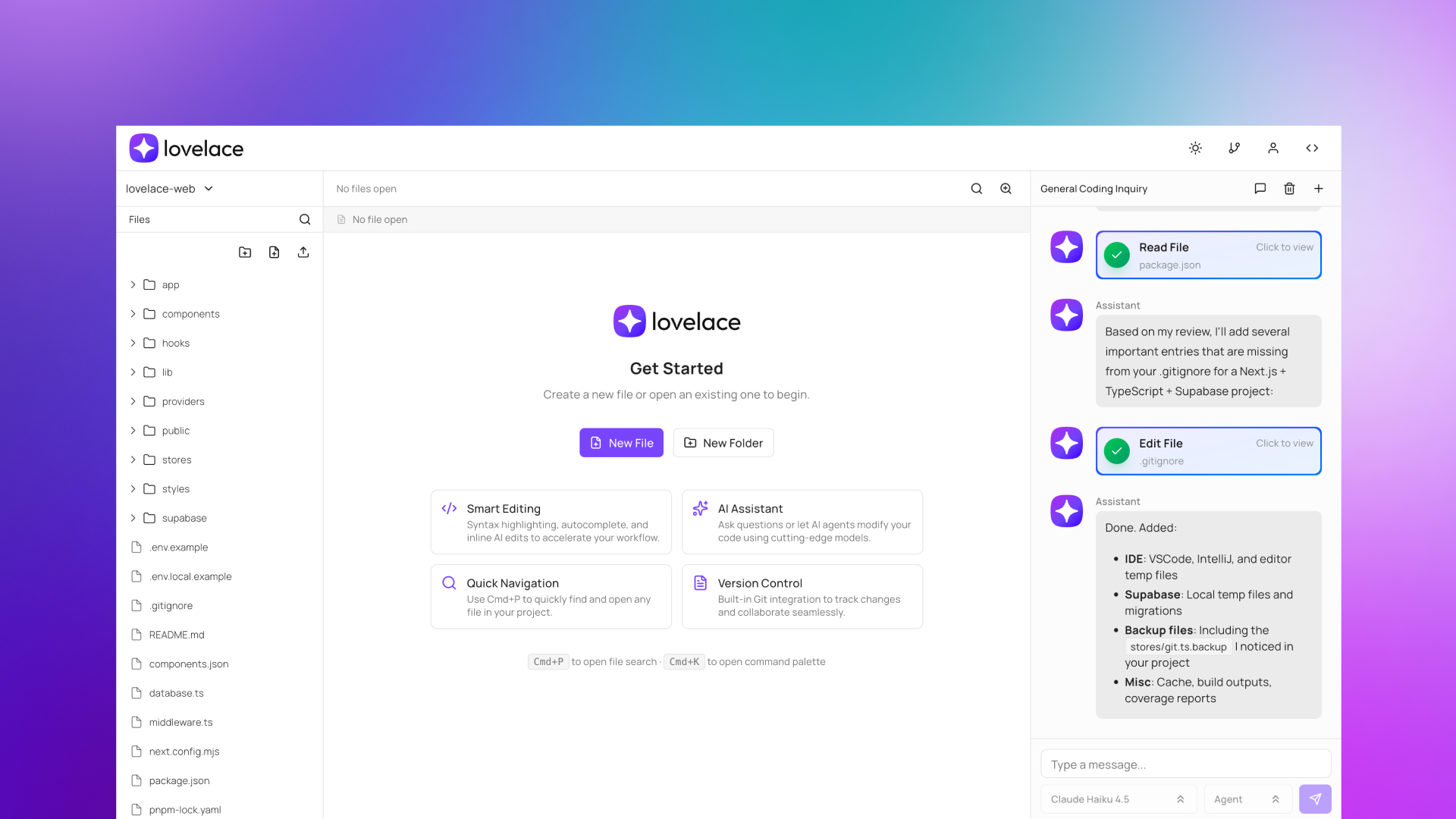
- Code immediately from any device without installation using our browser-based IDE built with pure web technologies
- Maintain development momentum during commutes or client visits with seamless device switching through cloud workspace continuity
- Generate clean code faster with AI-powered completion and generation that focuses on real development tasks, not just experimentation
- Manage complex projects effortlessly with seamless GitHub, GitLab, and Bitbucket integration for multi-file version control
- Work efficiently on lower-spec devices thanks to optimized performance through TypeScript and Next.js architecture
- Keep coding productive in any environment with built-in light and dark mode support for visual comfort
- Sync local and cloud workflows with CLI support for local codebase mirroring currently in testing
Pros & Cons
Pros
- Cloud-based IDE
- Runs in browser
- Fully responsive
- Agent and chat (planning) modes
- Multi-model support
- Enhances remote work
- CLI support for local codebase mirroring
- No heavy Electron-based applications
- Seamless GitHub, GitLab, and Bitbucket integration
- Cloud-based workspace continuity
- Prioritizes accessibility
- Prioritizes performance on low-spec devices
- Focuses on productive coding
- Light and dark mode support
- User-friendly interface
- Supports multiple programming languages
- Lowers barriers for coding entry
- Combines multiple capabilities
Cons
- Lacks offline capabilities
- Reliant on stable internet connection
- No direct integration with other cloud storage services
- CLI support still in testing phase
- Doesn't support native application development
Reviews
Rate this tool
Loading reviews...
❓ Frequently Asked Questions
Lovelace is a cloud-based integrated development environment (IDE) that employs artificial intelligence. This IDE is unique because it is designed to cater extensively for developers who work from various locations and across multiple devices. Using Lovelace, software engineers have the flexibility to work on their projects from anywhere without the need for heavy applications. It is equipped with features that enhance productivity, including AI-aided code completion and generation, and multi-file project management through seamless GitHub, GitLab, and Bitbucket integration.
Lovelace enhances developers' flexibility and productivity by operating fully in the web browser and eliminating the need for heavy applications. With Lovelace, developers can work on their projects from anywhere, at any time, without the need for access to their primary development machine. This is possible due to Lovelace's support for multiple platforms and devices along with the use of AI to enhance code completion and generation efficiency. It also facilitates seamless integration with version control platforms like GitHub, GitLab, and Bitbucket.
Lovelace uses pure web technologies such as TypeScript and Next.js to operate entirely in the web browser. These technologies help to eliminate the need for more cumbersome Electron-based applications. Using TypeScript and Next.js, Lovelace can maintain high performance levels on low-spec devices.
Multi-platform and multi-device support offered by Lovelace allows developers to seamlessly switch between devices and platforms without disruption. Regardless of whether they’re using a tablet, phone, or computer, developers can smoothly transition their work, facilitating coding in various situations. This means that developers can even continue their work while on a commute, at lunch, or away from their workstation, contributing to improved flexibility and accessibility.
Lovelace provides a cloud-based workspace to enable developers to work on their projects from any location. By running entirely in a browser using web technologies, it is accessible from any device with internet access and a web browser. Moreover, its AI-enhancement features such as code completion and generation assist in achieving tasks effectively, even when developers are away from their main development machine.
In Lovelace, artificial intelligence is used to streamline the code writing process with automatic code completion and generation features. When a developer starts typing, the AI predicts and suggests the end of the line, saving time and effort. Moreover, it can generate readable, clean code, which furthers enhances productivity by reducing manual coding tasks.
Lovelace's AI Agent serves as an intelligent assistant providing development support. It helps in accomplishing tasks faster and making remote work more efficient. Although specifics about its capabilities aren't mentioned, typically such an agent can provide suggestions, automate repetitive tasks, and analyze the codebase for errors or improvements.
Lovelace employs seamless integration with GitHub, GitLab, and Bitbucket for managing multi-file projects. With this integration, developers aren't hindered by limitations that come with being tied to a single workstation. It allows simultaneous work on multiple files, encourages collaborative workflows, and ensures no disruption while switching devices or locations.
Lovelace integrates seamlessly with GitHub, GitLab, and Bitbucket. This integration enables developers to have a smooth workflow while managing their codebase. Developers can handle code reviews, push urgent fixes, and ensure continuity in their projects regardless of their location or device.
Lovelace ensures continuity across different devices with its cloud-based workspace feature. Data synced in the cloud can be accessed on any device with a browser, allowing work to pick up exactly where it was left off, regardless of the device being used.
'Vibe coding' is not explicitly defined in the provided content, but from the context, one can infer that it refers to less productive coding practices driven more by emotions and aesthetics, rather than focusing on logical and functional elements of development. Lovelace is designed to help developers avoid 'vibe coding' by providing a genuine focus on development work. It accomplishes this by offering AI-driven assistance for real coding tasks, ensuring developers can work efficiently and effectively on any device.
Lovelace supports both light and dark modes to cater to different user preferences and environments. However, specifics about how this feature is embraced from a technical perspective are not outlined.
Lovelace offers CLI support for local codebase mirroring. However, detailed information about this feature is limited. What is mentioned is that this feature is currently in testing phase. Generally, CLI support for local codebase mirroring allows developers to maintain a copy of their codebase on their local machine, providing them with another means to manage and interact with their code.
Lovelace reduces friction between having an idea and acting upon it by offering a flexible coding experience. It allows developers to initiate and execute their projects promptly through the use of cutting-edge browser APIs and responsive designs. The code generation and completion features further streamline the coding process, allowing users to quickly turn thoughts into action.
The reference content does not explicitly mention Lovelace being suitable for coding education. However, features such as AI-powered code completion and generation, seamless integration with popular version control platforms, and support for various programming languages, could potentially be useful for learning purposes.
Lovelace includes built-in debugging and testing tools, which helps developers identify and fix issues in their code more efficiently. However, specific details about these tools aren't given in the reference content.
Yes, Lovelace supports multiple programming languages. This offers developers the versatility and adaptability to work on varied projects and across diverse stacks.
Lovelace offers version control through its seamless integration with GitHub, GitLab, and Bitbucket. These platforms enable developers to track changes, manage different versions of software, and collaborate efficiently on their projects.
The API in Lovelace allows developers to access the platform's functionality and integrate it with their applications. This not only expands the use and flexibility of Lovelace, but also allows for unique solutions to meet specific programming needs.
Lovelace's API allows developers to tailor the platform to specific programming tasks. By integrating with Lovelace's API, developers can potentially automate repetitive tasks, optimize their workflows, and create customized solutions that best fit their specific requirements.
Pricing
Pricing model
Freemium
Paid options from
$30/month
Billing frequency
Monthly


