

Overview
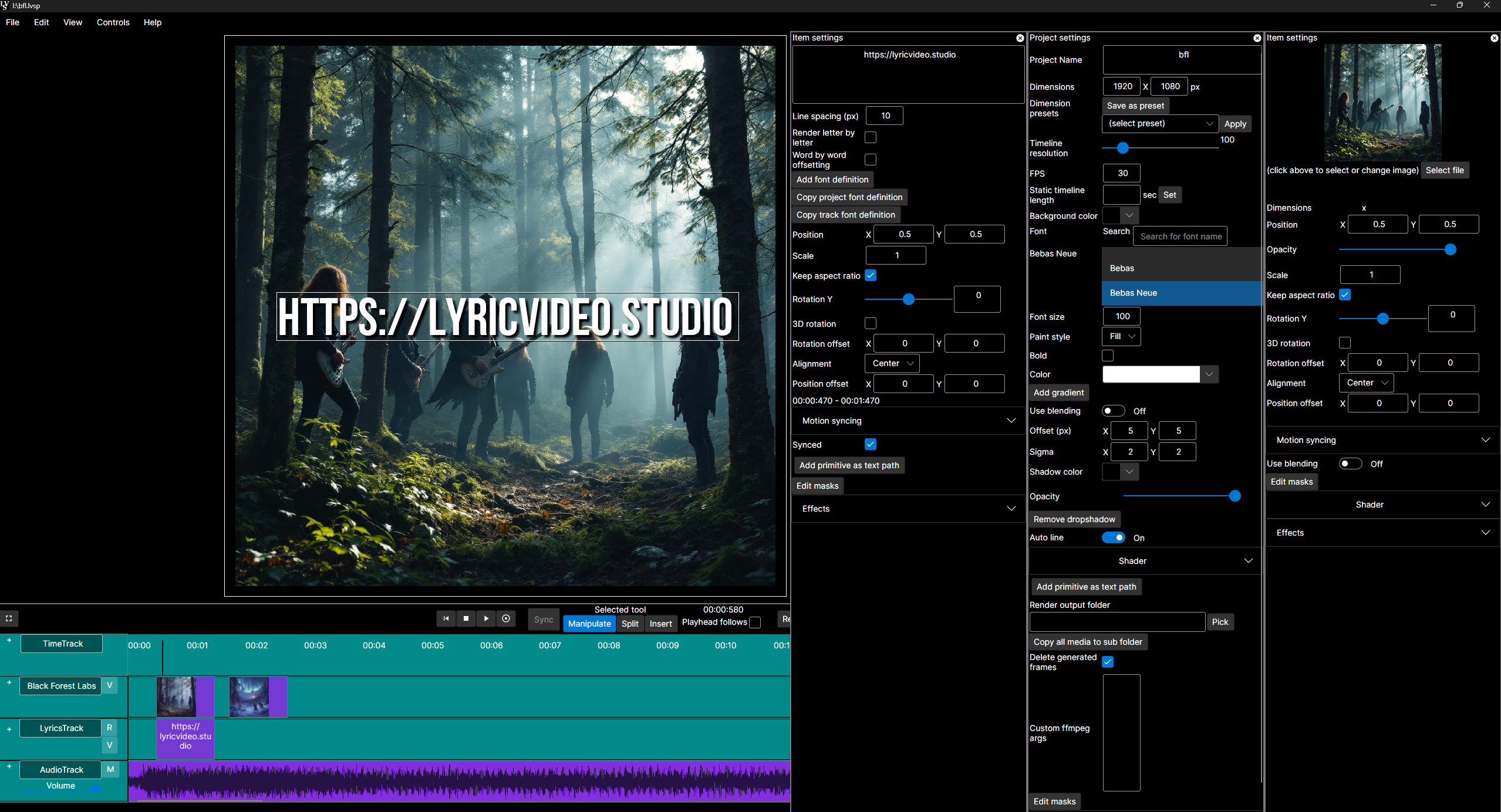
- Transform lyrics into perfectly synced videos automatically with one-click lyric synchronization
- Generate custom visuals from your lyrics using integrated AI image and video generation
- Create professional music videos without editing experience using the intuitive DAW-style timeline
- Remove video backgrounds instantly and track moving objects to attach text or effects
- Maintain consistent visual style across your entire project with project-wide effects and transitions
- Export high-resolution videos rapidly with multithreaded rendering for faster production
- Work with any media format and integrate with your favorite AI services through plugin support
Pros & Cons
Pros
- Efficient text tools
- Sound and visuals sync
- Supports third-party plugins
- Allows storyboard creation
- Transform images to videos
- Start frames for plugins
- Text prompt video creation
- DAW-like timeline
- Interactive engagement
- Multiple types of tracks
- Background removal
- Object tracking
- Built-in FX and transitions
- Lyrics integration
- From musicians to musicians
- Easy video editing
- Consistent transitions across project
- Lyric sync with video
- Automatic video creation
- Plugin support
- Integrated video library
- Prompt organization
- Effects at project level
- Animated variable editing
- Supports fragment shaders
- Fast lyric integration
- Free trial on stores
- Multi-track timeline usually for DAW
- Attachments to video objects
- Professional experience not necessary
- Visual object tracking
- Multi-track editing
- Import and export library
- Interchangeable service provider selection
- Safe results storage
- Easy variation swapping
- Import lyrics from text
- Simplified synchronous button
- Manual fix for timing
- Tool mindset against copying
- Faster idea iteration
- Microsoft and Steam availability
- Updates with new features
- Automatic update on stores
- Backgrounds removable from videos
- Object detection and tracking
- Final projects made consistent
- Mass editing of items
- Fast consistent transitions
- Continued updates
Cons
- No version control
- No collaboration features
- No native sound design
- Limited storyboard creation tools
- No support for VR/360
Reviews
Rate this tool
Loading reviews...
❓ Frequently Asked Questions
Lyric Video Studio's primary function is to streamline the process of creating lyric and subtitle videos. It provides efficient text tools and the ability to sync sound and visuals, enabling musicians to bring their vision to life.
Lyric Video Studio uses Artificial Intelligence to facilitate several features. It uses generative AI to enable users to add generative AI tracks as needed, to the multi-track timeline. It assists in the creation of videos using text prompts and in interactive engagement of video, lyric, and audio tracks.
Yes, Lyric Video Studio supports third-party plug-in integrations. This feature enables users to create storyboards or complete videos for their music using their service of choice.
The text prompt video creation feature in Lyric Video Studio enables users to create intuitive and engaging videos. Users can prompt images using their chosen service and easily convert those images into videos within the application. The software provides start frames for video plugins to generate content, enhancing the overall video creation experience.
No, it is not necessary to have professional experience to use Lyric Video Studio. Its features, including easy video editing and lyrics synchronization, are designed to be user-friendly and accessible for anyone to use.
Lyric Video Studio offers a range of video editing features such as simple video editing functionality, application of effects and transitions at both the project and track levels, background removal, object tracking, and the ability to attach items to video objects.
To add lyrics to existing videos in Lyric Video Studio, you need to import your lyrics from a text file. The app will position them in an initial layout which you can then sync with the song. The synchronization is made easy by simply pressing the 'Sync' button at the right times during the song playback.
Yes, Lyric Video Studio can remove backgrounds from videos. This feature is part of its latest addition, which includes motion and object tracking.
Yes, Lyric Video Studio does support object tracking. This feature, part of the app's latest additions, allows users to track moving objects in their videos, and even attach other items to these tracked objects.
Lyric Video Studio enables musicians to sync sound and visuals using its robust synchronization feature. Once lyrics are added, users can 'arm' the lyric track, hit record, and press the 'Sync' button at the appropriate times during song playback, efficiently synchronizing the lyrics with the music.
Lyric Video Studio employs a DAW-like horizontally scrolling multi-track timeline that is familiar from digital audios. It facilitates interactive engagement and accommodates as many lyric, video, audio, and generative AI tracks as needed.
Yes, you can add generative AI tracks in Lyric Video Studio. It provides the option to add as many generative AI tracks as needed onto the multi-track timeline.
With Lyric Video Studio, users can create lyric videos, subtitle videos, and complete music videos. It also enables the creation of videos from text prompts, and allows for the addition of lyrics to an existing video.
Lyric Video Studio aids in achieving consistent transitions through its built-in functionality for applying effects and transitions on project and track levels. This makes it much easier to maintain a consistent transition and visual aesthetic across the entire video project.
Lyric Video Studio offers support for third-party plug-in integration which enables users to create storyboards for their videos. Additionally, they can create complete videos using tools from their preferred services.
Yes, Lyric Video Studio can convert images into videos. Users can prompt images using their service of choice and conveniently transform them into videos within the app.
Yes, Lyric Video Studio offers start frames for video plugins. These can be used to generate content for videos.
Lyric Video Studio helps with sound synchronization by providing a simple, efficient system to sync lyrics and subtitles with the audio. Users can 'arm' the track and press 'Sync' at the appropriate times during the song, placing lyrics or subtitles perfectly in time with the music.
Yes, Lyric Video Studio supports multi-track editing. It provides a DAW-like horizontally scrolling multi-track timeline, familiar from digital audios. Users can add as many lyric, video, audio, and generative AI tracks as they require.
Yes, you can attach items to video objects using Lyric Video Studio. This is part of the app's functionality that includes object tracking and background removal.
Pricing
Pricing model
Freemium
Paid options from
$63
Related Videos
4K support in Lyric Video Studio
Lyric Video Studio•646 views•Mar 28, 2025


