

Maester blog creator
Overview
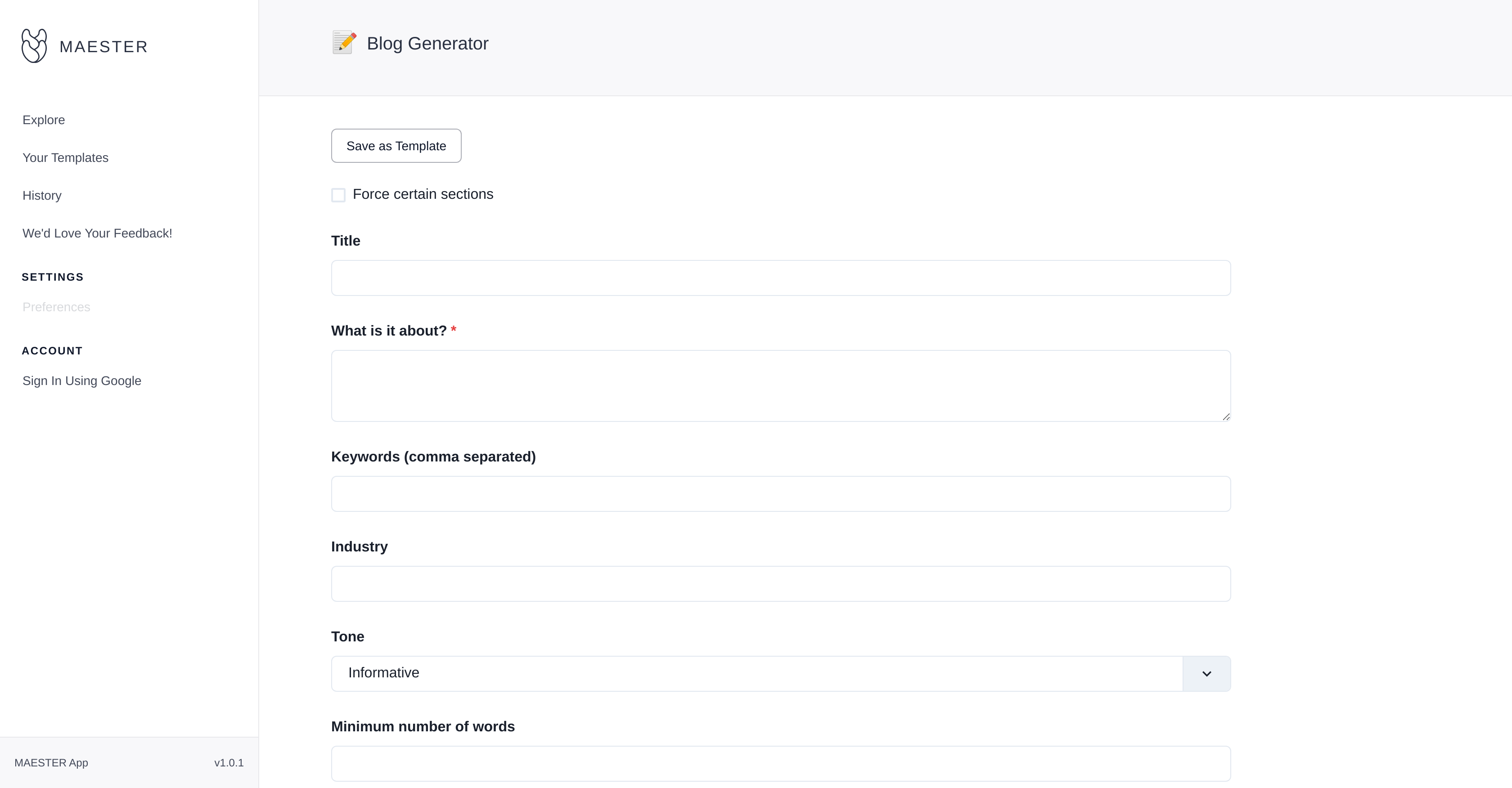
- Generate complete blog posts in minutes instead of hours by setting parameters like title, industry, and tone to guide AI content creation
- Eliminate repetitive setup for recurring topics by saving your content configurations as reusable templates for future blog generation
- Maintain complete control over content quality and relevance by inserting specific keywords and setting minimum word counts for each post
- Track and refine your entire content history with built-in activity monitoring that lets you revisit and modify previous blog posts
- Ensure consistent brand voice across all content by customizing the tone and style parameters for every blog article
- Streamline your workflow with Google account integration for instant access and direct feedback submission for continuous improvement
Pros & Cons
Pros
- Generates blog posts quickly
- Custom template creation
- Customizable post attributes
- Keywords guide content relevance
- Saves desired configurations
- Built-in history tracker
- Feedback encouraged for improvement
- Google account integration
- Quick, efficient content generation
- Personalized content creation
- Eliminates brainstorming
- Automated content creation
- Individual section forcing
- Tone-specific content
- Minimum word count setting
- One-click content generation
- Immediate publish-ready content
- Interactive user interface
- Improved content-writing productivity
- Aids topic-specific blogs
- Refines blog-creation process
- Time and effort saver
- Accessible previous posts
- Industry-specific blog generation
- User-interface customization
- Feedback loop for betterment
- Template saving for future use
Cons
- No autosave feature
- No offline functionality
- Limited to blog content
- No content export options
- No multi-language support
- Limited customization options
- Relies on Google sign-in
- No mobile app version
- No text-to-speech conversion
- No plagiarism checker
Reviews
Rate this tool
Loading reviews...
❓ Frequently Asked Questions
Maester is an AI-powered blog generator that enables users to create quality blog content quickly and efficiently. It simplifies the content creation process by allowing users to customize the details of the post, including title, description, keywords, and tone.
Maester generates blog content by using AI-algorithms to analyze user inputs. Users specify parameters, such as title, description of the post, keywords, industry and tone of the information, which Maester uses to create a custom post. Users also have the option to determine the minimum number of words for each post.
Indeed, Maester can generate content from a custom template. Users can save their preferred configuration of parameters as a template and use it for future content generation.
Yes, all blog posts generated by Maester can be customized. Users have the liberty to add a title, a description of what the post is about, keywords, their industry, and tone of the post.
In Maester, users can specify the minimum number of words in the generated posts during the customization process. There is a dedicated section in the user interface where the required word number can be set.
The history feature in Maester allows users to keep track of their previous posts. It lets users revisit and review their past activities, enabling them to make changes to previous posts if necessary.
Yes, Maester features a feedback system. Users can provide feedback directly on the platform, contributing to the tool's continuous improvement.
Absolutely, Maester allows the insertion of keywords to guide the AI in generating more relevant content. Keywords can be inputted through a dedicated section in the user interface.
Beyond content generation, Maester offers the ability to save configurations as custom templates for future use, a built-in history feature to monitor past activities, and a feedback system for continual improvement. It also supports Google account integration for easy sign-in and usage.
Yes, users can save a specific configuration as a template for future use in Maester. This eliminates the need to input parameters for every new topic, offering a more efficient content creation process.
Maester incorporates a 'history' feature that allows users to keep track of past activities. Using this feature, one can easily revisit previous posts and make changes if necessary.
Indeed, feedback can be provided directly through Maester. The platform encourages users to share their feedback to contribute to the continuous enhancement of its services.
Yes, Maester supports integration with Google accounts. This allows for an easy and quick sign-in process for users, enhancing the overall usability of the platform.
Maester has a streamlined process that facilitates efficient and personalized content generation. It involves setting specific parameters such as the title, description, keywords, industry and tone of the blog post. The AI then uses these parameters to generate the content. Users can also save specific configurations as templates for future use.
Yes, Maester can generate topic-specific and personalized content. By using the provided specific keywords and given industry, Maester generates relevant and personalized blog content.
Absolutely, Maester is designed to generate not only text but also blog content. Using AI, it analyzes the provided details like title, keywords, and industry to create unique and relevant content.
Yes, Maester aims to eliminate the tasks of brainstorming and manual content creation. Its AI-powered functionalities allow for efficient generation of content, transforming user ideas into structured blog posts.
In Maester, the tone of the information in the blog post can be set during the customization process. There's a dedicated section for setting the tone, allowing users to drive the overall feel of the blog post.
Yes, through Maester, the content-writing and blog-posting processes can be automated. Once the user inputs the required information and sets parameters, Maester takes over to generate a structured and cohesive blog post.
Pricing
Pricing model
Free
Paid options from
Free


