

objekto
Get a custom 3D model without learning CAD software: describe your object in a few words, or start from a photo, sketch or video, and the AI builds it part by part as parametric CAD.
Listing not yet reviewed by our editors · How we check
Overview
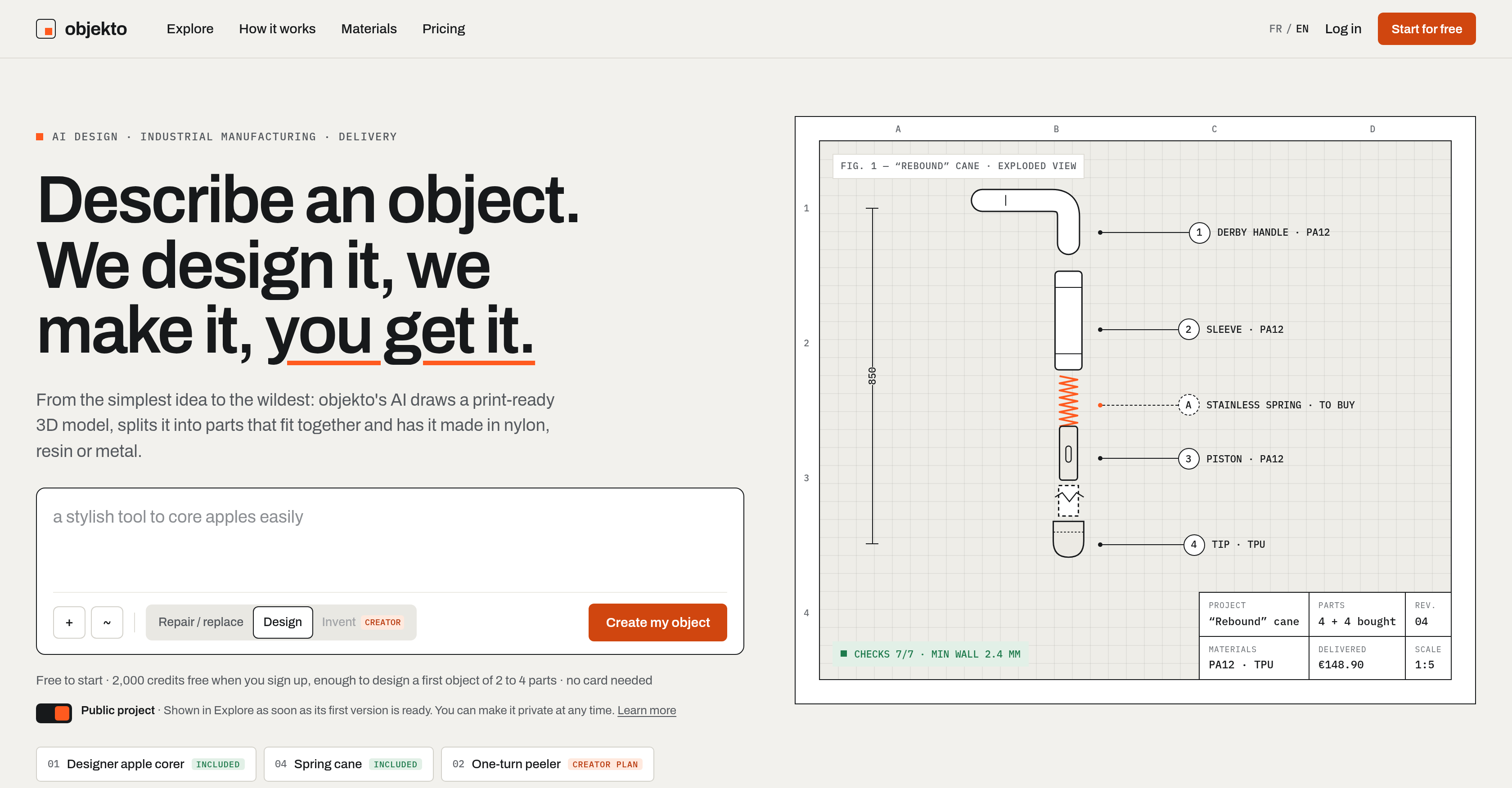
- Get a custom 3D model without learning CAD software: describe your object in a few words, or start from a photo, sketch or video, and the AI builds it part by part as parametric CAD.
- Avoid failed 3D prints and wasted orders: every part passes a printability check for wall thickness, smallest detail, clearances, maximum size per material, interference and stability before you order.
- Assemble your object with no drilling, cutting or gluing: threads, pins, clips and snap-fits are printed as part of the design, and the rare non-printable item such as a magnet, glass or electronics is listed separately, ready to use as sold.
- Build complex multi-part objects that fit together: designs reach up to 12 unique parts, larger pieces are split into connected printable parts, and you get an exploded view, parts list and step-by-step assembly guide.
- Match each part to its job and look: choose the material and colour per part, from PA12 nylon, flexible TPE/TPU and resins to PETG, PLA, full-colour PA12 and cast brass, with the price updating live.
- Fine-tune proportions without spending design credits: adjust dimensions with free sliders or refine the model through chat.
- Know your total cost and delivery date before you pay: custom 3D printing is billed in euros at a firm delivered price with VAT included, never in credits, with industrial workshop production and home delivery in France.
- Replace broken or discontinued items: design hard-to-find spare parts, made-to-measure storage and repair parts, or turn a photo into a personalised figurine or gift.
- Own editable files for your own workflow: paid plans unlock STL, 3MF and STEP downloads, plus build123d source code on Pro and Studio.
- Skip designing from scratch: remix or directly order objects from the community gallery, and set your own projects to private at any time.
- Try it with no financial risk: start free with signup credits and no payment card, and get credits refunded automatically when a generation fails on the platform's side.
Pros & Cons
From the listing; not yet checked by our editors.
Pros
- Accepts text, photos, video, sketches
- Starts from one sentence
- Supports replacement and repair parts
- Refines designs with adjustable sliders
- Splits oversized designs into connected parts
- Adds joints between printable pieces
- Prints the joints too: threads, pins, clips
- Shows assembled and exploded views
- Provides step-by-step assembly guides
- Checks material-specific wall thickness
- Checks printer size limits
- Checks moving-part clearances
- Checks mesh watertightness
- Checks powder escape holes
- Checks design stability
- Flags relevant safety limitations
- 12 materials, from nylon and resin to brass
- Assigns materials part by part
- Updates pricing after material changes
- Shows delivered pricing before ordering
- Includes VAT and delivery in displayed prices
- Provides delivery estimates before payment
- Buys a part only when printing is impossible
- Locks the print price for 30 min at checkout
- Opens community designs in 3D
- Shows community component lists and materials
- Displays print-readiness status where available
- Lets creators make projects private
- Includes 2,500 free design credits
- Starts without requiring a payment card
- Unused monthly credits roll over
- Fixes for its own mistakes cost 0 credits
- Charges only completed steps if stopped
- Shows generation cost before each run
- Supports up to twelve unique parts
- Counts repeated identical parts once
- Simplifies designs exceeding part limits
- Preserves user inputs and design rights
- Food-contact parts are stock stainless steel
Cons
- Not certified for food contact
- Not certified for medical use
- Not certified for load-bearing
- 12 unique parts maximum
- Free tier: four parts maximum
- Creator tier: eight parts maximum
- Designs public by default
- Delivery to France only at launch
- Making and delivery take 1 to 3 weeks
Alternatives to objekto
Tools that share the most tags with objekto.
- Vibe3D
Deliver client-ready photorealistic 3D renders in minutes, not hours, by automating the manual rendering process with AI
Paid · from $19/month
$19/month
Not yet checked
- Spell by Spline
Instantly convert 2D images into fully-realized 3D environments using a specialized AI diffusion model
Not listed
Not listed
Not yet checked
- Graswald
Slash return rates and boost conversion rates by giving customers interactive 3D product views and AR try-on that build purchase confidence
Not listed
Not listed
Not yet checked
- BowerBot
Rapidly bootstrap production-ready OpenUSD scenes from scratch by describing them in plain English, no USD expertise required
Free
Not listed
Not yet checked
- Next3D
Launch game-ready 3D assets in under 60 seconds with AI that converts images (JPG, PNG, WEBP) or text prompts directly into textured GLB models
Freemium · from $19/month
$19/month
Not yet checked
- Bezi AI
Accelerate 3D prototyping by generating assets on demand from text prompts, replacing manual modeling with instant AI generation
Freemium · from $80/month
$80/month
Not yet checked
Reviews
Rate this tool
Loading reviews...
Frequently asked questions
How do I start designing an object with objekto?
Arsene Huot 🛠️ 5 tools wrote:Describe the object in a few words, or start with a photo, video, or sketch. objekto’s AI asks questions, suggests concepts, and helps you refine the design before creating a 3D model.
Can objekto create a 3D design from a photo, video, or sketch?
Yes. You can start with a photo, video, or sketch, as well as text.
How does objekto use follow-up questions and sliders to refine a design?
objekto asks follow-up questions and suggests design concepts. You can adjust the design using sliders, which are free to use.
Can objekto design a replacement part for something I need to repair?
Yes. objekto supports designing replacement and repair parts as well as new objects.
Can objekto split a large design into parts that fit together?
Yes. objekto can split larger designs into connected printable parts and add joints so they fit together.
Do I need to buy screws or other hardware to assemble an objekto design?
Arsene Huot 🛠️ 5 tools wrote:Usually not. objekto prints everything that can be printed, joints included (threads, pins, clips, snap-fits). Only a part that cannot be printed, such as electronics, a magnet, glass or a blade, is listed separately, ready to use as sold, with no drilling, cutting or gluing.
Does objekto provide an exploded view and an assembly guide?
Arsene Huot 🛠️ 5 tools wrote:Yes. Every design comes with an assembled view, an exploded view, a parts list and a step-by-step assembly guide.
What materials can I choose for an objekto design?
Arsene Huot 🛠️ 5 tools wrote:Materials include PA12 nylon (SLS and MJF), full-colour PA12, flexible TPE and TPU, standard, clear, black and ultra-fine resins, PETG, PLA and cast brass. You can pick a material and a colour per part.