

Overview
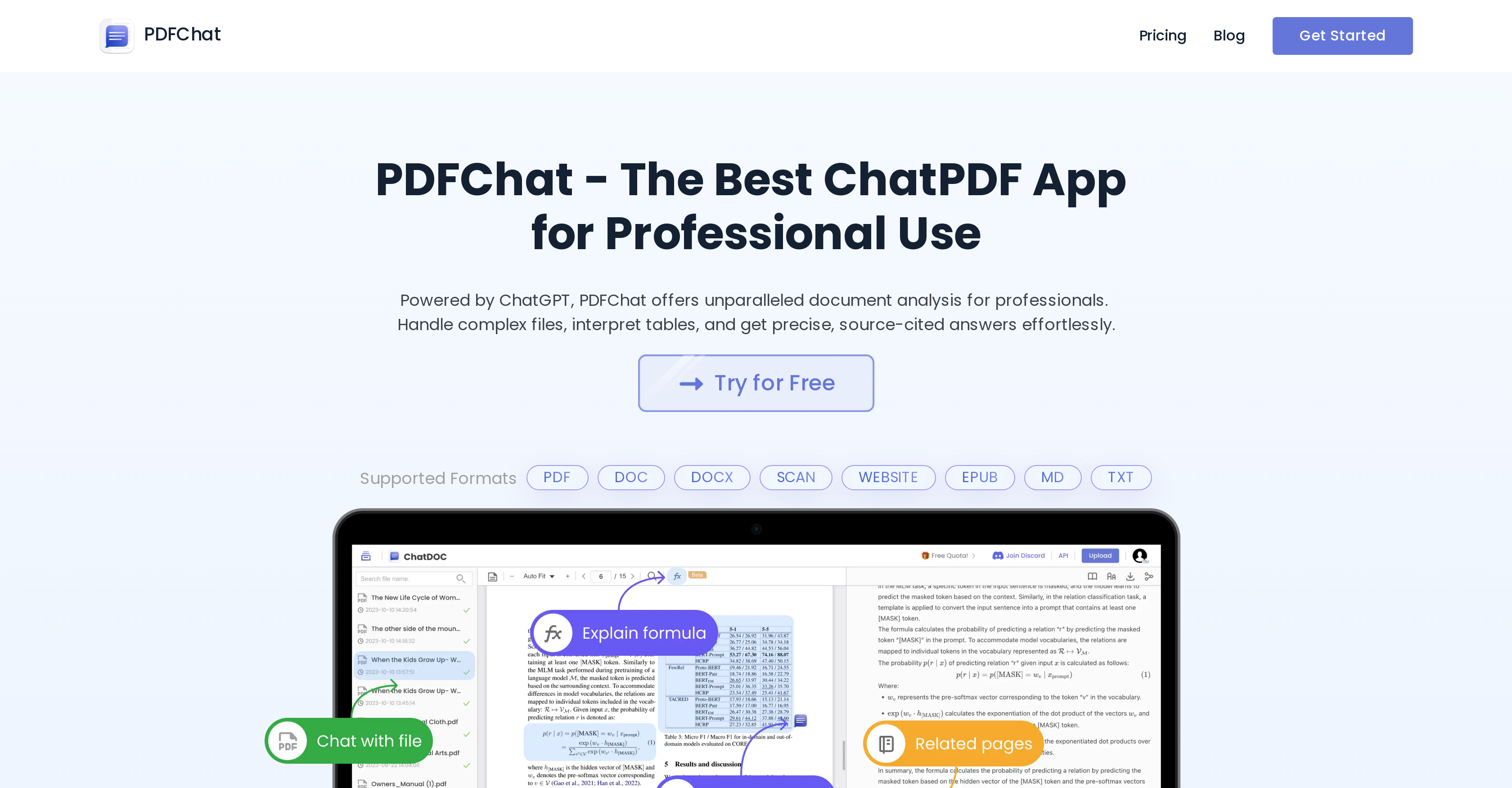
- Get instant answers to specific questions without manually searching entire documents through direct Q&A functionality with your files
- Extract precise information with verifiable source citations using AI analysis that traces every response back to original document locations
- Process complex data tables and mathematical formulas for detailed explanations through specialized AI interpretation capabilities
- Conduct comprehensive research across multiple documents simultaneously with cross-document query support that connects insights
- Verify information accuracy effortlessly by previewing references and confirming citations directly within the document interface
- Customize analysis performance by selecting from multiple language models and switching interface languages to match your needs
- Maintain workflow efficiency by saving and reusing frequent prompts while engaging in continuous document conversations
- Uncover hidden insights and deeper knowledge within documents through threaded exploration that follows information trails
Pros & Cons
Pros
- Interprets complex files
- Processes tables
- Precise, source-cited answers
- Supports multiple formats
- Q&A functionality with files
- Starts threads for deeper analysis
- Supports queries across documents
- Provides formula explanations
- Traceability and verification features
- Verification of citations
- Multi-mode feature for varied needs
- Select from various language models
- Easy language switch options
- Save and access prompts
- Engages in document Q&A
- Freemium model
- Handles variety of document types
- Increased efficiency in information extraction
- Can handle mathematical formulas
- Able to preview references
- Supports dialogue with documents
- Rich document analysis capabilities
- Comes with a built-in OCR
- Can analyze scanned documents
- Enriched document interaction options
- Supports website and epub formats
- Boosts research with cross-document queries
- Includes an API for integration
- Option to upgrade for advanced features
- Supports markdown (MD) format
- Allows upload of various file types
- Easy-to-use chat interface
- Extracts insights from any PDF
- Data is easily exportable
- Supports professional and academic use
- Provides summaries of uploaded files
- Unrivalled document analysis for professionals
- Allows free trials
- Can directly locate document sources
- Allows easy extraction of data
- Supports various language models
- Advanced text and table processing
- Tailored performance choosing preferred language model
- Can be used for intensive research
- Can recognize formulas in files
Cons
- Not compatible with mobile
- Performs poorly with images
- No offline mode
- Difficulty understanding complex formulas
- Limited free usage
- Charges for advanced features
- Support for few languages
- Pro tier supports limited file formats
- No API for integration
- Requires frequent user input
Reviews
Rate this tool
Loading reviews...
❓ Frequently Asked Questions
PDFChat is an AI-based chat application designed especially to interact with PDF documents. It processes and interprets these documents, facilitating the extraction of insights from them. It can read complex files and provide detailed information related to requested queries.
PDFChat supports a wide range of document formats for analysis. This includes PDF, DOC, DOCX, TXT and a few others which means a diversity of documents can be input for assessment.
When it comes to tables, PDFChat is capable of processing these in the document. Selected tables or text are analyzed by the AI, providing detailed insights and enabling more efficient knowledge extraction.
PDFChat is designed to extract precise, source-cited answers from the documents. The tool analyzes the input files and delivers pinpoint information, either coming from a user's query or through AI exploration of document content.
The Q and A functionality in PDFChat is one of its interactive features which supports user-file dialog. Users can ask questions directly in relation to the file and get the information swiftly without having to manually search the whole document.
PDFChat enables intensive research across multiple documents by allowing cross document queries. This feature supports comprehensive research, enabling users to contribute questions across varying files thereby widening the scope of investigation.
PDFChat has the feature to explain snipped mathematical formulas from the document. The AI tool will provide comprehensive explanations whenever a mathematical formula is detected and selected by the user.
Yes, PDFChat allows users to verify citations. It emphasizes on traceability and effortless verification, thereby letting users confirm citations and maintain a high degree of accuracy in the information extracted.
Yes, PDFChat allows users to preview references within documents. This feature helps users to reveal the original data, ensuring a smoother and more reliable workflow.
In PDFChat, tracing the AI responses back to original document sources can be undertaken directly. This is a part of the tool's emphasis on traceability and it assists in effortless verification and data authenticity maintenance.
PDFChat accommodates diverse user needs by allowing for multiple language model selections. Users can select from a range of language models for a performance that best suits their requirements.
In PDFChat, users can switch languages easily to enrich their experience and match their linguistic proficiency or needs. This helps create a custom and adaptable user interaction with their chosen documents.
PDFChat understands complex files by interpreting the documents and processing the information within. It is adept at handling data-rich files and extracting specific, cited answers from them.
PDFChat offers users the option to engage in document Q and A or open dialogues. This feature enables live interaction with the document, providing instant insights and responses to user queries.
Prompts can be saved and accessed routinely in PDFChat. This is one more step towards customizing the user experience by allowing frequented prompts to be stored efficiently for ease of use and a smoother workflow.
Upgrading from the free version to a premium model of PDFChat unlocks advanced features. Often these include support for larger file sizes, access to more formats and possibly, add-on features like OCR page or formula recognition.
PDFChat enhances efficiency in information mining by providing features such as Q&A functionality with documents, AI analysis of tables and texts, and initiating thread starts to uncover deeper knowledge within the documents.
Offering multi-mode for diverse user needs means PDFChat accommodates the varying needs of the user base. This implies various language models available for selection, switching languages for enhanced experience, routine saving and accessing of prompts, and the ability to engage in document Q and A or open conversations.
In PDFChat, starting threads is part of the process of exploring deeper knowledge within a document. This uncovers otherwise hidden or obscure information, enriching the depth and reach of user investigation.
Yes, PDFChat does support document queries for targeted research. This feature is what enables users to ask questions and conduct research across multiple documents. It is a potent tool for enhanced, exhaustive investigation of document data.
Pricing
Pricing model
Freemium
Paid options from
$8.99/month
Billing frequency
Monthly
Related Videos
pdf to ai with PDFChat
MLx •23 views•Jan 26, 2024













