Picture to Drawing AI
Overview
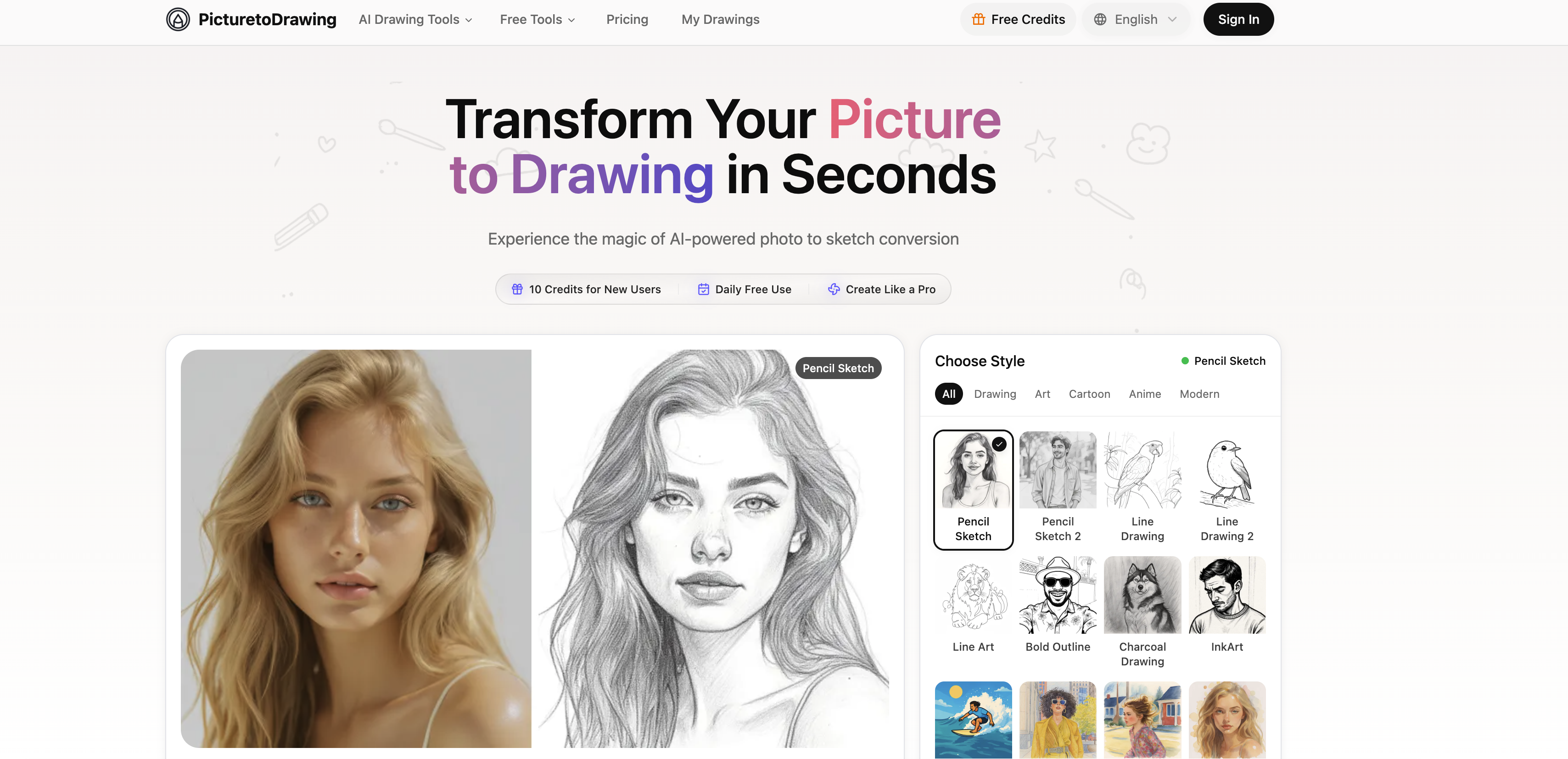
- Create professional-looking artwork from any photo without artistic skills using AI-powered conversion that preserves detail, texture, and shadows
- Transform images into multiple artistic styles including pencil sketches, watercolor paintings, cartoon, and anime for diverse creative projects
- Get print-ready, high-resolution artwork perfect for framing, gifts, or social media sharing with optimized output quality
- Protect your privacy with secure image processing that automatically deletes all photos after conversion
- Experiment freely with daily free conversions across multiple formats including JPG, PNG, WEBP, and HEIC
- Maintain the emotional essence of original photos while converting to hand-crafted looking drawings for authentic results
Pros & Cons
Pros
- Supports multiple image formats
- Variety of styles offered
- Preservation of image detail
- Texture inclusion in conversions
- Shadow accuracy
- High-resolution output
- Privacy protection
- Automatic deletion post conversion
- Daily free use
- Additional features for users
- Artistic transformation capabilities
- Offers numerous sketch styles
- Generates modern art styles
- Cartoon and anime styles
- Hand-crafted appearance in output
- Wide creative application
- Fast Processing
- Supports HEIC format
- Output Ratio Selection
- High resolution output download
- Unique transformation capability
- Wide range of styles
- Perfect for social media
- Ideal for printing
- Excellent for professional projects
- Multiple secure upload methods
- Lightning fast conversion
- Post conversion image deletion
- Excellent for education projects
- Ideal for creative portfolios
- Privacy and security prioritized
- Works perfectly on mobile devices
- Multiple resolutions available
- Responsive design
- One free conversion daily
- Suitable for large format printing
- Authentic artistic conversion
- Distinctive branding creation
- Elegant wall art creation
- Stand out social media content
- Personalized gift creation opportunity
- Exceptional quality
- Maintains image emotional essence
- Premium high resolution outputs
- Premium faster processing
- Compatible with all devices
- Premium users enjoy benefits
- Unique algorithms for each style
Cons
- Supports limited file formats
- Limited image editing capabilities
- No collaborative features
- Limited daily free use
- Most features are premium
- No batch processing
- Unable to preview different styles
- Lack of offline use
- No API for developers
- Missing advanced customizations
Reviews
Rate this tool
Loading reviews...
❓ Frequently Asked Questions
Picture to Drawing AI is a tool that provides AI-powered conversion of photos into artistic drawings and styles. It offers a fast, high-quality, and secure way to transform images.
Yes, Picture to Drawing AI supports multiple image formats for user convenience.
Picture to Drawing AI offers a wide range of styles including but not limited to pencil sketches, line drawings, watercolor paintings, modern and classic art styles, cartoons, and anime styles.
Picture to Drawing AI uses sophisticated AI technology that meticulously analyses every detail of the uploaded photo for conversion. This process ensures a substantial degree of detail preservation, texture inclusion, and shadow accuracy.
Yes, Picture to Drawing AI is suitable for applications demanding quality, such as printing, framing, or online sharing. Its high-resolution output capabilities make it an excellent choice.
With respect to user data privacy, Picture to Drawing AI processes all user photos securely and deletes them automatically after conversion.
Yes, Picture to Drawing AI offers daily free use.
The specific extra features of Picture to Drawing AI's premium options aren't explicitly stated on their website.
Yes, Picture to Drawing AI allows for optimization of high-resolution output, making it a viable solution for applications that require high-quality results.
Yes, Picture to Drawing AI does offer instant conversion of images.
Yes, Picture to Drawing AI supports both modern and classic art styles for image conversion.
Picture to Drawing AI ensures a high degree of detail preservation in the conversion process. The technology used meticulously analyzes every detail of the uploaded photo for this purpose.
Picture to Drawing AI handles texture inclusion and shadow accuracy by employing its cutting-edge AI technology to analyze these aspects of the photo during the conversion process.
Yes, all user photos are automatically deleted after conversion in Picture to Drawing AI.
Yes, with Picture to Drawing AI, users can choose to convert images into pencil sketches, line drawings, and watercolor paintings.
Yes, Picture to Drawing AI enables users to convert images into various styles including cartoon and anime.
Picture to Drawing AI works on increasing the speed of processing for image conversion but exact time stipulations are not mentioned on their website.
Picture to Drawing AI supports multiple image formats such as JPG, PNG, WEBP, and HEIC.
Yes, Picture to Drawing AI allows for daily use without imposing extra charges.
Detailed information about the premium options' pricing for Picture to Drawing AI can be found by navigating towards the 'Pricing' section on their website.
Picture to Drawing AI supports multiple image formats including JPG, PNG, WEBP, and HEIC.
Picture to Drawing AI offers a wide range of artistic styles for image conversion. While it doesn't specify a number on their website, it includes styles such as pencil sketches, line drawings, watercolor paintings, pop art style, and many more.
Yes, Picture to Drawing AI supports conversion of pictures into anime or cartoon styles, as well as many other imaginative styles.
Picture to Drawing AI uses advanced AI-powered technology to meticulously analyze every detail of the photo, including texture inclusion, shadow accuracy and detail preservation.
Picture to Drawing AI generates high-resolution output, making it highly suitable for applications that require quality like printing, framing, or sharing online.
Picture to Drawing AI ensures user privacy by processing all photos securely. It does not store user photos and deletes them automatically post conversion.
You can use Picture to Drawing AI for free on a daily basis. They also offer free credits for new users.
Yes, Picture to Drawing AI is designed to provide conversions that offer an authentic hand-crafted appearance, making the receiver feel as if the drawing was done by a professional artist.
While it does not explicitly mention an option to share drawings directly to social media, Picture to Drawing AI provides high-quality output suitable for sharing on social media platforms.
Yes, Picture to Drawing AI is fit for professional projects, be they in marketing, advertising, design or any other field that might require high-quality artistic image transformations.
Yes, with Picture to Drawing AI, users can transform any image into a wide array of artistic styles, giving them immense creative latitude.
Yes, graffiti art is one of the many artistic styles which can be achieved using Picture to Drawing AI.
The processing speed of Picture to Drawing AI depends on the complexity of the image. However, the AI is designed to offer quick conversions without compromising on the quality and detail of the output.
Yes, Picture to Drawing AI supports conversion to a wide range of modern art styles, apart from the classic ones.
Yes, Picture to Drawing AI is designed to maintain the essence and emotion of the original image in the converted drawing, providing a more authentic and emotionally resonant result.
Yes, creating colored pencil drawings is one of the many artistic styles Picture to Drawing AI supports.
Yes, Picture to Drawing AI takes user privacy very seriously. All photos are processed securely and are automatically deleted post-conversion. They never store or share personal images of the users.
Picture to Drawing AI can be used for creating unique personal gifts by transforming cherished photos into artistic drawings, making it ideal for occasions like anniversaries, birthdays, and other special occasions.
While the specifics are not mentioned, users can anticipate additional features, faster processing speeds, access to even higher resolution outputs, and more, as part of the premium experience with Picture to Drawing AI.
The unique factor about Picture to Drawing AI for image-to-sketch conversion lies in its AI-powered technology that analyzes every detail of the photo to offer conversions that looks hand-crafted, alongside a wide array of style choices.
Pricing
Pricing model
Free Trial
Paid options from
$6.99/month
Billing frequency
Monthly
Refund policy
No Refunds