PNGMaker
Overview
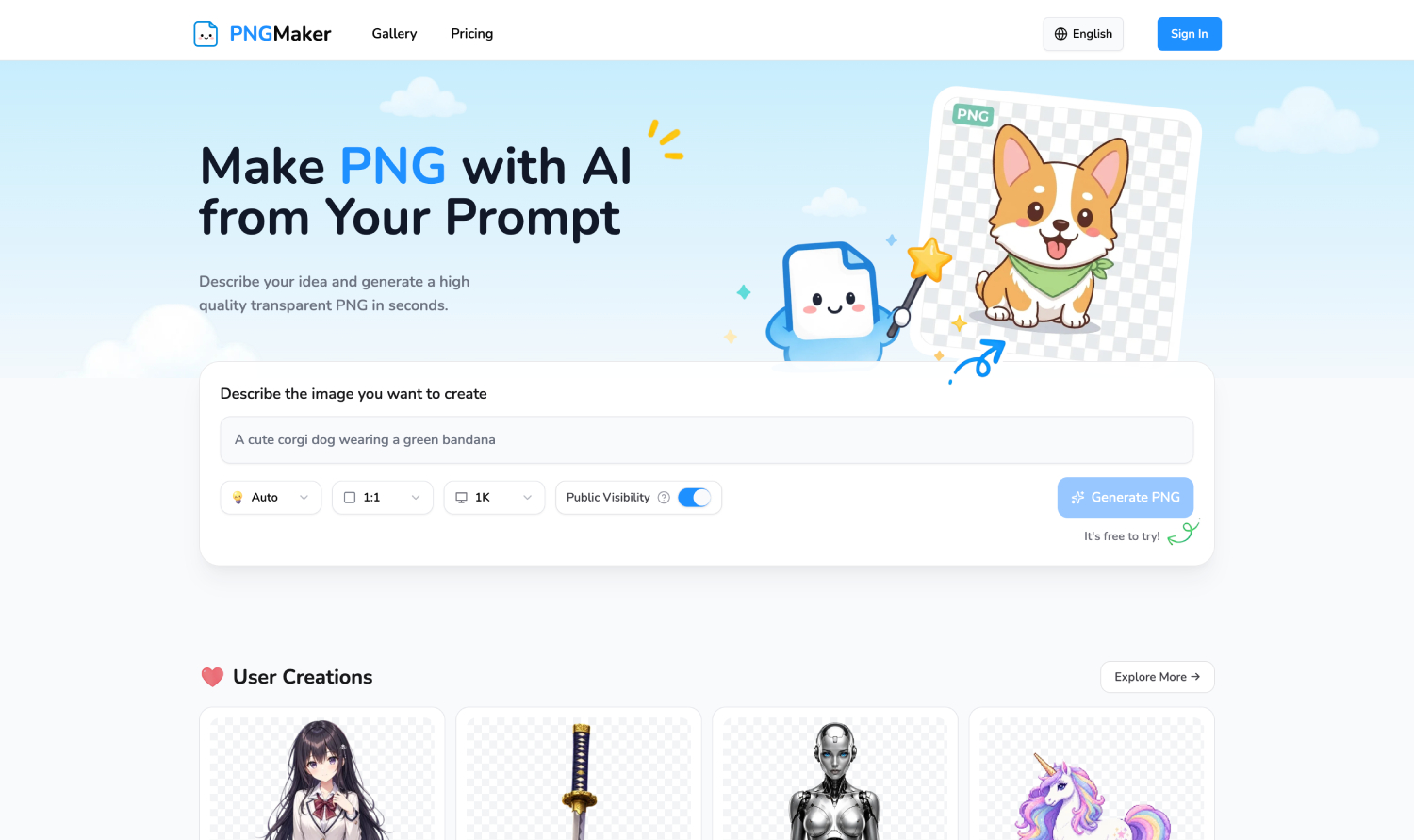
- Create ready-to-use transparent PNGs instantly from a simple text prompt, eliminating manual background removal
- Choose from kawaii, 3D cartoon, flat illustration, or pixel art to match your brand's creative direction
- Deliver sharp, detailed transparent PNGs at 1K, 2K, or 4K resolution, optimized for any screen or device
- Produce thumbnails, overlays, and channel graphics that drive higher click-through rates on YouTube
- Generate clean UI assets, feature icons, and illustrations for landing pages without any design experience
- Build consistent brand visuals with unique stickers, posts, and story assets for social media engagement
- Export promotional banners and product images with transparent backgrounds to increase e-commerce conversions
- Create characters, items, and game assets in multiple styles to accelerate indie game development
- Prototype faster by generating icons and mockup assets on demand, streamlining UI/UX workflows
- Control image visibility with public sharing or private mode to keep confidential projects secure
- Match any platform's requirements with flexible aspect ratios including 1:1, 4:3, 16:9, and 9:16
Pros & Cons
Pros
- Generates high-quality images
- Creates transparent PNGs
- Automatic background removal
- Supports multiple styles
- Supports multiple aspect ratios
- Offer resolutions options: 1K, 2K, 4K
- Privacy options available
- Beginner-friendly
- Professional-grade tool
- User control over image privacy
- No design experience needed
- Pre-edited images
- Image generation from text prompt
- Indie SaaS developers friendly
- Ideal for social media influencers
- YouTube content creators friendly
- Useful for E-commerce sellers
- Useful for UI/UX designers
- Ideal for indie game developers
- Ideal for website assets
- Creates thumbnails
- Creates overlays
- Creates emojis
- Generates channel graphics
- Generates feature icons
- Generates promotional visuals
- Generates stickers
- Generates post visuals
- Generates story visuals
- Ideal for digital content creation
- Helpful in create vector graphics
- Ideal for graphic design
- Helpful in Image editing
- Supports popular styles: kawaii, 3D cartoon
- Supports popular styles: flat illustration, pixel art
- Enables user focused creativity
- Permits public or private sharing
- Supports for various digital platforms
- Supports multiple aspect ratios 1:1, 4:3, 3:4, 16:9, 9:16
- Ideal for UI Design
- Generates images for UI assets
- Creates images for thumbnails, overlays
- Creates emojis for social media
- Generates images for channel graphics
- Generates images for feature icons
- Creates images for promotional visuals
- Supports fast image generation
Cons
- Limited artistic style options
- No real-time editing capability
- Limited image resolution options
- No API integration
- Fixed aspect ratio selections
- Manual style selection required
- No batch processing feature
- No mobile app version
- Single image generation at time
- Cannot import external images
Reviews
Rate this tool
Loading reviews...
❓ Frequently Asked Questions
PNGMaker is an AI-driven tool that creates high-quality transparent PNG images from text prompts. It has been designed to aid designers, creators, and developers by automating the process of creating images with clean transparent backgrounds.
PNGMaker uses artificial intelligence to transform textual descriptions into visual images. The user provides a description of what they want in an image, and the AI leverages this prompt to create a corresponding PNG image.
PNGMaker's key features include the creation of high-quality transparent PNG images from text prompts, automated background removal, multiple popular styles for image creation including kawaii, 3D cartoon, flat illustration, and pixel arts, support for various image aspect ratios, flexible resolution options, and the ability to share creations either publicly or keep them private.
With PNGMaker, users can create images in multiple popular styles. These include kawaii, 3D cartoon, flat illustration, and pixel art.
To generate a PNG image, PNGMaker automatically removes the background. This feature enhances the usability of the images created, eliminating the need for additional editing.
PNGMaker supports various image aspect ratios to suit different digital platforms. These include 1:1, 4:3, 3:4, 16:9, and 9:16 ratios.
Users have the option to choose their preferred resolution with PNGMaker. The tool supports 1K, 2K, or 4K resolutions, enabling optimal output for various devices and use cases.
With PNGMaker, users have full control over how they choose to share their creations. They have the choice to either share their images publicly or keep them private.
No design experience is required to use PNGMaker. The tool is designed to be accessible to both beginners and professionals, allowing anyone to generate high-quality images with ease.
Various roles can benefit from using PNGMaker. It aids YouTube content creators, Indie SaaS developers, E-commerce sellers, social media influencers, UI/UX designers, and indie game developers by providing them with a means to create customizable PNG images for their projects efficiently.
YouTube content creators can use PNGMaker to generate eye-catching thumbnails, overlays, emojis, and channel graphics, thereby attracting more views and improving click-through rates.
For Indie SaaS Developers, PNGMaker can be a valuable tool to generate clean illustrations, UI assets, and feature icons for their landing pages, apps, and product marketing materials.
E-commerce sellers can enhance their product images, banners, and promotional visuals with professional PNG graphics using PNGMaker. This can help increase conversions.
Social Media Influencers can use PNGMaker to create unique stickers, posts, and story visuals. This can help them build a consistent brand and boost audience engagement.
UI/UX designers can leverage PNGMaker to quickly generate icons, illustrations, and mockup assets. This can streamline their design workflow and speed up prototyping.
Indie game developers can use PNGMaker to create characters, items, icons, and game assets in multiple styles, extending their game ideas to life.
With PNGMaker, users just need to provide a text prompt describing what they want in an image. The AI uses this prompt to generate a corresponding PNG image with a clean transparent background.
Yes, PNGMaker offers a privacy control feature. Users can choose to keep their generated images and data confidential.
PNGMaker optimizes the output for various devices and use cases by offering flexible resolution options and support for multiple aspect ratios. Users can choose 1K, 2K, or 4K resolutions, and select from 1:1, 4:3, 3:4, 16:9, and 9:16 aspect ratios.
PNGMaker is designed to be user-friendly and accessible, making it a handy tool for both beginners and professionals. No prior design experience is required, which means anyone can use it to generate high-quality images easily.
PNGMaker's AI technology works by transforming textual prompts into high-quality transparent PNG images. Users describe the image they want to create in clear and simple words. The AI then interprets these prompts and generates a high-quality PNG image with a transparent background. It’s as easy as describing what you want, and the AI generates high-quality images for you.
PNGMaker ensures the quality of generated PNG images by using highly advanced AI algorithms. It creates sharp, clean, and detailed transparent PNGs that are ready for design, content creation, and professional use. The AI also enables PNG images to be created in multiple popular styles, all of which maintain high visual aesthetics. In addition, users can choose the resolution before the generation process between 1K, 2K, or 4K, optimizing the PNG output for various devices, screens, and use cases.
No, design experience is not required to use PNGMaker. The tool is user-friendly and is designed to be straightforward for beginners and professionals alike. The users simply have to describe what they want in clear, simple words, and the AI generates the images for them.
PNGMaker can create a variety of styles. The tool supports multiple popular image styles such as kawaii, 3D cartoon, flat illustration, and pixel arts. This variety allows users to have creative versatility in their projects. If the preset styles do not match the user's needs, they can include style details directly in their text prompt to get more customized visuals.
Yes, PNGMaker provides flexibility with images' aspect ratios. Users can choose from 1:1, 4:3, 3:4, 16:9, and 9:16. This makes it versatile for different use cases on social media, websites, and other digital platforms.
PNGMaker offers multiple resolution options. Before generating an image, users can choose from 1K, 2K, or 4K resolutions. This feature ensures that the generated PNG images are optimized for different devices, screens, and use cases.
PNGMaker automates the background removal process through the use of AI technology. When the user provides a textual description of the image they want to generate, the AI interprets the prompt and creates an image. The generated image is delivered as a PNG with a transparent background, removing the need for the user to manually edit out the background.
PNGMaker offers two options for sharing the images created with it. Users can choose to either share the generated images publicly, or keep them private. This flexibility gives users control over their content’s visibility.
Yes, PNGMaker does have the ability to generate images in a 3D cartoon style. This is one of the popular styles supported by the platform, alongside others like kawaii, flat illustration, and pixel arts.
Social media influencers can use PNGMaker to create unique stickers, posts, and story visuals. These images can help build a consistent brand and boost audience engagement. Plus, the versatility in style option, high-quality resolution and varied aspect ratios brings more value and adaptability to the social media environment.
For Indie game developers, PNGMaker offers the ability to create characters, items, icons, and game assets in multiple styles. It can generate high-quality transparent PNG images quickly that can bring game ideas to life. No design experience is required, facilitating streamlined game development and enhancing productivity.
Yes, PNGMaker is capable of generating pixel arts. This is one of the styles the platform supports, giving users a broad spectrum of creative flexibility in their projects.
PNGMaker has a feature that allows users to control the privacy of their generated images. By default, the generated content may be publicly accessible. However, PNGMaker also offers an option for users to enable private mode to keep their generated images and data confidential.
UI/UX designers can use PNGMaker to quickly generate icons, illustrations, and mockup assets. This can streamline their design workflows and speed up the prototyping process. With PNGMaker, designers can create high-quality transparent PNGs in seconds with a simple prompt. Also, with no background removal work needed, it saves designers time and fosters productivity.
Yes, one of the popular image styles supported by PNGMaker is kawaii. Users can generate kawaii-style images using text prompts, offering a vast amount of creative flexibility.
Yes, the images generated with PNGMaker can be kept private. PNGMaker offers a privacy option for users who want more control. Those who prefer to keep their generated images private can enable private mode to ensure their creations are confidential.
PNGMaker supports various digital platforms by offering flexibility in both image aspect ratios and resolution. It offers multiple aspect ratios (1:1, 4:3, 3:4, 16:9, 9:16) and multiple resolution options (1K, 2K, 4K) to ensure that generated images can adapt to different devices, screens, and platforms.
Yes, PNGMaker can be used for creating promotional visuals. It generates sharp and professional images that can be used in business projects, marketing campaigns, product designs, and other commercial applications. With high-quality transparent PNGs and a variety of styles, it makes the generation of attractive promotional visuals swift and convenient.
Pricing
Pricing model
Freemium
Paid options from
$23.90/month
Billing frequency
Monthly
Related Videos
You Won’t Believe This FREE PNG Generator Exists! 😍
The Tech Bro•1.6K views•Apr 16, 2025