Reel to Prompt
Overview
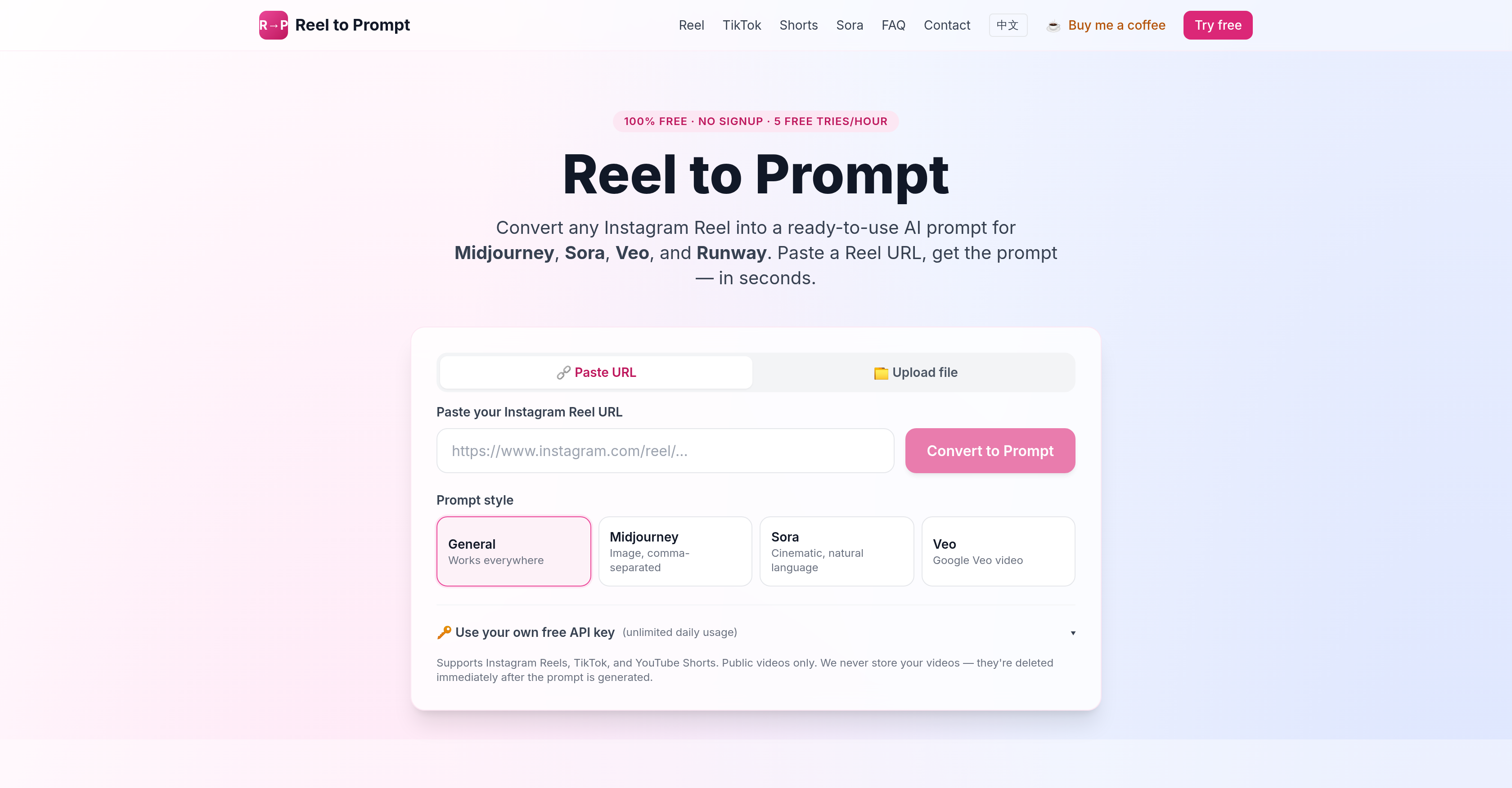
- Recreate trending video styles in Midjourney, Sora, or Runway by pasting a Reel URL and receiving a ready-to-use, generator-aware prompt in seconds
- Capture motion, camera movements, and pacing from any short-form video by analyzing multiple frames, not just a single image, for richer AI prompts
- Eliminate creative block by transforming viral Instagram Reels, TikTok clips, or YouTube Shorts into reusable AI prompts that fuel endless content remixes
- Protect your privacy with zero data retention—videos are deleted immediately after prompt generation and URLs are never stored or logged
- Scale your workflow without limits by using your own free API key for unlimited conversions, bypassing the 5-per-hour free tier
- Skip account creation entirely—no signup required to start converting public videos into structured, machine-readable prompts for any modern AI generator
Pros & Cons
Pros
- Converts social media videos
- Offers structured prompts
- No signup required
- Does not store videos
- Prompt style selection
- Understands video frames
- Privacy-first
- Multi-platform compatibility
- Free service
- Syntax adaptation
- Unlimited conversions with API key
- Trend detection conversion
- Diverse output formats
- Learning tool for prompt engineering
- Content creation utility
- Captures video motion and style
- Negative prompt included
- Off-site API key storage
- Public video compatibility only
- Free tier available
- API endpoint for bulk conversion
Cons
- Limited to public videos
- API key for unlimited usage
- Doesn't store videos
- Limited free conversions
- Requires video URL
- No options for still images
- Specific output for each generator
- Can't handle private videos
- No bulk conversion UI
- No support for login-only content
Reviews
Rate this tool
Loading reviews...
❓ Frequently Asked Questions
Reel to Prompt is an online tool that transforms Instagram Reels, TikTok videos, or YouTube Shorts into ready-to-use AI prompts for different AI generators including Midjourney, Sora, Veo, Runway, and Pika.
Reel to Prompt works in three simple steps. First, paste the URL of a public video from Instagram Reels, TikTok, or YouTube Shorts. Then, choose a prompt style for the AI generator you plan to use. The tool will analyze the video with a vision model, sampling multiple frames to capture motion, camera movements, and pacing. It then provides a structured, machine-readable prompt in seconds.
To use Reel to Prompt, all you need is a URL of a public video from Instagram Reels, TikTok, or YouTube Shorts. After pasting the URL, you can pick a prompt style based on the AI generator you intend to use. There is no need for signup or any other requirements.
Yes, Reel to Prompt is free. Every user gets 5 free conversions per hour using a shared Groq key. For higher volume usage, the tool provides the ability to use your own free API key.
Reel to Prompt takes user privacy seriously. Videos are immediately deleted after the prompt is generated. The URLs of the videos you submit are never stored or logged. Your Bring Your Own Key (BYOK) API keys stay in your browser and only the request to the provider gets transmitted.
Yes, Reel to Prompt works across multiple platforms including Instagram Reels, TikTok, and YouTube Shorts. The converter handles URLs of public videos from all these platforms.
No, Reel to Prompt doesn't require a signup. You can use it directly by pasting a URL of a public video and choosing your desired prompt style.
Reel to Prompt differentiates itself from similar tools by analyzing multiple frames from a video instead of a single image, allowing it to capture motion, camera movements, and pacing. It also offers different prompt styles tailored for different AI generators. Moreover, many other tools require signup, whereas Reel to Prompt does not.
In Reel to Prompt, you can choose from several types of prompt styles based on the AI generator you're using. These include General, which works everywhere, Midjourney that provides comma-separated image prompts, and Sora and Veo that offer cinematic, natural language and formatted video prompts respectively.
Reel to Prompt analyzes multiple frames from a video rather than a single image to comprehensively capture motion, camera movements, and pacing. This provides a more accurate and complex representation of the video, leading to more effective AI prompts.
Reel to Prompt can generate a prompt in mere seconds. Once you provide the URL of the video and the desired AI generator, the tool will rapidly analyze the video and produce a machine-readable AI prompt.
A 'Prompt Engineer' is someone who works with AI tools to create prompts, typically for use with AI generators. They can use Reel to Prompt to turn trending videos from Instagram Reels, TikTok, or YouTube Shorts into reusable AI prompts, helping them create high-performance, diverse content with less effort.
By transforming short-form videos into AI prompts, Reel to Prompt enables short-form creators to explore new creative avenues. They can turn a popular or trending reel into an AI prompt, then remix it to create unique and engaging content for their brand.
Yes, Reel to Prompt is designed not only for creating one-off captions but also reusable prompts. This tool provides prompt engineers and short-form creators with a unique way to repurpose and recycle trending reels, helping them maintain a robust and varied content pool.
Yes, Reel to Prompt produces structured, machine-readable prompts that various AI generators such as Midjourney, Sora, Veo, Runway, and Pika can utilize effectively.
Yes, when using Reel to Prompt, you can select your desired AI generator. The tool offers options for selecting the style of the prompt based on the AI generator you plan to use. This ensures that the generated prompt is in the syntax that matches your selected generator’s preference.
No, Reel to Prompt does not store or log the URLs of the videos used to generate the prompts. Users' privacy is a major priority for the tool, and all video data is immediately deleted after the prompt is generated.
Yes, by analyzing multiple frames from a video rather than a single image, Reel to Prompt captures motion, camera movements, and pacing in addition to composition. This makes the tool capable of comprehending and transcribing a more dynamic and comprehensive representation of the video into the AI prompt.
Reel to Prompt's output works with any modern image or video generator. This includes Midjourney, Sora, Google Veo, Runway Gen-3, Pika 2, Ideogram, Luma Dream Machine, Stable Diffusion 3, Flux, and Leonardo. The tool transforms the video into a prompt, matching the preferred syntax of these models.
No, Reel to Prompt can only process public reels. It cannot convert private or login-only reels as it does not ask for your credentials, thereby upholding your privacy and security.
Reel to Prompt supports a wide range of AI generators such as Midjourney, Sora, Veo, Runway, and Pika. The output is shaped to match the preferred syntax of the chosen model, making it compatible with any modern image or video generator
No, Reel to Prompt does not require signup. You can use the tool directly by pasting the URL of the public video you want to analyze.
Yes, Reel to Prompt lets you select the style of the prompt based on the AI generator you intend to use. You can choose among options like General, Midjourney, Sora, and Veo.
No, Reel to Prompt does not store your videos. Videos are immediately deleted after the prompts are generated, ensuring a strict privacy-first approach.
Yes, Reel to Prompt is free to use. It allows every visitor 5 free conversions per hour using a shared Groq key. After that, or for unlimited conversions, you can use your own free API key.
No, Reel to Prompt can only process public videos. It does not work with private or login-only reels.
The different prompt styles in Reel to Prompt essentially refer to the syntax preferences of various AI generators. The 'General' style creates a balanced description that works with any generator. 'Midjourney' returns a comma-separated string, 'Sora' produces cinematic, natural language prompts, and 'Veo' follows a format with subject, action, camera, and style descriptors.
Reel to Prompt is unique in its ability to understand multiple frames from a video. Unlike other similar tools that might only process single images, Reel to Prompt captures motion, camera movements, and pacing. It also generates AI prompts shaped to match the preferred syntax of various AI generators, and ensures utmost privacy by not storing videos or logging URLs. Plus, it supports unlimited conversions with a user's own API key.
Yes, Reel to Prompt allows for unlimited conversions when users use their own API key. Without it, the tool provides 5 free conversions per hour.
Yes, Reel to Prompt supports videos from various platforms, including Instagram Reels, TikTok, and YouTube Shorts.
Reel to Prompt generates AI prompts in seconds. Once a URL is entered and the preferred prompt style is chosen, the AI analyzes the video and returns a prompt shortly after.
All you need to use Reel to Prompt are public video URLs from Instagram Reels, TikTok, or YouTube Shorts, an internet connection, and optionally, your own API key for unlimited conversions.
An API key is needed by Reel to Prompt to access the AI vision model which analyzes the video and generates the prompt. Without this API key, the tool cannot function.
Yes, you can use your own API key with Reel to Prompt, which allows you to have unlimited daily usage.
After Reel to Prompt generates a prompt, your video is immediately deleted. The tool does not keep copies or log the URLs you submit, maintaining strong privacy standards.
Reel to Prompt is built for a wide range of users. It is not only useful for prompt engineers aiding their work, but also beneficial for creators and marketers for transforming trending videos into reusable AI prompts.
Reel to Prompt uses a special vision model that analyzes several frames within a video instead of just a single image. This allows the tool to understand and capture aspects like motion, camera movements, and pacing which are essential in videos.
No, Reel to Prompt does not store any user information. It adheres to a strong privacy-first policy where videos are deleted immediately after the prompt is generated and URLs are not logged at all. When a user's own API key is used, it stays in the browser and does not leave the request to the provider.
Pricing
Pricing model
Free
Paid options from
Free