

Overview
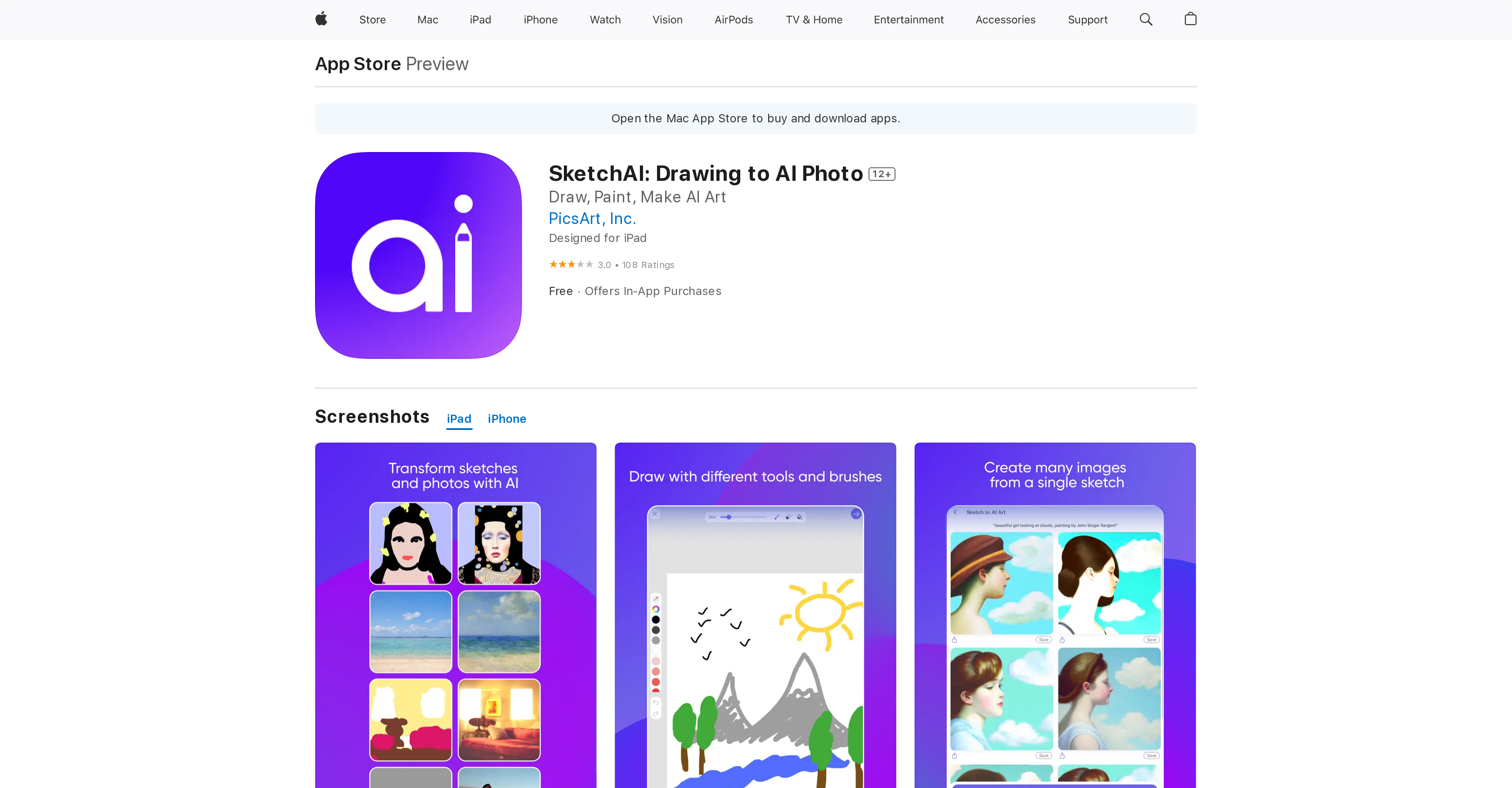
- Transform rough sketches into polished digital artwork instantly using AI image generation technology
- Generate unlimited variations of your artwork by adding descriptive prompts to explore different creative directions
- Create detailed sketches with professional tools including adjustable brushes, color wheel selection, and bucket fill for efficient coloring
- Refine every detail with precision using zoom functionality and brush size adjustments for complete creative control
- Experiment freely with undo and redo features that make digital art creation stress-free and forgiving
- Start creating immediately using pre-made templates and sketches that jumpstart your creative process
- Share your finished artwork directly to social media or download high-quality images for marketing materials and projects
- Upscale your final images to the highest possible quality for professional use in seconds
Pros & Cons
Pros
- High-quality image generation
- Variety of brush tools
- Eraser and bucket fill tools
- Range of color options
- Undo/redo brushstrokes
- Canvas zoom functionality
- Adjustable brush size
- Uploadable from gallery
- Pre-created sketch/templates available
- Generate unlimited variations
- Add prompts to sketches
- Shareable artwork
- Downloadable creations
- Mobile-friendly design
- Designed for iPad
- Available on App Store
- Ideal for professionals/hobbyists
- Can upscale image quality
- Claimed user satisfaction
- Free to download
- Offers in-app purchases
- Privacy policy provided
- Non-linked data collection
- English language supported
Cons
- Limited generations before paywall
- Mediocre generation quality
- Requires iOS 14.0 or later
- Requires macOS 11.0 for Mac
- Unclear privacy practices
- Size (15.3 MB)
- Has In-App Purchases
- Not designed for smaller screens
- Only English language supported
- No Android support
Reviews
Rate this tool
Loading reviews...
❓ Frequently Asked Questions
SketchAI is an AI-based application designed to convert sketches into high-quality stock photos and artwork. It offers a variety of features, such as a brush, eraser, and bucket fill tools, a range of colors, the ability to undo and redo brush strokes, and the facility to zoom in and out of the canvas. Users can also upload photos from their galleries, use pre-existing sketches and templates, generate unlimited variations of their sketch by adding prompts, and share their developed artwork or download it to their device.
SketchAI employs AI technology to convert sketched images into high-quality photos or artwork. Users sketch an image using the various drawing tools provided, then the AI turns the sketch into a polished photo or artwork. This process is optimized using prompts to better describe the user's vision, allowing them to generate multiple variations of their sketch.
SketchAI offers various tools such as a variety of brushes, an eraser, and a bucket fill tool. Users can select from a wide range of colors using a color wheel or quick colors panel. They have the ability to undo and redo their brushstrokes, and can adjust brush size which aids in refining the details. The zoom in and out feature allows users to work on fine details.
Users can upload photos to SketchAI from their galleries. Once uploaded, the photos can be transformed into sketches that can be further refined and developed using the various tools provided by the app.
SketchAI can process and generate high-quality photos and artwork from sketches. The AI technology allows users to generate an unlimited number of variations of their sketch. The magnitude of its processing capability is not specifically stated, but it is designed to generate professional-looking images in seconds.
Yes, SketchAI provides pre-created sketches and templates for easy generation of unique photos. Users can use these pre-created sketches and templates to start their creative process and then customize them according to their vision.
To generate multiple variations of a sketch with SketchAI, add prompts that describe your intended vision for the sketch. This instructs the AI to understand and generate your vision in various ways, leading to multiple versions of the same sketch.
Yes, you can share your artwork directly from SketchAI. Once you have finished creating your artwork, you can use the share function to distribute your creations to others, either via social media or other sharing means.
After finishing creating your artwork on SketchAI, you can download it directly to your device. This permits users to have a physical copy of their artwork for further use, either for personal purposes or further modifications.
SketchAI offers several in-app purchases. These include SketchAI Gold Weekly for $4.99, SketchAI Gold Monthly for $14.99, and SketchAI Gold Weekly 2 for $5.99. It is assumed that these purchases offer additional features or capabilities within the app, though the specific features offered are not clearly specified.
You can enhance the quality of your sketches in SketchAI by utilizing various features provided by the tool. These include a variety of brush, eraser, and bucket fill tools to shape your vision, the choice of a wide range of colors using the color wheel or quick colors panel, the option to undo and redo brush strokes, and the capability to zoom in and out to alter fine details. You can also upscale your image to get the highest possible quality.
SketchAI is compatible with iOS devices. It requires iOS 14.0 or later, demonstrating compatibility with iPhones, iPads, and iPod touch. Additionally, it can also run on a Mac with an Apple M1 chip or later, provided MacOS 11.0 or later is installed.
SketchAI has received mixed user reviews. Some users consider it an amazing app, turning sketches into works of art in seconds and effectively transforming concepts into pictures for work projects. However, some reviews suggest the app may be overrated, mentioning that only 7 generations are offered before a monthly payment is required, with some criticisms citing mediocre quality of generated images.
The developer of SketchAI, PicsArt, Inc., has indicated that data privacy practices may involve handling of data as described in their privacy policy. The collected data includes identifiers, usage data, and diagnostics, which is not linked to the user's identity.
The bucket fill tool in SketchAI is designed for easy coloring of your sketches. By utilizing this tool, users can fill larger areas of their sketch with a specific color, aiding in more efficient and uniform coloring.
Yes, you can undo and redo brushstrokes in SketchAI. This feature provides the flexibility to make changes and experiment with different designs as you are working on your sketch, making the creative process more forgiving and less stressful.
In SketchAI, you can adjust the brush size according to your needs to change and refine fine details. This feature gives you the ability to create detailed sketches by offering the flexibility to work on larger or smaller scales depending on your vision.
Yes, you can zoom in and out of the canvas in SketchAI. This feature allows you to zoom in for close-up work on intricate details and zoom out to view the whole image. It enhances the user's control over their artwork, allowing for better precision and overall design.
To add prompts to your sketch on SketchAI, you describe your vision in the prompts section provided within the application. These prompts guide the AI to better understand and interpret your vision, thereby generating a sketch that closely reflects your creative idea.
Pricing
Pricing model
Freemium
Paid options from
$7.99/month
Billing frequency
Monthly


