
Overview
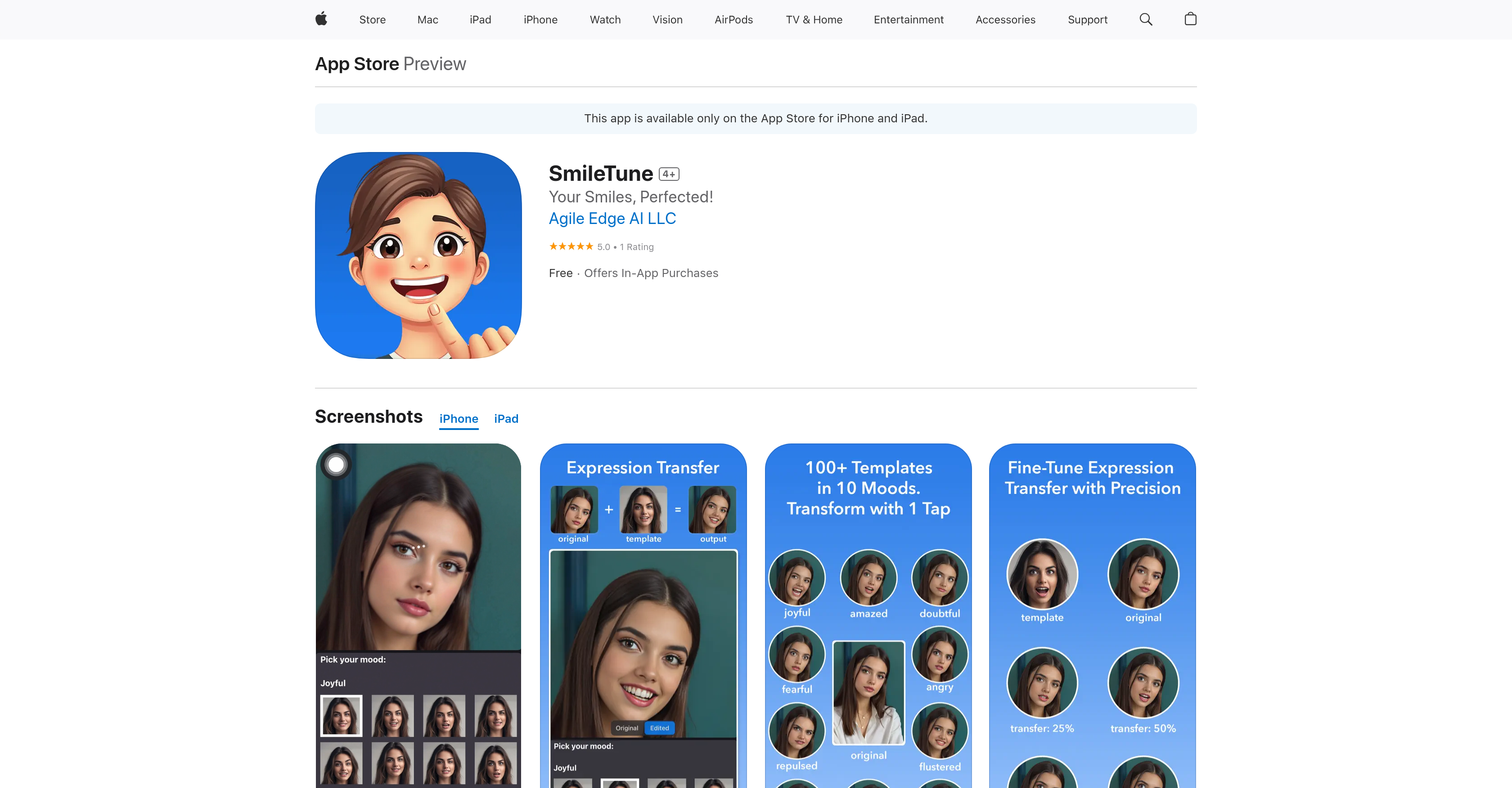
- Achieve perfectly natural-looking facial expressions using mood-based templates with expression transfer
- Adjust head angle and perspective in three dimensions with precise pitch, yaw, and roll controls using 3D face rotation
- Refine facial details while preserving authentic features through customizable intensity face enhancement
- Keep all photos completely private and secure with on-device processing that never uploads to cloud storage
- Edit any image type including real photos, AI portraits, anime, and paintings with versatile input support
Pros & Cons
Pros
- Natural facial expression editing
- Expression transfer feature
- 3D face rotation
- Face enhancement tool
- Compatibile with various input types
- Compatible with anime and paintings
- On-device processing
- No data uploaded to cloud
- Optimal for devices with 5GB+ RAM
- Privacy-first approach
- Preserves original face details
- Adjustments using mood templates
- Yields authentic results
- Export features with/without logo
- Refined user control
- Transformations with One-tap
- Highly compatible with iPhones
- Highly compatible with iPads
- Does not collect any data
Cons
- Requires 5GB+ RAM
- Limited device compatibility
- In-app purchases required
- Limited to iOS
- Can't process on cloud
- Logo on free exports
Reviews
Rate this tool
Loading reviews...
❓ Frequently Asked Questions
SmileTune is an AI-driven face editing app developed by Agile Edge AI LLC. It enables editing and enhancing of facial expressions in photographs with focus on delivering natural and authentic outcomes. The application provides numerous features such as expression transfer, 3D face rotation, and face enhancement.
SmileTune's expression transfer feature enables users to adjust facial expressions using templates across different moods. It is not explicitly stated how this feature operates, but it implies that users can modify facial expressions in a photo based on predefined templates, covering various moods.
Yes, SmileTune can be used to edit anime and paintings. Along with real photos and AI-generated portraits, anime and paintings are among the input types supported by SmileTune.
The 3D face rotation feature in SmileTune allows users to adjust the pitch, yaw, and roll of the face in the photo. This provides the ability to modify the orientation of the face in the three-dimensional space.
SmileTune ensures user privacy by performing all processing on-device. This means users' photos do not leave their device and are not uploaded to any cloud storage. This approach ensures user photos are kept private and not subjected to potential data breaches associated with cloud storage.
SmileTune works optimally on devices with 5GB+ RAM. Supported devices include iPhone 12 Pro / Pro Max, iPhone 13 Pro / Pro Max, all iPhone 14, 15, and 16 models, and later devices with 5GB+ RAM. For iPads, it supports iPad mini with A17 Pro, iPad Air (5th Gen), iPad Air with M2, iPad Pro 11-inch (2nd Gen), iPad Pro 12.9-inch (4th Gen), and later models with 5GB+ RAM.
Yes, SmileTune can be used for enhancing facial details through its face enhancement feature. This feature refines your face while preserving its natural look. Users can customize the intensity for a perfect balance.
SmileTune supports a variety of input types. Users can edit real photos, AI-generated portraits, anime, paintings, and more.
No, SmileTune does not upload user photos to the cloud for processing. All processing for photo editing is done locally on the user's device, respecting user privacy.
SmileTune contributes to creativity and user control by allowing the adjustment of facial expressions, position, and details with precision and ease. It offers expression transfer, 3D face rotation, and face enhancement that are controlled according to user preference, instilling a sense of creative control.
Yes, there is a requirement for device RAM to use SmileTune. It works optimally on devices with 5GB+ RAM. This is due to the high memory usage of the app, necessary for processing complex AI algorithms.
The face enhancement feature in SmileTune aids in refining facial details while maintaining a natural look. Users can tweak the intensity of the enhancement to strike an ideal balance.
Yes, SmileTune can adjust facial expressions across different moods. Its expression transfer feature provides the ability to do so using templates across various moods.
AI is utilized in SmileTune for face editing in several ways. The app leverages AI to adjust facial expressions with the expression transfer feature, perform 3D face rotations, and refine facial details with the face enhancement feature - all while maintaining a natural and authentic look.
All processing in SmileTune happens on-device, not on the cloud. This local processing helps in ensuring the privacy of user photos, as they don't leave the device or get uploaded to any cloud storage.
Yes, SmileTune does offer features for AI-generated portrait editing. It supports various types of inputs including AI-generated portraits, enabling users to edit and enhance them like other types of photos.
SmileTune can help users achieve natural and authentic results by providing user-friendly tools that deliver natural-looking edits. The expression transfer, 3D face rotation, and face enhancement features all work in harmony to ensure edits look natural and authentic. Additionally, users can customize the intensity of enhancements to find a balance they prefer.
In SmileTune, ensuring that edits look natural involves using the offered tools judiciously and exercising creative control. The application is designed to preserve the natural look of faces during edits. Users can tweak the intensity of enhancements, expression transfers, and 3D rotations to strike a balance they find most natural.
Yes, logo-free saves in SmileTune do require in-app purchases. While users can edit and export as many times as they like with the SmileTune logo included, credits are needed to export without the logo. These credits can be bought within the app.
Pricing
Pricing model
Paid
Paid options from
$0.99/unit
Billing frequency
Pay-as-you-go