
SpritePixel
Get characters that fit your game's art direction from the first draft: the AI character generator turns text prompts or uploaded reference images into original 2D game characters, with selectable art style (such as pixel art), perspective, and character type.
Listing not yet reviewed by our editors · How we check
Overview
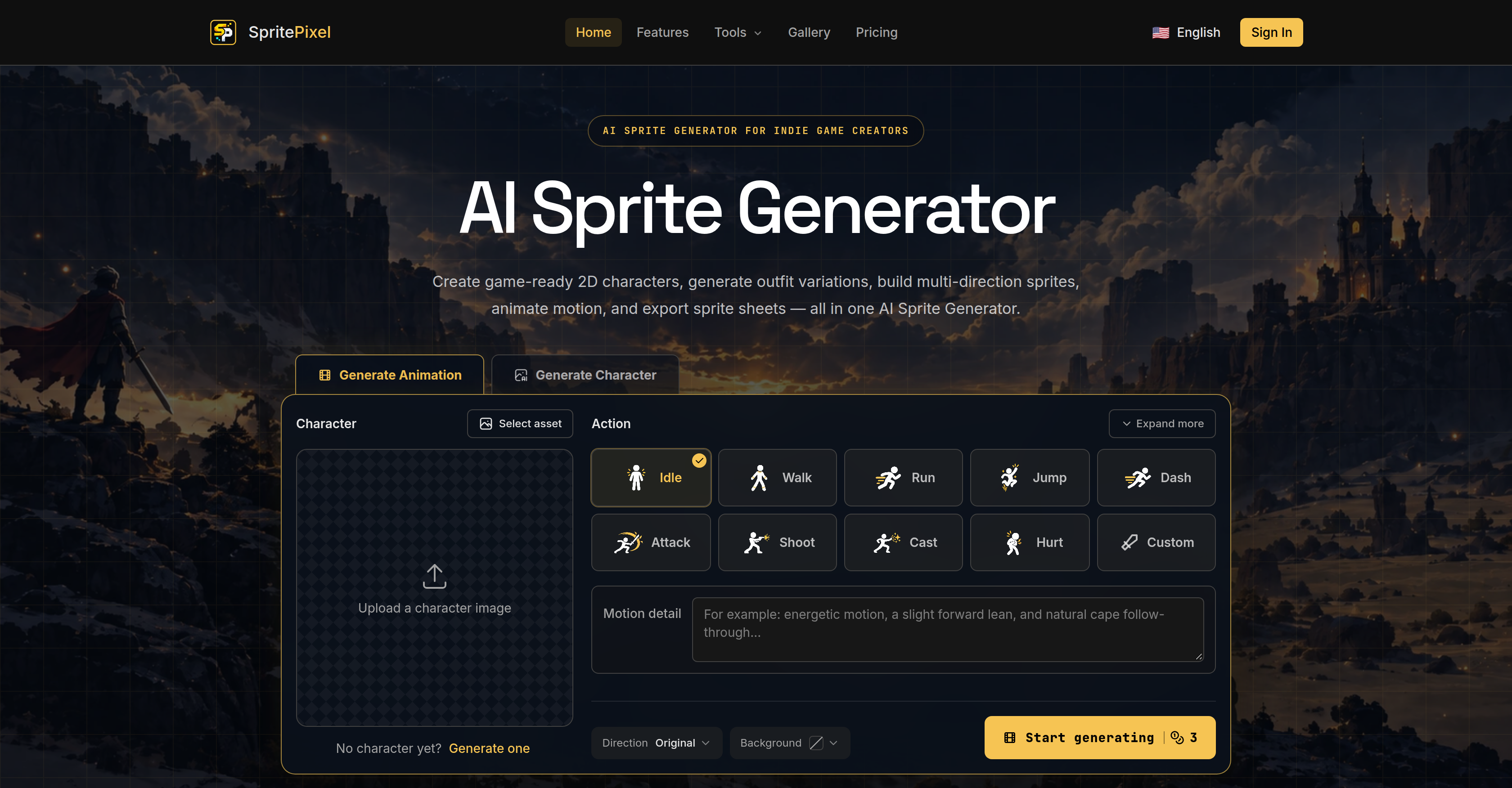
- Get characters that fit your game's art direction from the first draft: the AI character generator turns text prompts or uploaded reference images into original 2D game characters, with selectable art style (such as pixel art), perspective, and character type.
- Build a full cast without redrawing your hero: character variation generation produces outfits, skins, classes, and NPC alternatives while preserving the base character's core visual identity.
- Complete RPG and top-down character sets faster: multi-direction sprite generation creates matching front, side, and back views, including four-direction sets with front, right, back, and left.
- Animate characters without drawing every frame by hand: sprite animation generates frames for idle, walking, running, jumping, dash, attack, shooting, casting, and hurt, plus custom motions where you set the motion details and facing direction.
- Move finished art into your game development pipeline without extra cost: export organized sprite sheets or frame sequences, and downloads and exports never consume generation credits.
- Keep every game's assets in one place: project-based workspaces hold characters, variations, and animations together, with 1 project on Free, 10 on Indie, and unlimited on Pro.
- Fill inventories and skill bars with matching art: the AI Game Icon Generator creates icons for items, skills, and weapons.
- Reuse frames and existing sheets at no charge: the free Sprite Sheet Maker combines frames into a sheet, and the free Sprite Sheet Cutter splits existing sprite sheets into individual animation frames.
- Ship commercial games with private assets: Indie ($100/year, 1,440 credits) and Pro ($188/year, 3,120 credits) include commercial use, private-by-default assets, daily free credits, and email support, with priority generation on Pro.
Pros & Cons
From the listing; not yet checked by our editors.
Pros
- Text-prompt character generation
- Selectable visual styles
- Perspective generation settings
- Character-type generation choices
- Reference-image character input
- Base-character outfit variations
- Costume, skin, and class variants
- Front, side, and back views
- Directional character-set generation
- Idle animation frames
- Walking animation frames
- Running animation frames
- Jumping animation frames
- Attack animation frames
- Dash and hurt actions
- Custom motion instructions
- Motion direction controls
- Character animation generation
- Organized sprite-sheet exports
- Character-to-animation workflow
- Project-based asset organization
- Game icon generation
- Item, skill, and weapon icons
- Free browser sprite-sheet maker
- Free browser sprite-sheet cutter
- Combine frames into sheets
- Split sheets into frames
- Free monthly generation credits
- Commercial use on paid plans
- Priority generation queue on Pro
Cons
- Free tier: 10 monthly credits
- Free tier allows one project
- Free assets public by default
- Free tier uses standard queue
- Priority queue requires Pro
- Designed for 2D games only
- Not general-purpose image editing
- Generated assets need project integration
- Character consistency is approximate
Alternatives to SpritePixel
Tools that share the most tags with SpritePixel.
- God Mode AI
Ship professional animations without drawing skills using AI generation that eliminates technical barriers and artistic limitations
Freemium · from $19/month
$19/month
Not yet checked
- SpriteCook
Ship a full game art style in hours instead of weeks by generating every asset—characters, items, props, and tilesets—from a single text prompt with the AI pixel art generator.
Freemium · from $8/month
$8/month
Not yet checked
- SpriteFlow
Ship complete character animations in minutes instead of weeks, using one-click export to Unity, Godot, or Unreal with sprite sheet atlas and animation controller presets
Freemium · from $9.90/month
$9.90/month
Not yet checked
- AutoSprite
Ship complete character animation sets without drawing a single frame, generating idle, walk, and run cycles directly from one character image or text prompt
Freemium · from $12/month
$12/month
Not yet checked
- Spritix
Ship a fully animated 2D character without drawing frame by frame: upload a full-body PNG, JPG, or WebP image or describe your character in text, and the AI sprite generator builds Idle, Walk, Run, Jump, and Attack animations.
Freemium · from $12/month
$12/month
Not yet checked
- Ludo
Cut game design time in half by generating characters, mechanics, and stories in minutes instead of days
Free trial · from $15/month
$15/month
Not yet checked
Reviews
Rate this tool
Loading reviews...
Frequently asked questions
How do I create my first character in SpritePixel?
Describe the character you want, choose generation settings such as style, perspective, and character type, and optionally upload a reference image. Select Generate Character and start generating; you can then expand the asset with variations, directions, or animation.
What art styles and perspectives can I choose in SpritePixel?
The interface shows Pixel Art as a style, None as a perspective option, and Humanoid as a character type. SpritePixel says these settings are selectable, but the full list of available choices isn’t specified.
Can I upload a reference image to guide SpritePixel’s character generation?
Yes. You can upload a character image as a reference for generation.
How well does SpritePixel preserve a character’s appearance across outfit variations?
SpritePixel is designed to preserve the base character’s identity across outfit variations, but says it does so only as closely as generation allows; exact consistency isn’t guaranteed.
Can SpritePixel generate front, side, and back views of the same character?
Yes. It can generate matching front, side, and back-facing views. The site also shows a four-direction example with front, right, back, and left views.
Which actions and custom motions can I animate with SpritePixel?
Available actions include idle, walking, running, jumping, dash, attack, shooting, casting, and hurt, as well as custom motion. You can provide motion details for custom actions.
Can I specify the direction a SpritePixel animation should face?
Yes. SpritePixel lets you specify direction for generated motion results, but the available direction choices are not fully specified.
What formats and layouts can I export from SpritePixel?
You can download generated frames as organized sprite sheets or frame sequences. Specific file formats and sheet layout options are not stated.