

SubtitleGen
Overview
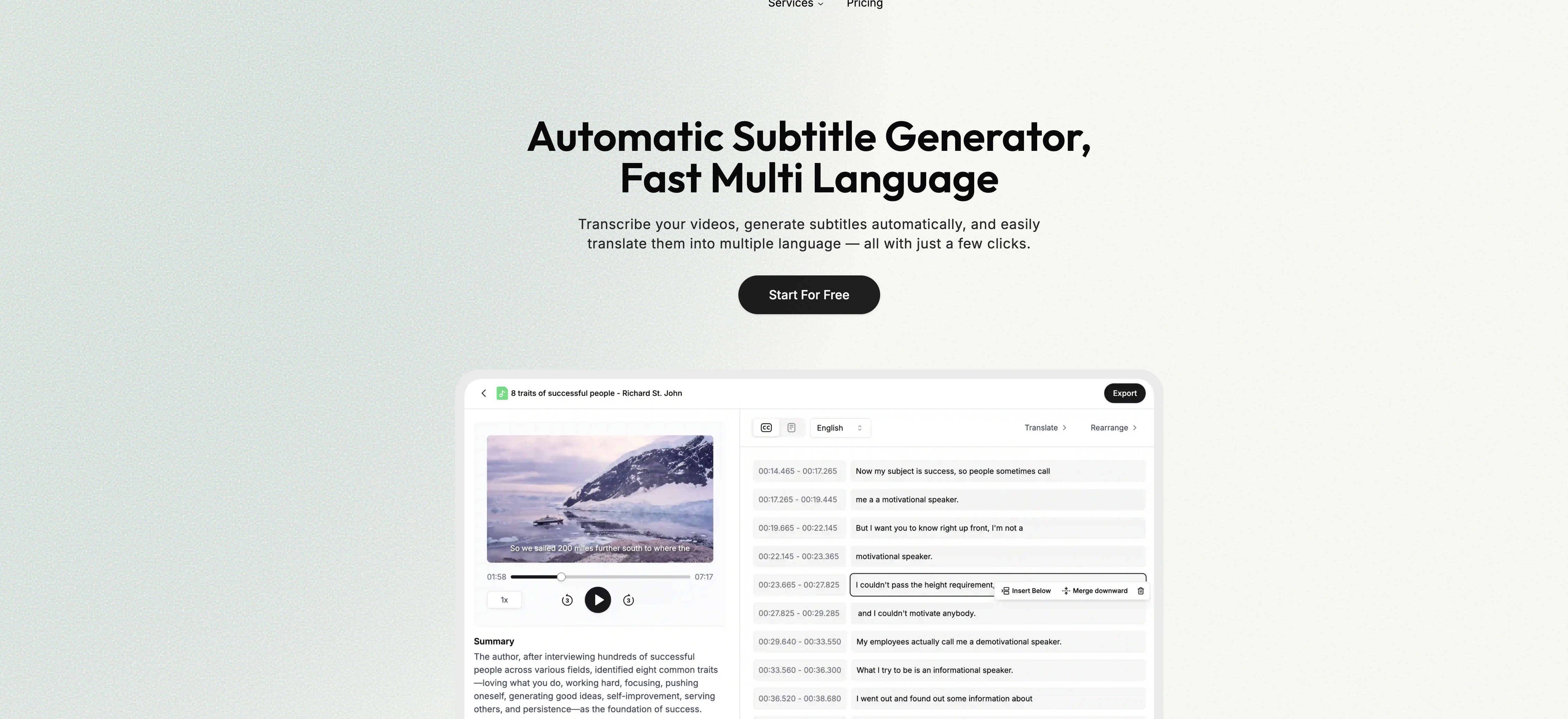
- Create perfectly timed subtitles automatically from any video or audio file with advanced AI transcription
- Expand your global audience by translating subtitles into dozens of languages for instant content localization
- Polish every detail with real-time editing in your browser using the built-in subtitle editor
- Protect sensitive content with enterprise-grade security that keeps your videos and data safe
- Work from any device without downloads using the web-based platform accessible on all browsers
- Export finished subtitles immediately for use across all your platforms and video players
Pros & Cons
Pros
- Auto-generates subtitles
- Subtitle translation
- Supports multiple languages
- Online subtitle editor
- Real time subtitle editing
- No installation required
- Data security
- Video and audio compatibility
- User-friendly interface
- Subtitle customization
- Content localization
- Browser compatibility
- Accurate transcriptions
- Prompt review and editing
- Easy exporting of output
- Online accessibility
- Enterprise-grade content protection
- Automatic subtitle generation
- Streamlined subtitling process
- Easy video upload
- Subtitle generation in preferred language
- Subtitle translation into multiple languages
- Audience engagement
- Content accessibility
- Multimedia content transcription
- Fast subtitle generation
- Subtitle and transcript review
- Format flexibility
- Secure and private
- Time-saving technology
- Editable subtitles
- High quality results
- Professional subtitle customization
- Instant subtitle generation
Cons
- No offline functionality
- No application version
- Real time edits lag
- Limited language support
- Possibility of translation errors
- Dependent on internet quality
- Content data concerns
- Missing customization options
- Unclear pricing details
- Accuracy based on language
Reviews
Rate this tool
Loading reviews...
❓ Frequently Asked Questions
SubtitleGen stands out from other subtitling platforms with its simplicity, accuracy, and versatility. It provides an advanced AI solution for transcribing video or audio into text, generating precise subtitles, and tailoring them to your specific needs. Additionally, it supports seamless translation of subtitles into several languages, thus enhancing the reach and accessibility of your content to global audiences. Moreover, it has an in-built online subtitle editor that enables real-time editing.
SubtitleGen prioritizes high-grade data security. It ensures that the uploaded content and generated subtitles are safely stored and protected, making it a reliable platform for data-sensitive users.
Yes, the subtitles generated by SubtitleGen are highly accurate. Its advanced AI system ensures precise transcription from video or audio into text, generating highly accurate subtitles.
SubtitleGen can generate subtitles in a wide range of languages. This offers flexibility to users to generate subtitles in their preferred language and makes the platform versatile for international content.
SubtitleGen supports a robust array of languages, including English, Spanish, French, German, Italian, Portuguese, Japanese, Chinese, Korean, Dutch, Turkish, and many more.
Yes, SubtitleGen allows users to review and make any necessary edits to the auto-generated subtitles. It features an online subtitle editor to assist with real-time edits, providing users with complete control over their content.
SubtitleGen is highly user-friendly. After uploading the video, the system automatically generates subtitles, which are readily available for prompt review and editing. It features a simple workflow, and its functions can be used with minimal effort, making the subtitling process swift and streamlined.
SubtitleGen is compatible with any web browser, as long as the device supports it. This increases the platform's accessibility to a wide range of users.
Yes, SubtitleGen can be used on mobile. Its online accessibility means it is compatible with any device that supports a web browser, which includes mobile devices.
No, SubtitleGen does not require any software installation. It is an online platform that can be accessed through any device with a web browser.
With SubtitleGen's online subtitle editor, users can make real-time edits directly in their browser. After uploading and automatic transcription, the subtitles are readily available for editing. Users can go through the generated text, make necessary changes, and customize them according to their preferences.
Yes, with SubtitleGen, users can easily export the final output of their subtitles. This feature enables the use of subtitles in various ways as per user requirements.
Yes, SubtitleGen provides transcription services. The advanced AI-powered platform transcribes video or audio content into text quickly and accurately.
Yes, SubtitleGen supports real-time edits. Its online subtitle editor allows users to make necessary changes to the generated subtitles in real-time, making it a dynamic and flexible solution for content creators.
The process to auto-generate subtitles with SubtitleGen is simple and quick. Users need to upload their video onto the platform, and the advanced AI system automatically transcribes the audio into text, generating accurate subtitles.
Yes, SubtitleGen includes a subtitle translation feature. It has the ability to automatically translate the generated subtitles into multiple languages, thus broadening the accessibility of your content to global audiences.
Yes, SubtitleGen supports content localization. By offering multilingual support and high-quality translation services, it enables content creators to adapt their resources to fit different languages and regions, enhancing the user experience and engagement.
SubtitleGen's advanced AI system allows for fast transcription. However, the exact duration may vary based on the length and quality of the video or audio file uploaded.
Yes, according to the provided information, SubtitleGen does offer a free trial, allowing users to test the services before opting for a paid plan.
The specific formats available for exporting subtitles from SubtitleGen are not mentioned explicitly. However, given its advanced features, it is safe to assume that it supports commonly used subtitle formats.
Pricing
Pricing model
Freemium
Paid options from
$7.50/month
Billing frequency
Monthly


