Overview
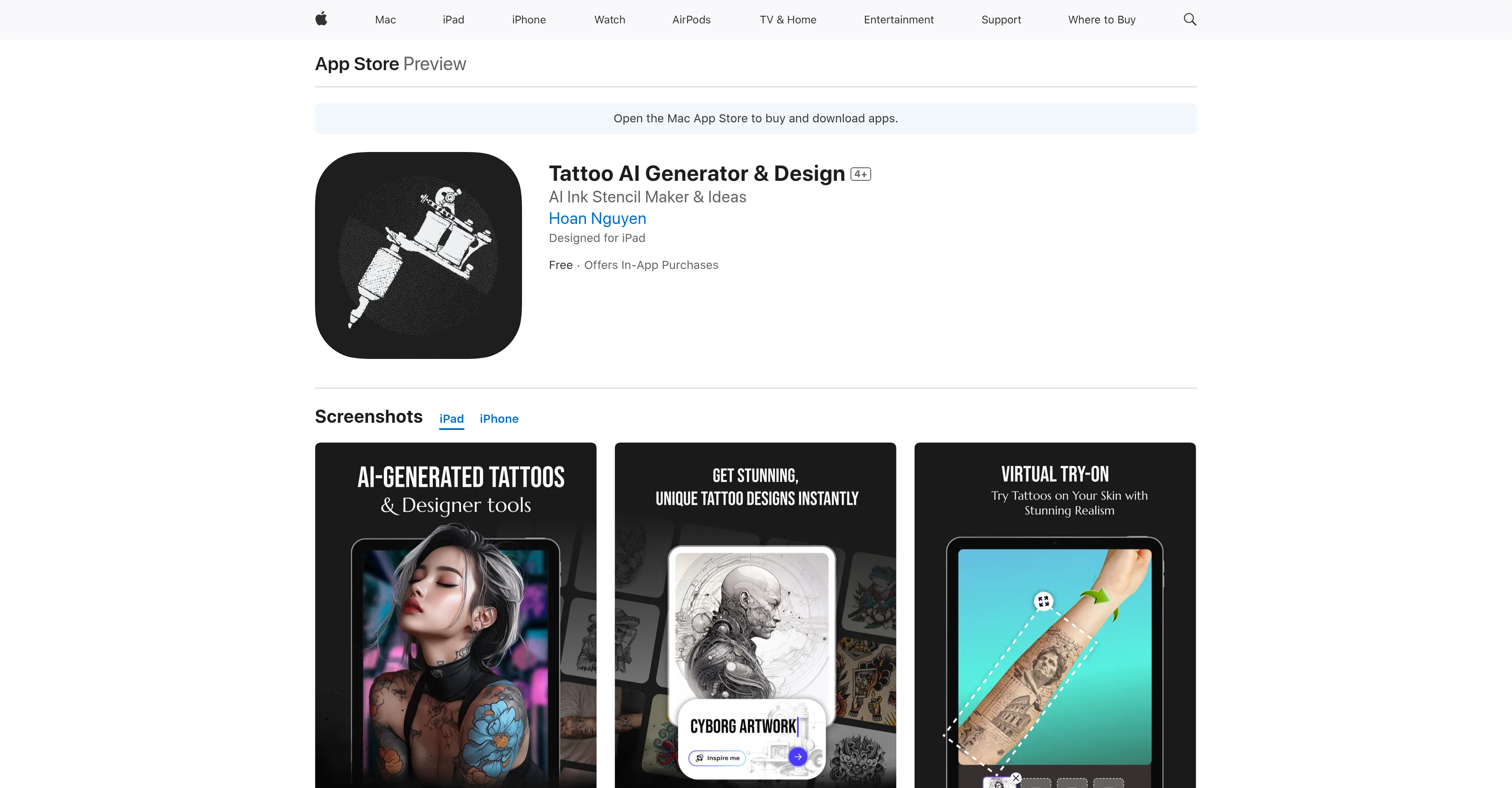
- Get unique tattoo designs generated instantly based on your preferences with the AI Tattoo Generator
- Visualize exactly how tattoos will look on your skin before getting inked using the lifelike virtual try-on feature
- Transform meaningful words, quotes, or names into custom tattoo art with the typography tool
- Create hand-drawn designs from scratch using the built-in sketching tools for complete creative control
- Modify and personalize your own uploaded designs with comprehensive customization options
- Save and share your tattoo creations directly with artists or on social media for instant feedback
Pros & Cons
Pros
- Individual customization options
- Virtual tattoo try-on
- Realistic visualization
- In-app sketching tools
- Typography art feature
- Upload own designs
- Save designs option
- Shareable designs
- Direct multi-platform sharing
- App Store availability
- Different subscription plans
- Regular app updates
- Multiple payment options
- Designed for iPad
- Built-in Stencil maker
- Supports user content
- Unlimited access plans
- Auto-renewal option
- Privacy policy available
- User tracking data
- Weekly PRO Subscription
- Monthly PRO Subscription
- Yearly PRO Subscription
- Transform text into art
- Free initial download
- M1 Chip compatibility
- 48 MB size
- Language support: Japanese, Portuguese
- Age rating 4+
- In-app purchases
- Alche Club support
- Graphics & Design category
- Requires iOS 17.0+
- Transform quotes into designs
- User-friendly interface
- Tailored to user preferences
- Turn ideas into tattoos
- Share with tattoo artists
- Social media sharing
- Supporting creative decision making
- Enhancing user experience
- Constant user-centered design
Cons
- Only available on App Store
- Requires subscription for full access
- Potentially expensive for users
- Limited language compatibility
- Lack of diversiform payment methods
- Data tracking across apps
- Potential privacy concerns
- Depends on user artistic ability
- Limited generated designs without subscription
- No Android version
Reviews
Rate this tool
Loading reviews...
❓ Frequently Asked Questions
The AI Tattoo Generator feature of AINK works by creating unique tattoo designs based on user preferences and inputs, bringing user's imagination to life.
Yes, you can upload your own designs to AINK, tweak them, and make them your own masterpiece.
With AINK, users can share their tattoo designs with friends, tattoo artists, or on social media with just a tap.
AINK does have a virtual try-on feature. This unique functionality allows users to visualize tattoos on their skin with lifelike realism.
Absolutely, you can customize your tattoo designs on AINK. Users can upload their designs and modify them as per their preferences.
AINK's typography art tool allows users to transform words, quotes, or names into meaningful and beautiful tattoo art.
Indeed, AINK is available for download on the App Store.
AINK has a range of subscription options for unlimited access to its features. These include weekly, monthly, and yearly PRO subscriptions.
AINK is regularly updated to enhance user experience and bring in new features.
AINK accepts payment for subscriptions through the user's iTunes account.
Yes, you can save your creations in AINK. In fact, you can save them for future reference or share them across various platforms directly from the app.
Absolutely, AINK uses AI for tattoo design exploration. The in-built AI Tattoo Generator is instrumental in creating unique tattoo designs based on individual preferences and inputs.
AINK provides a virtual try-on experience, providing users with a preview of tattoos on their skin with a sense of lifelike realism.
AINK provides sketching tools inside the app. These tools help users turn their ideas into reality by hand-drawing their custom tattoo design directly within the app.
AINK facilitates the translation of individual creativity into reality by offering a suite of tools for comprehensive tattoo design exploration, including an AI-powered tattoo generator, virtual try-on experience, and sketching tools.
Based on the information on their website, AINK seems to be highly user-friendly. It offers tools for custom design creation, virtual try-on, and the ability to modify and share one’s designs with ease.
The user experience on AINK is focused on empowering users with cutting-edge tools to explore, design, and visualize tattoos virtually, thus making every tattoo uniquely theirs.
Using AINK involves creative decision-making in customizing designs, using typography art, and tweaking uploaded designs. Every tattoo can be made uniquely yours with its AI-powered exploration tools.
Digital art tools offered by AINK include an AI-powered tattoo generator, sketching tools for hand-drawing designs, and a typography art feature.
AINK provides a range of tools to help users explore tattoo designs. Users can use the AI-powered tattoo generator for unique designs, upload and modify their own designs, and utilize the virtual try-on feature to visualize tattoos on their skin.
Pricing
Pricing model
Freemium
Paid options from
$10/month
Billing frequency
Monthly