
TextWisely
Overview
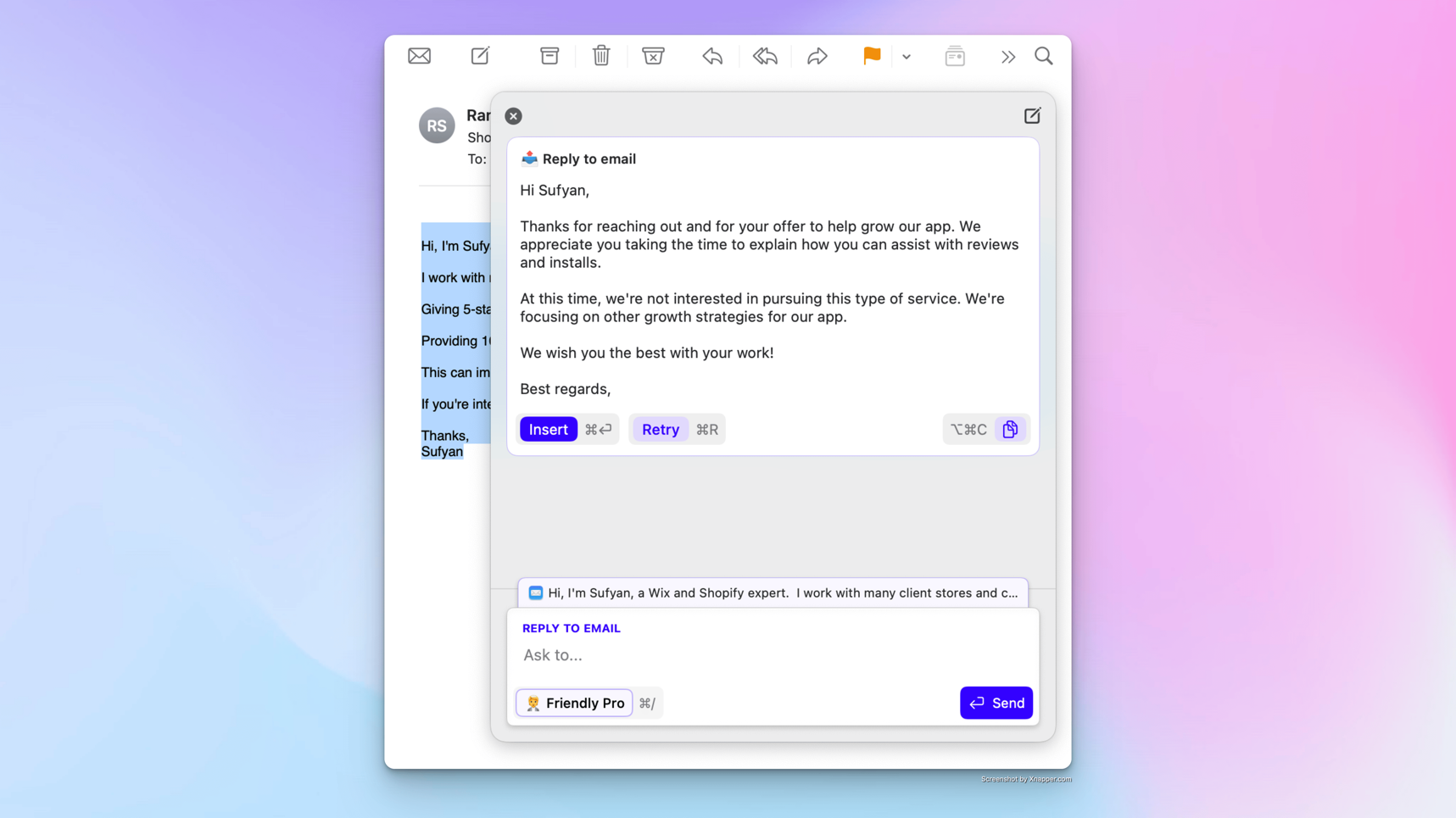
- Eliminate grammar errors and improve clarity instantly with one-click text correction from any macOS application
- Draft professional email replies automatically by providing context from email threads without switching applications
- Rephrase and summarize lengthy text documents quickly using customizable keyboard shortcuts and reusable actions
- Translate content seamlessly across 39 languages while maintaining your original formatting and workflow
- Maintain consistent brand voice and communication style through customizable personas and tone adjustments
- Keep all writing private and secure with local AI model support that prevents text transmission from your device
- Execute complex writing tasks without repetitive prompting using configurable actions and custom workflows
Pros & Cons
Pros
- Works with any macOS app
- Swift writing experience
- No app switching
- Re-usable actions via shortcuts
- Custom tones and personas
- Context-based text generation
- Text refinement
- Maintains privacy
- Multilingual support
- Quick grammar correction
- Email replying tool
- Text summarization
- Minimizes writing interruptions
- Reduces repetitive prompts
- Consistent communication
- Avoids app switching
- Accommodates user style preferences
- Works across various apps
- Adds workflow efficiency
- Reduces context switching
- Increases writing speed
- Adaptable to user style
- Supports 39 languages
- Customizable keyboard shortcuts
- Customizable actions
- Context attachment in actions
- One-off and regular actions
- Inline actions
- App-independent
- Custom persona configuration
- Fast and focused writing
- Refund policy
- Productivity optimization
- Resolves inconsistent tone issue
- Prevents copy-pasting
- Generates smart replies
- Eliminates writing delays
- No data storage
- Works with any text-selectable app
- Optimized user experience
- Multiple subscription options
- Specifically designed for text-based workflows
- Pay-as-you-go: use with personal OpenAI API key
Cons
- Only for macOS
- No free trial
- Needs Sequoia or newer
- Windows functionality unavailable
Reviews
Rate this tool
Loading reviews...
❓ Frequently Asked Questions
Edgar
🛠️ 1 tool
🙏 22 karma
wrote:TextWisely is your personal AI writing assistant, built natively for macOS to supercharge everyday writing – without breaking your flow. Unlike generic AI chat tools, TextWisely is purpose-built for fast, focused writing. No tabs. No copy-paste. Just instant actions – inside any macOS app.
Edgar
🛠️ 1 tool
🙏 22 karma
wrote:TextWisely has two types of actions: Instant and Regular.
Instant actions: When you select text, you can trigger a one-off action using an assigned keyboard shortcut or from a status menu. This action will use the selected text. The text and action are submitted to the AI, and once a response is received, the text is either replaced in place or the response is displayed in a new window, depending on your settings.
Works best for quick, one-off actions like grammar fixes, edits, improvements, and in-place translations.
Regular actions: Open the action picker (⌘\ shortcut by default) and select an action from the list or type a one-off action. Opening the action picker with selected text will attach it as context for the action, but you can always change or remove it. Use the action picker to work with the attached context or provide input for an action.
Works best for more complex actions, such as replying to an email with an attached thread (context), or iterating to adapt responses.
Edgar
🛠️ 1 tool
🙏 22 karma
wrote:Absolutely, TextWisely includes "quick actions" that allow for instant text corrections. These can be accessed using keyboard shortcuts or from the action menu.
Yes, TextWisely is designed to assist with email drafting as one of its core features. It can generate smart replies based on the context of your email threads, simplifying your email communication process.
Edgar
🛠️ 1 tool
🙏 22 karma
wrote:Yes. TextWisely works with any macOS app that allows you to select and/or type text.
TextWisely allows you to apply specific tones to your writing. This means that you can configure the tool to adjust your writing style and tone based on your specific needs or the personas you set up for it.
Edgar
🛠️ 1 tool
🙏 22 karma
wrote:Yes, TextWisely allows you to follow up on responses and adapt them. These changes can be made without having to switch between different applications, making for a swift and concentrated writing experience.
Edgar
🛠️ 1 tool
🙏 22 karma
wrote:To maintain consistent communication, TextWisely allows you to maintain a consistent voice through custom tones and personas. It also enables the reuse of actions via shortcuts, minimizing interruptions and avoiding context-switching between applications.
Edgar
🛠️ 1 tool
🙏 22 karma
wrote:Yes. TextWisely has been extensively tested with English, German, Spanish, Portuguese, Polish, Russian, and Latvian. However, it can help you write better and smarter in 39 languages:
Arabic, Bengali, Bulgarian, Chinese (Simplified), Chinese (Traditional), Croatian, Czech, Danish, Dutch, English, Estonian, Finnish, French, German, Greek, Hebrew, Hindi, Hungarian, Indonesian, Italian, Japanese, Korean, Latvian, Lithuanian, Norwegian, Polish, Portuguese, Romanian, Russian, Serbian, Slovak, Slovenian, Spanish, Swahili, Swedish, Thai, Turkish, Ukrainian, Vietnamese.
Absolutely, actions in TextWisely can be re-used via shortcuts, promoting efficiency and time savings in the writing process.
Edgar
🛠️ 1 tool
🙏 22 karma
wrote:Yes, with TextWisely, you can add custom tones and configure personas to match your desired writing style, helping to maintain a consistent voice throughout your text.
Edgar
🛠️ 1 tool
🙏 22 karma
wrote:Context-based text generation in TextWisely refers to its ability to generate text based on attached context and user requests. It adapts the resultant text to the context provided by the user, making the output more relevant and accurate.
Edgar
🛠️ 1 tool
🙏 22 karma
wrote:TextWisely offers privacy settings that prevent text transmission from the user's device. It supports local AI models through Ollama, ensuring your text remains private and confidential.
Edgar
🛠️ 1 tool
🙏 22 karma
wrote:Absolutely, TextWisely allows all necessary tasks to be performed without switching tabs or using copy-paste operations. This significantly accelerates the writing process and provides a more fluid user experience.
Edgar
🛠️ 1 tool
🙏 22 karma
wrote:Yes, TextWisely allows you to add custom actions and configure personas to match your individual writing style. This customization feature personalizes and enhances the generated output.
Edgar
🛠️ 1 tool
🙏 22 karma
wrote:Indeed, TextWisely addresses repetitive prompts through configurable actions that eliminate the need to continually repeat the same prompts, enhancing efficiency and speed.
Yes, TextWisely works with any macOS application. It is designed to be versatile and integrative, facilitating users to work uninterruptedly across their favorite applications.
Edgar
🛠️ 1 tool
🙏 22 karma
wrote:Yes, TextWisely can generate text based on your requests, including processing commands or reflecting specific requirements in the generated text.
Pricing
Pricing model
Paid
Paid options from
$4
Billing frequency
One-time
Refund policy
14 Day Money Back Guarantee
Related Videos
🚀 TextWisely for macOS – Write Smarter. Instantly.
Text Wisely AI•36 views•Nov 20, 2025