Mumble Note: AI Voice Notetakerv0.7.16
Overview
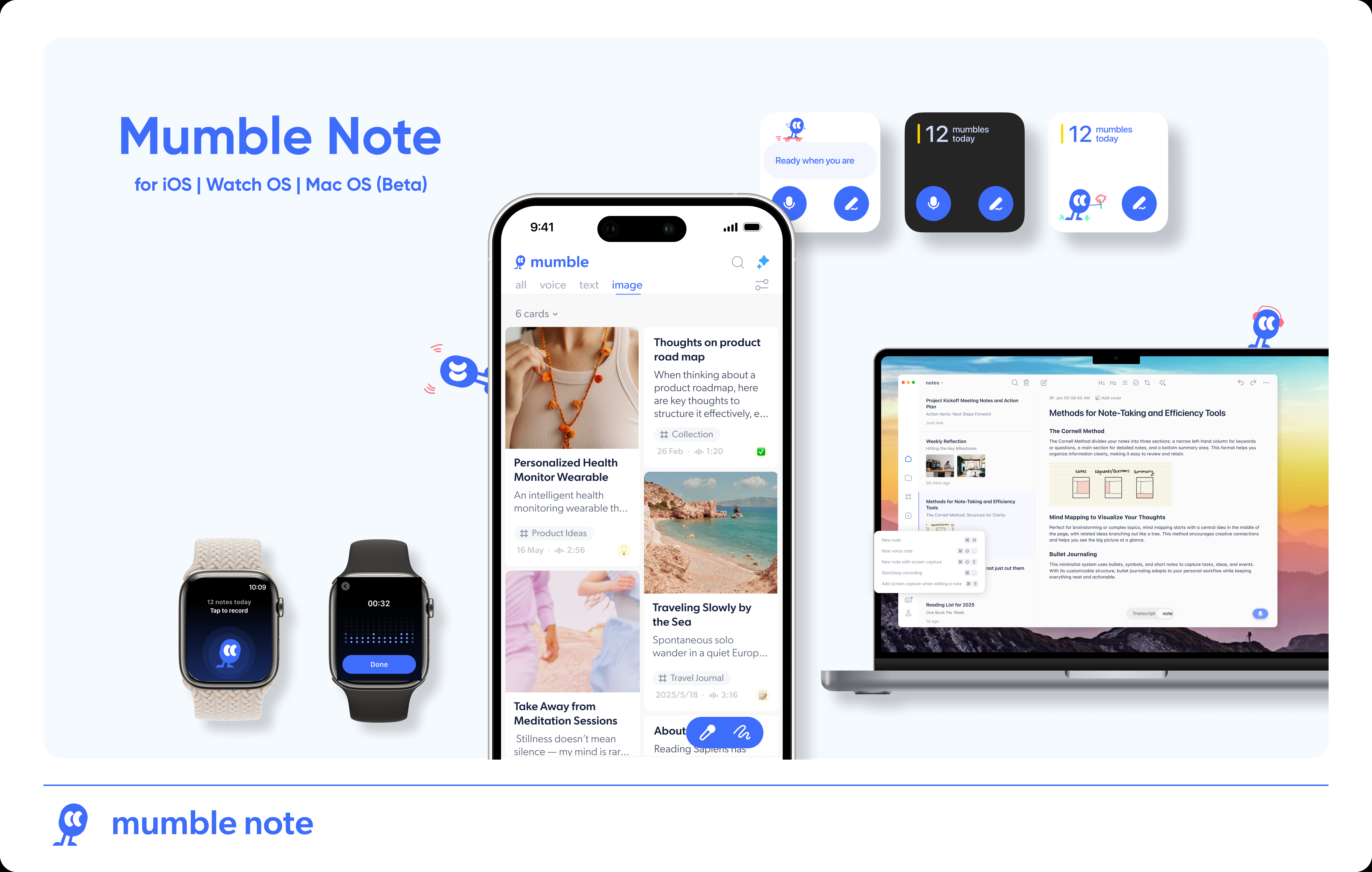
- Transform spoken thoughts into organized notes instantly with AI that structures your voice inputs
- Automatically group related notes into collections for easy retrieval using AI categorization
- Create actionable to-do lists from voice notes with automatic task identification
- Revise and edit notes using voice commands instead of typing for seamless content refinement
- Generate AI image covers and interpret images with text extraction for visual note-taking
- Sync tasks directly to your workflow with Apple & Google Calendar, Reminders, and Things 3 integration
- Capture ideas anywhere with mobile-first design that works across iPhone and Apple Watch
- Protect sensitive information with automatic encryption during voice transcription
- Summarize web links within the app to quickly capture key insights without switching apps
- Translate notes across languages while maintaining structure and meaning with AI translation
Pros & Cons
Pros
- Converts voice notes instantly
- Transforms ideas into actionable notes
- Allows image insertion
- Image annotation with voice
- Link summarization
- Creates to-do lists
- Automated note categorization
- Easy note retrieval
- Effortless navigation
- Connects scattered notes
- Generates creative output
- Ensures privacy and security
- Encrypts sensitive information
- Voice note editing
- Structured note formation
- Supports instant idea dumping
- Allows note modification
- Auto-organizes with memory nodes
- Supports iOS platform
- Available for beta testing
- In-app and external image addition
- Automated note restructuring
- Voice input transformation beyond transcription
- Adjustable structured notes
- Automated note organization for retrieval
Cons
- Only available for iOS
- Limited image annotations
- No manual tags
- Dependence on voice clarity
- Possible inaccuracy in transcriptions
- No multi-language support mentioned
- Requires constant internet connection
- No Android version
- Voice editing limitations
Reviews
Rate this tool
Loading reviews...
❓ Frequently Asked Questions
The Mumble App uses its AI technology to transform voice notes into structured notes. This goes beyond simple transcription, as the AI is capable of turning freeform spoken thoughts into organized, functional notes that can be readily adjusted or modified.
Yes, The Mumble App can be used for creating to-do lists. Simply input your tasks through voice notes and the AI will structure these voice inputs into organized to-do lists.
AI tagging in The Mumble App is a feature that assists users in organizing and retrieving their notes. This function categorizes notes into AI memory nodes, facilitating easier management, navigation, and retrieval of recorded ideas, thoughts, and to-do items.
In The Mumble App, memory nodes refer to the AI auto-categorisation of the notes. These nodes serve as the structured groups where specific notes are sorted to make the process of organizing, navigating, and retrieving notes quicker and more efficient.
Yes, users can add images within The Mumble App. In addition to the app itself, images can be added from other applications, with the image serving as a platform to take subsequent voice notes on.
Yes, The Mumble App is capable of summarizing links inserted into it. This feature allows users to gain quick insights from the linked content without leaving the app.
The Mumble App has prioritized privacy and security. The information remains private and protected at all times with notes being securely processed. Names and sensitive information are automatically encrypted during the transcription process.
The Mumble App offers note modification for voice inputs, enabling users to speak revisions that the AI seamlessly refines with voice editing. This goes beyond basic transcription, as it transforms voice notes into easily adjustable structured notes.
Retrieving notes in The Mumble App is made swift and convenient via the use of AI tagging. The AI categorises the notes into memory nodes. As a result, users are efficiently facilitated in navigating ideas, organizing notes, and retrieving important details.
Yes, The Mumble App aids in generating creative output. By connecting scattered notes into organized insights, the app enables users to produce creative output that can serve as a foundation for their next task.
The Mumble App utilizes AI to process voice notes by capturing the user's spoken ideas, thoughts, and to-do's, and instantly transforming them into structured, organized notes. This transformation is beyond basic transcription, as it makes the notes easily adjustable and modifiable.
Yes, The Mumble App can generate images based on voice notes. Beyond simply transcribing spoken words, the AI can produce images and also interpret inserted images.
Yes, The Mumble App does allow for note organization through the implementation of its AI technology. Notes are sorted into categories with AI memory nodes, making note management, navigation, and retrieval easier for users.
The Mumble App can enhance productivity by instantly turning thoughts and ideas into structured notes, creating to-do lists based on voice inputs, organizing and retrieving notes efficiently with AI tagging, and facilitating the formation and connection of ideas with memory nodes.
The Mumble App uses encryption during the transcription process to ensure that user information remains secure. The details regarding the type of encryption used are not fully disclosed, but it's stated that sensitive information and names are automatically encrypted during transcription.
The Mumble App captures ideas on the go by allowing users to talk freely to input their ideas, which are instantaneously transformed into organized and functional notes by the AI. This functionality extends to moments when users strike up ideas and choose to add images and take voice notes on them for later reference.
Yes, there is an option to join the beta test for The Mumble App as per the website's instructions.
Yes, The Mumble App works with other applications. Users can add pictures from other applications such as WhatsApp, Chrome extension, and take voice notes on them later.
Yes, The Mumble App allows users to revise and refine content using voice commands. Users simply speak their revisions and the AI refines the content seamlessly with voice editing.
When The Mumble App talks about turning ideas into actionable notes instantly, it refers to its ability to take user voice inputs and, through AI technology, transform them into structured, functional notes. In effect, this function takes casual spoken thoughts and makes them into organized, actionable pieces that can be acted upon instantly.
Pricing
Pricing model
Freemium
Paid options from
$3/month
Billing frequency
Monthly