Typeright
Overview
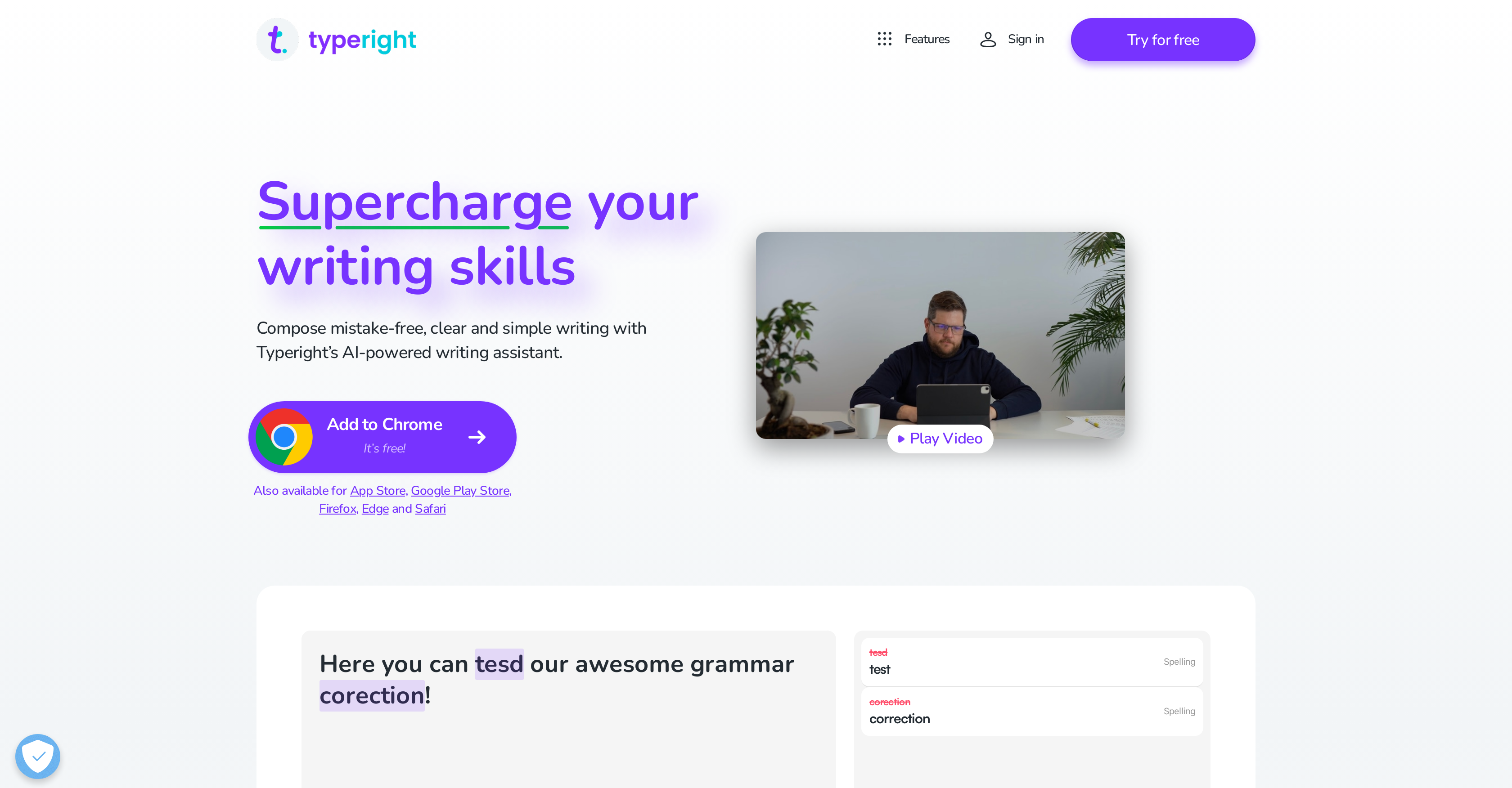
- Eliminate grammar, spelling and punctuation mistakes instantly with comprehensive error checking that catches even missing words
- Improve your writing style and vocabulary with intelligent synonym suggestions that make your text more engaging and vibrant
- Learn from your mistakes and avoid repeating them with memory features that help you build better writing habits over time
- Write confidently in multiple languages including English, German and Spanish with the same accuracy and style improvements
- Get real-time writing assistance everywhere with seamless integration across iOS, Android and desktop browsers
- Prevent errors before they happen with predictive typing that anticipates and corrects mistakes as you type
Pros & Cons
Pros
- Corrects grammar mistakes
- Corrects spelling mistakes
- Punctuation correction
- Provides style suggestions
- Synonym suggestion feature
- Improves writing skills
- Memo-aid for common mistakes
- Multilingual (English, German, Spanish)
- Finds missing words feature
- Predictive typing feature
- iOS, Android, and desktop availability
- Browser extension
- Cross-platform synchronization
- Unlocks all features with Typeright Plus
- Add-on plan for more features
- Accessible on multiple devices
- Aids in remembering mistakes
- Enhancing multilingual writing skills
- Compatible with various browsers
- App available in App Store
- App available in Google Play Store
- App available in Chrome Web Store
- Mobile App and Desktop Extension
- Ease of sign-up for Typeright Plus
- Friendly feedback on errors
Cons
- Limited language support
- Premium for full functionality
- No offline use
- Needs frequent updates
- Dependent on strong connectivity
- May over-correct unique styles
- Limited to textual content
- Possible data privacy concerns
- May not catch nuanced mistakes
- Compatibility issues across platforms
Reviews
Rate this tool
Loading reviews...
❓ Frequently Asked Questions
Typeright is an AI-powered writing assistant. This versatile tool checks for grammar, spelling, and punctuation mistakes while also providing style and synonym suggestions to refine and polish text. It was previously known as Grammatica and is designed to help users avoid repeating mistakes by aiding in remembering them. Additionally, Typeright supports multiple languages, including English, German, and Spanish, and is available on iOS, Android, and desktop via browser extensions.
Typeright enhances writing skills by offering a number of features such as checking for grammar, spelling, and punctuation errors. It also suggests enhancements in style and offers synonyms to add variety to your text. What's more, Typeright aids in remembering mistakes to avoid repeating them in the future. It even provides predictive typing and helps find missing words.
Yes, Typeright checks for both spelling and punctuation errors. It corrects simple mistakes and even helps find missing words in your text. These features make it a comprehensive tool for improving your written communication skills.
Typeright offers style suggestions to help make your text more engaging, clear and polished, and synonym suggestions to add variety and vibrancy to your writing, thereby avoiding unnecessary repetition of words.
Typeright handles multiple languages including English, German, and Spanish, making it a versatile tool for a broad range of users with differing language preferences.
Yes, Typeright works on both mobile devices and web platforms. It is available for use on iOS and Android through respective app stores, and on desktop browsers via extensions.
Typeright extensions are supported on multiple browsers including Chrome, Firefox, Safari, and Edge. This broad compatibility allows users to take advantage of Typeright's features regardless of their preferred browser.
Typeright Plus opens up access to all features across all support platforms when unlocked. While the specific additional features aren't explicitly defined, the implication is that Typeright Plus extends the functionality offered by the standard version of Typeright.
Yes, Typeright does offer predictive typing, which can potentially detect and correct typing errors before they happen. It uses AI capabilities to predict and offer corrections or improvements while typing.
Yes, one of Typeright's key features is its ability to help users remember their mistakes so they can avoid repeating them in the future. It is designed to not only correct errors but also aid in the learning process for lasting improvement in writing skills.
Typeright does have the ability to find missing words in your text. This function can be extremely helpful in ensuring that your text is well-structured and makes contextual sense.
Yes, Typeright is designed to be equally useful for diverse groups of users. It supports multiple languages, including English, German and Spanish, making it an excellent tool for use by a global user group. It is also platform-independent, available across iOS, Android, and desktop, which further enhances its inclusivity.
Grammatica is the previous name for Typeright. They are not separate tools but rather represent the evolution of the same product, with Typeright being the current, updated version.
Yes, you can share your Typeright Plus account with friends and family. By doing so, others can also take advantage of all the features Typeright Plus offers.
Yes, Typeright does offer a free trial for Typeright Plus. You can sign up on their website to start the free trial and experience the enhanced capabilities of the Plus version.
Typeright helps correct a range of writing mistakes, beginning with simple spelling and punctuation errors to providing style suggestions and helping find missing words. It also offers predictive typing and aids in remembering previous mistakes to avoid repetition.
Yes, Typeright does have mobile applications available in both the Apple App Store and the Google Play Store. These applications allow you to take advantage of Typeright's features conveniently on your mobile device.
Non-English speakers can greatly benefit from Typeright's multilingual support. Aside from English, it also supports German and Spanish. The tool helps non-native speakers remember and correct their mistakes, improving their usage of the language over time.
Pricing
Pricing model
Freemium
Paid options from
$9.99/month
Billing frequency
Monthly
Related Videos
typeright lesson kny edit
⭐Lia The Light Fox⭐•2.1K views•Aug 23, 2025