

VideoTextRemover
Keep every frame full-size and clean, with no blurred patches or cropped edges: AI inpainting repaints the background that subtitles, captions and titles used to cover.
Listing not yet reviewed by our editors · How we check
Overview
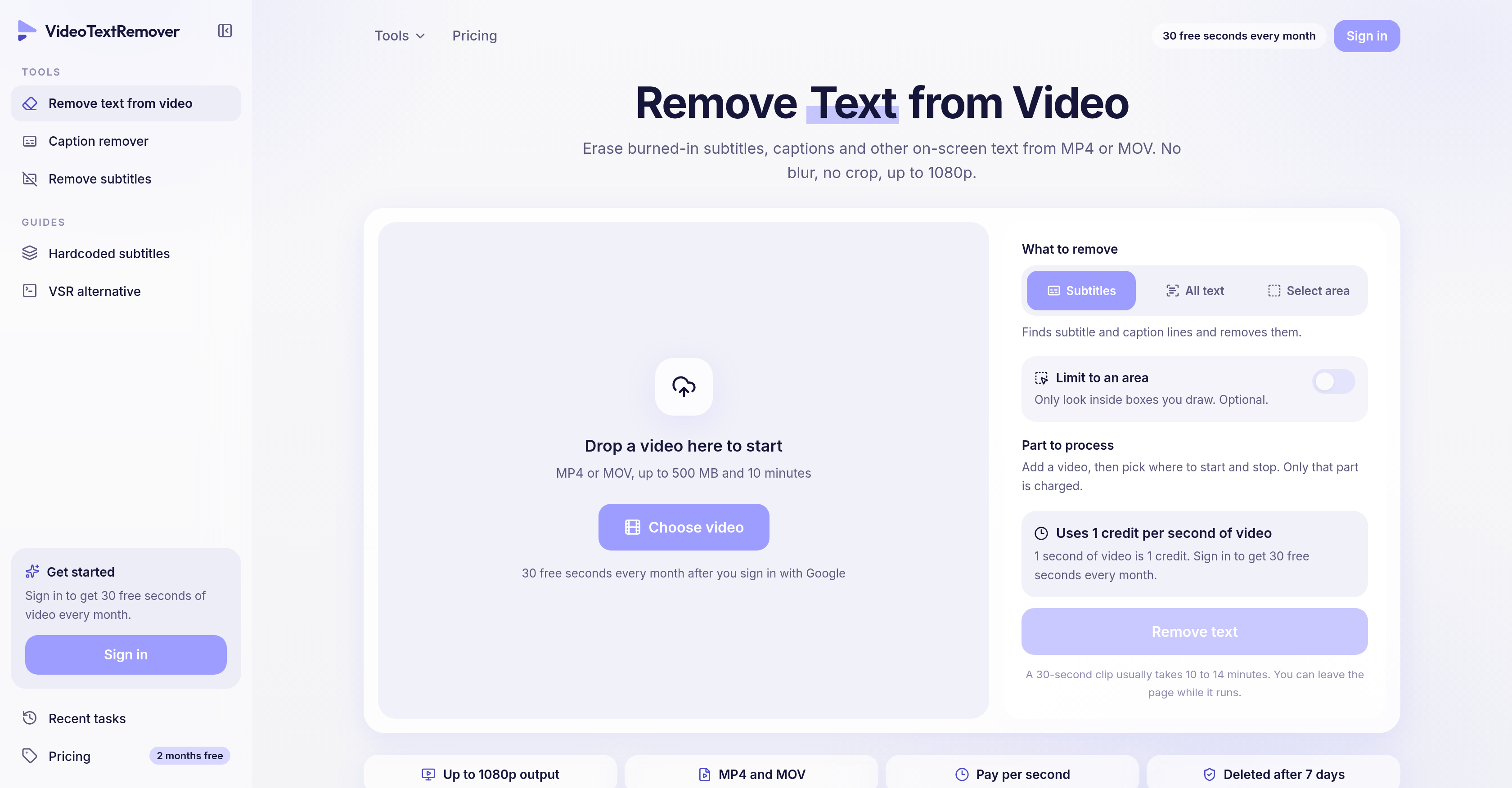
- Keep every frame full-size and clean, with no blurred patches or cropped edges: AI inpainting repaints the background that subtitles, captions and titles used to cover.
- Remove hardcoded subtitles without marking a single frame: the AI detects subtitle text on its own, frame by frame, across the whole clip.
- Get completely text-free footage for reuse or re-editing: All text mode erases every on-screen element, including labels, titles and timestamps.
- Keep the on-screen text you want and erase only what you choose: draw boxes on the first frame to limit text removal or detection to those exact areas.
- Spend only on the footage that matters: set a start and end point to process one segment and pay per second for that part alone, with failed tasks never charged and 30 free seconds monthly in supported countries.
- Strip burned-in subtitles from movie scenes and TV episodes in Full HD: upload MP4 or MOV files at up to 1080p, 10 minutes and 500 MB per upload.
- Start editing on any computer without setup or editing skills: cloud processing in your browser means no software, plugin or GPU to install.
- Keep unreleased or personal videos private: uploads and processed files are visible only to your account and are deleted automatically after 7 days.
Pros & Cons
From the listing; not yet checked by our editors.
Pros
- Extracts text from videos
- Removes subtitles, captions, titles
- Supports MP4, MOV formats
- Supports up to 1080p
- Doesn't require video blurring
- Doesn't require video cropping
- Finds subtitles autonomously
- Frame by frame processing
- Allows user input via drawing boxes
- Has 'All text' mode
- Select specific processing start and end
- Respects user's privacy
- Deletes files after 7 days
- In-browser service
- Requires no installations
- User-friendly with no advanced editing skills needed
- Can limit text eradication to specific areas
- Can cleanse video of all text
- Pro users get 30 seconds free monthly
- Handles up to 500MB and 10 minutes per upload
- Offer customized area selection
- Repaints instead of blurring
- Private storage for uploads
- Same resolution downloads
- User-guided selective area text clearing
- Retains original video resolution after processing
- Automatic subtitle detection
- Hard-coded subtitle removal
- Available on Google sign-in
- Transparent Pricing
- Offer free monthly seconds in selective regions
- Supports credit per second payment
- Recognition of various language subtitles
- Supports removal of bold captions
Cons
- Limited 1080p resolution
- Only supports MP4, MOV
- No watermark removal
- No logo removal
- Doesn't process subtitles separately
- No offline processing
- Requires Internet connection
- Files deleted after 7 days
- No batch processing
- Limited file size and duration
Alternatives to VideoTextRemover
Tools that share the most tags with VideoTextRemover.
- W-Agent
Publish clean, professional video and image content without watermarks, subtitles, or logos distracting your audience, using AI-powered overlay detection and removal that works on MP4, AVI, MOV, MKV, PNG and more
Free
Not listed
Not yet checked
- Video Text Remover
Republish any video across platforms by removing distracting watermarks, logos, and subtitles with AI that rebuilds the background for a seamless finish.
Free trial · from $5
$5
Not yet checked
- Remove Text From Video – AI Subtitle & Watermark Re...
Repurpose any video clip for new platforms by erasing hardcoded subtitles and captions with AI-powered inpainting that reconstructs the background seamlessly.
Freemium · from $9.90/month
$9.90/month
Not yet checked
- Remove Text From Video.net
Repurpose any video clip for new platforms by automatically removing distracting watermarks, logos, and burned-in subtitles with AI detection
Free trial · from $19.99/month
$19.99/month
Not yet checked
- UnMarkAI - Video Text & Watermark Remover
Deliver production-ready videos without blurred patches or pixelation — next-gen AI reconstructs the original background behind removed watermarks, text, and overlays
Free trial · from $3
$3
Not yet checked
- Subtitle Remover
Get completely clean video with no blur or black bars after removing hardcoded subtitles using frame-by-frame pixel reconstruction that rebuilds the actual background behind text
Paid · from $5.30/month
$5.30/month
Not yet checked
Reviews
Rate this tool
Loading reviews...
Frequently asked questions
How long can my video be?
Lucas Lewis 🛠️ 5 tools wrote:Up to 10 minutes and 500 MB per upload, in MP4 or MOV. You can also process just one part of a clip and pay only for those seconds.
Is videotextremover.ai the same as videotextremover.org?
Lucas Lewis 🛠️ 5 tools wrote:No. VideoTextRemover at videotextremover.ai is an independent service and is not affiliated with videotextremover.org or other sites with similar names.
Can I remove subtitles from a movie or TV episode?
Lucas Lewis 🛠️ 5 tools wrote:Yes, from the video file. VideoTextRemover removes film and series subtitles burned into the picture, in uploads of up to 10 minutes each.
Do I need to install software to remove subtitles?
Lucas Lewis 🛠️ 5 tools wrote:No. VideoTextRemover runs in your browser and processes the video in the cloud, so there is no app, plugin or GPU to set up.
How much does VideoTextRemover cost?
Lucas Lewis 🛠️ 5 tools wrote:About $0.03 per second of the part you process on monthly plans, and about $0.025 on yearly plans. Plans start at $19.90 a month for 666 seconds, and one-time credit packs at $19.90 for 500 seconds; accounts in supported countries get 30 free seconds every month, and failed tasks are not charged.