

WheelStage
Skip the studio shoot and still publish showroom-quality vehicle photos: car background replacement removes parking-lot scenery and places each vehicle in a professional setting with adjusted lighting, shadows, and reflections.
Listing not yet reviewed by our editors · How we check
Overview
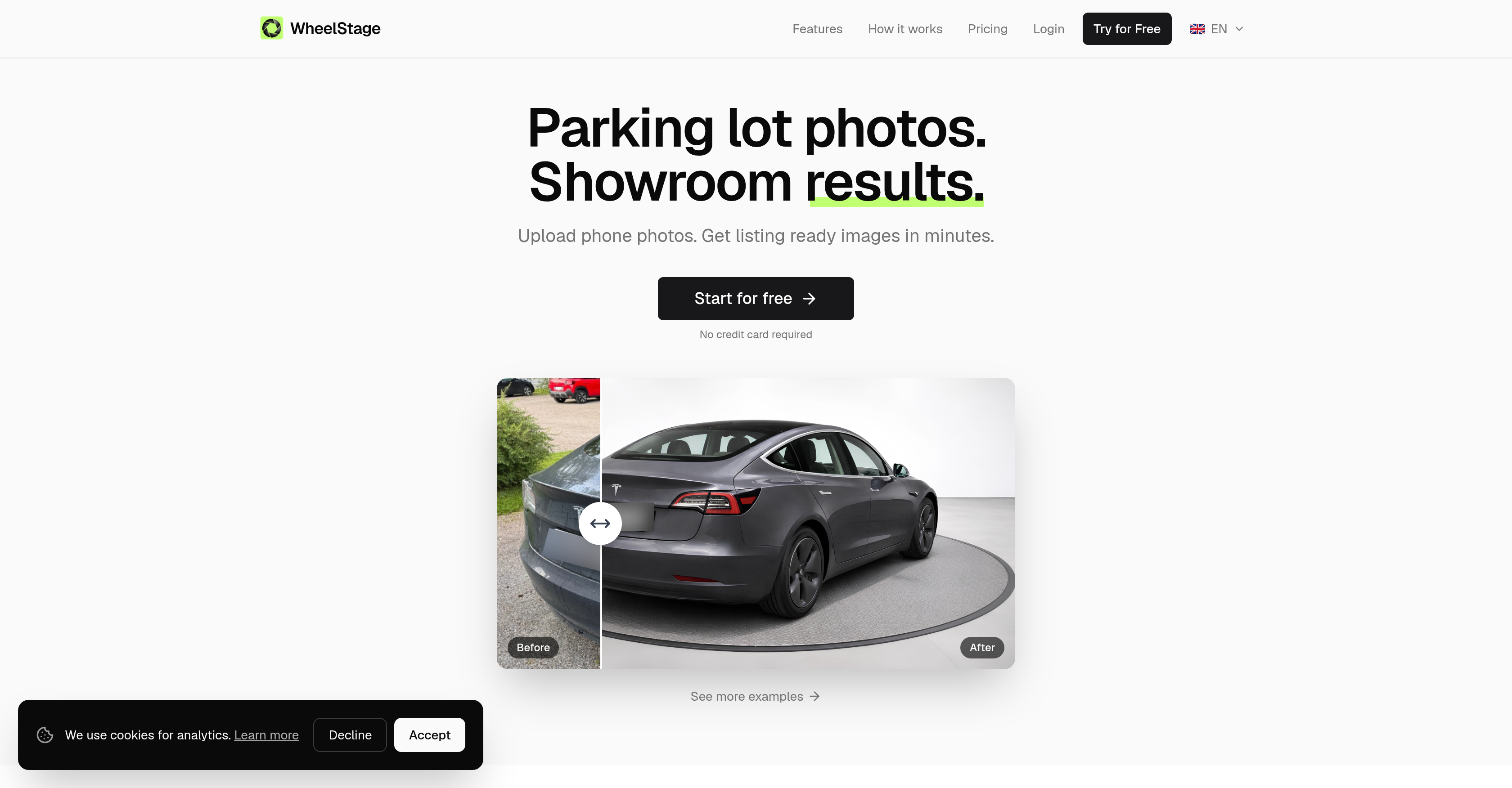
- Skip the studio shoot and still publish showroom-quality vehicle photos: car background replacement removes parking-lot scenery and places each vehicle in a professional setting with adjusted lighting, shadows, and reflections.
- Make every listing look like it was shot at your dealership: upload your own showroom background or choose from nine preset environments for a uniform inventory look.
- Show paint and glass without distracting outdoor reflections: automatic reflection removal cleans up windows and body panels during processing.
- Skip sorting interior and exterior shots before upload: automatic shot detection identifies each photo type and applies the right editing workflow to each.
- Protect customer privacy or promote your dealership on every plate: auto-blur license plates, or upload a branded dealer plate that is placed automatically on each vehicle.
- Brand your entire inventory without manual stamping: save your dealership logo once and it is applied to every processed car photo.
- Meet the image requirements of every listing site from one set of photos: configurable output aspect ratios frame each vehicle for your target marketplace.
- Go straight from lot walk-around to editing: upload JPG, PNG, or iPhone HEIC files directly from your phone camera roll, with no conversion step.
- Prepare whole inventory batches in minutes instead of days of manual retouching: process up to 50 vehicle photos per batch, at an average of about 36.6 seconds per photo, then download individually or as a single zip file.
- Pay only for the car photos you publish, with no monthly subscription: one credit equals one processed image, volume packages bring the cost down from $0.38 to $0.19 per photo, and five free credits let you start without a credit card.
Pros & Cons
From the listing; not yet checked by our editors.
Pros
- HEIC format native support
- Direct phone roll uploads
- Custom showroom background upload
- Nine built-in professional environments
- Automatic exterior/interior detection
- Automatic reflection removal
- License plate auto-blur option
- Dealer plate overlay integration
- Saved logo auto-placement
- Configurable output aspect ratios
- Bulk processing up to fifty images
- Per-image credit pricing model
- Free starter credits, no card
- Processing time ~30 seconds
- Consistent lighting adjustment
- Natural shadow recreation
- Realistic reflection synthesis
- Drag-and-drop UI
- Individual or batch download
- No subscription required
- Transparent per-credit cost
- Supports PNG, JPG, HEIC
- Custom background scaling
- Auto-size logo to fit
- Aspect ratio presets included
- Low latency cloud processing
- High-resolution output preservation
- Automatic background masking
- Edge feathering for smooth blend
- Plate detection accuracy high
- Batch credit usage tracking
- Real-time processing queue
- Secure encrypted uploads
- GDPR-compliant data handling
- Mobile-friendly responsive design
Cons
- Batch limit fifty photos
- Only nine preset backgrounds
- Custom background single upload
- No RAW file support
- Automatic lighting, no manual tweak
- Plate blur errors on foreign plates
- Cloud-only processing, no on-premise
- No undo after processing
- Output limited to JPG/PNG/HEIC
- No API for automation
Alternatives to WheelStage
Tools that share the most tags with WheelStage.
- Spyne
Transform basic car photos into professional studio shots with AI-powered virtual studio lighting and over 100 customizable backgrounds
Paid · from $292.23
$292.23
Not yet checked
- Car Background AI - Easy-to-use AI Car Photo Editor
Turn lot photos into professional listings with one click, using automotive-trained AI that precisely handles chrome, glass, and shadows
Free trial · from $0.40/unit
$0.40/unit
Not yet checked
- EzRemove
Browser tool that removes the background from a photo and returns a transparent PNG.
Freemium
Not listed
Nov 24, 2026
- Playground AI
Transform text descriptions into photorealistic images and unique artwork instantly using AI-powered text prompts
Freemium · from $12/month
$12/month
Not yet checked
- daisy | LinkedInPro
Create professional headshots from everyday photos without expensive studio sessions using AI-powered photo transformation
Freemium · from $2.50
$2.50
Not yet checked
- Etsy Media Kit Generator - Image-To-Video.app
Launch professional product listings in minutes instead of days by generating a complete media kit from a single photo in 10-15 minutes
Free trial · from $8.25/month
$8.25/month
Not yet checked
Reviews
Rate this tool
Loading reviews...
Frequently asked questions
How does WheelStage replace the parking‑lot background with a showroom scene?
WheelStage uses AI‑powered compositing that isolates the vehicle, removes the original parking‑lot scenery, and inserts it into a selected showroom environment while automatically adjusting lighting, shadows and reflections so the car appears naturally placed.
Can I upload my own custom showroom background to WheelStage?
Yes, on their website dealers can upload their own showroom image to use as a custom background instead of the nine preset environments.
What file formats does WheelStage accept – are HEIC photos from my iPhone supported?
WheelStage accepts JPG, PNG and HEIC files, so photos taken directly from an iPhone’s camera roll are supported.
Does WheelStage automatically detect interior shots versus exterior shots?
The service automatically distinguishes exterior photographs from interior shots and applies the appropriate processing workflow for each.
How does WheelStage handle reflections on windows and body panels?
Outdoor reflections on windows and body panels are automatically cleaned up; the AI detects and removes them during the compositing step.
Can WheelStage blur license plates automatically or add my dealer’s plate design?
WheelStage can auto‑blur license plates and also lets users upload a branded dealer plate image that is placed automatically on every processed vehicle.
Is there a way to add my dealership logo to every processed image in WheelStage?
Dealers can upload their logo once; the system then stamps the logo onto each generated image without additional manual steps.
What aspect ratio options does WheelStage offer for the final images?
Output aspect ratios are configurable; users can select from multiple ratios to match their listing requirements, though the exact list of ratios is not enumerated on the site.