AI Image Edit.ai
Overview
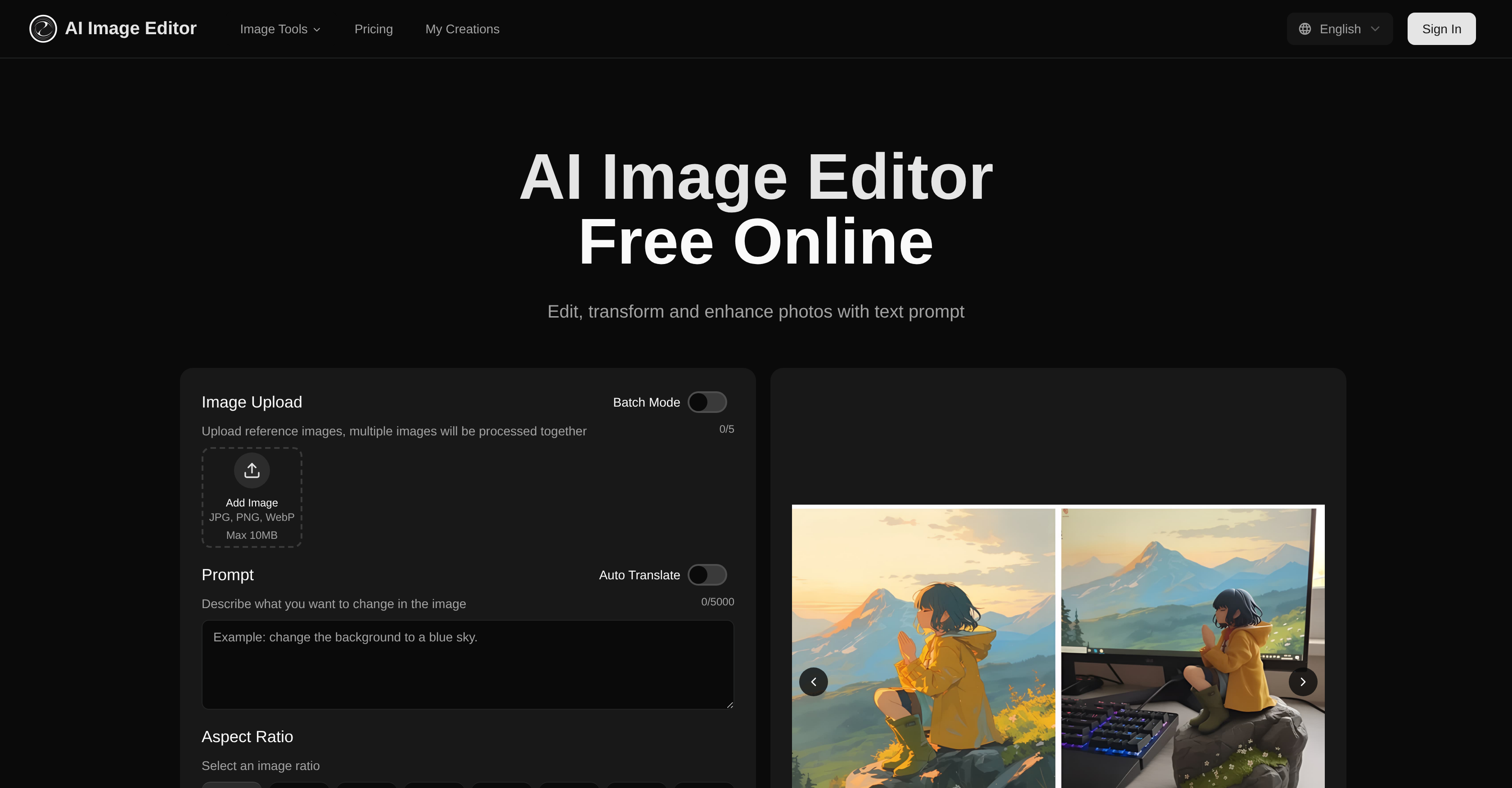
- Transform existing photos while preserving facial features and branding elements using structure-aware AI that maintains original composition
- Change backgrounds, adjust styles, and modify poses with simple text prompts instead of complex editing software
- Edit multiple images simultaneously with batch processing to accelerate content creation workflows
- Apply pixel-level precision edits to specific regions while keeping surrounding areas perfectly consistent
- Generate production-ready images optimized for marketing, advertising, and professional content creation
- Maintain complete commercial rights to all transformed images with paid subscription plans
Pros & Cons
Pros
- Web-based platform
- Multiple image formats support
- Text-prompt transformations
- Four-step intuitive process
- Maintains structure, composition
- Preserves facial features
- Batch processing
- High-quality final images
- Commercial rights for subscribers
- Context understanding
- Simultaneous multiple images processing
- Pixel-level precision control
- Region control
- Large scale transformations
- Minor adjustments capabilities
- Efficient digital editing
- Professional application
- Multiple output generation
- Automated translation
- Image ratio options
- Intelligent structure preservation
- Versatile creative toolkit
- Workflow support
- Bulk generation
- Up to 20 images batch
- Instant image transformation
- Output quality optimization
- Commercial usage rights
- Adjustable transformation settings
- Efficient transformation
- Supports JPG, PNG, WebP
- Allows specific instructions
- Maintains high quality
- User-friendly Interface
- Interactive User Experience
- Prompt-Guided Precision
- Fast processing speed
- Large size and resolution support
- Supports complex changes
- Advanced neural networks
- Studio-quality visuals
- Flexible plan options
- Add-on Purchase Options
- Allowance for free users
- Transforms existing images
- Designed for content creation
- Seamlessly blend adjustments
- Image-to-image generation
Cons
- No offline usability
- Limited to 20 images batch processing
- Transformation speed varies
- Size limit of 20MB
- Pixel dimensions limit of 4096x4096
- Free version has usage limits
- Needs multiple renders for perfect result
- No support for GIF transformations
- No options for non-rectangular crops
- Subscription needed for commercial use
Reviews
Rate this tool
Loading reviews...
❓ Frequently Asked Questions
AI Image Editor is a web-based image editing platform that leverages artificial intelligence to transform, enhance, and restyle photos. Users can reshape and restyle images using text prompts, with pixel-level precision control. The platform allows image uploading, transformation setting adjustments, and generation & downloading of the final, high-quality image results.
AI Image Editor maintains the structure and composition of original photos while executing transformations, in contrast to Text-to-Image generation tools. Its structure-aware transformations preserve facial features, branding elements, and overall composition consistency of the images, even while enabling changes to backgrounds, poses, or styles.
Yes, AI Image Editor supports multiple image formats such as JPG, PNG, and WebP. The image size should be maximum 10MB for the upload.
The four-step process of the AI Image Editor starts with image uploading. Users then describe what changes they would like in the image. Next, they can adjust settings to facilitate the changes. The final step involves generating and downloading high-quality transformed images.
AI Image Editor can execute numerous transformations on images. These include changes to backgrounds, poses, styles and overall structure. It can also preserve features like faces and branding elements while making transformations.
The structure-aware transformation feature of AI Image Editor retains and maintains the original structure and composition of photos, even during transformations. It preserves facial features, branding elements, and ensures composition consistency while making changes. This feature enables the preservation of important image components when implementing style changes or background edits.
Yes, AI Image Editor can process multiple images at a time. The platform offers batch processing which allows users to simultaneously process several images.
Yes, as a paid subscriber, you have the rights for commercial use of all transformed images from the AI Image Editor.
The free version of the AI Image Editor provides users with a monthly transformation allowance. Users must subscribe to a paid plan for higher limits.
Paid plans of AI Image Editor offer higher upload and transformation limits and options to purchase additional credits. They also provide rights for commercial use of all transformed images.
The text-prompt-controlled editing feature of AI Image Editor allows users to guide the transformation process. They can describe in words what they want to change in the image, and the AI will implement those changes.
AI Image Editor offers pixel-level precision for photo editing. This allows users to apply accurate edits with an ideal balance of preservation and change.
AI Image Editor ensures the high quality of output images by using advanced neural networks to understand your source image and prompt. This allows the AI to deliver professional results without the need for complex tools.
Yes, you can edit and change the style or background of images using the AI Image Editor. The editor allows transformations while ensuring the preservation of original structure and important features.
Yes, AI Image Editor is beneficial for content development pipelines. It allows users to generate consistent, high-quality assets with optimization for professional use.
Yes, AI Image Editor preserves the original structure and composition of photos while transforming them. This feature differentiates it from other image generation tools.
Yes, AI Image Editor can preserve facial features during the editing process. This is part of its structure-aware transformation feature, which maintains important aspects of the original image during the transformation process.
The image resizing functionality in the AI Image Editor works by allowing users to select a preferred image ratio from available options, or maintaining the original aspect ratio. This ensures the output image fits the desired specifications.
Paid subscription of AI Image Editor provides numerous benefits including higher upload and transformation limits, rights for commercial usage of all transformed images, flexibility to get more credits for additional transformations, and priority customer support.
Yes, there is an option to purchase additional credits on AI Image Editor. This becomes particularly useful when users have exhausted their monthly transformation allowance under their subscription plan.
AI Image Editor is a web-based image editing platform that uses artificial intelligence to transform and improve photos. Its advanced neural networks analyze the source image and user prompts to deliver professional results. It provides solutions for a range of enhancement needs, from small tweaks to large scale transformations, while maintaining the original structure and composition of the images. It operates on the principle of text prompts supplied by the user to guide the editing process.
The key features of AI Image Editor include: structure-aware transformations, prompt-guided precision, batch processing, pixel-level accuracy, the ability to maintain facial features, branding elements, and composition consistency, image format support, region control, and context understanding. It also supports the production of high-quality outputs for various professional applications.
AI Image Editor supports various image formats, including JPEG, PNG, GIF, and WebP.
Yes, AI Image Editor does support batch processing, which allows for the simultaneous processing of multiple images.
Yes, users have complete control over the image transformation process in AI Image Editor. They can adjust transformation strength, specify detailed instructions, and choose the number of images to be generated.
AI Image Editor is different from Text-to-Image generation tools in that it transforms existing images while maintaining their core structure and composition. Unlike text-to-image generators that create entirely new images from textual descriptions, AI Image Editor applies precise changes to existing images based on user prompts.
Yes, AI Image Editor preserves the structure and composition of the original photos while executing transformations. It is able to maintain facial features, branding elements, and overall composition consistency.
The step by step process to edit an image using AI Image Editor is: 1. Choose processing mode and upload photos. 2. Describe the desired changes in a text prompt. 3. Adjust settings such as transformation strength and output count. 4. Generate and download the images.
Yes, images edited with AI Image Editor are suitable for professional applications. The high-quality, optimized outputs are ideal for use in marketing, advertising, and content creation.
Yes, AI Image Editor extends full commercial usage rights to paid subscribers. Any transformed images can be used for commercial purposes.
AI Image Editor's pixel-level precision feature allows users to target specific areas in an image for high-precision modifications, while keeping the rest of the image consistent. It provides detailed control over the changes made to the image.
AI Image Editor is adept at handling both minor adjustments and large scale transformations. Based on user prompts, it can apply careful tweaks or full-scale changes while maintaining the original image's structure and consistency.
Transforming images in batch mode with AI Image Editor involves selecting the batch mode, uploading the images to be processed, entering the desired changes in a text prompt, adjusting settings if required, and then generating and downloading the transformed images.
Yes, AI Image Editor provides a monthly transformation allowance for free users. The exact number of allowed transformations is not specified, but higher limits and additional credits are available with paid plans.
AI Image Editor excels with clear, well-lit images featuring defined subjects. The tool supports various content types, including portraits, landscapes, and product photos. The best results are achieved using images that match the target aspect ratio.
Yes, AI Image Editor uses user-provided text prompts to modify images. Users describe the changes they want in these prompts, and the AI applies the modifications accordingly.
Yes, AI Image Editor can blend text, styles, and lighting adjustments seamlessly for image transformation. These blended changes allow for on-brand, studio-quality visuals every time.
AI Image Editor can handle images up to 20MB in size. The maximum resolution supported is 4096 x 4096 pixels.
Yes, AI Image Editor can adjust the aspect ratio of an image. Users can choose from a given list of common aspect ratios or select an automatic setting.
Yes, AI Image Editor can generate multiple image outputs. Users can choose how many results to generate, up to a maximum specified by the system.
Pricing
Pricing model
Free Trial
Paid options from
$11.85/month
Billing frequency
Monthly
Refund policy
No Refunds