
AI-Image-Editor.com
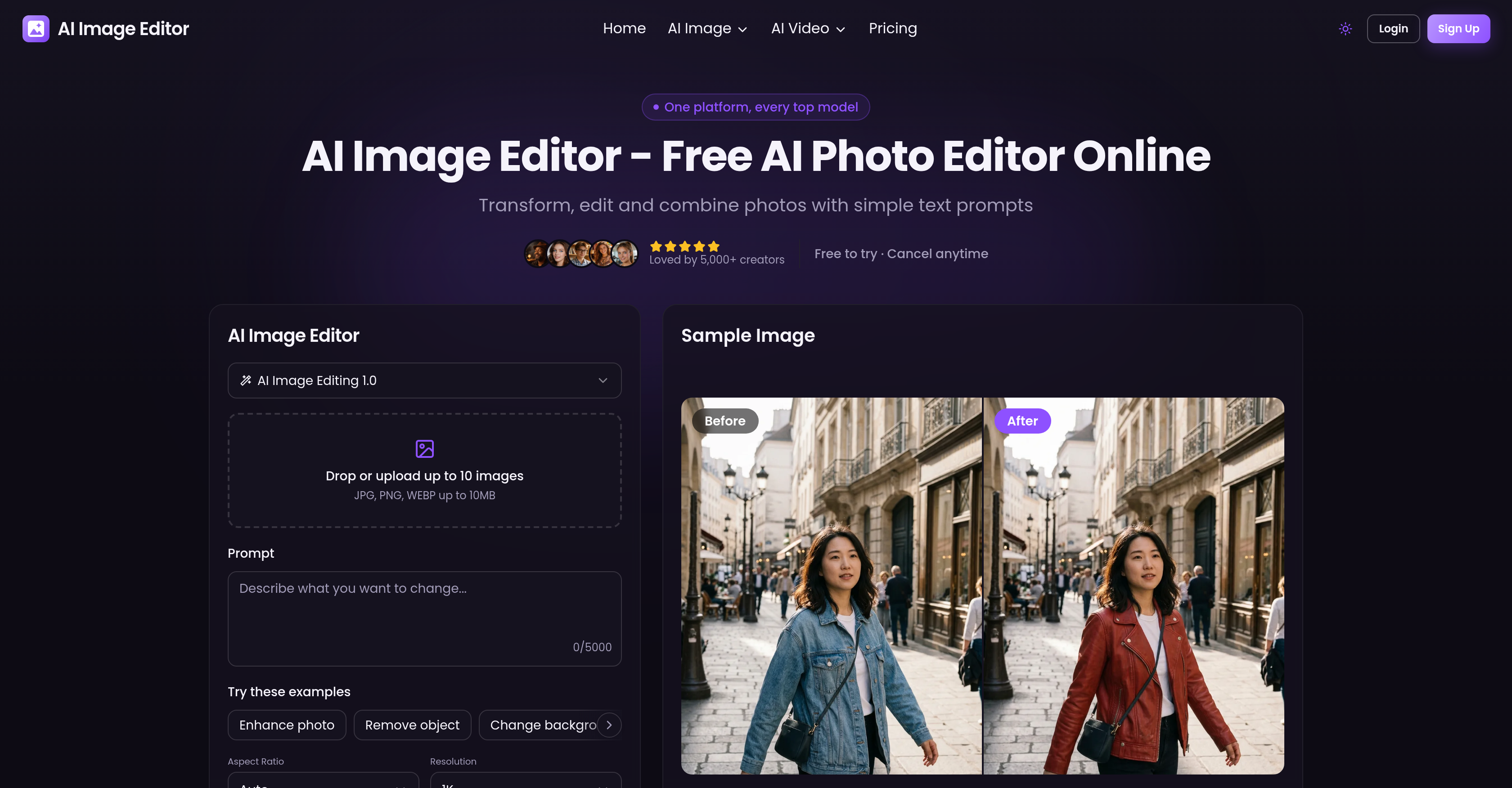
Get professional photo edits without learning design software: describe the change in plain language, upload a JPG, PNG, or WebP image, and download the AI photo edit in seconds to a few minutes, with built-in example prompts to guide your instructions.
Listing not yet reviewed by our editors · How we check
Overview
- Get professional photo edits without learning design software: describe the change in plain language, upload a JPG, PNG, or WebP image, and download the AI photo edit in seconds to a few minutes, with built-in example prompts to guide your instructions.
- Change one detail and leave the rest of the shot intact: prompt-based targeted edits swap a specific garment, remove unwanted objects, replace backgrounds, or add seasonal elements to an existing photo.
- Rescue dark, blurry, or flat pictures: photo enhancement corrects brightness, sharpens detail, and restores color in underexposed or dull images.
- Bring damaged family archives back to life: old photo restoration removes scratches and fading, and black-and-white photo colorization adds natural color to vintage prints.
- Turn one photo or rough sketch into a new visual style: image-to-image generation produces cartoon, 3D, illustrated, artistic, or realistic versions from your source file.
- Keep a recurring character recognizable across a whole series: character consistency preserves the same appearance when you place that subject into different scenes.
- Build a single composite from many sources: multi-image blending merges selected elements from up to 16 reference images into one unified composition.
- Create store-ready product shots and polished headshots from ordinary photos: prompt-driven restyling converts plain product images into styled ecommerce visuals and casual portraits into professional headshots, with commercial usage rights on paid plans.
- Produce correctly sized assets for every social channel and website: selectable aspect ratios from 1:1 to 21:9 and output resolution from 1K up to 4K generate multiple social media and web assets from one source image.
- Match quality to budget on every edit: choose among Nano Banana, GPT Image, and Seedream models with different quality levels, resolution limits, and credit costs, see the price before generating, get refunds on failed generations, and keep one-time credit packs that never expire.
- Keep client and personal work out of public view: paid accounts can turn off public visibility for everything saved in My Creations.
- Test results before paying anything: the free online photo editor allows one edit per day with no account, and signing up unlocks free credits and access to every model.
Pros & Cons
From the listing; not yet checked by our editors.
Pros
- Prompt-based image manipulation
- Character consistency across scenes
- Multi-image compositing blending
- Automatic garment replacement
- Seasonal element insertion via text
- Background swap without masks
- Object removal via natural language
- Scratch and fade restoration
- Blackwhite photo colorization
- Resolution and aspect ratio control
- Highresolution output up to 1K
- Quick generation seconds per edit
- Browseronly, no installation required
- Supports JPG, PNG, WebP
- Batch upload up to ten
- Prompt suggestion library integrated
- Example task templates provided
- Layerless workflow simplifies process
- Download readytouse assets
- Underexposed photo brightening
- Blur reduction and sharpening
- Dull color correction
- Style transfer to cartoon 3D
- Imagetoimage artistic variations
- Preserves subject appearance
- Instant ecommerce styling
- Social media asset generation
- Headshot enhancement from selfie
- Automatic aspect ratio selection
- Resolution upscaling to 1K
- Free trial without signup
- Subscription unlocks all models
- 24/7 online service
- Zero design skill required
- Multiimage element extraction
- Advanced blending algorithm
- Promptdriven seasonal effects
- Automatic lighting correction
- Color balance adjustment
- Sharpness enhancement
- Nocode editing interface
- Supports files up to 10MB
- Immediate download after edit
- Example prompts for each task
- Preserves facial features accurately
Cons
- No layer-based editing
- 10MB file size limit
- No RAW support
- Browser-only, no offline
- Batch limit: ten images
- No undo/redo history
- Output licensing ambiguous
- No privacy guarantees
- No API integration
Alternatives to AI-Image-Editor.com
Tools that share the most tags with AI-Image-Editor.com.
- EzRemove
Browser tool that removes the background from a photo and returns a transparent PNG.
Freemium
Not listed
Nov 24, 2026
- Dewatermark
Erase any watermark automatically in seconds using AI detection, even complex multi-layered or color-blended ones
Freemium · from $5/month
$5/month
Not yet checked
- Remove Background by Picsart
Eliminate manual editing and process thousands of product images automatically with AI-powered background removal that scales with your production needs
Freemium · from $10/month
$10/month
Not yet checked
- UnblurImage AI
Rescue blurry photos ruined by motion or poor focus with AI algorithms that refine each pixel for maximum sharpness
Freemium · from $3.90/month
$3.90/month
Not yet checked
- Photoleap
Transform any photo into professional quality with AI enhancement that perfects colors, lighting, and details
Free trial · from $3.99/month
$3.99/month
Not yet checked
- RemoveMark
Get watermark-free Sora videos instantly without downloading software using our web-based platform
Freemium · from $9.90/month
$9.90/month
Not yet checked
Reviews
Rate this tool
Loading reviews...
Frequently asked questions
How does AI Image Editor handle text prompts for editing?
On their website AI Image Editor parses natural‑language prompts and applies the described changes to the uploaded image using advanced AI image‑to‑image models, then returns the edited result.
What image formats can I upload to AI Image Editor?
Supported formats are JPG, JPEG, PNG and WebP.
Can I change the aspect ratio and resolution of the output in AI Image Editor?
Yes; users can choose an aspect ratio (auto plus ratios from 1:1 to 21:9 and model‑specific options) and a resolution (default 1K, with 2K and up to 4K available on paid models).
Is there a size limit for files I upload to AI Image Editor?
Each uploaded file is limited to a maximum size of 10 MB.
How many images can I combine in one AI Image Editor project?
Up to 16 reference images can be used with GPT Image 2.5 and up to 14 with Nano Banana models; the UI also caps free uploads at 10 images per task.
Does AI Image Editor let me replace a specific piece of clothing with a prompt?
Yes, the editor supports targeted garment replacement via a text prompt (e.g., “change the jacket to a red leather jacket”).
Can AI Image Editor remove objects from a photo without leaving artifacts?
Object removal is offered through prompts and is designed to produce clean results, though the site does not guarantee zero artifacts.
What styles can AI Image Editor apply – like cartoon, 3D, or realistic?
The tool can apply artistic, illustrated, realistic, cartoon, and three‑dimensional (3D) styles, including 3D cartoon conversions.