

AIPhotoEdit.ai
Change outfits, hairstyles and lighting without losing the person in the photo: the Nano Banana model preserves facial identity while adapting fit, folds, shadows and illumination to the new look.
Listing not yet reviewed by our editors · How we check
Overview
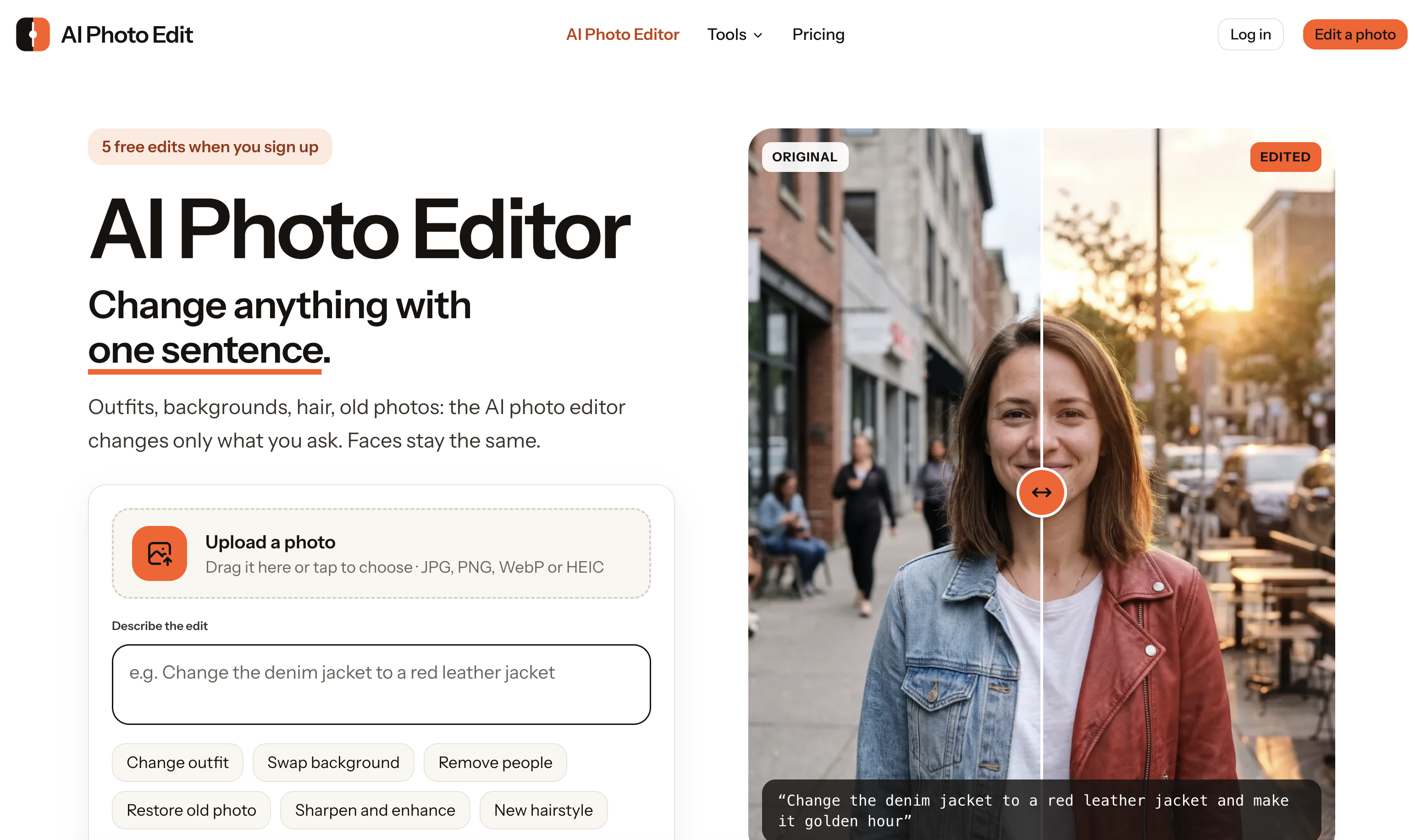
- Change outfits, hairstyles and lighting without losing the person in the photo: the Nano Banana model preserves facial identity while adapting fit, folds, shadows and illumination to the new look.
- Get edits done with no Photoshop skills: describe the change in one plain-language sentence instead of working with layers, masks or manual selections, or start from built-in prompt starters for outfit changes, background swaps and restoration.
- Place people, pets or products in a new setting that looks real: AI background replacement keeps the subject's position, shape and shadows while rebuilding the surrounding scene.
- Bring damaged family prints back to life: photo restoration removes scratches, stains and torn corners, sharpens faded details and colorizes old photos naturally.
- Get clean shots free of distractions: object removal clears bystanders, and text removal erases writing and logos from signs and products, filling the gap with matching surrounding texture.
- Rescue blurry or low-resolution images: an upscaling and de-blurring pipeline restores sharp, natural detail in noisy or soft photos.
- Build a composite from two photos without manual cutouts: upload a reference image to transfer a jacket, put a product in someone's hand or add another person to the main photo.
- Produce e-commerce product photos with crisp detail and realistic lighting: switch to the GPT Image model for sharper rendering and clean text in product shots.
- Turn snapshots into artwork that still looks like your subject: style transfer applies looks such as watercolor painting while keeping people and pets recognizable.
- Publish to any channel without re-cropping: export in Square 1:1, Portrait 4:5 and 3:4, Story 9:16 or Wide 16:9 at 2K or 4K resolution.
- Compare different ideas fairly: every edit starts from the original image rather than a previous variation, so alternative instructions are tested on the same base.
- Test results before paying: five free full-quality 2K edits with no watermark and no credit card, plus automatic credit refunds on failed edits.
- Keep personal photos under your control: uploads are private to you, originals are deleted automatically after 7 days and edited results after 30 days.
- Edit from your phone or computer with nothing to install: the online photo editor runs in the browser on iPhone, Android, Mac and Windows and accepts JPG, PNG, WebP and HEIC files.
Pros & Cons
From the listing; not yet checked by our editors.
Pros
- Browser-only, no installation
- Supports HEIC uploads
- Preserves facial identity
- One-sentence prompt editing
- No masks or layers needed
- Edits always start original
- Choose between multiple diffusion models
- 4K resolution output available
- Free tier includes five edits
- Credit refunds on failed edits
- Multiple aspectratio presets
- Adjustable quality levels
- Prompt starter library included
- Sample images for experimentation
- Contentaware background replacement
- Semantic object understanding
- Seamless secondimage compositing
- Inpaint text removal
- Automatic photo restoration
- Upscaling lowres enhancement
- Watercolor style transfer
- Contextual shadow rendering
- Adaptive lighting adjustment
- Clothing fit and fold adaptation
- No watermark on downloads
- Mobilefriendly web interface
- Supports JPG, PNG, WebP, HEIC
- Highresolution credit consumption transparent
- Privacyfirst upload rights notice
- No manual selections required
- Singlestep editing workflow
- Realtime before/after slider
- Consistent facial feature preservation
- Automatic background lighting match
- Precise object insertion
- Autogenerated masks internally
- Diffusionbased highquality edits
- Tailored product photo editing
- Pet photo editing optimized
- Travel photo enhancement tools
- Portrait enhancement presets
- Direct download after edit
- No external plugins needed
- Uses toptier diffusion models
- Secondsfast edit rendering
- Creditbased pricing flexibility
Cons
- No manual mask control
- Edits always reset original
- One sentence per edit
- Creditbased highres pricing
- No API or SDK
- Requires internet upload
- Limited to preset aspect ratios
- Model choice restricted to two
- Free tier only five edits
- No offline processing
Alternatives to AIPhotoEdit.ai
Tools that share the most tags with AIPhotoEdit.ai.
- EzRemove
Browser tool that removes the background from a photo and returns a transparent PNG.
Freemium
Not listed
Nov 24, 2026
- Dewatermark
Erase any watermark automatically in seconds using AI detection, even complex multi-layered or color-blended ones
Freemium · from $5/month
$5/month
Not yet checked
- Remove Background by Picsart
Eliminate manual editing and process thousands of product images automatically with AI-powered background removal that scales with your production needs
Freemium · from $10/month
$10/month
Not yet checked
- UnblurImage AI
Rescue blurry photos ruined by motion or poor focus with AI algorithms that refine each pixel for maximum sharpness
Freemium · from $3.90/month
$3.90/month
Not yet checked
- Photoleap
Transform any photo into professional quality with AI enhancement that perfects colors, lighting, and details
Free trial · from $3.99/month
$3.99/month
Not yet checked
- RemoveMark
Get watermark-free Sora videos instantly without downloading software using our web-based platform
Freemium · from $9.90/month
$9.90/month
Not yet checked
Reviews
Rate this tool
Loading reviews...
Frequently asked questions
How do I change someone's outfit with AI Photo Edit?
Upload the portrait, then type a single sentence describing the new clothing, e.g., “Change the denim jacket to a red leather jacket and make it golden hour.” The editor redraws only the outfit while preserving the original face and lighting.
Can AI Photo Edit swap the background without moving the subject?
Yes. Enter a sentence such as “Move the person to a beach background” and the AI replaces the background while keeping the subject’s position and shadows intact.
Will AI Photo Edit keep my face looking the same after an edit?
Yes. The default Nano Banana model is optimized to preserve facial features; every edit explicitly requests the face stay the same.
What image formats can I upload to AI Photo Edit?
JPG, PNG, WebP and HEIC files are accepted.
How does the credit system work for high‑resolution outputs in AI Photo Edit?
High‑resolution outputs (2K or 4K) consume credits: Nano Banana costs 2 credits for 2K and 4 credits for 4K; GPT Image costs 4 credits for 2K and 6 credits for 4K. Credits are deducted only after a successful render.
Can I use a second photo to add an object or person with AI Photo Edit?
Yes. When an edit requires a second image, upload it as a reference; the AI can transplant items like a jacket, a product, or an additional person into the primary photo.
What aspect ratios are available when I export from AI Photo Edit?
Export options include Square (1:1), Portrait (4:5), Portrait (3:4), Story (9:16) and Wide (16:9).
How do I choose between the Nano Banana and GPT Image models in AI Photo Edit?
A model selector appears above the edit controls. Choose “Nano Banana 2.1” for strong face preservation and style flexibility, or “GPT Image 2.5” for richer detail and clean text rendering.