Overview
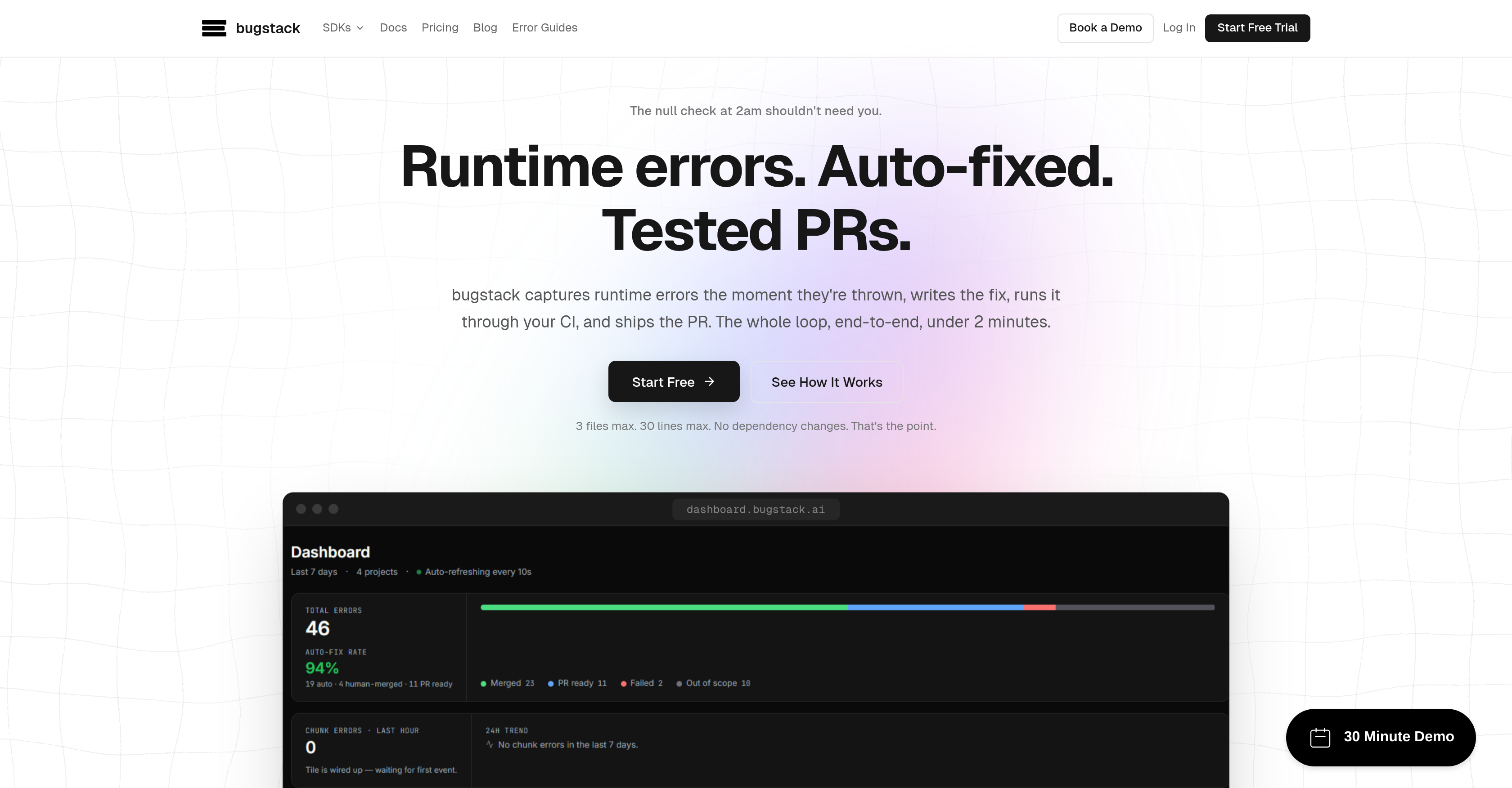
- Eliminate hours of manual debugging by converting production errors into tested GitHub PRs in under two minutes
- Captures runtime errors (TypeError, null access, async failures) the moment they are thrown using SDKs for JavaScript, Python, Go, and Ruby
- Ship fixes with zero dependency changes—your package.json, requirements.txt, and Gemfile remain untouched
- Prevent broken deploys from flooding your pipeline with built-in rate limiting that handles error bursts without system overload
- Maintain codebase integrity as every fix runs through your existing CI pipeline, passing the same tests as human-written code
- Focus engineering time on architecture and business logic while Bugstack autonomously resolves stack-trace-anchored runtime errors
- Review every PR with confidence—sensitive fixes touching authentication or cryptography always require human approval, regardless of confidence score
- Accelerate deployment cycles by auto-merging low-risk fixes above a configurable confidence threshold, cutting review backlog
Pros & Cons
Pros
- Transforms errors into tested PRs
- Real-time error catching
- SDKs for JavaScript, Python, Go, Ruby
- Automates bug handling
- Doesn't change application's core structure
- Handles stack trace anchored errors
- Runs fixes through existing CI
- Reduces bug handling time
- Production bug volume reduction
- No dependency changes during fixing
- Fixes submitted as GitHub PRs
- User can review or auto-merge PRs
- Rate limiting feature
- Secure error fixing
- Simple SDK installation
- Full-contextual error flow
- Implements robust testing before merging
- Helps maintain application performance
- Fingerprinting for error management
- Fixes autonomous for 40-60% of bugs
- Checks solution with existing CI pipeline
- Fixes runtime errors in under 2 minutes
- End-to-end error resolution
- No human intervention needed for fixing
- Efficient debugging automation
- Promotes non-blocking error handling
- Duplicate errors increase counter
- Auto-merge based on confidence threshold
- Your CI remains as gatekeeper
- One retry then stop if failed
- Certain fixes always require human review
- Option for manual review of fixes
- Detailed error report generated
- Non-impactful on existing operations
- Fast and concurrent Go SDK
- Fingerprinted automatically
- Swift error capture as they're thrown
- Promotes securer coding practices
- Mitigates impact of broken deploy
Cons
- Doesn't handle logic errors
- Can't address architectural problems
- Doesn't fix dependency/package upgrades
- Not suitable for debugging business logic bugs
- Inefficient for database schema issues
- Not effective for Build-only failures
- Ineffective for errors with bad/missing stack traces
- Useless for third-party/framework-only stack traces
- Rate-limiting may hamper error resolution
- One retry limitation on failed CI
Reviews
Rate this tool
Loading reviews...
❓ Frequently Asked Questions
Bugstack is an Artificial Intelligence tool designed to automate the process of identifying and fixing runtime errors in production code. It captures these errors in real-time, writes a fix, runs the fix through your Continuous Integration and writes resultant tested code into GitHub Pull Requests.
Bugstack achieves this process by utilizing Software Development Kits for JavaScript, Python, Go, and Ruby to catch and analyze errors as they occur. Post error capturing, Bugstack immediately writes a fix and runs it through the user's Continuous Integration. The resultant fixed code is then submitted as GitHub Pull Requests.
Bugstack provides Software Development Kits for JavaScript, Python, Go, and Ruby languages. It supports frameworks like Express, Next.js for JavaScript SDK, Flask, FastAPI, Django for Python SDK, and Rails for Ruby SDK.
Bugstack uses its SDKs integrated into your application to monitor for bugs in real-time. As soon as a runtime error is thrown, Bugstack captures the error. The tool then begins its process of identifying the issue, formulating a tested resolution, and writing it into a GitHub Pull Request.
No, Bugstack doesn't interfere with or make changes to your application's dependencies while fixing bugs. Its operations are constrained to the error handling, it doesn't induce any package additions or version bumps. Therefore, your dependency topology remains intact and unaltered during and after the autofix process.
Bugstack's autofix feature works by analyzing the caught runtime errors and formulating a solution. Upon creating a fix, the tool runs it through your existing Continuous Integration pipeline to ensure that it works as intended without introducing new issues. The fix is subsequently written into a GitHub Pull Requests which can be reviewed before merging.
No, Bugstack does not handle architectural issues in your code. It is designed to work with stack-trace-anchored runtime errors, which constitute a significant portion of bugs in typical SaaS codebases. For issues like silent logic errors, architectural problems, or dependencies requiring an upgrade, manual intervention is required.
No, Bugstack does not perform package upgrades. Its focus is solely on identifying and fixing runtime errors that occur within your codebase. Issues requiring dependency or package upgrades fall outside its scope and would require manual intervention.
Yes, each fix generated by Bugstack is submitted as a PR that runs through your existing CI pipeline before merging. It enables you to manually review the PR or sets an auto-merge above a confidence threshold, giving you flexibility and control over the process.
Bugstack assists in reducing the volume of production bugs by promptly capturing and fixing runtime errors as they occur, thereby preventing them from accumulating. By intercepting errors and auto-fixing them, the tool considerably reduces the time required to handle bugs, which in turn reduces the overall volume of production bugs.
Bugstack maintains the integrity of your codebase by ensuring that its process does not include any dependency changes. The tool's operations are strictly limited to catching and fixing runtime errors, and no alterations are made to the core structure or dependencies of your application. Moreover, each fix runs through your existing Continuous Integration pipeline before being merged as a PR, ensuring a thorough check.
Through automation of the error capturing and fixing process, bugstack enhances development efficiency. The time that would have been spent on identifying, diagnosing and fixing bugs is drastically reduced. There is no need to manually deal with each bug, freeing up developers to focus more on other essential tasks.
Every fix generated by Bugstack is run through your existing Continuous Integration pipeline before being merged. This denotes that the fixes it generates receive the same scrutiny, checks, and tests that other changes to your code would. This ensures that the patches are tested and will work with your current codebase configuration.
The confidence threshold in bugstack's PR review process is a setting that allows PRs to be auto-merged if the confidence score of a fix exceeds a set value. This means that fixes that Bugstack is highly confident in do not have to wait for manual review and can be incorporated directly, saving time while maintaining quality.
Integrating JavaScript SDK on Bugstack requires adding the bugstack-sdk npm package to the project and initializing Bugstack with your API key. It works with JavaScript frameworks such as Express and Next.js.
Bugstack works with Ruby SDK in a process similar to how it works with other languages. It's integrated into Ruby-based applications and then actively monitors for runtime errors which are captured and fixed, with the fixes tesed and written into GitHub Pull Requests.
Bugstack doesn't address silent logic errors because its operational design is based on reacting to thrown errors. Silent logic errors, which don’t cause a program to stop or crash but lead to incorrect results, do not generate explicit error messages and therefore are undetectable by Bugstack’s bug-catching mechanics.
Yes, Bugstack has some limitations in scope: it only affects a maximum of 3 files (the erroring file, its direct imports, and the test file), and changes are limited to a maximum of 30 lines of code. These constraints ensure that fixes remain small and manageable, enhancing the reviewability of the PRs and mitigating the risk of larger, more complex changes.
Bugstack handles runtime errors like TypeError, null/undefined property access, missing or wrong local imports, unhandled async failures, promise rejections, local import/export/signature mismatches amongst others. These are the types of errors that can typically be traced back to their root cause via a stack trace, enabling Bugstack to autonomously diagnose and rectify them.
Bugstack ensures Quality Assurance in the autofix process by running every generated fix through the existing Continuous Integration pipeline before anything merges. This means that each fix undergoes the same tests that other code changes in your codebase do. Additionally, fixes which touch sensitive areas such as authentication, cryptography, or input sanitization always require a human review, regardless of confidence score.
Bugstack employs its SDKs for different programming languages to catch errors as they happen in real-time. After capturing an error, bugstack automatically generates a fix for that error and tests it to ensure its functionality. This fix is then run through the user's CI pipeline, which triggers bugstack to make a pull request on GitHub. All these steps occur continuously and in an automated manner, keeping the structure of the user's application intact.
Bugstack uses a variety of Software Development Kits (SDKs) across several languages including JavaScript, Python, Go, and Ruby. These SDKs help in capturing runtime errors in codebases written using these languages as soon as they are thrown in real-time.
Bugstack integrates with your CI by running every generated fix through your existing pipeline before initiating a merge. This ensures that every fix has been fully tested in line with your existing protocol before it is applied, thereby avoiding unexpected complications or inconsistencies. You have the control here and you can manually review the PR or opt for auto-merge after a confidence threshold is reached.
Bugstack avoids inducing dependency changes because that could lead to unexpected alterations of the core structure of the application, potentially resulting in destabilization. Bugstack’s error-fixing process is designed to respect the original framework of your application by leaving dependencies unchanged, thus maintaining the integrity and performance of other operations within your application.
Bugstack is highly proficient in handling stack trace anchored runtime errors, which make up a significant part of production bug volume in a typical SaaS codebase. Bugstack captures these errors as they occur, generates fixes, and tests them in the user's CI environment before submitting the fixes via pull request. This process happens in under two minutes, providing rapid resolution for common runtime errors.
Bugstack does not address silent logic errors or architectural issues because such issues often require deeper, holistic understanding of the specific software architecture or business logic than bugstack is designed to provide. These types of issues often need personal attention from a developer or architect who has an inherent understanding of the project's architecture or logic.
Yes, Bugstack incorporates rate-limiting features to prevent system overload in the event of a flood of errors. This way, it is ensured that a single broken deploy doesn't disrupt your fix pipeline or overwhelm your system, providing a consistent and reliable error management process.
Yes, each fix generated by bugstack can be manually reviewed. The solutions it comes up with are submitted through pulled requests via your existing CI pipeline. From there, you have the choice of manually reviewing and approving each one, or setting a confidence threshold for auto-merging.
Installation of bugstack's SDK is simple and straightforward. It's designed to be non-intrusive and you can easily integrate it into your existing framework. The platform offers clear instructions and providing full context flows of production errors as and when they occur.
Bugstack is described as a 'self-healing' codebase platform because it automates the process of catching and repairing errors in real-time, effectively 'healing' the codebase as it continues to run. It captures runtime errors the moment they occur, immediately generates a viable fix, and runs the solution through CI before submitting the fix. This creates an efficient loop that continually ensures a clean and error-resilient codebase.
Bugstack claims to resolve production errors in under two minutes. It accomplishes this by automating the debugging process, instantly capturing runtime errors, generating and testing fixes, and running them through a CI pipeline to ship a PR, all within this short timeframe.
The debugging process becomes automated with bugstack in a few key steps. Firstly, when a runtime error occurs, bugstack's SDK captures it immediately. Once the error is obtained, bugstack writes a fix for that error. This solution is then tested through the Continuous Integration (CI) system before bugstack makes a PR on GitHub. These steps are automated and occur in a loop that gets repeated every time an error occurs.
No, properly installing and using bugstack should not impact the performance of existing operations in any coding environment. It captures runtime errors asynchronously on a background thread, which means your API response times shouldn't change, and users should not experience waits due to bugstack.
Bugstack is equipped to handle a variety of production bugs, especially stack trace anchored runtime errors. These include but are not limited to TypeError, wrong or missing local imports, unhandled async failures, promise rejections, small guard and input-shape fixes, etc. However, it's not ideal for logic errors, architectural problems, or business logic bugs, which typically require an engineer's intervention.
Yes, there are several instances where human intervention is still necessary despite using bugstack. These include dealing with silent logic errors, architectural problems, dependency or package upgrades, database schema & migration issues, errors with bad or missing stack traces, and errors that don't throw an exception. These situations often require a deep understanding of the project's specifics, making a human engineer’s perspective necessary.
Bugstack incorporates several measures to ensure secure error fixing. For instance, it deliberately refrains from changing any dependencies, thus maintaining the structural integrity of your application. bugstack also handles sensitive fixes (like bugs in authentication, cryptography, or input sanitization paths) in a special mode, which requires manual human review irrespective of the confidence score.
Yes, bugstack is designed to handle a flood of runtime errors. It has built-in rate-limiting features which ensure that a burst of errors doesn't overwhelm the system. This setting keeps the debugging process efficient and the software stable, even when high error yield occurs.
Bugstack is designed to seamlessly integrate with your existing CI pipeline. Every fix it generates for a detected error runs through your CI pipeline before a merge is attempted. This way, it ensures the fixes align with established testing and quality control standards without requiring additional infrastructure or creating duplicate work.
Yes, there is a layer of robust testing done before a fix generated by bugstack is merged. Each solution derived by bugstack passes through your existing CI pipeline, functioning under your predefined rules, standards, and tests. This way, it validates every fix before it proceeds to a merge operation, ensuring inconsistency is caught and fixed before deployment.
Pricing
Pricing model
Free Trial
Paid options from
$79/month
Billing frequency
Monthly