GPT Caricature
Overview
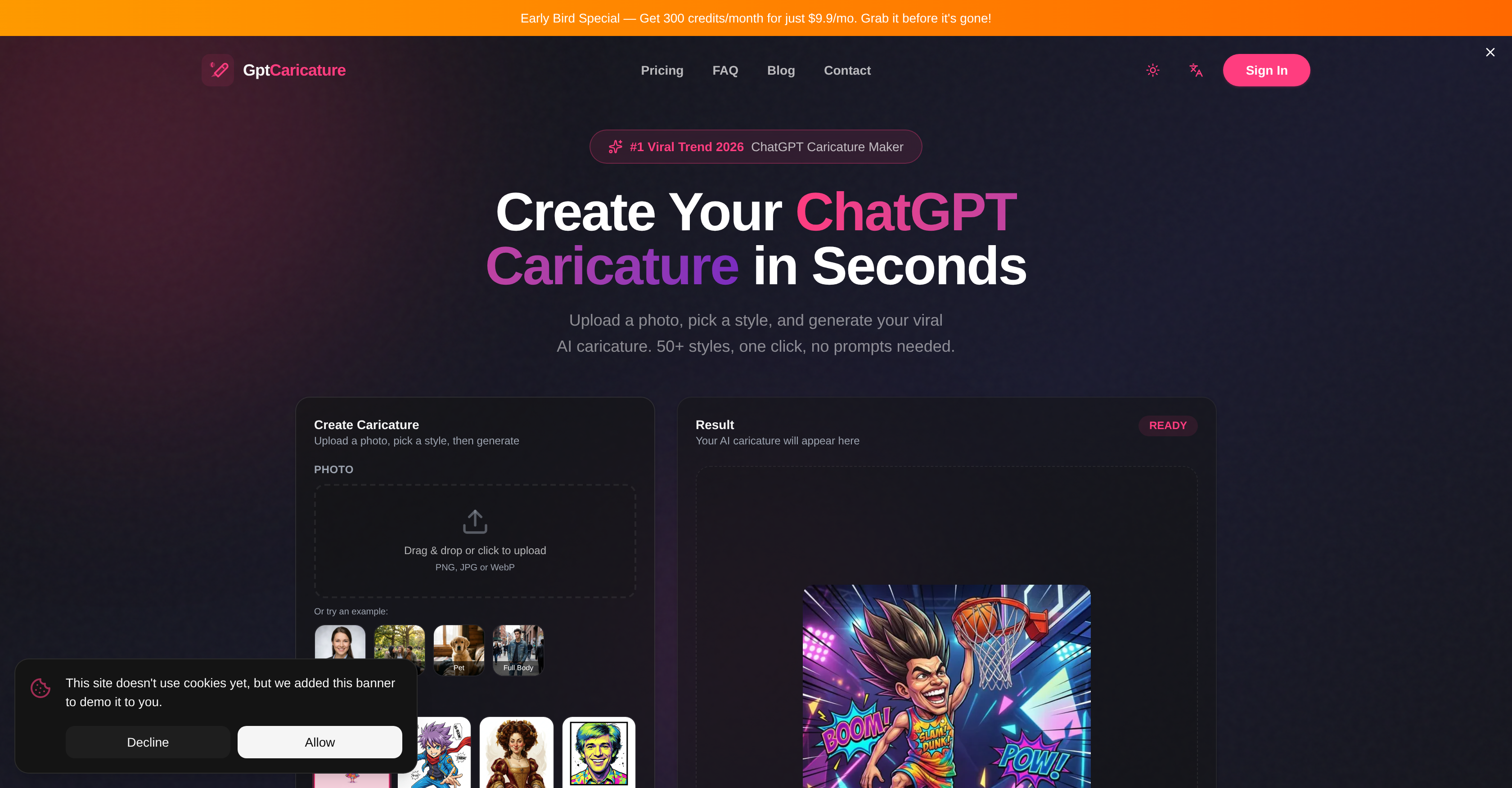
- Create unique, eye-catching profile pictures and posts for all major social platforms in under a minute with a simple three-step upload, style, and generate process.
- Produce commercial-ready caricature art for merchandise, branding, and client projects with the included commercial license.
- Experiment with dozens of distinct artistic effects on a single image, from cartoons and watercolors to pop art and sketches, to find your perfect look.
- Transform any type of photo—professional headshots, casual selfies, group pictures, full-body shots, or even pet photos—into personalized art.
- Download your final artwork in high-definition formats suitable for professional printing or digital sharing, ensuring quality across all uses.
- Fine-tune your caricature's colors, saturation, and overall mood to perfectly align with your personal brand or creative vision.
Pros & Cons
Pros
- Extensive style selection
- Supports multiple image formats
- Transforms various scenes
- High-definition export
- Widely utilized by creators
- One-click generation
- Customizable color palettes
- Supports batch processing
- Commercial license availability
- Automatic feature enhancement
- Mobile optimization
- High user rating
- Provides HD downloads
- API access for businesses
- Optimized for different platforms
- 50+ pre-built styles
- Supports group photo caricatures
- Supports pet caricatures
- Creator commercially viable
- High resolution images support
- No subscription required
- Zero prompt writing
- Fine-tune color and saturation
- Responsive editor
- Smart enhancement features
- Can generate caricatures in bulk
- Free Result Preview
Cons
- No image editing options
- No free version available
- No API mentioned
- Doesn't support SVG
- No local application
- Limited image formats
- Supports only photos
- Unpredictable end-results
- No style customization
- No texture options
Reviews
Rate this tool
Loading reviews...
❓ Frequently Asked Questions
ChatGPT Caricature is a technology that uses artificial intelligence to transform photos into caricatures. It offers users a swift and straightforward process that only requires the user's photo and a preferred style for the caricature.
To create a caricature with ChatGPT Caricature, you only need to upload a photo, choose a predefined style, and generate the caricature. The tool processes these inputs and transforms the photo into the selected caricature style.
ChatGPT Caricature provides an extensive range of styles customized to meet diverse user tastes. These styles include cartoons, watercolors, pop art, sketches, and many more.
Yes, ChatGPT Caricature supports the transformation of group photos into caricatures. The tool can recognize and transform multiple faces within an image.
Yes, you can create caricatures of your pets using ChatGPT Caricature. The tool recognizes and converts animal images into the desired caricature style.
ChatGPT Caricature supports various image formats, including PNG, JPG, and WebP. These formats provide flexibility and convenience to users while uploading photos.
ChatGPT Caricature allows you to export your caricatures in high resolution. Once the caricature is created, you can freely download it in a high-quality format suitable for sharing or printing.
ChatGPT Caricature is utilized across various platforms, including YouTube, Instagram, TikTok, Twitter, Snapchat, Pinterest, Behance, and Dribble. The diverse platform usage illustrates the tool's popularity and versatility among creators.
To use ChatGPT Caricature, follow these three easy steps: upload the photo you want to be caricatured, choose your preferred style from the selection available, and generate your caricature.
Yes, the ChatGPT Caricature tool can transform a full body photo into a caricature. It's designed to recognize and process both close-up and full body photos for caricature conversion.
To upload a photo in the ChatGPT Caricature tool, you can either click to select an image file from your device or simply drag and drop the photo into the designated uploader interface on the tool's page.
Yes, cartoon style is one of the many styles offered by ChatGPT Caricature. This style is part of a wide range of selections including watercolors, pop art, sketches, and more.
ChatGPT Caricature does specify that for the best results, a clear, well-lit photo where the face is visible should be used. Front-facing portraits tend to work best, and distinctive features such as glasses or unique hairstyles can help produce engaging caricatures.
ChatGPT Caricature is immensely popular among creators due to its user-friendly design, quick turnaround time, and an extensive selection of caricature styles. It provides a practical, efficient solution for customized AI-generated caricatures, catering to a wide variety of user tastes and preferences.
Yes, you can use ChatGPT Caricature on various social media platforms, including YouTube, Instagram, TikTok, Twitter, Snapchat, Pinterest, Behance, and Dribble. Creators use the tool to make unique caricatures for their profiles and posts for these platforms.
The time it takes to create a caricature using ChatGPT Caricature tends to be very short, often taking just a few seconds to under a minute depending on the image and the chosen style.
Yes, with ChatGPT Caricature, you can transform any photo into a caricature. Whether it's a professional headshot, a casual selfie, a group picture, or a pet photo, the tool can turn it into personalized caricature art, provided the photo meets the quality standards for a clear, well-lit image.
Yes, ChatGPT Caricature allows you to select different caricature styles for the same photo. This feature provides flexibility and allows you to experiment with various artistic effects on the same image.
Yes, you can use ChatGPT Caricature for commercial projects. The tool includes a commercial license that allows you to utilize the generated art commercially. This makes it highly suitable for merchandise, branding, and client work.
Yes, you can edit your photos using ChatGPT Caricature. The tool features options to fine-tune colors, saturation, and mood to match your personal brand or creative vision.
Pricing
Pricing model
Free Trial
Paid options from
$9.90/month
Billing frequency
Monthly
Refund policy
No Refunds