ConnectTheDots Generator
Overview
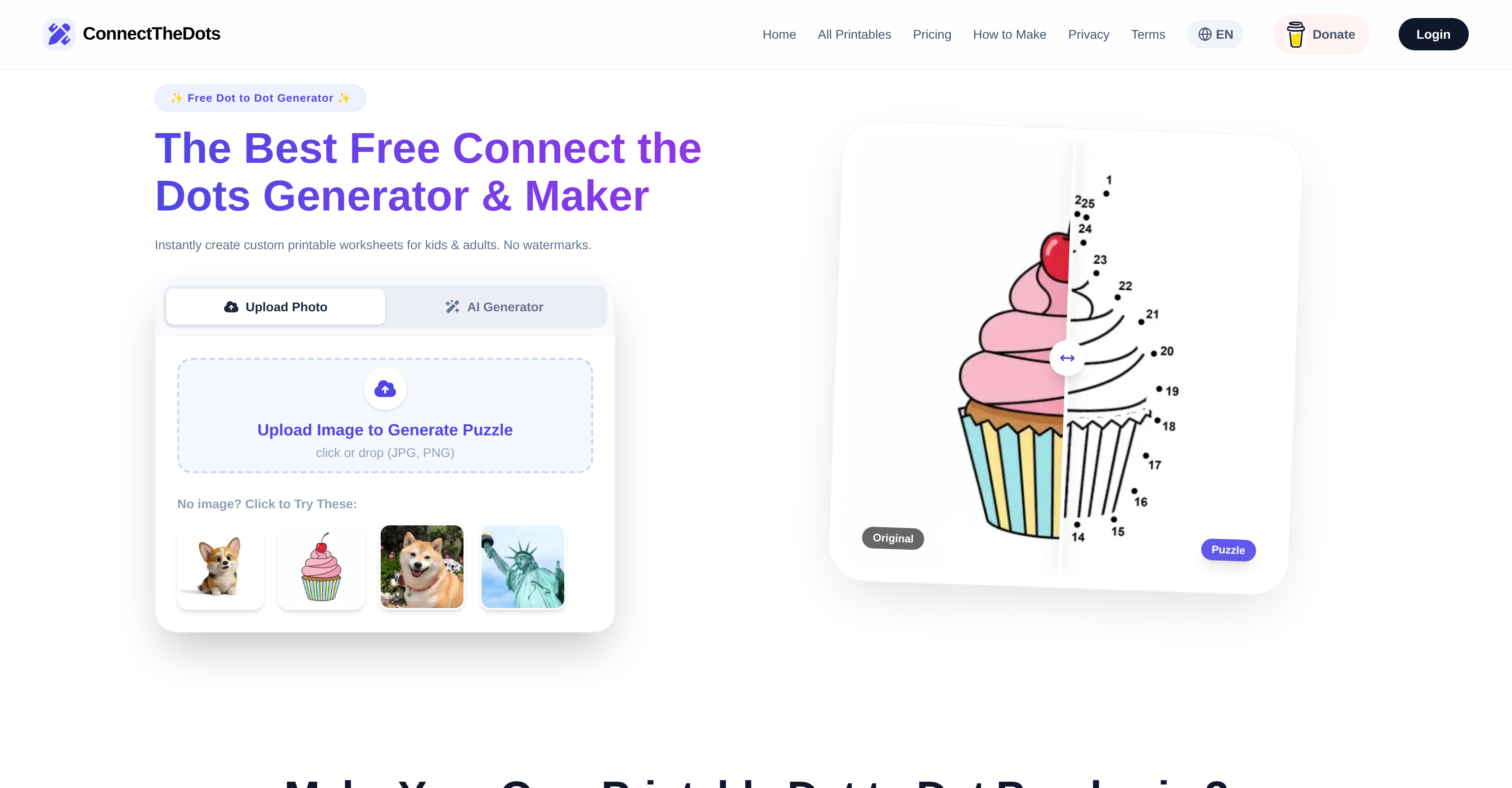
- Instantly create personalized dot-to-dot activities from any family photo or drawing using AI that generates clean, vector-like outlines.
- Tailor puzzles to any skill level, from young children to adults, by adjusting the dot count and selecting Easy, Medium, or Hard difficulty.
- Download professional, print-ready worksheets in high-resolution PDF or PNG formats without any distracting watermarks.
- Generate puzzles from your imagination by describing concepts like 'a robotic dragon' for a unique creative exercise.
- Access a ready-made library of themed puzzles for educational use or quick fun, categorized by age and difficulty.
- Use the tool in English, Spanish, or German on any device, with a mobile-optimized interface for creating puzzles anywhere.
Pros & Cons
Pros
- High-quality PDF or PNG downloads
- Free from watermarks
- Supports multiple languages
- Optimized for mobile devices
- Adjustable puzzle difficulty
- Instant puzzle generation
- Pre-made puzzle collections
- Customizability of puzzles
- Clean, vector-like puzzle outlines
- Theme-based puzzle categories
- Easy three-step puzzle creation
- Support images for puzzle creation
- Advanced image-to-dot-to-dot conversion
- Templates for various skill levels
- Easy generator interface
- Educational Alphabet Worksheets
- Ready-to-Print puzzles
- Editable Dot count
- Advanced Mandala Puzzles
- Works best with high-contrast images
- High-resolution output for printing
- Real-time hint adjustments
- Automatic background removal
- Print optimization guide
- FAQ for troubleshooting
- Free daily puzzle generation
Cons
- Not for commercial use
- No offline mode
- Can't save progress
- Limited language options
- Only high-contrast images supported
- No batch process
- No API
- No layered modifications
- No plugin extensions
- No tutorial available
Reviews
Rate this tool
Loading reviews...
❓ Frequently Asked Questions
You can upload clear photos or simple line art to the ConnectTheDots Generator. The AI works best with high-contrast images or simple line art.
You can adjust the difficulty on ConnectTheDots Generator by selecting Easy, Medium, or Hard. You can also manually set the dot count to match the skill level.
You can download the generated worksheets from ConnectTheDots Generator in high-resolution PDF or PNG formats.
You can export your puzzle as a high-resolution PDF or PNG from ConnectTheDots Generator. It is ready for instant printing at home or school!
Commercial use is not permitted for ConnectTheDots Generator to protect the integrity of the tool and to maintain it as a free product for personal and educational uses, and to prevent the commercial exploitation of its generated worksheets.
ConnectTheDots Generator uses AI technology to convert your uploaded images or text concept descriptions into high-quality, printable dot-to-dot puzzles. Unlike standard filters, the AI generates clean, vector-like outlines that are optimized for dot-to-dot mapping.
Yes, ConnectTheDots Generator supports multiple languages including English, Español, and Deutsch.
Yes, ConnectTheDots Generator allows users to describe any concept from 'a robotic dragon' to 'a Victorian house', and the AI will build it into a dot-to-dot puzzle.
The puzzles from ConnectTheDots Generator are considered professional due to the AI technology that generates clean, vector-like outlines optimized for dot-to-dot mapping. They are high-resolution, free of watermarks, and ready for professional printing.
Yes, ConnectTheDots Generator offers a collection of pre-made worksheets for adults, children, and educational purposes.
Yes, ConnectTheDots Generator offers puzzles for every age and skill level, with custom difficulty adjustments possible ranging from Easy, Medium, to Hard.
No, ConnectTheDots Generator does not add watermarks to the printable worksheets, ensuring they're clean for professional printing.
As an educator, you can use ConnectTheDots Generator to create printable, educational dot-to-dot activities tailored to the learning level of your students. You can transform any concept into a dot-to-dot puzzle, enhancing the student learning experience.
Yes, ConnectTheDots Generator is suitable for adults. It offers more complex and intricate designs specifically for adult users.
ConnectTheDots Generator helps in learning and skill development by creating engaging puzzles that can be tailored to suit any skill level. Users can develop their fine motor skills, enhance their focus, and increase their cognitive abilities while navigating these puzzles.
ConnectTheDots Generator can enhance creativity by providing a unique mechanism to promote visualization. Users can upload any image or describe a concept, and the Generator will transform it into a dot-to-dot puzzle, stimulating the creative process.
'Vector-like outlines' refers to the crisp, clean lines generated by ConnectTheDots Generator. Unlike bitmap or raster graphics, vector graphics are resolution-independent and can be scaled without loss of quality, ensuring the highest quality dot-to-dot puzzles.
Yes, with ConnectTheDots Generator, users can transform any photo into a professional dot-to-dot worksheet.
You can download the printable worksheets from ConnectTheDots Generator by exporting your puzzle as a high-resolution PDF or PNG. The downloaded printable is ready for instant printing.
There are no costs associated with using ConnectTheDots Generator for personal and educational use. The dot-to-dot printables are completely free to download and print, while some premium designs may be available for a small fee, but they're clearly marked.
ConnectTheDots Generator is an online tool harnessing advanced AI technology to create custom printable connect the dots worksheets in multiple languages. Users can upload an image which is transformed into a professional dot-to-dot worksheet. The AI optimizes the quality of puzzles, creating clean, vector-like outlines suitable for dot-to-dot mapping. It also allows users to create puzzles based on described concepts. ConnectTheDots Generator also offers pre-made worksheets catering to various age and skill levels, all available for instant download in high-quality PDF or PNG formats.
To create your own connect the dots worksheet with ConnectTheDots Generator, you first upload an image of your choice. From there, you can adjust the difficulty and dot count. Once you've customized your settings, you download your customized worksheet in either high-resolution PDF or PNG format, ready for printing.
Yes, ConnectTheDots Generator provides options to adjust the difficulty level of your custom worksheets. This feature allows users to set the complexity of the puzzle to match the skill level of the participant, from simple designs for children to intricate and complex ones for adults. You can also manually set the dot count to match the level of difficulty.
Yes, besides the option to create your custom puzzles, ConnectTheDots Generator provides a host of pre-made worksheets. The library of ready-to-print puzzles includes designs for various age groups and difficulty levels. The categories range from easy designs meant for children, to complex ones for adults, and educational alphabet worksheets for preschool.
The worksheets from ConnectTheDots Generator are instantly downloadable in high-quality PDF or PNG formats. These formats ensure premium print quality and the preservation of the layout and image integrity, regardless of your device or printer.
To generate a connect the dots worksheet, ConnectTheDots Generator works best with clear photos or simple line art. The advanced AI performs at its best when dealing with high-contrast images. Hence, pictures with distinct, high-contrast elements will yield more precise dot-to-dot mapping.
Yes, ConnectTheDots Generator is fully optimized for mobile devices. Whether via desktop or mobile, you'll have a seamless experience right from uploading an image to downloading your created worksheet. The tool is touch and swipe optimized, allowing easy interaction and accessibility on any device.
ConnectTheDots Generator supports multiple languages including English, Spanish, and German, serving a diverse global audience. The multi-lingual interface adds to the accessible nature of the tool, enhancing user experience across different regions.
The worksheets generated by ConnectTheDots Generator are designed to be printed. Whether you create a custom design or choose from the pre-made worksheets, you can instantly download them in PDF or PNG formats. Designed in high-resolution, these formats guarantee excellent print quality which ensures a favorable offline activity experience.
Yes, the worksheets generated by ConnectTheDots Generator are free of watermarks. This ensures a clean, professional output, ideal for creating high-quality, enjoyable printable activities at home or for educational purposes.
Yes, with ConnectTheDots Generator, you can describe a concept, from 'a robotic dragon' to 'a Victorian house', and the AI will build it into a dot-to-dot. The AI dot-to-dot generator understands your imagination, turning text prompts into high-quality, printable puzzles.
The usage policy for ConnectTheDots Generator specifies that it's for personal and educational use only. The restrictions to commercial use ensure the adherence to copyright norms and maintain the tool's integrity as a free resource for educational and personal sphere.
No, you don't need to have a picture to use ConnectTheDots Generator. While you can create custom worksheets by uploading images, the platform also provides an extensive collection of pre-made worksheets for those who prefer to skip the customization process.
ConnectTheDots Generator is suitable for a wide age range. With adjustable difficulty levels, it caters to everyone from young kids to adults. It has easy designs for children with fewer dots and large fonts, and hard ones for adults with intricate designs and more dot-to-dot connections. This makes ConnectTheDots Generator a versatile tool that engages different age groups and skill levels.
Yes, ConnectTheDots Generator is an excellent tool for educational purposes. Teachers and educators can use it to create a variety of engaging dot-to-dot worksheets for their students. The ability to adjust the difficulty based on the student's age or skill level makes it a valuable resource in educational environments. Additionally, its multi-lingual platform makes it an effective tool for language learning.
ConnectTheDots Generator enhances learning through interactive fun by encouraging users to transform an image into a dot-to-dot puzzle. This activity stimulates creativity, develops problem-solving skills, and aids in understanding the correlation between numbers. Consequently, it cultivates learning through play, making it a suitable tool for both personal and educational use.
To make your own dot-to-dot puzzles with ConnectTheDots Generator, you just have to follow three easy steps. First, upload a clear photo or drawing. Then, adjust the difficulty level and manually set the dot count to match the skill level. Finally, download your activity as a high-resolution PDF or PNG, ready to be printed at home or school.
Yes, ConnectTheDots Generator is equipped to turn any photo or drawing into a professional dot-to-dot worksheet. Regardless of the image's content, the built-in AI technology will optimize and generate a clean, vector-like outline that's perfect for dot-to-dot mapping.
For the best results with ConnectTheDots Generator, your photo or drawing should be clear and high in contrast. The AI works most effectively with these types of images, as it allows for precise placement of dots and generation of clean, vector-like outlines.
Pricing
Pricing model
Freemium
Paid options from
$4.90
Billing frequency
One-time