
Constellav1.1.0
Overview
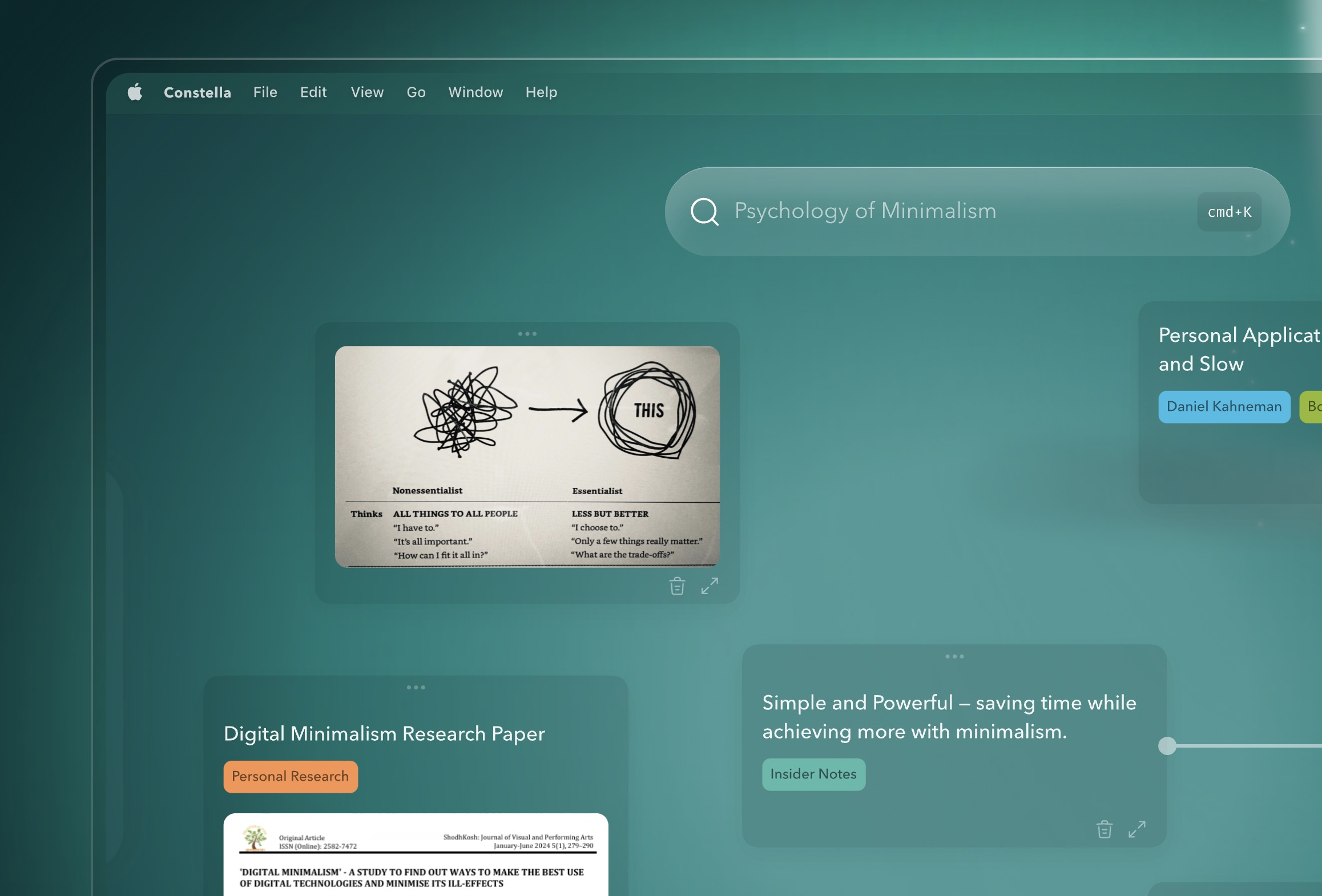
- Instantly capture thoughts without organizing them into folders by pressing Enter to save notes and files
- Recall past notes and ideas automatically as you type with AI that surfaces relevant connections
- Build knowledge networks visually by dragging and dropping thought nodes on an infinite canvas
- Make informed decisions with comprehensive context from your past notes and learnings
- Implement the Zettlekasten system automatically for structured, interlinked notes without manual work
- Access your entire second brain on mobile to capture and connect ideas anywhere, anytime
- Own your data completely with offline-first support, encrypted cloud sync, and Markdown export
Pros & Cons
Pros
- Visual infinite graph
- No-search note retrieval
- Real-time note surfacing
- Facilitates neurologically-informed thoughts mapping
- Content import/export capability
- Efficient searching feature
- Mobile compatible
- Assists in decision-making
- Supports Zettlekasten knowledge system
- Built-in importing/exporting feature
- Facilitates mind mapping
- Supports PKMS
- Secure data privacy
- Robust cloud sync
- 3x faster note taking
- Facilitates text recognition
- Intuitive thought connection
- Texture-based file search
- Promotes adaptive learning
- On-the-go access
- Advanced research tool
- Supports work on-the-go
- Infinite canvas for thoughts
- Instant thoughts capturing
- Visual thought tracing
- Thought-based web clipping
- Supports multiple file formats
- Markdown export support
- Handles ideas and typos
- Intelligent note recall
- Cloud sync encrypted buckets
- Offline support
- Ease of use
- Adaptive to user
- Thoughts backlinking
- Powerful organizing capability
- Material visualization
- Rapid thought-retrieval
- Local-first support
- Contextual decision-making aid
- Auto-implements Zettlekasten
- All data ownership
- Integrated chat with files
- Dynamic file management
- Visualized task management
- Supports personal note jotting
Cons
- Limited customizability
- No multi-users/shared canvas capability
- Weak offline support
- No folder-based organization
- Inflexible exporting formats
- Inefficient when overloaded with notes
- No annotation for imported files
- No web-browser extension
- Reliance on cloud sync
Reviews
Rate this tool
Loading reviews...
❓ Frequently Asked Questions
Constella is an intelligent 'Second Brain' application designed to aid in the acquisition of knowledge and the systematization of notes, links, and files. It operates on a visual limitless graph and aims to supersede the need to sift through traditional files and folders, displaying related notes as a user types. At its core, the app is fueled by artificial intelligence and built for quick note-taking, enhanced recall, intuitive connections between thoughts, content transfer, intelligent search, and mobile compatibility.
The term 'Second Brain' as used by Constella refers to the app's ability to mimic the functionalities of a human brain in terms of storing, organizing and recalling information. The application allows users to feed in data, which it can instantly store and manage in an organized, easily retrievable manner, effectively serving as an auxiliary brain.
Constella's visual infinite graph organizes information inputs in a visual and intuitive layout that embodies the structure and connectivity of a neural network. It presents related notes as users input their thoughts, providing an immersive, limitless platform, which steers clear from traditional file and folder schemas.
Constella leverages artificial intelligence in various ways to enhance its core functionality. It can almost instantly store notes and files added by the user, and surface relevant notes from the past on its canvas as a user types. Beyond this, AI helps establish connections between thoughts visually and intuitively, much like the way neurons do inside the human brain.
Constella aids in recalling past notes by leveraging its artificial intelligence core to surface related notes from the past on its canvas while the user is typing. This capability is similar to how neurons in the human brain bring up related past memories when a topic or thought is being processed.
Constella allows for easy content import and export. The built-in import/export feature supports content transfer from other applications, enabling users to gain full ownership of their 'Second Brain'. The app values user freedom, indicating that it accommodates the easy transmission of data between platforms, thereby enhancing user flexibility.
Constella can serve as a Personal Knowledge Management system effectively. The application offers quick thought capture, effortless backlinking, and instant retrieval of information. It enables users to create chains of thought that can be retrieved instantly without the hours needed for maintaining a manual PKMS. It's also designed to be easily learned and adapted to the user's needs.
Yes, Constella can assist in research. It enables users to effortlessly visualize and link materials together, which can be crucial in research. The application takes advantage of its linking functionalities to assist users in compiling and making sense of data from various sources.
Constella facilitates decision-making by providing comprehensive context, reminders and past learnings to augment the decision-making process. It surfaces related past notes and ideas that could be relevant to the matter in question, aiding users in making well-informed decisions.
Constella supports mind-mapping by letting users drag-and-drop thought nodes visually on its platform. The application can remember the positions and connections of these nodes over time, which facilitates easy referencing and recall of past thought patterns.
The Zettlekasten system in Constella is a note-taking and knowledge management system that lets you create and manage interlinked, structured notes that promote understanding and recall. By using Constella, the implementation of this system is automatic, eliminating manual categorization of notes and allowing for a more efficient retrieval of relevant notes when required.
In terms of privacy and security, Constella hosts a couple of appealing features. Users retain complete ownership of their data. It offers offline first support along with encrypted buckets for secure cloud synchronization. The system operates on a local AI search model and allows for easy data export in the Markdown format.
Yes, Constella provides mobile compatibility. There is a dedicated mobile application that allows for seamless usage of Constella's functionalities. Users can jot down thoughts, capture notes, and access data anytime, anywhere through the mobile app.
Constella organizes user's notes and files using a visual infinite graph. This allows for the instant storage of notes or files, eliminating the need to sift through traditional files and folders. The system surfaces related past notes while the user is inputting new notes, which aids in recall and links to information.
Yes, Constella is accessible on the go with its mobile app. It maintains constant connectivity, supporting capabilities such as quick searching, instant capture, thought connection, and more, making it an excellent tool for users to capture thoughts and data whenever they arise.
Constella can be used as a learning tool by facilitating visualization of information, mind mapping, and thought connection, which could facilitate deep learning. It offers a smart system of note organization in an easily retrievable manner, encouraging users to learn and recall efficiently.
Currently, there's no specific mention of text recognition features in Constella. However, it surfaces related notes while a user types, which presupposes a sophisticated ability to identify and associate text inputs with related data stored in the system.
Yes, Constella visually connects thoughts. It supports connections between thoughts in an intuitive way that mirrors the functionality of neurons. This feature enhances the visualization of thought constructs and associations, aiding in understanding and recall.
Cloud syncing in Constella is carried out securely and robustly. The system securely syncs data across multiple devices, ensuring users have access to their data anytime, anywhere. Besides, the data is stored in encrypted buckets, promoting an enhanced level of data security.
Constella offers several use-cases as a 'Second Brain' app. It can serve as a Personal Knowledge Management system, aid in research, facilitate decision-making, and assist in mind mapping. It's also useful for implementing the Zettlekasten system for efficient note-taking and knowledge management. Moreover, Constella can help different professional segments, including researchers, creators, and entrepreneurs, as well as individuals with ADHD, by organizing thoughts visually on one canvas, helping users to recall whenever required.
Pricing
Pricing model
Free Trial
Paid options from
$5.99/month
Billing frequency
Monthly