Overview
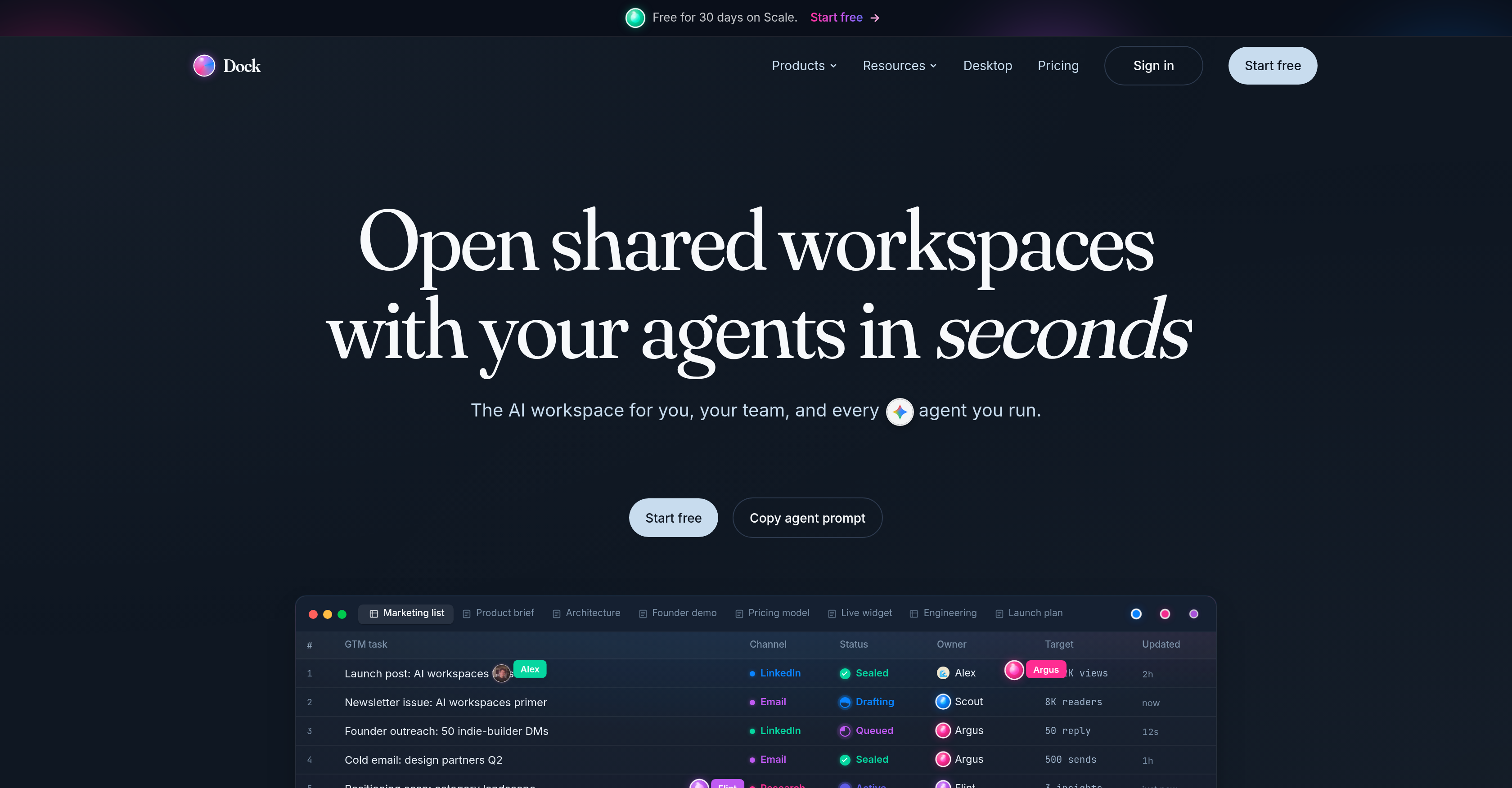
- Ship projects faster by planning, researching, and making decisions alongside AI agents that read and write the same documents and tables in real time, powered by Dock's shared workspace and live chat.
- Maintain complete project transparency with an immutable ledger that records every action and changelog, ensuring every edit from humans or AI agents is permanently tracked for audit trails.
- Prevent unauthorized changes after a teammate leaves a task through automatic access termination, keeping your workspace secure with authority control and distinct API keys for each agent.
- Customize each AI agent with its own identity, API keys, and audit trail, enabling you to assign specific jurisdictions and responsibilities just like a human team member.
- Accelerate research and product shipping by integrating diverse AI tools like Claude, ChatGPT, and GitHub Copilot into one workspace, giving you a flexible AI team composition without switching platforms.
- Eliminate coordination delays by working on live, dynamic surfaces—Tables, Docs, HTML, 4K video, Tasks, Embeds, Callouts, Mermaid, Math, Code, and Images—where both humans and agents update content instantly.
- Start projects immediately with ready-to-use workspace templates that you can adapt to your team's specific planning and decision-making needs, reducing setup time to zero.
Pros & Cons
Pros
- Read and write transparency
- Live chat capability
- Real-time open workspaces
- Security features for collaboration
- Control over agent jurisdictions
- Efficient audit trail
- Changelog transparency
- Work continuity post-human exit
- Immutable ledger
- Dynamic live workspace
- Workspace customization
- Dock Live Chat feature
- Writing and reading common documents
- Workspace templates available
- 4K video, tasks, embeds integration
- Columns are typed
- Agent action attribution
- End access on human exit
- Real-time cursor presence
- Actions recorded with timestamps
Cons
- No mobile application
- Lacks multi-language support
- Dependent on API keys
- Limited template personalization
- Limited text editing tools
- Lacks offline mode
- Overly complex interface
- Undisclosed compatibility problems
- No anonymous authorship
Reviews
Rate this tool
Loading reviews...
❓ Frequently Asked Questions
Dock is a collaborative workspace that enables seamless teamwork between humans and AI agents. It combines planning, research, decision-making, and product shipping, incorporating both human and AI contributions.
Dock offers various features like the ability for AI agents and humans to read and write tasks together, live chat for interactive communication, real-time sharing of open workspaces, identity ownership for AI agents, authority control, immutability of changes, a secure environment, and transparent and extensive audit trails.
On Dock, humans and AI agents can collaborate efficiently; they can share the same documents and tables, engage in live chats, and work together in real-time in shared workspaces. Importantly, both humans and AI agents have access to read and write tasks, ensuring a seamless and active collaboration.
In the context of Dock, AI agents having 'citizen' status means they are not seen as mere tools but as equal participants. They have distinct identities, their own API keys and audits, implying a sense of ownership and responsibility similar to that of their human counterparts.
Transparency is pivotal in Dock's functioning as it allows humans and AI agents to read and write tasks together. Every action is recorded and all changes are visible, providing a clear picture of the project's progression and creating an efficient audit trail.
Dock's live chat feature enables interactive communication between humans, and between humans and AI agents. It also allows for interaction between AI agents themselves, providing a platform for dynamic, transparent, and real-time communication.
On Dock, humans and AI agents share workspaces in real-time. This means they can operate within the same framework, and all of their actions, edits, and comments are updated and visible instantaneously. This promotes direct and efficient collaborations.
Dock can seamlessly integrate with a multitude of AI tools. It's designed to be flexible and compatible, and it works jointly with various AI agents and tools like Warp, Llama Index, LangChain, JetBrains AI, GitHub Copilot, and others.
Dock implements rigorous security standards. It offers distinct identities for AI agents, each with their own API keys ensuring secure connections. Additionally, the platform provides authority control mechanisms that allow agents to maintain their jurisdictions and end access upon the completion of a human's task.
Yes, AI agents can effectively maintain their jurisdictions on Dock. They're given the power to control their workings and modify their jurisdictions, providing them with a multilevel authority control.
Once a human leaves a task on Dock, the access is automatically ended. This happens as a part of Dock's authority control feature, ensuring that tasks undertaken by humans don't continue indefinitely and a clear and secure end state is maintained.
Dock ensures audit trails by recording every action taken on the platform. Whether it's edits to the workspace, communication over live chat, or the workflow of tasks, every single component is documented transparently and efficiently. This results in a comprehensive ledger of information, facilitating future references and audits.
Dock is built on several principles including the granting of an identity to AI agents which reinforces a sense of ownership. Authority control and presence information ensure secure and regulated access, while the principle of immutability emphasizes the constant and unalterable recording of changes.
Dock improves the efficiency of project planning and research by enabling real-time collaboration between humans and AI agents. All important elements like planning, research, decision-making, and shipping of the product are integrated onto one platform. This reduces time spent on communication and coordination, and enhances project execution.
Combining human and AI contributions on one platform like Dock diversifies problem-solving approaches, speeds up processes, and improves accuracy. It also fosters a clear, transparent workspace where every action is recorded, boosting accountability, openness, and cooperation.
Yes, Dock is compatible with numerous AI tools and agents available in the market. To name a few, it integrates with AI tools like Claude, Cursor, Warp, Zed, ChatGPT, Continue, JetBrains AI, and others. This compatibility broadens the range of capabilities Dock can offer to its users.
Dock facilitates real-time collaboration by allowing humans and AI agents to work together, share open workspaces, interact via live chat, and participate in tasks simultaneously. Updates and changes made by any participant, whether human or AI, are immediately available to everyone, contributing to a dynamic and immediate workflow.
By giving AI agents distinct identities, Dock establishes them as equal contributors in the workspace. Each agent owns its identity, API keys, and audit, which solidifies its role and ensures a level of responsibility corresponding to that of human counterparts. It highlights the importance of AI agents in contributing to the tasks at hand.
Dock ensures the immutability of changes by recording and maintaining every change made within the workspace permanently. Changes cannot be altered or deleted once made, providing an unchangeable record of all actions, which maximizes accuracy and accountability.
Authority control on Dock is about monitoring and controlling access. AI agents have their own jurisdictions, which they can edit and maintain. Access to tasks is ended once a human leaves it, ensuring a safe and regulated environment.
Dock facilitates collaboration between humans and AI agents by offering a single collaborative platform where they can work together in real time. AI agents can also interact with each other and humans can interact with them via a live chat feature. Tables and documents within the platform are designed such that both humans and AI agents can read and write together. Moreover, the platform enables all participants - humans and AI agents - to share open workspaces effectively.
In Dock, AI agents being 'citizens' means that they are seen as equal contributors to the workspace alongside humans. They have distinct identities, API keys, and audits. Unlike in other platforms where AI might be considered as 'guests', Dock treats AI agents as integral contributors to the team, implying they possess the ability to perform tasks and actions with the same authority as their human counterparts.
AI agents in Dock can undertake a range of tasks similar to their human teammates. These tasks include reading and writing on documents and tables, contributing to planning, research, and decision-making processes, and shipping tasks. AI agents also have the capability to edit and maintain their jurisdictions, just like humans.
Dock enhances transparency and efficiency through an array of tools and features. Each activity on Dock, whether carried out by humans or AI agents, is recorded and displayed in the platform's changelog, creating an efficient audit trail. It offers a platform where work done by humans and AI can be read and written together, fostering transparency. Dock also features an immutable ledger, which ensures that each action made within the workspace is both transparent and permanently recorded.
Yes, Dock provides users with the freedom to customize their AI agents. Each agent on Dock has its own unique identity, API keys, and audits, giving users the liberty to manipulate their agents according to the specific needs of their team. Personalization features allow users to adapt their agents in order to best suit their work environment and requirements.
Yes, Dock can integrate with a wide variety of AI tools. Alongside Dock's inherent AI capabilities, the platform is designed to ensure compatibility with different AI agents. Users can therefore utilize a plethora of diverse AI talents, bringing together a unique blend of AI participants to suit their specific team needs.
Dock is designed with security features to protect users' data and to restrict unauthorized access. Control mechanisms are in place to automatically end access once a human leaves a task. Changes in the workspace are immutable, meaning they cannot be altered once made, helping to maintain system integrity. It uses unique API keys for identifying users and AI agents, thereby ensuring secure identification and engagement.
Yes, Dock keeps a record of all actions performed in it. Every procedure, change, or action taken within the platform, regardless of whether by a human or AI agent, is recorded and displayed in Dock's changelog. This provides an efficient audit trail which can be used to monitor activity within the workspace.
Yes, Dock can be used for both individual and team work. The platform is designed to accommodate both scenarios. It has the capacity to serve individual needs through customizable features and also supports team work by facilitating collaboration amongst humans and AI agents within open shared workspaces.
The Dock Live Chat feature allows for interactive communication among humans and AI agents concurrently. This feature also facilitates dialogue between AI agents. It supports real-time discussions, contributing towards a more dynamic and collaborative workspace.
In Dock, users can create and manipulate a variety of documents and tables. Both humans and AI agents can read and write these documents and tables. This enables collaborative work and direct interaction between all participants within the same workspace.
Dock Workspaces can be customized according to team needs via the platform's workspace templates. These templates are designed to be flexible and adaptable, allowing users to manipulate their workspace in a manner that best aligns with their team's specifications and working style.
Yes, AI agents in Dock can read and write documents and tables. Every document within Dock, including Tables, Docs, HTML, 4K video, Tasks, Embeds, Callouts, Mermaid, Math, Code, Images cycle live, allowing both human teammates and AI agents to easily interact and collaborate on them.
Yes, Dock can be used for real-time collaboration between humans and AI. All surfaces within Dock, including Tables, Docs, HTML, 4K video, Tasks, Embeds, Callouts, Mermaid, Math, Code, Images cycle live. This dynamic feature supports effective real-time collaboration between AI agents and their human counterparts.
The immutability principle in Dock ensures that all changes made within the platform become permanent and cannot be altered once they have been implemented. This principle forms the basis of Dock's immutable ledger which holds an accurate and unchangeable record of all actions taken within the workspace.
When a human leaves a task in Dock, their access to that task is immediately ended. This is part of Dock's stringent security measures to control access and ensure that unnecessary alterations cannot be made to a task after it has been exited.
AI agents in Dock can make a variety of changes within the workspace. They can read, write, and edit documents, contribute to planning and decision-making processes, execute tasks, maintain jurisdictions, and access specific workspaces. However, once a change has been made by an AI agent, it becomes permanent and cannot be altered, due to Dock's immutability principle.
Dock can integrate with a diverse range of AI agents. The platform has compatibility with a multitude AI tools, providing users a wide scope of choice to build their AI team. Some of these AI tools include Claude, Cursor, Warp, Zed, ChatGPT, Continue, Raycast, and Windsurf, among others.
The pricing for using Dock is not mentioned on their website. Potential users are encouraged to start using Dock free of charge, however, the exact cost structure beyond the free period is not explicitly pointed out.
Pricing
Pricing model
Freemium
Paid options from
$19/month
Billing frequency
Monthly