

img2.video
Test six image-to-video AI models without opening six accounts: Grok Imagine, Kling, Veo, Vidu, Seedance and Seedance Mini run from one dashboard on one shared credit balance.
Listing not yet reviewed by our editors · How we check
Overview
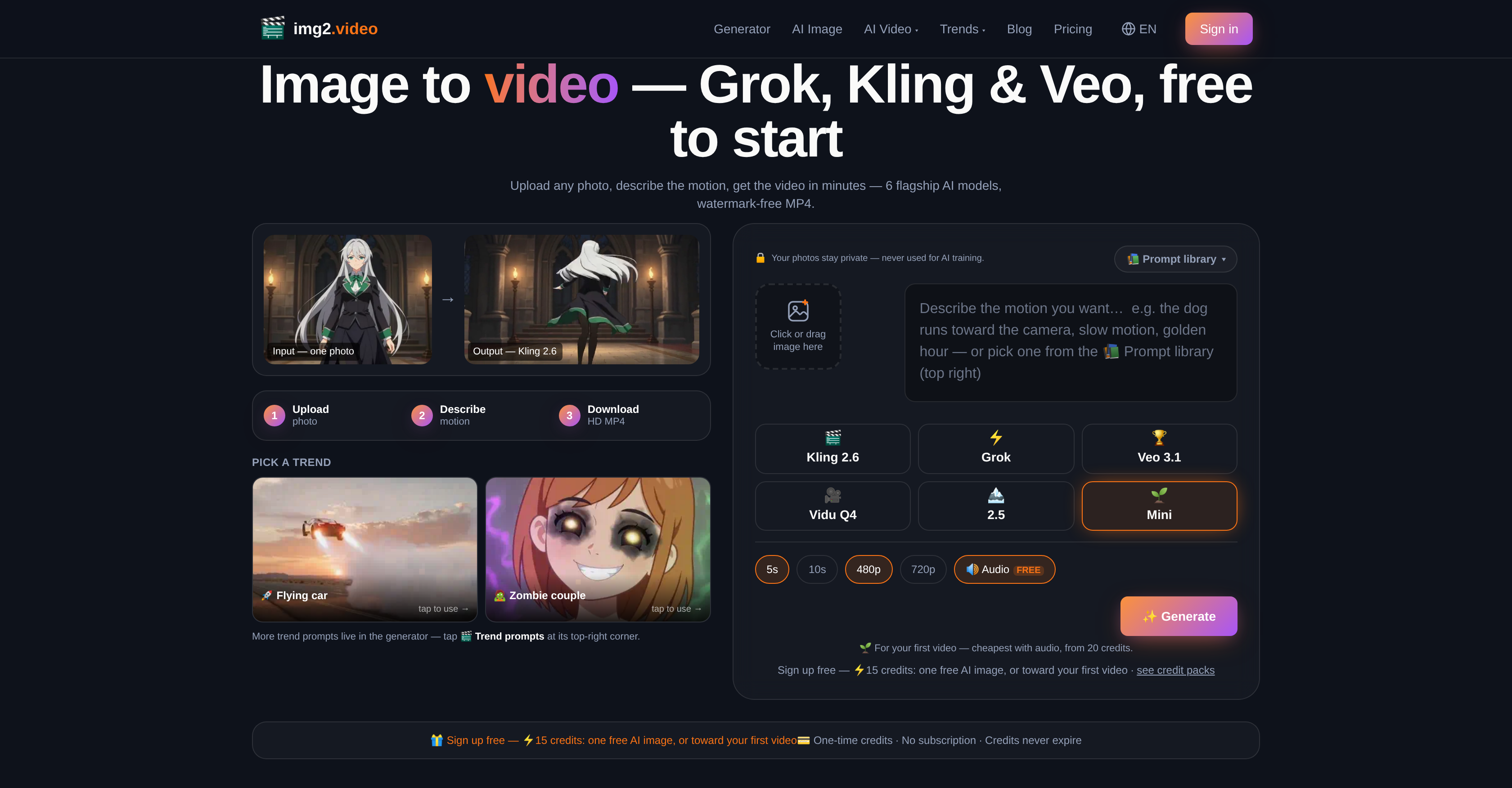
- Test six image-to-video AI models without opening six accounts: Grok Imagine, Kling, Veo, Vidu, Seedance and Seedance Mini run from one dashboard on one shared credit balance.
- Pick the right engine before spending a credit: model comparisons cover duration, audio, resolution, pricing and best use cases, so you can choose Grok Imagine for fast social clips, Kling for cinematic camera moves and natural physics, or Veo for the highest realism.
- Tell a longer story from a single image: Seedance 2.5 extends clips to 30 seconds and Vidu Q4 to 16 seconds, beyond the 8–10 second limits of other engines.
- Deliver crisp product shots and scenery at the size you need: choose from 480p and 720p/1080p HD up to 4K ultra-high definition on Veo 3.1, Vidu Q4 and Seedance 2.5.
- Post animated photos with sound already in place: Grok Imagine, Veo 3.1, Vidu Q4, Seedance 2.5 and Seedance Mini add synced audio, and Kling 2.6 offers it as an option.
- Know the exact cost before every render and lose nothing on errors: the generator shows the credit price for your chosen model, resolution and duration, and it refunds credits from failed generations to your balance at once.
- Pay only for the videos you make: one-time credit packs replace monthly subscriptions, and purchased credits never expire.
- Publish and sell your results immediately: every MP4 download is free of watermarks, and you own the output for commercial use when you hold the rights to the source image.
- Write motion prompts that work on the first try: trend prompts, category presets, a prompt library and demos that show the input, the prompt and the output let you load proven instructions in one click.
- Bring pet photos, portraits, products and landscapes to life: upload a photograph or an illustration, then add expressions, camera moves, lighting effects, mist or drifting clouds.
- Keep source images confidential: uploads are never used for AI training, stay private during processing and are deleted after 7 days.
- Get finished clips in minutes: median render time is 2.6 minutes across all models, and 90% of videos finish within 5.7 minutes.
Alternatives to img2.video
Tools that share the most tags with img2.video.
- VidFlux - Image to Video AI
Create professional-grade videos from images without switching between multiple tools using our all-in-one platform with integrated AI models
Paid · from $9/month
$9/month
Not yet checked
- Image to Video AI
Bring static images to life with dynamic motion, transforming JPG, PNG, or WEBP files into engaging videos
Free trial · from $13.90/month
$13.90/month
Not yet checked
- Img2Video AI
Create professional animated videos from any image instantly with AI-powered image to video conversion
Freemium · from $5.99/month
$5.99/month
Not yet checked
- MindVideo
Transform static content into vibrant videos instantly using text prompts or uploaded images
Freemium · from $7.90/month
$7.90/month
Not yet checked
- Grok Imagine
Transform abstract ideas into unique visual concepts instantly with AI image generation based on your text prompts
Freemium · from $30/month
$30/month
Not yet checked
- AIVideoMaker - Free AI Video Maker
Bring static photos to life with motion by simply uploading JPG or PNG images and describing the animation you want
Freemium · from $19.96/month
$19.96/month
Not yet checked
Reviews
Rate this tool
Loading reviews...
Frequently asked questions
How do I upload a photo and start animating it on img2.video?
To start, click the upload area on img2.video, drag‑or‑drop or select a photo, then type a short motion description in the prompt box, pick a model and desired resolution, and press Generate. When the video finishes you can download the MP4 directly.
What’s the difference between Grok Imagine, Kling 2.6, and Veo 3.1?
Grok Imagine is the cheapest fast‑track engine (25 credits) that creates punchy 10‑second clips with built‑in audio, optimized for memes and social posts. Kling 2.6 (20 credits) focuses on cinematic camera moves, natural physics and optional native audio, still limited to 10 seconds but with higher visual fidelity. Veo 3.1 (25 credits) delivers the highest realism, supports up to 4K resolution and includes native audio at no extra cost, but its maximum clip length is 8 seconds.
How many credits does a 10‑second HD video cost with each model?
A 10‑second HD video costs 25 credits with Grok Imagine, 20 credits with Kling 2.6, and cannot be produced with Veo 3.1 because its maximum duration is 8 seconds; the longest Veo HD clip costs 25 credits for 8 seconds.
Can I add my own audio track to a generated video?
Yes. Models that support audio (Grok Imagine, Kling 2.6, Veo 3.1, Vidu Q4, Seedance 2.5 and Seedance Mini) let you upload a native audio track that is synced to the generated motion.
Are the generated videos watermark‑free?
All downloadable MP4s from img2.video are watermark‑free.
How long does it usually take for a video to render?
The median generation time across all models is 2.6 minutes; 90 % of videos finish within 5.7 minutes. Exact time varies by model and server load.
Do the uploaded images get stored or used to train the AI?
Uploaded images are never used to train the underlying AI, remain private during processing, and are deleted after a 7‑day retention period.
What resolution options are available for the output video?
Output resolutions range from standard definition (480p) to HD (720p/1080p) and up to ultra‑high‑definition 4K for models that support it (Veo 3.1, Vidu Q4, Seedance 2.5).