

ImgRemix
Change only what you want in a photo and keep the subject, pose, and composition intact. Image to Image editing starts from your existing picture instead of generating a new scene from text, and your prompt names exactly which details to preserve.
Listing not yet reviewed by our editors · How we check
Overview
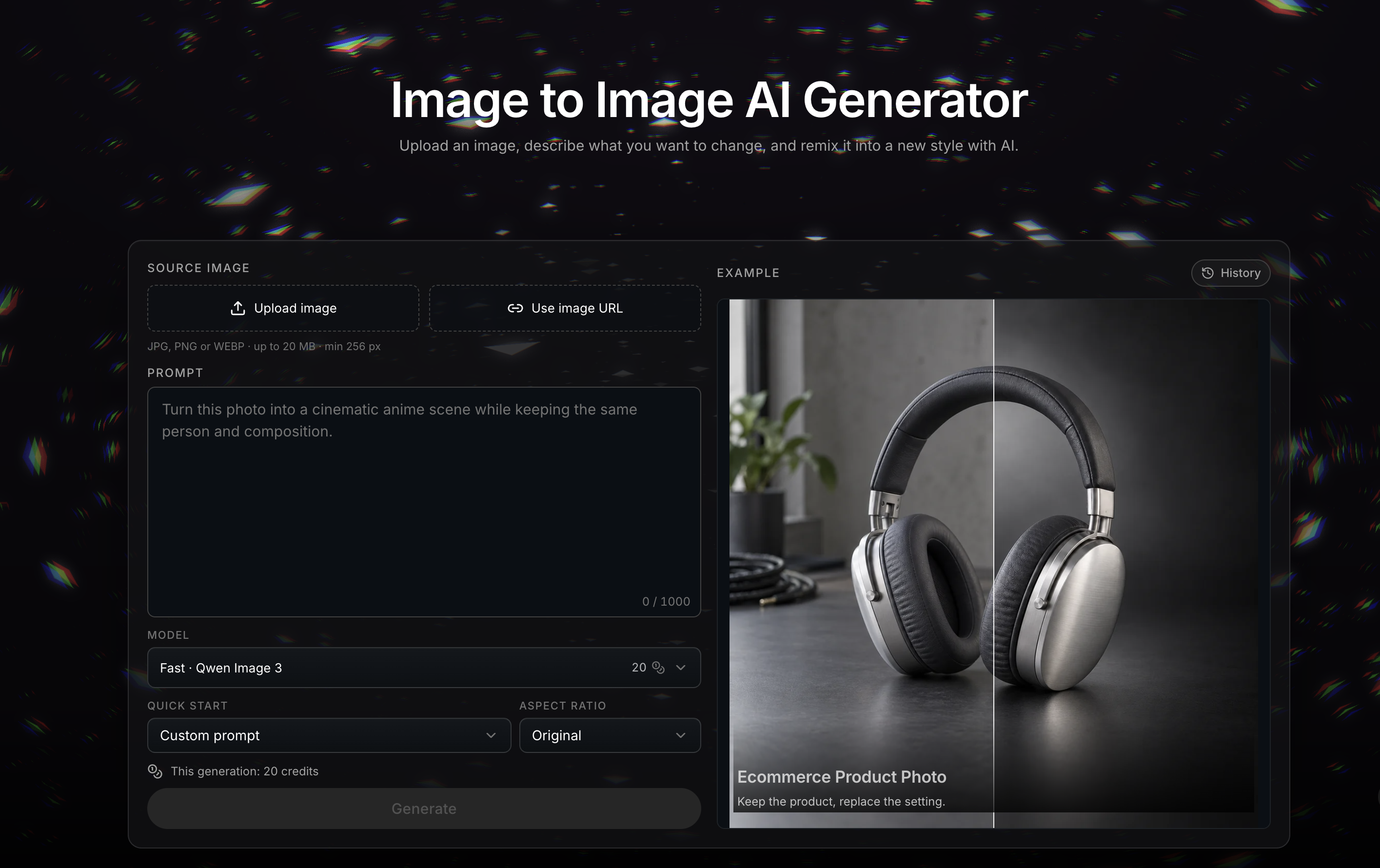
- Change only what you want in a photo and keep the subject, pose, and composition intact. Image to Image editing starts from your existing picture instead of generating a new scene from text, and your prompt names exactly which details to preserve.
- Get clean, marketplace-ready product photos without a reshoot. AI background replacement swaps cluttered settings for pure-white or styled backdrops on your existing product image.
- Turn rough sketches and graphite drawings into fully colored, polished illustrations. Sketch-to-illustration conversion keeps your original composition while adding finish.
- Create new looks from a single image, such as anime-style portraits, moody cinematic city scenes, or a paper object recast in glass. AI restyling, relighting, and material changes edit one attribute and leave the rest untouched.
- Reproduce a reference image's style in your preferred AI generator. Prompt Builder converts an image to a structured, editable prompt formatted for Midjourney, Stable Diffusion, and Flux.
- Publish accessible, searchable images faster. Describe Image writes alt text and image descriptions and answers specific questions about what a picture contains.
- Land the result you want before you download it. Preview each output, refine your prompt, regenerate as often as needed, and switch between multiple AI models, including the fast Qwen Image 3.
- Keep your output ready to use on any channel. An "Original" aspect ratio setting preserves your source format, and every download comes without a watermark.
- Start from the files you already have. Upload JPG, PNG, or WEBP images up to 20 MB, or paste an image URL.
- Control your spending across every tool. A single shared credit balance covers editing, prompt building, and image description with no separate subscriptions, credit costs appear before each generation, and new accounts receive free welcome credits.
Pros & Cons
From the listing; not yet checked by our editors.
Pros
- Visual anchor preserves composition
- Precise pose retention control
- Material transformation specific editing
- Background replacement with aspect lock
- Aspectratio lock option
- Multimodel selection flexibility
- Prompt Builder autogenerates prompts
- Structured prompts for Stable Diffusion
- Compatibility with Midjourney syntax
- Flux model support included
- Image URL input support
- Supports JPG/PNG/WEBP 20MB
- Minimum 256pixel dimension requirement
- Iterative prompt refinement workflow
- Creditbased generation transparency
- Fast lowcredit model option
- Ecommerce photo cleanup tool
- Sketch-toillustration conversion feature
- Interior redesign preview capability
- Relighting scenes with lighting control
- Anime style portrait conversion
- Professional headshot generation from casual
- Consistent campaign asset variations
- Material swap (paperglass)
- Preserve folds and silhouette
- Preserve camera angle unchanged
- Structured prompt language export
- Alttext generation via Describe Image
- Q&A about image content
- Integrated image utilities suite
- Threestage simple UI workflow
- Supports up to 1000character prompts
- Model credit requirement display
- Customizable aspect ratio options
- Highresolution output download
- Retains original framing automatically
- Controlled editing versus full replacement
- Supports product image enhancements
- Enables consistent visual identity
- Rapid generation with Qwen Image 3
- Crossmodel prompt translation feature
- Detailed prompt templates provided
- Preserves spatial relationships accurately
- Handles complex background changes
- Supports transparent background removal
Cons
- Credit consumption per generation
- File size capped at 20MB
- Supports only JPG/PNG/WEBP
- No batch image processing
- Limited model selection options
- Prompt limited to 1000 characters
- Cannot set custom resolution
- Missing region masking feature
- Cloud-only, no offline mode
Alternatives to ImgRemix
Tools that share the most tags with ImgRemix.
- EzRemove
Browser tool that removes the background from a photo and returns a transparent PNG.
Freemium
Not listed
Nov 24, 2026
- Dewatermark
Erase any watermark automatically in seconds using AI detection, even complex multi-layered or color-blended ones
Freemium · from $5/month
$5/month
Not yet checked
- Remove Background by Picsart
Eliminate manual editing and process thousands of product images automatically with AI-powered background removal that scales with your production needs
Freemium · from $10/month
$10/month
Not yet checked
- UnblurImage AI
Rescue blurry photos ruined by motion or poor focus with AI algorithms that refine each pixel for maximum sharpness
Freemium · from $3.90/month
$3.90/month
Not yet checked
- Photoleap
Transform any photo into professional quality with AI enhancement that perfects colors, lighting, and details
Free trial · from $3.99/month
$3.99/month
Not yet checked
- RemoveMark
Get watermark-free Sora videos instantly without downloading software using our web-based platform
Freemium · from $9.90/month
$9.90/month
Not yet checked
Reviews
Rate this tool
Loading reviews...
Frequently asked questions
How do I upload an image to ImgRemix?
To upload an image, click the “Upload image” button on the ImgRemix interface, then select a JPG, PNG, or WEBP file (up to 20 MB and at least 256 px on the short edge) or drag and drop the file into the upload area.
Can I use an image URL instead of uploading a file on ImgRemix?
Yes, ImgRemix accepts an image URL as an alternative to uploading a file; you can paste the URL into the provided input field.
What file formats and size limits does ImgRemix accept?
ImgRemix supports JPG, PNG, and WEBP formats, with a maximum file size of 20 MB and a minimum dimension of 256 pixels on the short side.
How do I tell ImgRemix what parts of the picture to keep and what to change?
You tell ImgRemix what to keep and what to change by writing a clear prompt that explicitly states the elements to preserve (e.g., pose, composition, subject) and describes the desired modifications (e.g., style, background, material).
Does ImgRemix keep the original aspect ratio automatically?
ImgRemix includes an aspect‑ratio control that can automatically retain the original image’s format when you select the “Original” option.
Can I change the background of a product photo with ImgRemix?
Yes, you can replace or modify the background of a product photo by specifying the new background style in your prompt (e.g., “remove the original background and create a clean, pure‑white marketplace product image”).
How many credits does one remix generation cost on ImgRemix?
A single remix generation typically costs 20 credits, though the exact credit requirement may vary with the selected model and settings.
Which AI models can I choose from in ImgRemix?
ImgRemix offers multiple generation models; the default fast model shown is Qwen Image 3, and the platform also supports prompts compatible with Midjourney, Stable Diffusion, and Flux via the Prompt Builder.