Overview
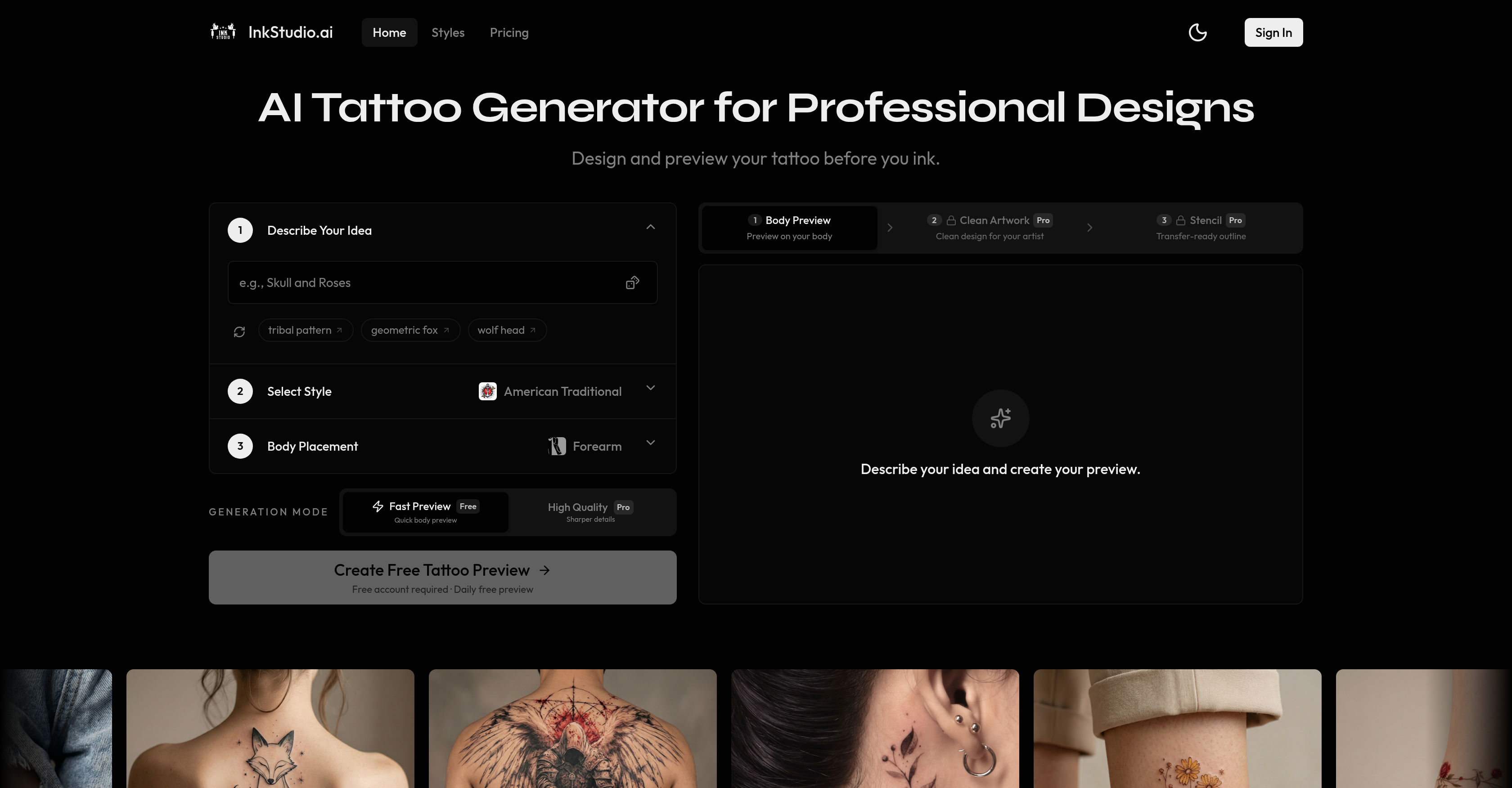
- See exactly how your custom tattoo will look on your body before you commit, using a realistic body placement preview that shows the design on your actual skin.
- Choose from 28 distinct tattoo styles—including Traditional, Japanese, Blackwork, Watercolor, Geometric, Minimalist, and Neo-Traditional—to match your exact aesthetic vision.
- Deliver artist-ready stencil linework directly to your tattoo artist, eliminating the guesswork and back-and-forth from the design process.
- Export high-resolution artwork for further refinement, giving you a clean, detailed base to perfect before your appointment.
- Get a quick preview of your tattoo idea in seconds with Fast mode, then switch to High Quality Pro mode for sharper, more detailed visuals before finalizing.
- Create a truly unique tattoo design every time, because each generated piece is built from your specific idea, style selection, and body placement.
- Make informed decisions about your body art by visualizing the final outcome on any body area, reducing the risk of regret after inking.
Pros & Cons
Pros
- Realistic tattoo preview
- Customizable tattoo styles
- User-friendly process
- Variety of styles (28)
- Fast preview mode
- High-quality pro mode
- Realistic body placement feature
- Generates high-resolution artwork
- Produces stencil linework
- Free account for preview
- Pro Passes for additional services
- Generates unique designs
- Promotes informed tattoo decisions
- Tattoo idea customization
- Body area selection
- Variety of tattoo styles
- Quick and sharp preview modes
- High resolution artwork export
- Clean Artwork Pro
- Creation of stencil linework
- Tool aids tattoo artists
- Artist-ready design production
- Promotes accurate tattoo designs
- Turns ideas into designs
- Ability to export designs
- Suitable for professional use
- Artwork ready for refinement
- Two generation modes
- Body preview feature
- Daily free preview
- Sketch ready designs
- Clean design for artists
- Transfer-ready outline
- Visible on multiple body areas
- Available in various styles
- User-focused design
- Promotes body art personalization
- Quality control of design
- Export in high resolution
- Supports style selection
- Includes placement aspect
- Dedicated for real tattoos
- Fit preview in actual body area
- High resolution for detail orientation
- Pro level stencil production
- Supports tattoo style exploration
- Free usage right
- Automatic renewal of Pro Passes
- Designed for informed decisions
- Aids professional tattoo designs
Cons
- Limited to 28 styles
- Quality dependent on description
- Only two generation modes
- Pro Passes for extra services
- Unconfirmed accuracy of body preview
- High-resolution exports not free
- Design rights not mentioned
- Automatic Pro Passes renewal
- No offline functionality
Reviews
Rate this tool
Loading reviews...
❓ Frequently Asked Questions
InkStudio.ai is an artificial intelligence-powered tool that revolutionizes the tattoo design process. It provides users the ability to generate and preview tattoo designs based on their personal ideas, explore various styles, and envisage how the design would look on their body prior to being inked.
InkStudio.ai's AI tattoo generator transforms a user's tattoo idea into a realistic preview. Users begin by describing their tattoo idea, then select a style from 28 options, and finally decide on body placement for the design. Users can then preview the design in both low and high quality before settling for the final design.
InkStudio.ai offers a variety of styles to cater to different preferences. Styles include American Traditional, Fine Line, and other popular styles, making a total of 28 options available.
The High-Quality Pro mode on InkStudio.ai supplies users with a sharper-detailed preview of the tattoo design. This mode is meant for users who desire a more detailed and distinct view of how their design will look like on their body.
The fast preview mode on InkStudio.ai is designed for a quick body preview of the tattoo design. It gives a swift overview of the users' tattoo idea transformed into an actual design and how it'd look like on their body.
The feature of realistic body placement on InkStudio.ai shows how the design fits on the actual body area. This helps users visualize their tattoo placement better and make informed decisions before getting inked.
InkStudio.ai provides high-resolution artwork for its users. This ensures clean, quality visuals of the tattoo designs.
The Pro Pass on InkStudio.ai provides additional services beyond the basic functionality. While the basic functionality allows for a free tattoo preview, Pro Passes unlock extra services, enhancing user experience and providing further refinement tools for the designs.
Yes, the designs generated by InkStudio.ai are unique, tailored to each user's distinct preferences and differently created based on each user's input.
Yes, a free account is required to utilise the features of InkStudio.ai, including the free tattoo preview feature.
InkStudio.ai generates two types of artwork: clean, high-resolution artwork of the tattoo design for further refinement, and professional-quality stencil linework that is accepted by tattoo artists for direct application.
There are 28 styles available on InkStudio.ai for users to select from based on their distinct preferences.
Yes, with InkStudio.ai, users can preview the tattoo design on their actual body. This realistic preview aids users in making decisions on design and placement before inking.
Once InkStudio.ai generates the high-resolution artwork for the tattoo design, users can refine the artwork. However, the website does not specify the tools or methods available for refinement.
On InkStudio.ai, describing a tattoo idea involves inputting the details of your imagined tattoo into the AI's user interface. The AI then takes your input and tries to create the closest possible match in visual form.
Yes, the stencil linework provided by InkStudio.ai is accepted by tattoo artists. The tool generates high-quality stencil linework suitable for professional use.
The style selection on InkStudio.ai is part of the user-friendly design process, where you select from 28 available styles after describing your tattoo idea, helping the AI generate a design closely aligned with your preferred style.
Yes, you can try InkStudio.ai for free. However, a free account is required even for the free tattoo preview.
Yes, InkStudio.ai provides tattoo design and previewing services, allowing users to visualize their tattoo designs on their body before actually getting inked.
Yes, the AI on InkStudio.ai generates artist-ready designs. From high-resolution artwork ready for refinement to stencil linework suitable for professional transfer, InkStudio.ai makes sure that the design is ready for the artist's use.
InkStudio.ai offers an array of styles including but not limited to American Traditional, Fine Line, Japanese, Blackwork, Watercolor, Geometric, Minimalist, and Neo-Traditional. In total, 28 different styles are available for users to select from.
The purpose of the fast preview mode on InkStudio.ai is to provide users with a quick, preliminary preview on their actual body area. This enables users to rapidly see how their chosen design fits their body before committing to the tattoo.
The realistic body placement feature on InkStudio.ai is designed to allow users to visualize how the proposed tattoo will look on the chosen body area. This gives a better approximation of the final outcome, thus aiding users in making more informed decisions about inking their bodies.
Using InkStudio.ai, you can create high-resolution artwork by describing your tattoo idea, selecting a style and a body placement, and then using the High Quality Pro mode. Your resulting design can then be exported as clean, high-resolution artwork that's ready for further refinement by a tattoo artist.
Yes, InkStudio.ai is capable of generating professional stencil linework. These generated stencils are designed to be used by tattoo artists, serving as an accurate template for the tattoo process.
To get a free tattoo preview on InkStudio.ai, you will need to create a free account. With this account, you are eligible for a daily free preview of your tattoo design using their fast preview mode.
The Pro Passes on InkStudio.ai offer users access to additional benefits. Beyond the basic functionality, a Pro Pass allows for high-quality generation of tattoo designs, clean high-resolution artwork export, and the generation of transfer-ready tattoo stencil outlines for use by tattoo artists.
The process of designing a tattoo on InkStudio.ai involves: describing your tattoo idea, selecting one from the variety of styles available, and deciding on your preferred body placement. Once these steps are completed, InkStudio.ai then generates a realistic preview of your proposed design on the chosen body area.
The 'generation mode' on InkStudio.ai has two options. The 'Fast' option which provides a quick body preview of the design, and the 'High Quality' which provides sharper details in the preview.
You can export your high-resolution artwork from InkStudio.ai after using the AI to generate your tattoo design. This artwork will be clean and ready for further refinement by your chosen tattoo artist.
InkStudio.ai offers a total of 28 different tattoo styles. These include American Traditional, Fine Line, Japanese, Blackwork, Watercolor, Geometric, Minimalist, and Neo-Traditional among others.
With InkStudio.ai, you can preview your designed tattoo on any body area. This allows you to see how your tattoo will fit and look on the chosen part of your body.
Yes, InkStudio.ai can aid in informed decision-making about body art. It allows you to see realistic body placement previews of your desired tattoo design. Combined with its feature of clean, high-resolution artwork export and professional stencil linework, you will have a clear idea of the expected final outcome of the tattoo process.
Features that make InkStudio.ai unique for getting a tattoo include its ability to generate realistic tattoo previews based on a user's specified parameters, providing high-resolution and ready-to-use artwork, stencil linework generation, a variety of styles to choose from, and realistic body placement preview. It also notes that the designs generated are unique to each user's specifications enhancing the individuality of the tattoo experience.
The difference between a free and Pro Pass on InkStudio.ai mainly lies in the access to additional services and enhanced features. The free account offers a daily free tattoo preview, while the Pro Pass offers high-quality generation of designs, high-resolution artwork export, and the generation of professional stencil linework.
Yes, the InkStudio.ai site contains a number of previous tattoo designs as samples to showcase the capabilities of the AI tool. Examples include a variety of styles from Fine Line, Traditional, Japanese, Blackwork, and many more.
Pricing
Pricing model
Freemium
Paid options from
$29.99/month
Billing frequency
Monthly
Related Videos
Ink Studio AI REVIEW- Does This TATTOO DESIGN GENERATOR Deserve The Hype? See(View Before Use
Every View Matters•17 views•Nov 11, 2025