
Overview
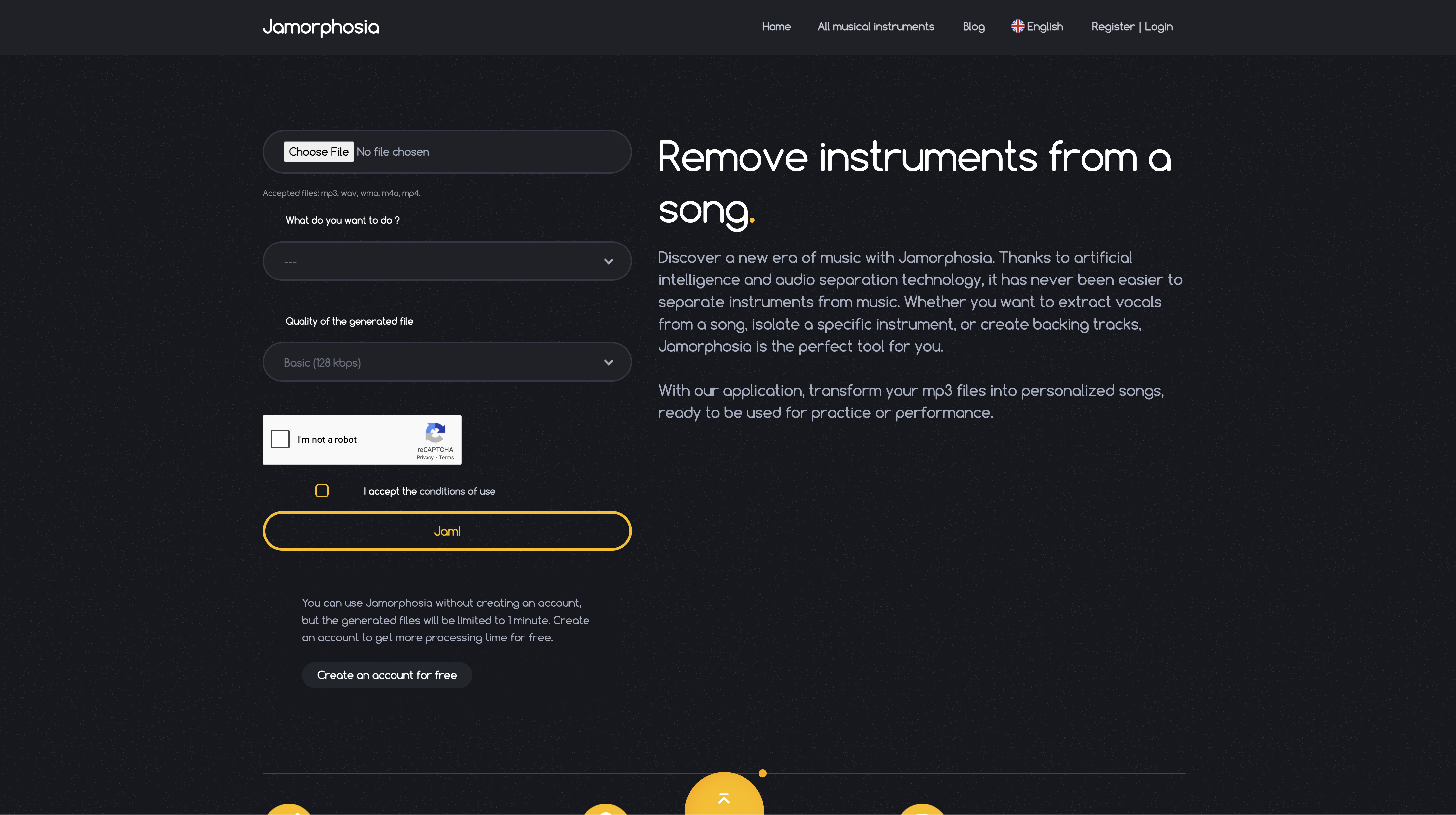
- Practice any instrument perfectly by isolating its track from original songs using AI-powered instrument extraction
- Create professional karaoke tracks instantly by removing vocals completely with advanced vocal removal technology
- Build custom backing tracks for performances by removing specific instruments you don't need from any song
- Access your separated tracks anytime with permanent library storage for all your processed music files
- Process full songs without time limits by creating a free account for extended file processing capabilities
- Share your custom tracks directly to social media platforms using built-in sharing links for Facebook, Twitter, and Reddit
- Get studio-quality instrument separation with output files up to 320 kbps maximum quality for professional results
- Work with any audio format including MP3, WAV, FLAC, M4A, and MP4 files for maximum compatibility
Pros & Cons
Pros
- Splits audio into multiple tracks
- Allows instrument-specific isolation
- Removes vocals for karaoke
- Analyze and split mp3 files
- Creates backing tracks
- Stores generated tracks in library
- Various file quality options
- Basic usage without account
- Extended processing time with account
- Multilingual platform
- Supports multiple file formats
- Remove or extract specific instruments
- Support for practice across instruments
- User-friendly interface
- Customizable track creation
- Practice with original music
- High-quality audio outputs
- Backtrack algorithm for accuracy
- Can split complex music compositions
- Convenient and efficient for musicians
- Enhances music playing experience
- Instant track creation
- Good utilization for music education
- Personal library for created tracks
- Best tool for band rehearsals
Cons
- Only supports mp3 uploads
- Limited file size (10MB)
- 1 minute limit without account
- No batch processing
- No option for lossless quality
- No API for integrations
- Doesn't support all musical instruments
- Multiple quality options may confuse
- No mobile app available
Reviews
Rate this tool
Loading reviews...
❓ Frequently Asked Questions
Jamorphosia is an AI-powered tool designed to analyze and split music tracks into separate tracks for each instrument. It provides various features to musicians, such as removing specific instruments from a song, isolating a particular musical instrument, or even erasing vocals to create a karaoke version of a song.
Jamorphosia's AI uses a backtrack algorithm to analyze uploaded mp3 files. It identifies different instrumental and vocal components within the music and then automatically divides these components into separate tracks representing each instrument.
Yes, Jamorphosia is proficient at removing vocals from a song. This feature allows users to create a karaoke version of the song.
Jamorphosia offers numerous utilities to musicians. It allows them to remove any instrument from a song or isolate a particular musical instrument. This way, musicians can practice their own part along with the original music or they can create new music by adding their recordings onto tracks with instruments removed.
Jamorphosia allows musicians to practice individual instruments by removing unwanted elements from existing songs. For instance, a guitarist can practice by isolating the guitar track, or a singer can practice by having all the instrumental tracks while removing vocals.
Jamorphosia provides different quality options for the generated files. These include Basic quality with 128 kbps, Superior quality with 192 kbps, and Maximum quality with 320 kbps.
Yes, if you use Jamorphosia without an account, the processing time for files is capped at 1 minute.
Establishing an account on Jamorphosia offers users the benefit of extended processing time, which allows for more comprehensive editing of longer music files.
Yes, Jamorphosia supports multiple audio file formats for splitting. These include mp3, wav, wma, m4a, mp4, and flac.
Yes, the tracks that users create in Jamorphosia are stored in their library for later use.
Absolutely, by removing vocals from a song using Jamorphosia, users can easily create a karaoke version of any song.
Jamorphosia splits the music tracks using artificial intelligence and a backtrack algorithm. The AI analyzes the mp3 files and separates the tracks for each instrument present in the audio.
Yes, Jamorphosia allows users to remove specific instruments from a song. The user can select whether they want to keep or remove the track of each instrument present in the song.
Jamorphosia accepts music files up to a maximum size of 10MB.
Yes, before using Jamorphosia, users are required to accept the website's conditions of use.
With Jamorphosia's feature of removing vocals from a song, users can practice singing along to their favorite songs.
As an AI-powered tool, Jamorphosia is designed to provide accurate isolation of tracks, allowing users to separate vocals and different instruments from complete songs.
With Jamorphosia, users can extract individual instruments from a song by selecting the 'extract' option for a specific instrument while uploading the music file. The AI then creates a separate track for the selected instrument.
Jamorphosia provides sharing links for major social media platforms including Facebook, Twitter, and Reddit. Users can employ these links to share the tracks they create using Jamorphosia.
The maximum quality of files generated by Jamorphosia is 320 kbps, referred to as the 'Maximum' option.
Pricing
Pricing model
Free Trial
Paid options from
$3.30
Billing frequency
One-time