Music Video Generator
Overview
- Publish a professional music video in minutes, not days, by uploading your song and letting AI analyze beats, tempo, and lyrics to generate a perfectly synced video.
- Own 100% of your video with full commercial rights for monetization on YouTube, TikTok, and Spotify Canvas, with no attribution required.
- Engage viewers with synchronized lyric subtitles that the AI automatically times to your song's rhythm for a karaoke-style experience.
- Launch videos optimized for any platform by selecting the exact aspect ratio—16:9 for YouTube or 9:16 for TikTok and Instagram Reels.
- Get unique, AI-generated visual scenes that match your song's mood and themes, creating original footage not available in stock libraries.
Pros & Cons
Pros
- Analyzes beats, tempo, lyrics
- User selects video style
- Synchronizes visuals to track
- No editing skills required
- Offers various themes
- Customizable aspect ratios
- Synchronized lyric subtitles
- Full rights to output
- Distributed across multiple platforms
- Gameplay footage available
- Motion graphics selection
- Fast video creation
- Professional Quality Result
- Custom video styles
- Video Looping
- Multimedia Tool
- Cross-Platform Compatibility
- Digital Rights Management
- Suitable for music industry
- Supports content creation
- Promotes music
- Seamless video loops
- Stage performance visuals
- Abstract visuals
- Lyrics overlay option
- Output suitable for YouTube, Instagram, TikTok
- No in-app editing restrictions
- Downloadable for external edits
Cons
- No in-app editing options
- Limited customization options
- Limited to preset styles
- Extra cost for different styles
- Long video generation time
- No multi-platform optimization
- Resolution limited to 1080p
- Cannot preview before purchase
- No support for multi-track upload
- No animated character options
Reviews
Rate this tool
Loading reviews...
❓ Frequently Asked Questions
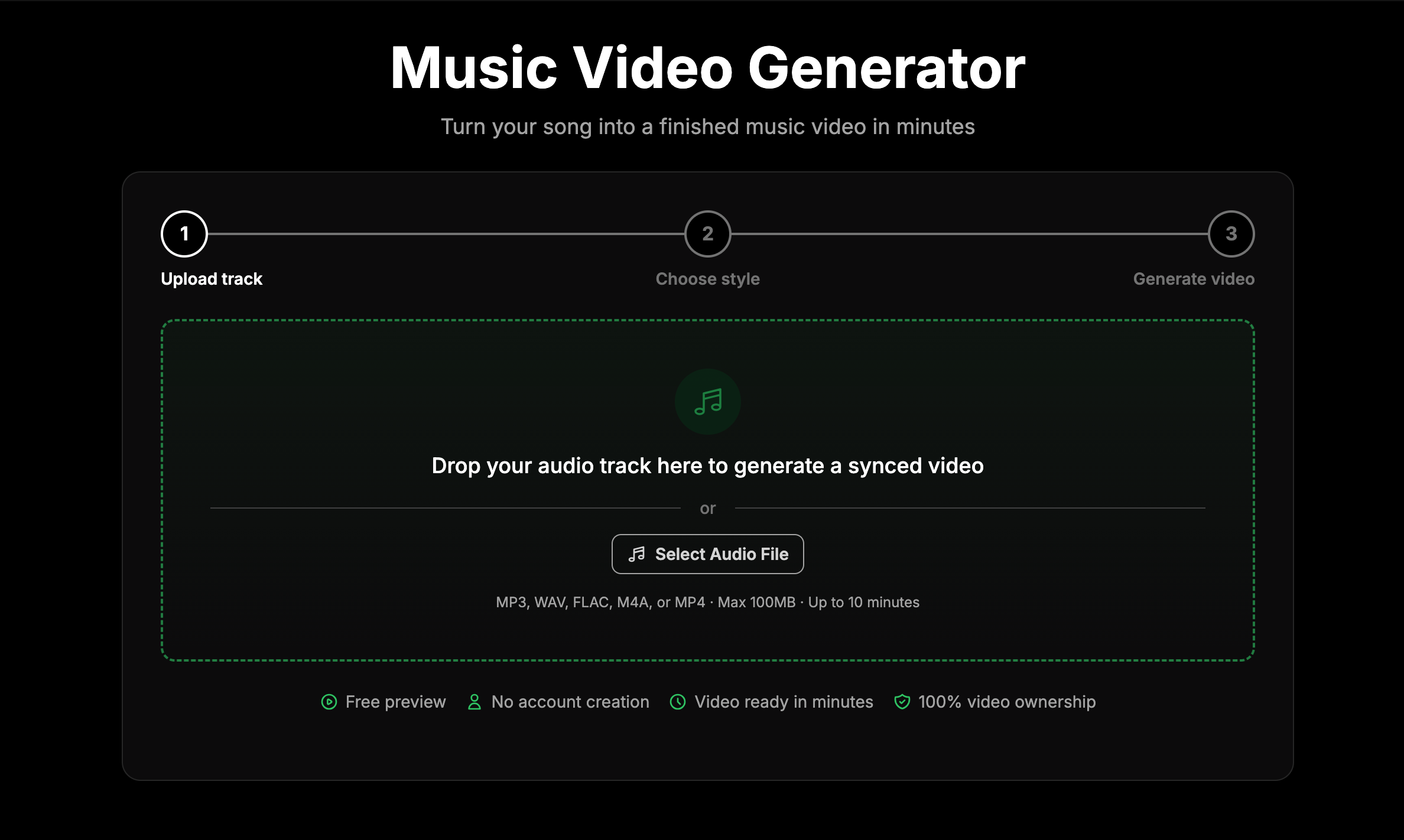
Music Video Generator is a tool that allows musicians to create visually compelling music videos without any editing skills. Users begin by uploading their music track. The system then analyzes the beats, tempo, and lyrics of the song. Afterwards, the user selects a video style from various AI-generated visuals, gameplay footage, or motion graphics. After a style selection, Music Video Generator syncs the chosen visuals with the uploaded track to create a finished music video ready for sharing. The tool offers various video themes and aspect ratios, and also has the option of synchronized lyric subtitles.
Music Video Generator analyzes your song by examining its beats, tempo, and lyrics. This process enables it to understand the rhythm and feel of your track, resulting in a more accurate representation in the generated video.
Music Video Generator offers a variety of styles to choose from. These options range from AI visuals, gameplay footage, and motion graphics. Your chosen style will then be synchronized with your audio track to create a finished music video.
Yes, Music Video Generator allows you to select a theme for your video. The available themes are designed to complement a variety of music and video styles, ensuring the output closely matches the aesthetic of your choice.
Music Video Generator offers two main aspect ratios for your video, these are 16:9, which is best for YouTube, and 9:16, which is most suitable for TikTok and Instagram.
Yes, Music Video Generator supports the display of synchronized lyric subtitles in your video. This feature can be very helpful to engage your audience with your lyrics as well as the visual elements of the video.
Absolutely. Once your music video is created by Music Video Generator, you have the full rights to the output. You can utilize and distribute your video across multiple platforms according to your preferences.
You are free to distribute your videos to any platform you desire after using Music Video Generator. Examples of potential platforms include YouTube, Instagram, TikTok, and Spotify Canvas.
Music Video Generator focuses on simplifying the video creation process, which necessitates minimization of complex features like in-app editing. This tool is designed for speed and straightforwardness. Any extra edits or changes to the video should be accomplished using an external video editing software.
The time it takes to generate a video using Music Video Generator can vary but most videos are generated in 3-5 minutes. If you opt for fully AI-generated footage, it might take a bit longer — typically around 6-10 minutes.
Yes, every video created by Music Video Generator is unique to your song. The AI takes into account your song's lyrics, BPM, and emotional tone to create visuals that match your music's vibe.
Music Video Generator's refund policy ensures a full refund if your video fails to generate or encounters a technical issue. However, refunds based on creative preference aren't provided as each video is generated on-demand using AI and cloud resources.
There is no resolution limit stated for videos created by Music Video Generator. However, the videos are generated at a standard resolution of 1080p for crystal clear visuals and text.
Music Video Generator isn't built for complex editing, hence once a video is generated, no in-app edits can be made. Any further changes or edits must be made using your own video editing tools.
Music Video Generator matches visuals to your song by analyzing the beats, tempo, and lyrics of your track. It then uses these parameters to align the chosen visual elements and create a well-synced music video.
Absolutely, Music Video Generator does support lyrics overlay. This feature allows the display of synchronized lyrics subtitles in your video, providing a karaoke-style experience for the viewer.
The costs for using Music Video Generator differ based on the style selected. AI imagery is priced at $4, gameplay footage at $2, short cinematic AI videos at $12, and audio-reactive shapes and particles at $3.
The AI in Music Video Generator creates a video based on your lyrics by first analyzing them along with beats and tempo of the song. It uses this information to generate visuals, gameplay footage, or motion graphics that are unique and representative of your song's themes.
Yes, you surely can monetize the videos generated by Music Video Generator. Once your video is created, you own all rights to it and can use it in whatever way deals appropriate including uploading to platforms where you can monetize them.
The reason Music Video Generator doesn't offer refunds based on creative preference is mainly because each video produced is unique and utilizes resources to create. Since the service is on-demand and uses AI and cloud resources to customize videos according to your song, creative preference does not qualify for a refund justification.
Music Video Generator operates through a three-step process. Users begin by dropping the required audio file which the system analyses for beats, tempo, and lyrics. The second step involves the selection of a desired visual style. Here, users can pick from AI visuals, gameplay footage, or motion graphics. With the style chosen, Music Video Generator generates the music video in the third step. The finalized video is synced perfectly to the music, with the seamless looping of the chosen visuals.
Music Video Generator accepts audio files in MP3, WAV, FLAC, and M4A formats.
Music Video Generator implements AI technology to analyze the uploaded track. This process includes analyzing beats, and the tempo, so it can synchronize those elements to the visual style selected by the user. Additionally, it analyzes the lyrics, which it uses to generate appropriate AI visuals and seamless looping, if the lyrics overlay feature is activated.
Music Video Generator offers several styles to choose from. These include AI visuals, gameplay footage, and motion graphics. Additional styles feature stage performances, abstract visuals, cinematic narratives that represent the song's meaning and themes, frequency spectrum, particle storm, geometric pulse, and radial bars pulsing to each frequency band.
AI visuals with Music Video Generator refer to the visual patterns and footages created through artificial intelligence. These visuals, which could be cinematic imagery or short videos, are processed to loop seamlessly to the music. The AI interpretations are based on the song's lyrics and rhythm, ensuring visuals that match the musical mood and story.
Yes, Music Video Generator does automatically synchronize the chosen visuals with the music. Based on the beat, tempo, and lyrics of the uploaded track, the visuals fuse perfectly with the rhythm of the song.
Music Video Generator gives users an option to select from a variety of aspect ratios. You can choose widescreen 16:9 ratio, suitable for YouTube, or portrait 9:16 ratio, ideal for TikTok & Instagram.
Music Video Generator handles lyrics subtitles with an enabling feature. Users can choose to display lyrics in the video and the AI system ensures synchronization of these subtitles, matching them perfectly to the rhythm of the song.
Yes, you can distribute the generated music video across multiple platforms. Music Video Generator permits users to upload the output video on any platform of their choosing like YouTube, Instagram, TikTok, and Spotify Canvas among others.
Yes, you retain 100% of the rights over the music video made by Music Video Generator. You can use it as you please without any restrictions, including for monetization, promotions, or inclusion in your portfolio. No attribution is required.
Music Video Generator does not have any in-app editing options. The system generates the music video as a finished product. Any further modifications to the video need to be executed using an external tool.
Yes, Music Video Generator is equipped to overlay lyrics subtitles on the video. Users can enable this feature, after which the AI system ensures perfect synchronization of the lyrics subtitles with the rhythm of the song.
Yes, there are several options available to customize your music video in Music Video Generator. You can choose the video style, overlay synchronized lyrics subtitles, and pick an aspect ratio. The system also offers color theme options within each style.
Music Video Generator supports MP3, WAV, FLAC, and M4A formats for audio uploads.
The timeline for video generation in Music Video Generator varies based on the option chosen. Most videos take approximately 3-5 minutes to generate. The AI Video option, which creates entirely AI-generated footage, usually takes longer - around 6-10 minutes.
The videos created by Music Video Generator are of professional quality, generated at 1080p (Full HD). The clarity of visuals and texture contribute to full resolution outputs across video styles and aspect ratios.
The AI Video option with Music Video Generator produces original footage by taking inspiration from the themes of the song. The AI technology ensures that the visuals harmonize with the song's lyrics, rhythm, and mood. This promises fully AI-generated unique visual content for each song.
Yes, you can use your music video, created by Music Video Generator, for commercial purposes. Once the video is generated, you hold all rights for its use without restrictions and no attribution is required. This includes uses like monetizing, promotion, or including it in your commercial repertoire.
Music Video Generator supports aspect ratios for social media platforms like Instagram and TikTok. The system lets users select a portrait 9:16 ratio, which is the best fit for Instagram and TikTok.
While Music Video Generator doesn't provide options to modify your video following generation, you certainly can alter the video after downloading it. You can download the video and use your own video-editing tools for further edits or additions to the basic structure provided by Music Video Generator.
Pricing
Pricing model
Paid
Paid options from
$2
Billing frequency
One-time