
Overview
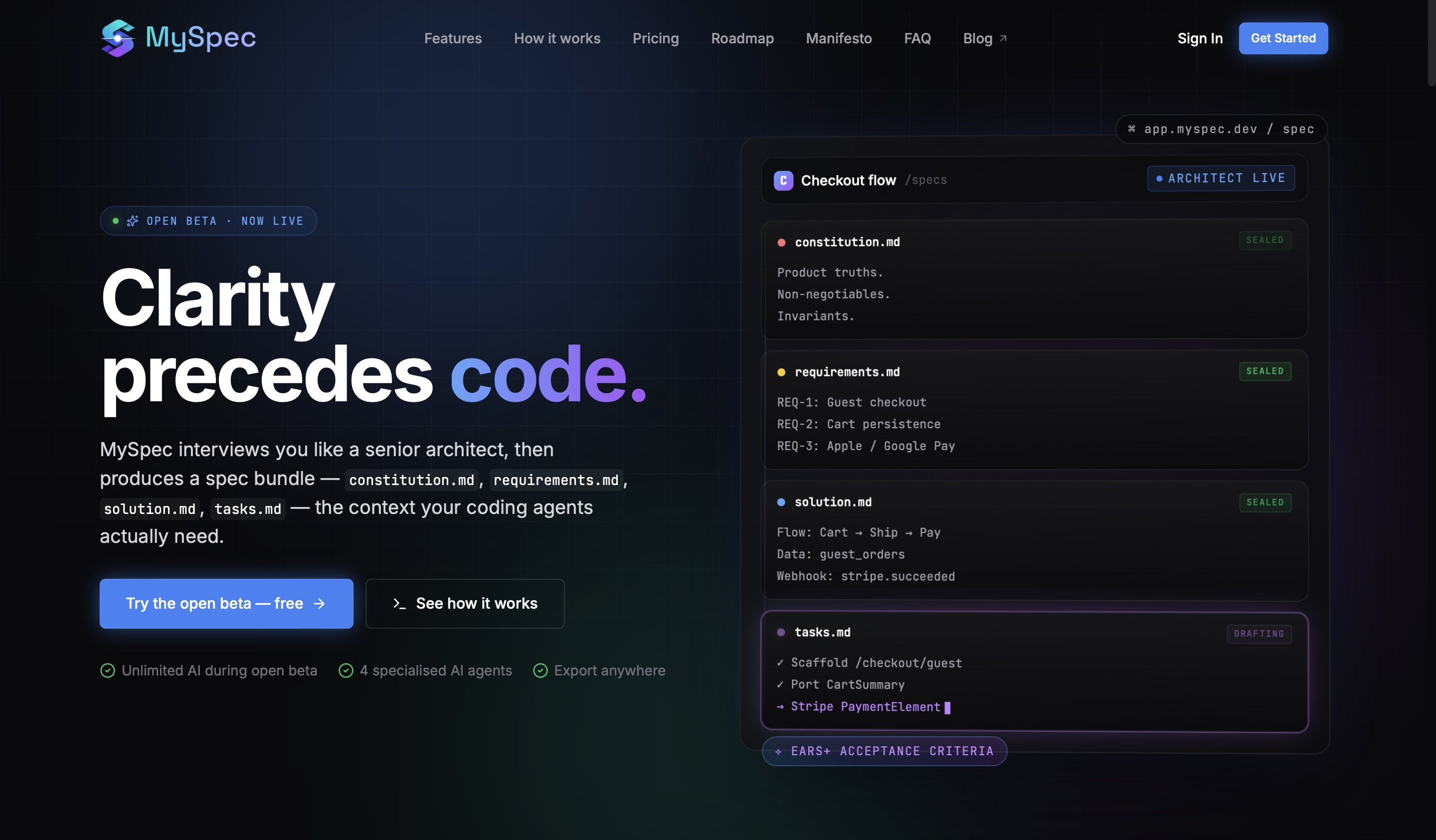
- Eliminate vague requirements and prompt chaos by transforming rough ideas into structured technical specifications with a structured interview that extracts scope, flows, and edge cases.
- Ship stable code faster by feeding Cursor or Claude Code a complete spec bundle—constitution.md, requirements.md, solution.md, tasks.md—exported as a ZIP or dropped into .specs/.
- Prevent context loss across AI conversations by maintaining a single, version-controlled specification bundle where every change lands with a diff for full traceability.
- Reduce technical debt from unclear prompts by using EARS+ acceptance criteria that deliver testable WHEN/IF/THE-system-SHALL clauses with every requirement.
- Validate architecture decisions instantly with a live Mermaid preview that renders flowcharts, ER diagrams, and sequence diagrams as you refine the solution.md.
- Keep all stakeholders aligned by editing the entire spec bundle in plain English, making complex technical adjustments accessible to non-developers.
- Move from idea to implementation in four steps—paste a paragraph or voice note, answer the interview, vibe-spec the bundle with live diagrams, then export directly to your AI coding agent.
Pros & Cons
Pros
- Facilitates Spec Driven Development
- Eliminates idea ambiguity
- Generates robust technical specifications
- Functions like digital senior architect
- Conducts intelligent interviews for requirements
- Generates comprehensive specification bundle
- Captures scope, flows, edge cases
- Allows alteration in plain English
- Features EARS+ acceptance criteria
- Offers real-time Mermaid diagram previews
- Exports bundle in versatile formats
- Four-step idea to spec delivery
- Integration capabilities with GitHub, VS Code
- Version-controlled truth for changes
- Free and Pro versions available
- Unified source of truth in specs
- Testable EARS+ WHEN/IF/THE-system-SHALL clauses
- Live writing process with Mermaid
- Import rough idea feature
- Structured interview to clarify scope
- Allows further refinement of bundle
- Export bundle as ZIP or clipboard copy
- Can export into .specs/ for tool use
- Agents capture idea details via single conversational interface
- Structured spec bundle provides context
- Live previews of diagrams
- Scenario-based questioning
Cons
- No offline access
- Workflow not customizable
- Limited integration options
- Limited to English
- ProVersion costs
- No multi-device syncing
- No immediate GitHub integration
- No support for pictures
- No Collaborative workspace
- Doesn't support all coding languages
Reviews
Rate this tool
Loading reviews...
❓ Frequently Asked Questions
MySpec is an advanced AI tool designed for Spec Driven Development in coding projects. It functions as a digital senior architect, conducting smart interviews to extract and understand project needs. It then turns these into robust technical specifications, effectively turning vague ideas into well-defined blueprints for coding. Its features include EARS+ acceptance criteria, a live Mermaid preview for real-time rendered diagrams of flowcharts, ER diagrams, and sequence diagrams, and export capabilities in various formats.
MySpec handles ambiguity in coding projects by conducting intelligent interviews that help it understand project requirements, then generates robust technical specifications. The specifications act as a blueprint for coding, providing critical context information such as constitution, objectives, solutions, and tasks required.
In MySpec, there are four AI agents: Analyst, Architect, Designer, and Reviewer. Together, they navigate through a unified conversational interface to extract, understand, and capture scope, flows, and edge cases from an initial idea.
The conversational interface in MySpec is a single platform through which the four AI agents collaborate to capture the scope, flows, and edge cases from a preliminary idea. It extracts this information from a rough idea, without leaving a blank page.
The EARS+ acceptance criteria is a feature in MySpec that ships with every requirement, providing WHEN/IF/THE-system-SHALL clauses that are actuall testable. These criteria provide a layered understanding of project requirements that can be easily interpreted by both the development team and the AI.
The live Mermaid preview in MySpec is a feature that provides real-time rendered diagrams. As the solution.md is written, the diagrams - which include flowcharts, ER diagrams, and sequence diagrams - are rendered and visible to users for a visual representation of the project's process or architecture.
MySpec can generate a range of diagrams, offering visual representations of the project's process or system architecture. These include flowcharts, Entity Relationship (ER) diagrams, and sequence diagrams.
Yes, users can edit the specification bundle in MySpec. The tool allows you to make changes in user-friendly plain English, ensuring the updates remain comprehensible for all stakeholders.
MySpec allows users to export the finished bundle in different, versatile formats. These include downloadable ZIP files and copy to clipboard, as well as dropping into .specs/ for Cursor and Claude Code.
The process of using MySpec involves four steps. First, describe the idea by pasting a paragraph, slack threads, or voice notes. Second, answer the interview, where a structured back-and-forth clarifies scope, users, flows, and edge cases. Third step is Vibe Specification of the bundle where four markdown files render live with Mermaid diagrams, refine in chat as the agents keep them coherent. Finally, export to your agent where you can download the bundle as ZIP, drop into .specs/, and point Cursor or Claude Code at it.
Plans for GitHub and VS Code integration in MySpec include direct committing of specifications and in-editor access. MySpec also plans to offer enhanced Markdown editing in the VS Code environment.
MySpec facilitates Spec Driven Development by turning vague ideas into detailed technical specifications. By acting like a digital senior architect, it extracts and understands project requirements and uses this information to create a blueprint for the development process.
MySpec provides technical specifications that contain vital context information for a coding project. This includes the constitution of the project, the objectives, possible solutions, and tasks required for implementation.
MySpec conducts intelligent interviews by having a structured back-and-forth with the user to clarify scope, users, flows, and edge cases. The AI system inside MySpec operates these interviews, making it possible to glean the necessary information to create a comprehensive technical blueprint for the project.
The 'digital senior architect' feature in MySpec refers to the tool's ability to understand and create comprehensive project specifications, similar to a human senior architect's role. It conducts intelligent interviews to understand project needs, then generates technical specifications that act as detailed blueprints for coding projects.
The specification bundle in MySpec contains critical context information for a coding project. This includes constitution.md, requirements.md, solution.md, tasks.md, that are all necessary components for the project at hand.
Anyone involved in coding projects and needs help turning initial ideas into robust and detailed technical specifications can use MySpec. It's beneficial to both individual developers and development teams.
Plain English support in MySpec means that users can easily monitor and alter the specification bundle in a user-friendly way. All changes, including complex technical adjustments, can be made in plain English, making it accessible to all stakeholders.
The version-controlling feature in MySpec is designed to keep track of every change made in the specification bundle. Any modification of the bundle lands accompanied by a difference, ensuring all updates remain clear and trackable.
MySpec has three pricing plans: Free, Pro, and Team. The Free plan is for early users and offers unlimited access to AI, projects and specs, standard integrations, Markdown and Mermaid editor, ZIP export of spec bundles, and community support. The Pro plan is for serious builders and offers 5-times the AI limit and advanced integrations, including future GitHub and VS Code integrations. The Team plan is catered towards shipping teams and offers 10-times the AI limit of Free, team collaboration features, shared projects and roles, centralized billing.
MySpec is an advanced AI tool specifically designed to facilitate Spec Driven Development in coding projects. It acts like a digital senior architect that conducts intelligent interviews to understand project requirements and generates robust technical specifications, extracting the ambiguity inherent in ideas and converting them into actionable tasks.
MySpec works by conducting intelligent interviews to gather and understand the project requirements. Once the requirements are extracted, it generates a technical specification bundle that includes pivotal information such as constitution, objectives, solutions, and tasks necessary for the coding project. Users can conveniently monitor and alter the specification bundle using user-friendly plain English.
In MySpec, there are four distinct AI agents: Analyst, Architect, Designer, and Reviewer. They work together in a cohesive manner through a single conversational interface to capture scope, flows, and edge cases from an initial idea.
MySpec's specification bundle comprises of essential context information such as constitution.md, requirements.md, solution.md, and tasks.md that act as a blueprint for coding projects.
MySpec allows users to interact with and modify the generated specification bundle in plain English. This ability enables developers to keep the bundle in line with changing project requirements or any updates in the coding process.
Within the MySpec context, the EARS+ acceptance criteria refer to the requirements-clauses system to describe software product behaviors in a way that is easy to read, write, and test. Each requirement comes with testable WHEN/IF/THE-system-SHALL clauses.
The Mermaid live preview feature in MySpec serves an essential function by rendering real-time diagrams of flowcharts, ER diagrams, and sequence diagrams as the solution.md is written. This live previewing aids in making the spec-making process interactive and easier to understand.
MySpec streamlines the transition from an initial idea to a completed technical specification through a seamless four-step process. The steps include injecting an idea into the platform, answering the structured interview to clarify details like scope, users, flows, and edge cases, further refining the generated bundle, and finally, exporting the completed bundle in a preferred format.
Exporting the specification bundle prepared by MySpec can be done in various accessible formats. Users can download the finalized bundle as a ZIP file, copy it to the clipboard, or save it into .specs/ for utilization with other tools.
Version-controlled truth in MySpec refers to the tool's feature of supporting version control, allowing users to track changes with a difference (diff). This feature provides a historical record of modifications made to the specifications ensuring transparency and traceability.
MySpec is planning to include integration capabilities with GitHub and VS Code in its future updates. These integrations will amplify the tool's utility by streamlining the development workflow.
In the context of MySpec, .specs files refer to the files where the finalized spec bundles get saved and can be used with other tools. Users can export the completed specification bundle into .specs/.
The interview process in MySpec uses a structured back-and-forth dialogue to clarify project scope, users, flows, and edge cases from a rough idea. This intelligent interview imitates a senior architect's questioning, ensuring every pertinent detail gets extracted without gaps.
In MySpec, the free version is perfect for starters with an AI usage limit, standard integrations, and community support. In contrast, the pro version is designed for serious builders. It offers 5x the AI limit, extended integrations, higher precedence in email support, and access to features like GitHub and VS Code integrations when released.
MySpec offers diverse options for exporting the generated specification bundle. Users can download the complete bundle as a ZIP file, copy it to the clipboard, or save it into .specs/ for subsequent usage with other tools.
MySpec supports Spec Driven Development by converting vague ideas into strong technical specifications. Using intelligent interviews, it extracts and understands project requirements. It generates a specification bundle with essential context information for the coding project. Developers have the flexibility to edit this bundle in user-friendly plain English.
Yes, MySpec does handle ER diagrams and sequence diagrams. Its Mermaid live preview feature provides real-time rendering of these diagrams., aiding the visual understanding of any given workflow or data flow associated with the coding project.
The workflow of MySpec begins with an initial idea which gets elaborated through an intelligent interview process. After the detailed extraction of scope, users, flows, and edge cases, MySpec generates a specification bundle. Users can refine this bundle in an interactive chat with the AI agents. The finalized bundle can be exported to other tools or downloaded as a ZIP.
Future plans for MySpec encompass myriad features meant to enhance the platform's efficiency and integration capabilities. Some of these features include the integration with GitHub and VS Code, a new version with enhance AI capabilities, and advanced features including team collaboration, shared projects & roles, centralized billing and programmatic API.
MySpec is considered an AI-powered platform because of its utilization of intelligent AI agents that replicate the roles of a senior architect. These agents facilitate extraction of scope, flows, and edge cases from rough ideas and aid in multiple functionalities such as specification generation, editing, and version control among others.
Pricing
Pricing model
Freemium
Paid options from
Free tier available
Billing frequency
Monthly