
Podcastor
Overview
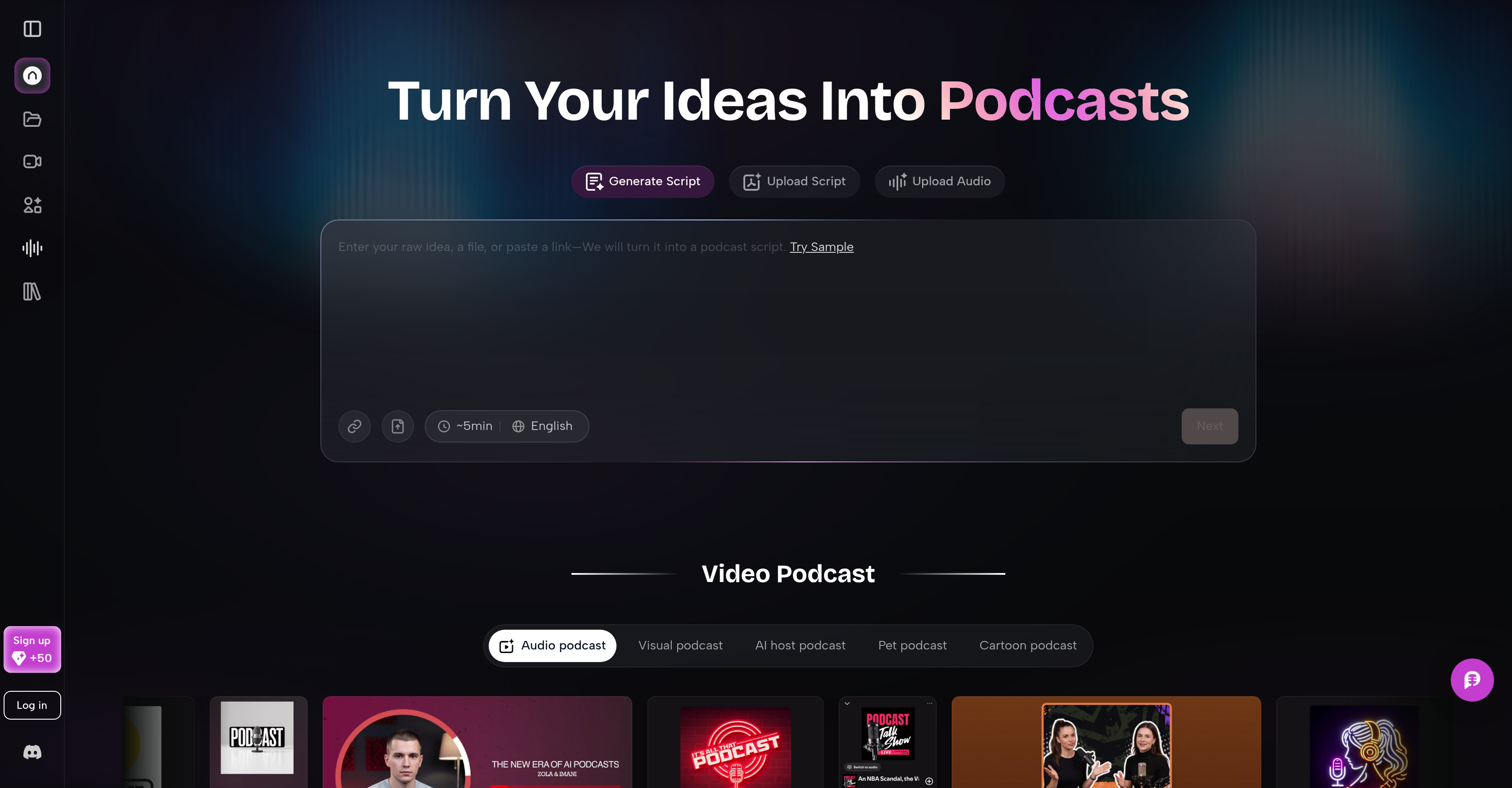
- Turn any raw idea, URL, PDF, or voice recording into a structured podcast script with clear chapters and natural conversation flow, eliminating manual scriptwriting from scratch.
- Produce professional audio episodes or video podcasts with split-screen dialogues, using realistic, cartoon, or pet-hosted AI avatars to match any brand or audience.
- Repurpose existing blogs, webinars, lessons, or product updates into fresh podcast content without re-recording, maximizing the value of every asset.
- Fine-tune every episode with captions, pacing adjustments, and enhancements directly in the editor, ensuring polished, accessible content before publishing.
- Publish directly to YouTube and TikTok from the studio, skipping separate upload workflows and getting episodes live faster.
Pros & Cons
Pros
- Content transformation into podcasts
- Accepts links, PDF, notes
- Processes voice recordings
- Auto-generates podcast scripts
- Organizes content into scripts
- Creates podcast chapters
- Extracts key insights
- Ensures natural conversation flow
- Creates audio and video podcasts
- Offers different voices, styles
- Can make split-screen dialogues
- Avatars vary: humans, cartoons
- Customizable captions
- Allows pacing control
- Content enhancement options
- Direct podcast publishing
- YouTube, TikTok integration
- Educational application
- Marketing application
- Repurposes existing content
- Supports multimedia publishing
- Allows voice format selection
- Perfect for individual creators
- Podcast studio for teams
- No need to start from scratch
- Eliminates messy transcripts
- Editable clean content
- Creates realistic, cartoon, pet-hosted podcasts
- Enables script fine-tuning
- Software workflows for teams
- Turns webinars into podcasts
- Converts lessons into podcasts
- Transforms product updates to podcasts
- Upload raw idea for script
- Upload URLs and documents
- Upload quick voice recordings
- Structured script generation
- Transforms text into podcast scripts
- Turns audio into structured scripts
- Facilitates repurposing of content
- Can generate video podcasts
- Structured script from any input
- Multiple voices for script narration
- Customizable podcast pacing
- Broad range of avatar choices
- Suitable for teaching aids
- Facilitates creativity in content creation
- Multiple hosting options for podcasts
- Seamless workflow for users
Cons
- Limited voice customization
- Limited enhancement options
- Might oversimplify complex content
- Undefined content security measures
- Limited video podcast formats
- No collaboration feature
- May lack emotional intelligence
- Not specified offline capabilities
- Absence of multilingual support
Reviews
Rate this tool
Loading reviews...
❓ Frequently Asked Questions
PodcastorAI leverages AI to transform any kind of content into a structured podcast script. Once the user provides the input, PodcastorAI processes it and converts into a neatly scripted content conducive to a podcast format, effectively eschewing messy transcripts and extracting key insights to inform a natural conversation flow.
PodcastorAI can accept various types of inputs to convert into podcasts. These include texts, links, PDFs, notes or even voice recordings, anything that can provide substantive content to be transformed into a podcast.
PodcastorAI facilitates the generation of both audio and video podcasts. It's not limited to just audio content. Users can opt to create standalone audio episodes, full-fledged video podcasts, or even engage in split-screen dialogues with AI hosts.
Yes, PodcastorAI aids in organising the podcast script. The AI processes the input content and organises it into clear podcast scripts. These scripts are then structured with chapters, key insights, and a natural conversational flow, replacing traditional transcripts with cleaner, more usable content.
PodcastorAI offers different voices, styles, and formats for podcast creation. These range from standalone audio episodes to full-fledged video podcasts and split-screen dialogues with AI hosts. The AI hosts can be in different avatars, providing a bunch of aesthetics to choose from.
Yes, the voice of the AI host in PodcastorAI can indeed be changed. Users have the flexibility to opt between different voices to craft podcasts that fit particular needs.
PodcastorAI does provide an option to have a cartoon character or a pet as an AI host. The AI hosts within PodcastorAI can embody various avatars, from realistic human figures to animated cartoons or pets, as per the user's preference.
PodcastorAI does offer options for adding captions and pacing enhancements. Further customizations such as these can be made within the tools interface, offering users the ability to refine their content to satisfaction.
PodcastorAI allows for direct publishing of podcasts on various platforms. These include but may not be limited to video sharing platforms such as YouTube and social media platforms like TikTok.
PodcastorAI can be an effective tool for educational purposes. It can be used to transform lessons, slides, study notes, and course materials into clear podcast episodes, making it easier for students to learn and share knowledge. This enables content repurposing for fresh consumption.
For marketing teams, PodcastorAI can be greatly beneficial. It can facilitate the transformation of webinars, product updates, reports, and long-form content into branded audio, video, and short-form podcast clips. This makes information dissemination and brand promotion more versatile and engaging.
Yes, PodcastorAI offers the functionality to repurpose existing content. It's not just about creating new content, but also about transforming existing content into podcasts for fresh and convenient consumption.
PodcastorAI places high emphasis on quality and accessibility. While it aims to streamline the podcast creation process, it does so without compromising on quality. Its services are accessible and intuitive to use, making it user-friendly for individuals and businesses alike.
Yes, PodcastorAI can indeed convert a PDF or voice recordings into podcasts. Any such form of content can be given as an input, from which it would create an engaging podcast script.
Yes, PodcastorAI does provide an option for split-screen dialogues with AI hosts. This feature aids users in creating dynamic content with interactive exchanges facilitated by the AI.
PodcastorAI structures a podcast script by utilizing its AI to process and organise the given input. It creates a structured flow with chapters and key insights, crafting a natural conversation flow. This eliminates traditional messy transcripts and provides more ready-to-use content.
Yes, PodcastorAI can generate podcasts that are suitable for YouTube and TikTok. Once the content is created and refined, users have the option to directly publish their content on these platforms, among others.
Several customizations can be made within the PodcastorAI interface. From selecting different voices and styles to adding captions, pacing, and enhancements, PodcastorAI offers a slew of tools for users to refine and tailor their podcast content according to specific needs.
With PodcastorAI, the possibilities of transforming content are extensive. Not only can it turn any content into a podcast script, but it also helps to organise this content into clear, structured scripts. It can be used to repurpose existing content into podcast formats, catering to various sectors from education to marketing.
PodcastorAI provides a robust tool for creating podcasts that fit specific needs. It can generate podcasts not only in different audio and visual formats but also allows for extensive customizations such as selecting different voices and styles, and even the AI host's avatar. It is an all-inclusive solution for a variety of podcasting needs.
With PodcastorAI, you can start with any kind of content. This includes a simple web link, PDF documents, personal notes, or even voice recordings. The system processes whichever form of content you provide.
PodcastorAI uses advanced AI technology to transform your input into a structured podcast script. It inspects the content you provide, intelligently identifies key insights, organises the content into clear podcast scripts, and structures it with chapters and a natural conversation flow. This eliminates the need for building a script from scratch.
PodcastorAI provides multiple features to organise podcast scripts. It structures the content into clear chapters for easy navigation, highlights key insights for a quick overview, and maintains a smooth, natural conversation flow within the script. These features together eradicate messy, unstructured transcripts, leaving behind clean and editable scripts.
Yes, PodcastorAI allows the creation of video podcasts. It's not limited to generating audio-only content, so you can create full-length video podcasts across various formats.
PodcastorAI offers a variety of voice formats and styles to accommodate users' specific needs. This includes realistic human voices, as well as unique and animated voices for cartoon or pet avatars.
Yes, you can create split-screen dialogues with AI hosts on PodcastorAI. This allows for engaging, conversational-style podcasts that can effectively engage the audience.
AI hosts in PodcastorAI can represent a wide range of avatars. They are not limited to realistic human figures but can also embody animated, fictional characters, including cartoons and pets.
PodcastorAI offers various customization options to shape your podcast content as per your needs. This includes refining the pacing, adding captions, and implementing other enhancements within the tool's interface. The goal is to create engaging and accessible content that is unique to you.
Once you finish creating and refining your podcast in PodcastorAI, you can directly publish it from within the interface. This eliminates the need for separate upload processes, streamlining the podcast creation and publishing process in one tool.
You can publish your podcasts created with PodcastorAI on various platforms. This includes popular social media and content sharing platforms like YouTube and TikTok.
PodcastorAI has been used in various practical applications by individuals and teams across sectors. It has helped creators in transforming blogs or similar content into podcasts, has been useful for educators in repurposing lessons into podcasts, and assisted marketing teams in converting product updates or existing long-form content into fresh podcasts.
Yes, PodcastorAI can significantly aid in the transformation of educational content. Teachers and educators can convert lessons, slides, study notes, and course materials into clear podcast episodes, making learning easier and more accessible.
PodcastorAI is beneficial for marketing teams as it allows transformation of various content forms like webinars, product updates, reports, and long-form content into branded audio, video, and short-form podcast clips. This enhances the brand's reach and engagement by presenting information in unique formats.
Yes, PodcastorAI enables content repurposing. Whether it's an old blog, outdated lessons, or redundant product updates, the tool aids in transforming these into engaging and modern podcast formats.
Yes, PodcastorAI supports audio editing throughout the podcast creation process. This feature allows you to tweak and refine audio to match your audience's engagement and comprehension levels.
PodcastorAI uses AI technology to generate automatic scripts for podcasts. Users simply enter an idea, a link, or upload a document, and the system auto-generates a structured podcast script with clear chapters, key insights, and natural conversation flow.
PodcastorAI offers a range of formats and styles for creating podcasts. Users can craft standalone audio episodes, create full-fledged video podcasts, or even produce split-screen dialogues with AI hosts. All this can be accomplished in different voice formats, styles, and themes.
PodcastorAI provides various enhancements for fine-tuning episodes. Users have the ability to add captions, adjust pacing, and make other refinements to perfect their podcast before publishing.
Yes, PodcastorAI can turn quick voice recordings into structured podcast scripts. The advanced AI technology transforms your vocal content into a clearly defined and editable script optimized for podcasts.
PodcastorAI aids in the multimedia publishing of podcasts. Once users have created and fine-tuned their podcast, they can directly publish it to various platforms like YouTube and TikTok from within the tool's interface. This streamlined workflow saves time, making the process efficient and user-friendly.
Pricing
Pricing model
Paid
Paid options from
$10/unit
Billing frequency
Pay-as-you-go