Revoldivv2.1
Overview
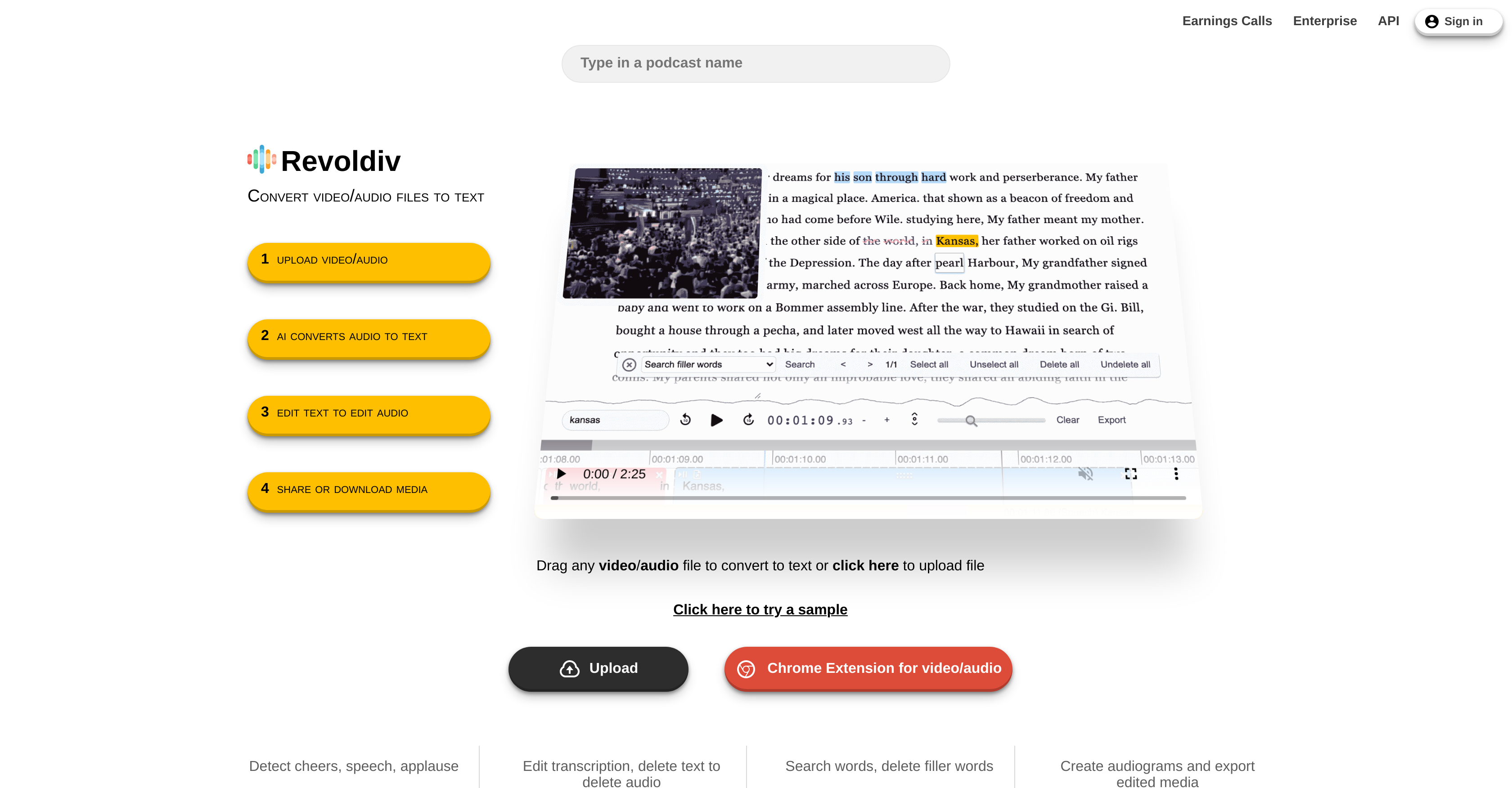
- Get accurate transcriptions for podcasts and video calls fast with automated speech recognition technology
- Edit audio content by simply editing text, deleting words to remove corresponding audio sections instantly
- Clean up recordings automatically by removing filler words like 'um' and 'uhh' with a single click
- Create navigable content by building chapters that make long recordings easy to browse and reference
- Generate shareable snippets and audiograms under 3 minutes for social media and team collaboration
- Export finished content in multiple formats including TXT, SRT, VTT and various video formats
- Collaborate effectively with built-in commenting and discussion features for team projects
- Detect audience reactions automatically with applause and cheer recognition for content analysis
Pros & Cons
Pros
- Supports Chrome, Firefox
- Detects cheers, speech, applause
- Search, delete filler words
- Create exportable audiograms
- Supports video/audio file conversion
- User-friendly interface
- Supports up to 2-hour long media
- Drag and Drop uploading
- Text highlight easy selection
- Removes filler words
- Synchronized text-audio editing
- Creates shareable chapters
- Commenting, discussion functions available
- Supports Chrome Extension media files
- Supports multiple export formats
- Supports flag post
- Speaker detection functionality
- Accurate transcription in seconds
- Real-time text editing
- Allows IGTV, Stories, Reel formats
- Downloadable plain text, subtitles
- Allows creating content navigation chapters
- Supports live events, enterprise plans
- Multiple subtitle formats supported
- Shareable snippets, projects
- Convenient file upload options
- Supports enterprise use with API
- Audiograms limited to 3 minutes
- Dark mode, video mode options
- Single-word at a time editing
- Text search functionality
- Automatic video/audio file conversion
- Easily navigable layout
- Confidence levels for transcription
- Function to detect speakers
- Allows for community interaction
- Option to skip parts
- Supports un-skipping parts
- Option to select/deselect all
- Transcription of contentious, buzz words
- Supports exporting of snippets
- Allows copying of transcription time
- Adaptable export formats
Cons
- Limited browser support
- No mobile editing
- Audiograms limited to 3mins
- Maximum media length: 2hrs
- No support for live events
- Lack of DataManager
- Doesn't support all video formats
- Not fully accessible tools
Reviews
Rate this tool
Loading reviews...
❓ Frequently Asked Questions
Revoldiv is an AI-powered tool specifically designed for converting audio or video files to text. The platform offers highly accurate transcriptions, detection of cheers, speech, applause and the ability to create chapters for easier content navigation. It also includes features for content editing, like removing filler words, and the ability to share and export content in various formats.
Revoldiv uses automated speech recognition technology to convert audio from uploaded media files into text. After the conversion, users can edit the text to correspondingly edit the audio. Key features like 'recognizing speakers' and 'flagging post' facilitate the editing process. The whole process is done via a four-step procedure: uploading the media file, AI converting audio to text, users editing the text to edit audio, and finally, sharing or downloading the media.
In Revoldiv, users can upload any video or audio file for conversion to text. There isn't a specific file type limitation mentioned. The platform supports the drag and drop feature to easily upload media files.
Revoldiv supports functionality on non-mobile devices. This indicates that while you may access the platform on your mobile device, some features, such as editing functions, might currently be restricted on mobile.
Revoldiv is supported by widely-used browsers like Chrome and Firefox. It even has a Chrome Extension specifically built to support media file uploads.
On Revoldiv, users can edit the transcriptions conveniently by directly modifying the converted text. The platform allows changes such as deletion of text or filler words, word searches, creation of chapters and even text highlighting for easy selection.
Revoldiv claims to provide the most accurate transcriptions with records speed, implying that despite the fast turn-around time, there is low likelihood of making errors during the speech-to-text conversion process.
Yes, sharing is one of the main features in Revoldiv. Users can share their full projects or their favorite snippets using the platform's sharing feature. It's also possible to leave comments or responses to foster discussion within the application.
Revoldiv allows users to download the transcription in several formats, including plain text (.txt), SubRip Subtitle (.srt), and Video Text Tracks (.vtt). It's also possible to export the content in various video formats.
Revoldiv provides a special feature for dealing with filler words in transcriptions. Users can instantly eliminate common filler words like 'um', 'like', and 'uhh' from their transcriptions with a single click, enabling cleaner and clearer content.
Yes, Revoldiv is equipped to detect applause, cheers, and speech. These detected features can assist users to understand the sentiments and reactions within the recorded audio.
Revoldiv supports the creation of audiograms. Users can easily create audiograms of their favorite snippets directly from the platform. However, it's worth noting that the audiograms must be less than 3 minutes.
Users can create chapters for their content in Revoldiv. This functionality aids in indexing and makes the navigating through content a breeze. Creating chapters is part of the editing process after the AI has converted the audio into text.
Revoldiv provides a feature for easy text selection. Users can select all or part of the transcriptions just by highlighting the text, which streamlines editing and exporting processes.
Yes, Revoldiv supports the transcription of favorite podcasts. Users can drag and drop their podcast files or directly search for them on the platform to obtain accurate transcriptions in seconds.
Revoldiv encourages active user engagement through a commenting feature. Users are free to leave comments, respond to existing discussions, or share their thoughts about the transcriptions, fostering a collaborative environment on the platform.
Yes, Revoldiv enables users to conveniently search for specific words in the transcriptions. This feature is part of the editing functionalities after the AI has converted the audio into text.
Revoldiv allows users to delete sections of text from the transcriptions, and this automatically deletes the corresponding audio section. This feature greatly simplifies the audio editing process.
Revoldiv does have a Chrome Extension for easier access and operations. This extension can be found on the Chrome web store for installation and usage.
Revoldiv supports media files that are less than two hours long for transcriptions. This is to ensure speedy and accurate transcriptions while maintaining the high performance of the platform.
Pricing
Pricing model
Free
Paid options from
Free