Sidekick - AI Chat Bot
Overview
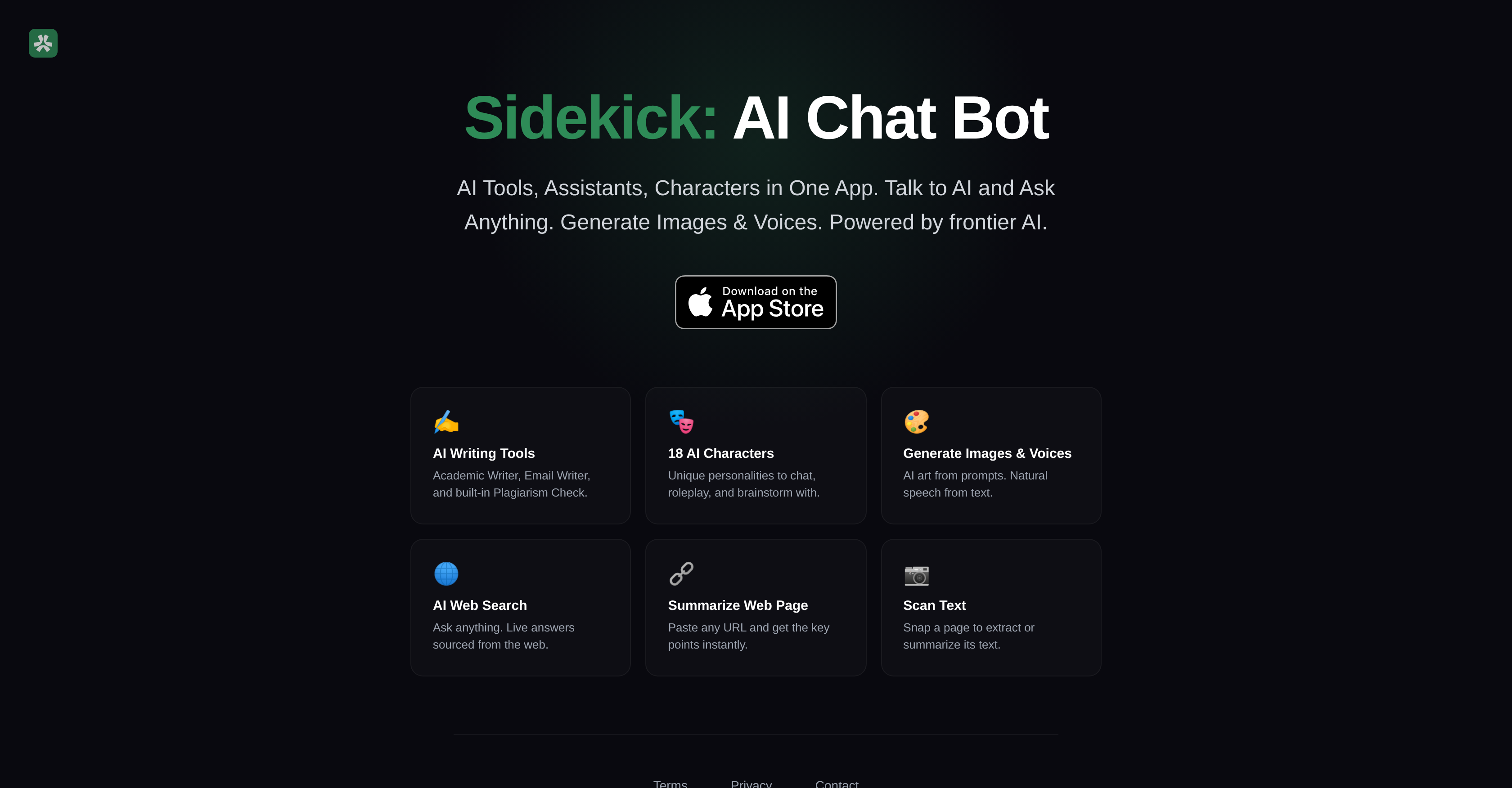
- Get instant, real-time answers from the web without switching tabs using the AI-driven web search feature
- Write polished academic papers and professional emails faster with built-in AI writing aids and a plagiarism checker
- Create unique AI-generated art and convert text to natural speech using the image and voice generation tools
- Extract and summarize text from any webpage or physical document instantly by pasting a URL or scanning a page
- Brainstorm and roleplay with 18 unique AI characters, each with distinct personalities for engaging conversations
Pros & Cons
Pros
- GPT-5.4 technology integration
- Voice generation feature
- Converts text into speech
- Built-in plagiarism checker
- Unique personalities for chat
- Role-playing feature
- Brainstorming tools integrated
- Built-in text summarization
- Physical text scanning
- Automatic text extraction
- All-in-one platform
- Built on data privacy
- Delivers instant answers
- URL-based webpage summarizing
- Creative tool options
Cons
- No language translation capabilities
- No offline use
- Limited to one platform
- No user reviews option
- Requires internet connectivity
- No voice recognition
- No ad-blocker
- Limited academic citation styles
- Non-adjustable text-to-speech speed
Reviews
Rate this tool
Loading reviews...
❓ Frequently Asked Questions
Sidekick is a comprehensive AI assistant that offers a plethora of AI tools, assistants, and characters within a single application. This includes dialog interactions, content generation, voice synthesis, academic writing aid, email drafting, web search, text extraction, and text summarization. It also has a plagiarism check feature for content verification, and it offers 18 AI characters for chat, role-playing, and brainstorming sessions.
The technology driving Sidekick is the Generalized Pre-training Transformer 5.4 (GPT-5.4) and OpenAI Technology. It utilizes this technology to provide various functionalities including dialogue interactions, web search capabilities, academic writing aids, and more.
Yes, Sidekick can assist users in both academic writing and email drafting. It encompasses AI writing tools that provide aid during these processes.
GPT-5.4 and OpenAI technology are machine learning models that have been trained on vast amounts of text data. These technologies can generate human-like text based on the input they receive. They power Sidekick's various features and tools.
The AI characters in Sidekick each come with unique personalities. They can be used for chats, role-playing, and brainstorming sessions, thereby helping to create diverse and engaging interactions.
Sidekick is designed with user privacy in mind, but the specific details of how Sidekick protects user privacy haven't been provided on their website.
Yes, Sidekick can generate images and voices. This feature allows users to create art from prompts and convert written text into natural speech.
The text extraction feature in Sidekick allows translations of scanned physical text into digital format, where it can be processed further to extract or summarize the text.
According to the available information, Sidekick is a free AI Chat Bot and comprehensive AI assistant. There is no mention of any associated costs on their website.
Yes, Sidekick does have a plagiarism check feature. This in-built tool helps in verifying content originality.
Yes, Sidekick provides the functionality to summarize web pages. Users can paste any URL into the app, and Sidekick provides key points from the webpage instantly.
The AI Web Search feature in Sidekick provides real-time answers sourced directly from the web, making searching more convenient and efficient for users.
Users can interact with the AI on Sidekick through dialogue. Personal interactions with the AI, such as asking and receiving information, chatting, or role-playing, are all part of the engagement process.
Interactions with the AI characters in Sidekick are highly diverse. With 18 unique AI characters to chat, roleplay, and brainstorm with, users are presented with a variety of engaging and diverse interaction experiences.
The AI writing tools in Sidekick have several practical uses including academic writing, email drafting, and content verification through a built-in plagiarism check feature.
Yes, users can perform web searches using Sidekick. Real-time answers are sourced directly from the web.
Yes, Sidekick does provide real-time answers to inquiries by sourcing information directly from the web.
Yes, Sidekick has the ability to convert written text into natural speech, enhancing the user's interactive and creative experience with the AI.
Sidekick facilitates art creation through its ability to generate images and voices. Users can create visual and auditory art from prompts provided by Sidekick.
The 'Interactive App' feature in Sidekick refers to its comprehensive suite of AI tools, characters, and assistants that enhance user interaction, exploration and creation. Examples include chat interactions, brainstorming with AI characters, and using advanced features like text extraction, text summarization, and web searching.
Sidekick is a comprehensive AI chatbot and assistant equipped with a wide array of AI tools, assistants, and characters within a single application. It employs GPT-5.4 and OpenAI technology, allowing users to engage in conversations, inquire, and receive information from it. Sidekick provides features like Image and Voice generation, academic and email writing aids, a plagiarism checker, and 18 unique AI characters for chat, role-play, and brainstorming. It also introduces practical features such as an AI-driven web search, webpage summarization, and physical text scanning and extraction.
GPT-5.4 powers Sidekick by providing the underlying AI model that allows the application to understand and generate human-like text responses. It enables Sidekick to engage with users in dynamic conversations, aid in content creation like academic and email writing, and even generate AI-driven art from prompts. GPT-5.4, being an advanced language model, is also responsible for Sidekick's ability to translate written text into natural speech.
Sidekick offers a multitude of AI tools including a chatbot, academic and email writing aids, plagiarism checking, AI-driven web search, webpage summarization, physical text scanning, and extraction. It also provides AI-driven tools like image and voice generation, which help in creating art from prompts and converting text into speech. Additionally, Sidekick presents 18 AI characters with unique personalities for chat and role-play, and brainstorming interaction.
The role of OpenAI technology in Sidekick is to provide the artificial intelligence foundation on which its various features operate. OpenAI technology enables Sidekick to deliver diverse functionalities such as generating human-like responses in dynamic conversations, generating images and voices from prompts, aiding with academic and email writing, role-play and brainstorming with AI characters, and web search.
Using Sidekick, you can use the image and voice generation features by providing prompts or text respectively. Sidekick draws upon its GPT-5.4 technology to create AI-driven art from the prompts you give. For voice generation, you can input your written text, and Sidekick converts it into natural speech.
Yes, Sidekick is designed with tools that assist you with academic writing. These tools are embedded with capabilities to provide guidance, proofreading, and editing assistance while drafting academic content, thereby streamlining the writing process and improving the quality of your output.
The plagiarism checking feature in Sidekick is designed to safeguard the originality of your content. It helps you verify the authenticity of your written content, ensuring it does not duplicate already existing content on the web. With this feature, you can maintain the integrity of your academic or email writing.
Yes, Sidekick includes role-play features. It presents 18 AI characters each possessing unique personalities, which users can interact with. These AI characters can be utilized in roleplay scenarios, enriching the user's interaction experience.
Yes, Sidekick can assist in brainstorming sessions. It brings forward 18 unique AI characters with which users can converse, raising individual or collaborative brainstorming to a higher and dynamic level.
From Sidekick's AI web search feature, you can expect real-time answers to your queries sourced directly from the web. These responses pulled from varied internet resources would provide well-rounded, in-depth information for your questions.
Sidekick's webpage summarization feature works by extracting key points from a provided URL. All you need to do is paste any URL, and Sidekick will supply the main points from the webpage almost instantly, saving you reading time and providing on-point information.
Yes, you can use Sidekick to extract texts. This is part of its physical text scanning feature. By taking a scan or picture of a page, this tool processes the image to extract the text contained within it instantly.
While specific methods are not detailed, Sidekick emphasizes its focus on user privacy. It is likely to protect user data, conversations, and interactions within the application, possibly employing encryption and secure data handling practices to ensure data confidentiality and security.
Yes, you can generate AI-driven art using Sidekick. It offers an AI tool that generates images from prompts. Essentially, you have to provide a prompt, and Sidekick uses AI technology to leverage this prompt to generate art.
SonderSpot O is the developer company of Sidekick.
Apart from assisting you in drafting precise and professional emails, the email writing aid in Sidekick also helps you proofread your emails for succinctness and relevance. It can aid in improving the email's tone, grammar, punctuation, and overall articulation, ensuring your message is expressed clearly and professionally.
Yes, Sidekick can translate text into natural speech. By employing its advanced GPT-5.4 technology, Sidekick can convert your written text into human-like speech, aiding in accessibility and user experience.
The text extraction feature in Sidekick works in tandem with its physical text scanning functionality. When you scan a page, Sidekick processes the image to instantly extract the text contained on it. This assists in digitizing physical documents, transcribing them into editable text, and further processing like summarizing or translation.
Pricing
Pricing model
Free Trial
Paid options from
$19.99/month
Billing frequency
Monthly