

Staccato
Overview
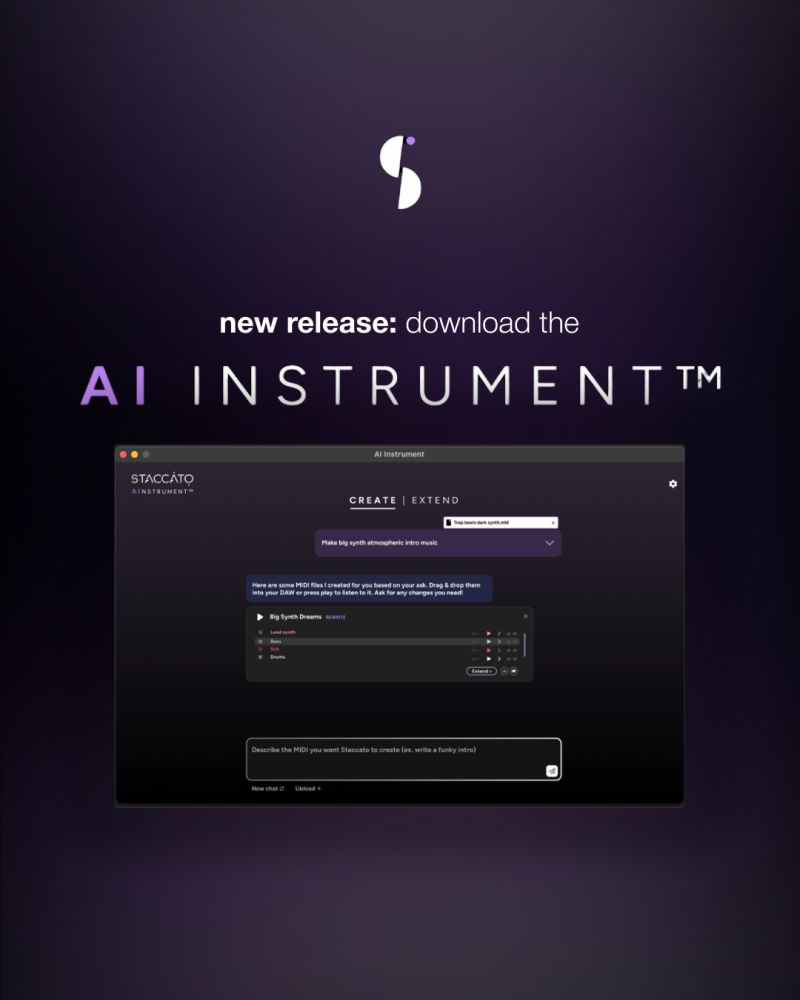
- Generate unique, royalty-free MIDI that you fully own for commercial use with our copyright-respecting AI models
- Overcome creative blocks instantly by describing musical ideas in plain language through the chat-based interface
- Extend and transform your existing MIDI files by rewriting them in different genres or generating new bridge sections
- Work seamlessly across any DAW or notation software with VST3, AU, and standalone drag-and-drop compatibility
- Create complete multi-instrument arrangements with basslines, drums, chords, and melodies in a single prompt
- Iterate without limits using unlimited generations included in your subscription, no prompt credits required
Pros & Cons
Pros
- Generates music and lyrics
- Overcomes writer's block
- Teaches new composition techniques
- Upload MIDI for composition
- Change parameters for generation
- Generates music in same key
- DAW Integration
- Lyrics based on keywords/mood
- Suggests music based on style
- Offers three-month free trial
- Discounts through participation
- Real-time lyric suggestions
- Generates instant rhymes
- Exports work from Finale/Sibelius
- Track copy-paste functionality
- Helps maintain creative flow
Cons
- Requires uploading MIDI files
- Depends heavily on user-defined parameters
- Lack of personalized user feedback
- No mention of offline usage
- Possibly limited genre support
- No API for application integration
- Potentially limited DAW compatibility
- Discounts require user comments
- No detail about text-to-speech technology
Reviews
Rate this tool
Loading reviews...
❓ Frequently Asked Questions
Jason Kowalczyk
🛠️ 1 tool
🙏 1 karma
wrote:Yes. Each MIDI file is generated from scratch using your prompt, so your output is unique.
Very simple requests (e.g., generic four-chord loops) can land on similar material, but your instrument choices and sound-design decisions still make each track yours.
Jason Kowalczyk
🛠️ 1 tool
🙏 1 karma
wrote:Absolutely, it's yours!
Jason Kowalczyk
🛠️ 1 tool
🙏 1 karma
wrote:Everything you generate is royalty-free and yours to use commercially or personally. Our models are trained only on data that respects artists' copyrights, and guardrails prevent outputs that are too close to existing works.
Jason Kowalczyk
🛠️ 1 tool
🙏 1 karma
wrote:It's subscription-only. A flat monthly rate lets you generate, iterate, and refine ideas without worrying about prompt credits. This model also allows us to support our developers’ ongoing work, ensuring continuous new features and updates to the AI Instrument™.
Jason Kowalczyk
🛠️ 1 tool
🙏 1 karma
wrote:No credits are required. You get unlimited generations with your subscription.
Jason Kowalczyk
🛠️ 1 tool
🙏 1 karma
wrote:Simple Create prompts (e.g., 4-bar loops) usually render in a few seconds. Complex multi-section Rewrite jobs can take around 15 seconds.
Jason Kowalczyk
🛠️ 1 tool
🙏 1 karma
wrote:Yes, the AI Instrument™ supports multi-instrument, multi-track generation
Jason Kowalczyk
🛠️ 1 tool
🙏 1 karma
wrote:The AI Instrument™ is designed to help you create musical ideas like stems, melodies, bridges, and loops, rather than full songs. You drive the overall arrangement; the more detail you add to a prompt, the more complete the result.
Jason Kowalczyk
🛠️ 1 tool
🙏 1 karma
wrote:No, it is separate from your DAW. You simply drag and drop MIDI between the AI Instrument™ and your DAW.
Jason Kowalczyk
🛠️ 1 tool
🙏 1 karma
wrote:Yes, prompts are processed in the cloud.
Jason Kowalczyk
🛠️ 1 tool
🙏 1 karma
wrote:The AI Instrument™ generates MIDI, not audio, in both the web version and the plugin.
The web version includes some basic built-in sounds for convenience, but we highly recommend using your own virtual instruments for the best experience. The plugin does not include any sounds, so you will need to route the MIDI to your preferred virtual instrument or sampler.
Jason Kowalczyk
🛠️ 1 tool
🙏 1 karma
wrote:The current model does not adapt to individual users. The AI Instrument™ is trained to respond accurately to detailed, musical prompts.
Jason Kowalczyk
🛠️ 1 tool
🙏 1 karma
wrote:Prompts in any language will work in both Create and Rewrite. However, the interface for both the web version and the plugin is currently in English.
Jason Kowalczyk
🛠️ 1 tool
🙏 1 karma
wrote:The AI Instrument™ works with any DAW or notation software that supports VST3 or AU. There's also a standalone version for drag-and-drop workflows (compatible with Ableton, Logic, FL Studio, Pro Tools, Cubase, Reaper, Dorico, MuseScore, and more).
You can also route MIDI internally using IAC on Mac or third-party tools like LoopMIDI on Windows.
Jason Kowalczyk
🛠️ 1 tool
🙏 1 karma
wrote:● macOS 10.15 or later / Windows 10 or later
● 4GB RAM (8GB recommended)
● 1gb of hard drive space
● Internet connection required for AI prompt processing
● Standalone (recommended), VST3, or AU host
Pricing
Pricing model
Paid
Paid options from
$6.49/month
Billing frequency
Monthly
Refund policy
No Refunds
Related Videos
How to Use the Extend Feature | Staccato AI Plugin Tutorial
Staccato•554 views•Apr 29, 2025


