

TimeLoop
Turn a messy to-do list into a realistic daily schedule in seconds: say or type plans like "gym three times, six hours of study by Friday" in your own words and in any language, and the day planner builds the plan.
Listing not yet reviewed by our editors · How we check
Overview
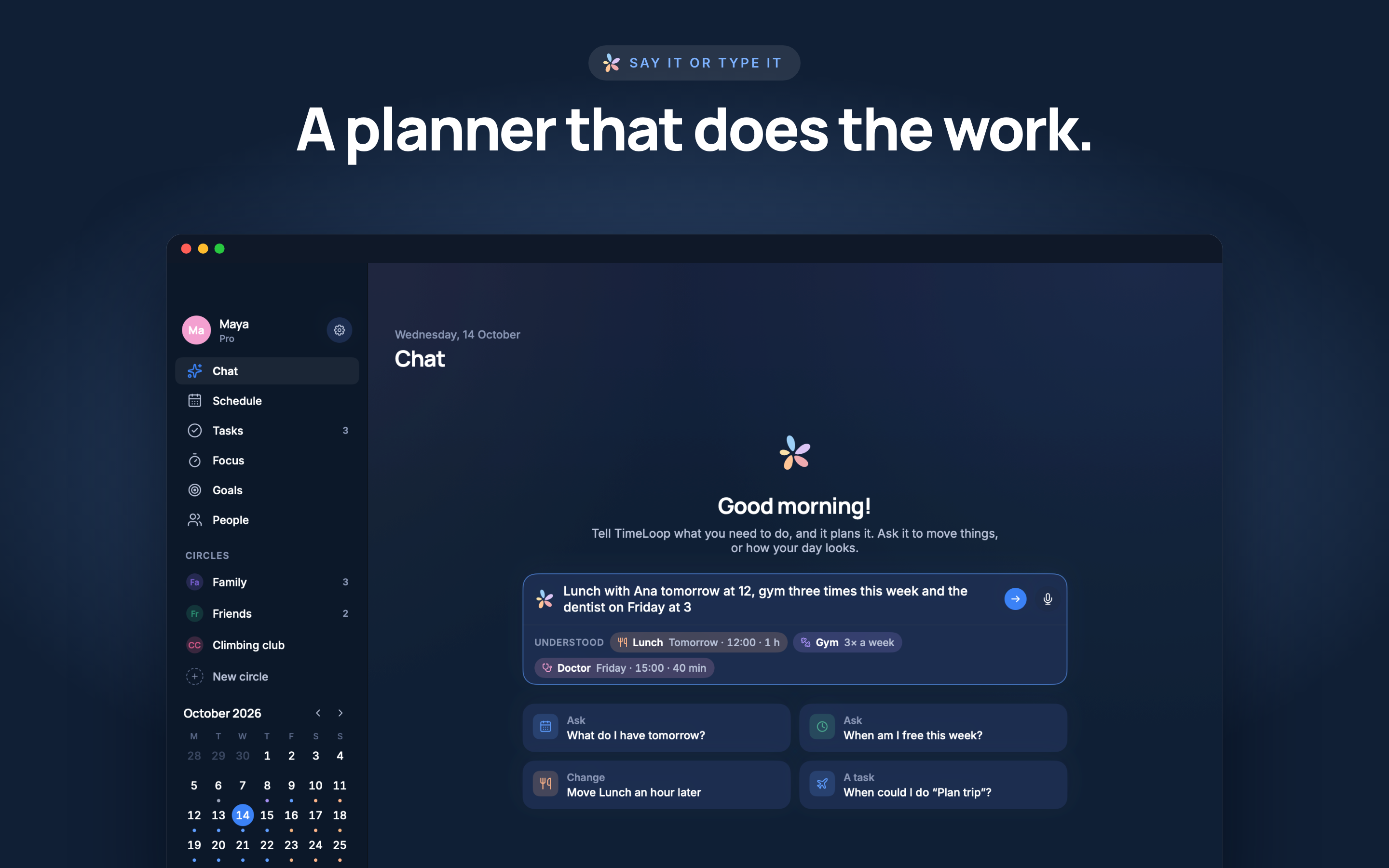
- Turn a messy to-do list into a realistic daily schedule in seconds: say or type plans like "gym three times, six hours of study by Friday" in your own words and in any language, and the day planner builds the plan.
- Keep full control of your calendar: TimeLoop shows what it understood before saving anything, nothing changes until you confirm, and undo is always available.
- Protect the appointments that matter: fixed events like a doctor visit stay locked in place while flexible tasks are auto-scheduled around them, with travel time included.
- Recover from a late start without rebuilding your day: one tap or one sentence replans the rest of your schedule, shows a before-and-after view, and keeps fixed commitments and the drive to them intact.
- Spend less time on the road: errands before a pickup are ordered by the route with the least driving, and Pro tells you exactly when to leave and the weather at each stop.
- Hit your weekly habits for real: goals like gym three times a week get actual time slots, planned and completed sessions are tracked separately, and you are warned when a goal won't fit.
- Keep unscheduled tasks without fake deadlines: tasks with no set time wait on your task list until you place them, with checklists under each task and focus sessions with a timer and steps.
- Run one schedule across every calendar: two-way calendar sync with Google Calendar, Apple Calendar, Outlook.com, Microsoft 365 and iCloud Reminders.
- Find a time that works for everyone: Circles let family, friends or a team join with a single link and no account setup, see shared availability, answer proposed times with yes, maybe or no, and share lists.
- Check your next move without opening the app: ask Siri what is next, see departure times on the CarPlay Dashboard, and keep today on Apple Watch, the Lock Screen and fourteen widgets across iPhone, iPad, Android, Mac and the web.
- Manage your plan from ChatGPT or Claude: TimeLoop's MCP server connects your schedule directly to the AI assistant you already use.
- Plan without giving up your data: no ads, no tracking, and full account deletion from inside the app, in a 35-language interface.
- Start planning for free: the free tier includes the timeline, manual editing, running-late replanning, tasks, shared lists, calendar sync, one goal and one circle, while TimeLoop Pro adds voice and text planning, leave-time alerts, weather, a morning brief, web answers saved to events and natural-language Siri.
Pros & Cons
From the listing; not yet checked by our editors.
Pros
- Requests accepted in any language
- Type or dictate requests
- Preview interpretations before planning
- Fixed events remain protected
- Flexible tasks scheduled around commitments
- Travel time built into schedules
- Departure times shown on timelines
- Errand stops reordered to reduce driving
- Route options evaluated across stop orders
- Late-day replanning with before-and-after review
- Fixed commitments preserved during replanning
- Confirm changes before they take effect
- Ask about, move, or cancel plans
- Recurring goals receive actual time slots
- Planned and completed goals counted separately
- Tasks can remain unscheduled
- Checklists attached to tasks
- Shared task lists with completion attribution
- Focus sessions include timers and steps
- Calm focus sounds on select platforms
- Morning brief summarizes the day
- Timeline separates fixed and movable items
- Timeline displays available gaps
- Day, week, and month views
- Daily schedule fullness indicators
- Overload warnings for busy days
- Shared availability through Circles
- Propose plans when everyone is free
- Calendar and device syncing both ways
- Manual entry alongside conversational commands
- Watch access for on-the-go planning
- Car access through Siri and CarPlay
- Home Screen and Lock Screen widgets
- Weather shown at arrival time
- Event answers retained with their sources
- Follow-up questions about event details
- Departure guidance includes travel duration
- Tasks and appointments in one timeline
- Available free across mobile, Mac, and web
Cons
- Planning from speech or text needs Pro
- CarPlay Dashboard needs iOS 26
- Work Outlook may need the organisation's approval
- Calm sounds exclude Android
Alternatives to TimeLoop
Tools that share the most tags with TimeLoop.
- Skej
Eliminate manual meeting coordination entirely by letting Skej handle all scheduling tasks through your existing calendar and email
Freemium · from $30/month
$30/month
Not yet checked
- Blockit AI
Eliminate manual scheduling and back-and-forth emails entirely with an AI that handles all appointment coordination for you
Not listed
Not listed
Not yet checked
- Fhynix
Never miss a task again with smart WhatsApp reminders that arrive exactly when needed
Free trial · from $7.20/month
$7.20/month
Not yet checked
- Agenda Hero
Transform any text description into perfectly formatted calendar events without manual entry using natural language processing
Free
Not listed
Not yet checked
- Toki AI
Centralize all your calendars in one hub to eliminate scheduling conflicts across Google, Apple, and Outlook
Freemium · from $3.59/month
$3.59/month
Not yet checked
- Smart Calendars AI — Plan fast & easy
Create events hands-free while driving or multitasking using voice recognition for event creation
Freemium · from $1/month
$1/month
Not yet checked
Reviews
Rate this tool
Loading reviews...
Frequently asked questions
How does TimeLoop turn a typed or spoken request into a daily schedule?
You type or dictate what you need in ordinary language. TimeLoop shows its interpretation, then schedules flexible tasks around fixed events, including travel time and departure times.
Can TimeLoop understand scheduling requests written in any language?
Yes. You can type requests in any language; in the app, you can also dictate in any language your phone hears.
Does TimeLoop show me what it understood before adding something to my plan?
Yes. TimeLoop shows what it understood before building the plan.
How does TimeLoop decide which tasks can move and which events must stay fixed?
Fixed events stay in place, while flexible tasks are scheduled around them. When replanning, TimeLoop tries to keep fixed commitments and their travel arrangements intact.
Can TimeLoop schedule travel time and tell me when to leave?
Yes. It includes travel time and tells you when to leave; it can also show the weather at your destination.
How does TimeLoop choose the order for errands along a route?
TimeLoop considers different stop orders and chooses the one with the least driving, then tells you when to leave.
What happens to my schedule in TimeLoop when I report that I’m running late?
It recalculates the flexible parts of the schedule and shows the proposed changes, while keeping fixed commitments in place where possible.
Can I review and approve TimeLoop’s schedule changes before they take effect?
Yes. Proposed schedule adjustments are shown for review, and nothing changes until you confirm them.