Overview
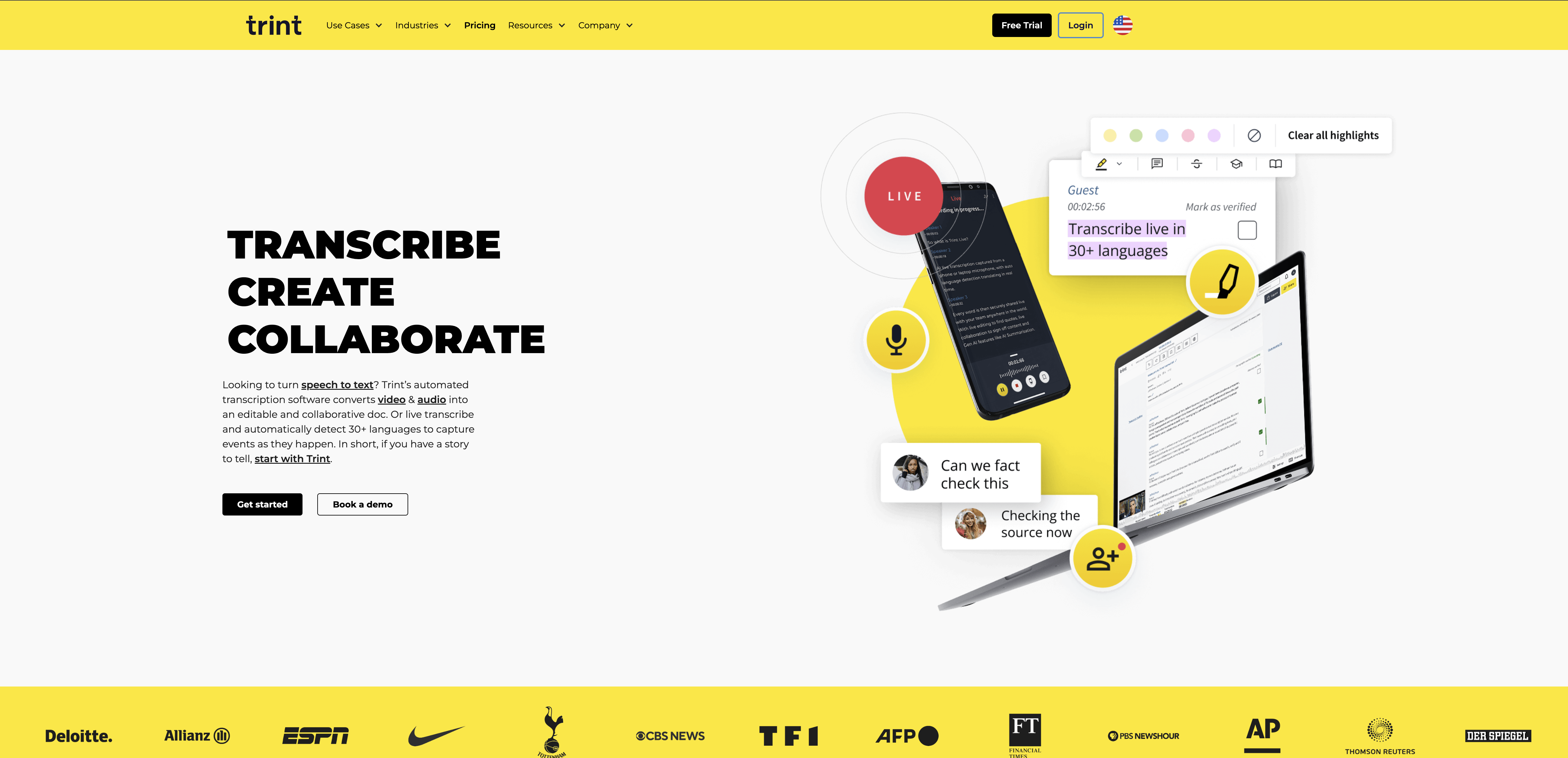
- Turn interviews and meetings into editable text instantly with AI transcription that achieves 99% accuracy
- Collaborate with your team in real-time using highlight and comment tools for faster review and sign-off
- Reach global audiences by automatically translating transcripts into 50+ languages and adding closed captions
- Protect sensitive content with enterprise-grade security, ISO 27001 certification, and EU/US data hosting
- Export finished transcripts into multiple formats that integrate seamlessly with your existing workflow tools
Pros & Cons
Pros
- Supports 30+ languages
- 99% transcription accuracy
- Real-time collaboration
- Content editing features
- Seamless sharing and sign-offs
- Supports export into multiple formats
- Integrates with other platforms
- Provides closed captions
- Automatic translation into 50+ languages
- ISO 27001 certified
- Extensive data server locations
- Guarantee of user privacy
- Real-time productivity tracking
- Transcribes video and audio
- Supports various media formats
- User-friendly interface
- Transcription processing speed
- Mobile application available
- Bespoke enterprise solutions
- Highly trusted by industries
- Dedicated support teams
- Granular access permissions
Cons
- 99% accuracy not 100%
- Limited to 30 languages
- Closed captions not customizable
- No live transcription
- ISO 27001, no other certifications
- Limited export formats
- No native mobile app
- Limited integration options
- Data servers only in US and EU
- No transcription speed options
Reviews
Rate this tool
Loading reviews...
❓ Frequently Asked Questions
Trint is a software tool specializing in the transcription of audio and video files. It uses artificial intelligence to provide a quick solution for converting different media formats into text. It's not only capable of transcribing, but also allows users to edit, search, and playback transcripts. Trint offers integrations to export transcripts and provides closed captions and automatic translations. It is used by various industries including media firms, researchers, and content creators.
Trint works by leveraging AI capabilities to transcribe audio and video files into text. After users upload their media files, Trint handles the conversion into written content in over 30 languages. Once transcribed, users can take advantage of Trint's content editing features to verify, edit, search, and playback their transcripts.
Trint supports over 30 languages for transcription, making it a global tool suitable for multilingual needs.
Trint promises up to 99% accuracy in its transcription results, which can vary depending on the quality and clarity of the uploaded audio and video files.
Trint offers a variety of editing features, allowing users to verify, edit, search, and playback their transcripts. It also enables users to highlight portions of transcripts and add comments, which facilitates collaboration on documents and transcripts.
Yes, Trint enables real-time collaboration. It offers highlight and comment tools for team collaboration and allows sharing with granular access permissions and shared drives for quick and easy sign-offs.
Yes, Trint allows users to export transcripts into multiple formats. This flexibility makes it easy to integrate the software into different workflow setups.
Yes, Trint offers automatic translations into more than 50 languages which helps to enhance accessibility and global reach.
Trint is ISO 27001 certified and hosts data servers in both the US and EU, ensuring a high level of security. It does not listen to recordings and trains its AI externally to protect user data.
Trint values user privacy and does not listen to recordings. Its AI is trained externally to further protect user data. For more specific details, users can refer to Trint's privacy policy at https://trint.com/privacy-policy.
Trint is typically used by media firms, researchers, and content creators as a quick and efficient transcription tool, facilitating content editing, sharing, and collaboration.
Trint is known for being user-friendly and has been noted to be one of the easiest-to-use transcription tools available.
A wide range of industries trust Trint. It is used by media firms for efficient transcription, content creators for swift turnaround of content, and researchers for transcribing interviews or findings.
Trint can improve your productivity by streamlining the transcription process with its AI capabilities, reducing the time consumed in manual transcription. Its features like real-time collaboration, editing, multi-format export options, and automatic translations also greatly enhance efficiency.
Trint integrates with workflows by allowing users to export transcripts into multiple formats or integrate with other platforms. It enhances accessibility, allowing content to reach a global audience through automatic translations into more than 50 languages.
Yes, Trint can be used for automatic closed captioning. This adds value to video content by making it more accessible for people with hearing disabilities, non-native speakers or those who prefer to watch videos with captions.
Yes, Trint does provide a mobile application. This offers users more flexibility to use the tool for transcription needs anywhere, anytime.
Trint has specific comparison pages for Trint vs Otter, Trint vs Descript, Trint vs Rev and Trint vs Happy Scribe. These pages detail the differences between Trint and these other transcription tools, providing users with thorough comparisons to aid in decision-making.
Yes, Trint can be used to generate quick captions for videos. This enhances the accessibility of the video and can help reach a wider audience.
Absolutely, Trint can be utilized for generating transcriptions for research insights and analysis. Researchers can use it to transcribe interviews, conversations, or any other audio and video material that needs to be analyzed in text form.
Pricing
Pricing model
Paid
Paid options from
$52/month
Billing frequency
Monthly
Related Videos
How to Trint - Transcribing with Trint
Trint•473 views•Jul 25, 2025