Overview
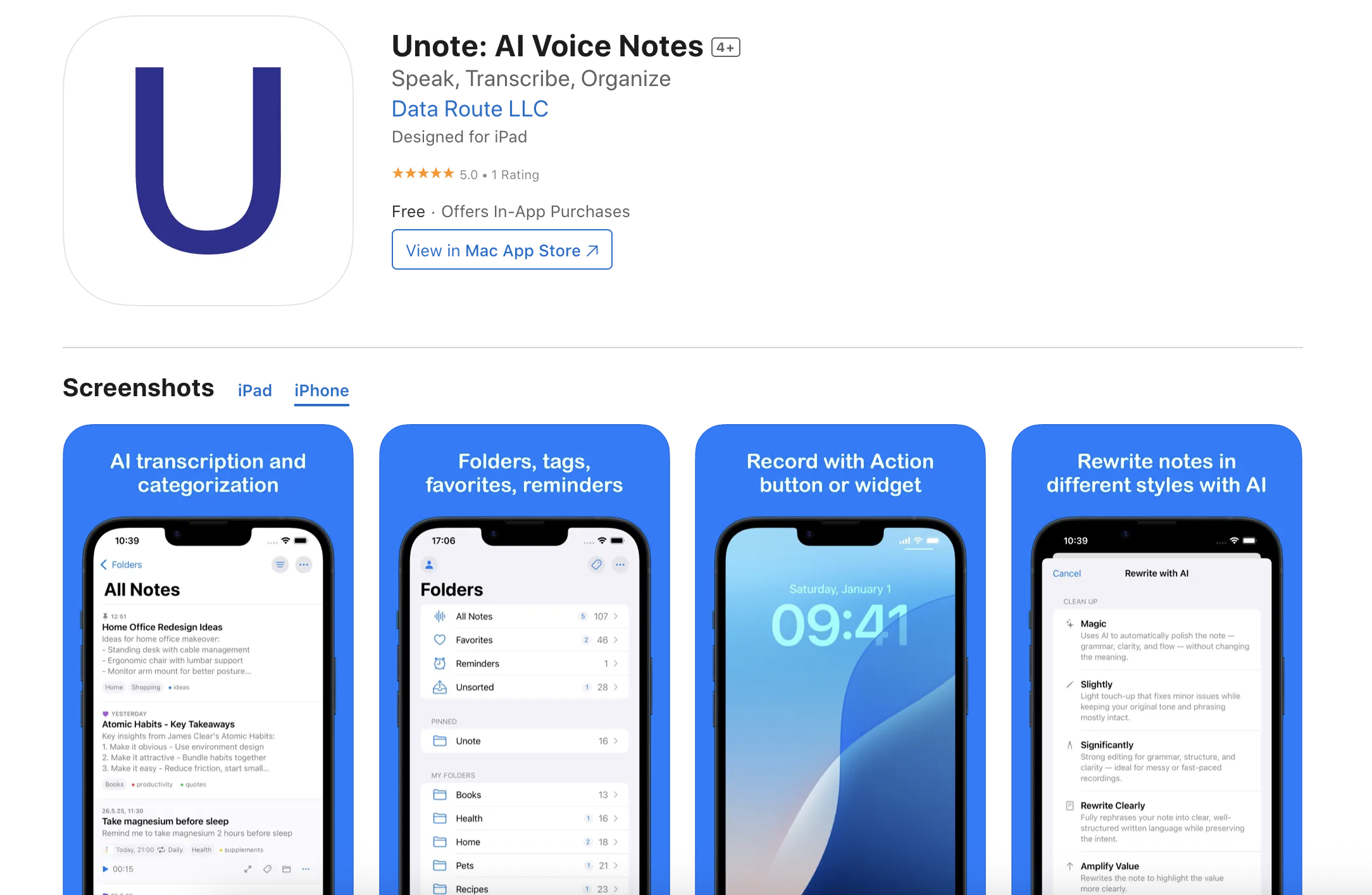
- Transform spoken ideas into organized, searchable text instantly with AI-powered transcription that understands multiple languages and accents
- Automatically categorize notes into relevant topics and tags using intelligent analysis, eliminating manual organization work
- Capture thoughts the moment they happen with one-tap voice recording, perfect for meetings, lectures, and creative inspiration
- Access all your notes securely across iPhone, iPad, and Mac with seamless synchronization that keeps everything current
- Maintain complete focus on your ideas with a minimalist, distraction-free interface designed for pure note-taking
- Review lecture content and meeting discussions later with precise transcriptions instead of relying on memory or messy handwriting
Pros & Cons
Pros
- Instant voice recording
- Multilanguage transcription
- Accurate speech recognition
- Intelligent note categorization
- Supports multiple accents
- Minimalist UI design
- Notes sync across devices
- Secure cloud processing
- Ideal for professionals
- Suits student users
- Promotes creative brainstorming
- Speech to text facility
- Seamless interface
- Efficient organization of thoughts
- Built for Apple devices
- Leverages ChatGPT capabilities
- Ease of information retrieval
- Distraction-free note-taking
- Ideal for voice notation
- Real-time transcription
- Assists in documentation
- Suitable for audio notes
- Caters to creative minds
- Data security provided
Cons
- Only for Apple devices
- Requires internet for operation
- Potential lag in transcription
- Limited accents/language support
- No offline processing
- Data security concerns
- Not free of cost
- Automatic categorization may misinterpret
- Cloud based storage only
Reviews
Rate this tool
Loading reviews...
❓ Frequently Asked Questions
Unote: AI Voice Notes is an advanced voice note-taking application. It leverages Artificial Intelligence (AI) technology to facilitate the process of recording, transcribing, and organizing ideas. The solution transforms spoken words into organized, searchable text, making it an ideal aid for capturing and preserving thoughts.
The key features of Unote include: instant voice recording, AI-powered transcription, intelligent categorization, a clean and intuitive interface, secure synchronization across all Apple devices, and cloud processing of voice recordings. The app uses OpenAI for accurate transcription in multiple languages and accents, and ChatGPT for automatic organization of notes into relevant categories and tags.
The AI technology in Unote primarily assists in instant voice recording, transcription, and intelligent categorization. It utilizes OpenAI's advanced speech recognition technology for transforming voice recordings into accurate text. Furthermore, it makes use of ChatGPT to automatically analyze and organize notes into relevant categories and tags, simplifying the retrieval of information.
Yes, Unote does support transcription in multiple languages and accents. It achieves this functionality with the help of OpenAI's advanced speech recognition technology.
Intelligent categorization in Unote is powered by ChatGPT. The AI technology automatically analyzes the content of the notes and organizes them into relevant categories and tags. The aim is to make it easy to retrieve and review the information later.
Unote is compatible with various Apple devices including iPad, iPhone, and Mac. It requires iOS 18.0 or later, iPadOS 18.0 or later, and macOS 15.0 or later for Mac devices with an Apple M1 chip. It also works with Apple Vision, requiring VisionOS 2.0 or later.
The secure synchronization feature in Unote ensures that your notes are always accessible across all your Apple devices. It syncs the data securely, providing a seamless note-taking experience and ensuring that your ideas are available at your fingertips whenever needed.
Yes, Unote does provide a cloud processing feature for voice recordings. This feature is facilitated using OpenAI API and allows for enhanced functionality while upholding stringent security standards.
The target users of Unote are professionals who wish to document insights from meetings, students who want to record lecture notes, creative individuals needing to capture sudden inspiration, and generally anyone who prefers speech to typing for notations.
Yes, Unote can effectively be used for capturing and organizing sudden creative ideas. Its instant voice recording and AI-powered transcription features can transform spontaneous thoughts into organized, searchable text.
OpenAI plays a significant role in Unote's functionality. It powers the app's transcription feature, converting voice recordings into accurate text in multiple languages and accents. Plus, it is used in cloud processing of voice recordings, enhancing the functionality of Unote while maintaining high security standards.
The interface of Unote contributes immensely to the note-taking process. It features a clean, intuitive, and minimalist design, ensuring a distraction-free note-taking environment. The uncluttered look and feel allow users to focus on their ideas while recording, transcribing, and organizing them.
Unote ensures the security of notes through its secure synchronization feature and cloud processing functionality. It syncs notes securely across all your Apple devices. In addition, the voice recordings are processed in the cloud via the OpenAI API with a robust security mechanism that provides powerful features while maintaining high security standards.
Yes, Unote is suitable for professional use. Professionals can use the app to document insights from meetings or brainstorming sessions, offering a modern and efficient method of recording and organizing their thoughts.
Yes, Unote can be very useful for students to record lecture notes. It captures voice notes and transcribes them into text, allowing students to focus on the lecture and review the notes later for study purposes.
Unote efficiently functions with different user accents. It employs OpenAI's advanced speech recognition technology to accurately understand and convert speech from various accents into precise text.
As indicated by the information available, Unote leverages advanced speech recognition technology, allowing for voice-activated notation. The instant voice recording feature enables users to capture their thoughts with one tap, and it can, presumably, be activated by voice commands.
ChatGPT plays a crucial role in Unote's functionality. It powers the intelligent categorization feature, analyzing and organizing notes into reproducible categories and tags. This makes it easy for users to retrieve and review their information at a later stage.
Unote simplifies the note-taking process through its instant voice recording, AI-powered transcription, intelligent categorization, and secure synchronization features. These features transform spoken words into organized and searchable text, making it easy for users to record and post-process their thoughts efficiently.
Yes, Unote is available on Mac and other Apple devices. It requires macOS 15.0 or later for Mac devices with an Apple M1 chip. It also works on iPad and iPhone, requiring iOS 18.0 or later and iPadOS 18.0 or later respectively.
Pricing
Pricing model
Freemium
Paid options from
$8.99/month
Billing frequency
Monthly