Vidnix | AI Custom Kiss
Overview
- Turn any text prompt into a polished, high-quality AI video instantly using Text to Video conversion.
- Transform a single photo into a moving scene with Image to Video generation, no editing skills required.
- Build realistic AI Avatars that speak your script with Lip Sync and Motion Control for lifelike presentations.
- Extend your existing video clips seamlessly with Video Extend to create longer, continuous content.
- Generate custom background music and voiceovers directly from text using AI Music and Text to Speech.
- Apply smooth Video Transition effects between clips to create professional-grade visual storytelling.
- Create unique images from text descriptions or transform existing visuals with Text to Image and Image to Image.
- Upload multiple JPG, PNG, or WEBP images at once and convert them into a video in a single workflow.
- Regenerate or customize any output by entering your own text prompts when built-in results don't match your vision.
Pros & Cons
Pros
- Multilingual support
- Cost-effective rates
- Keeps control of motion
- Offers lip sync feature
- Supports text to speech
- Supports multiple image formats
- Uploading multiple images at once
- Re-generate or input own prompts
- Image to video conversion
- Text to video conversion
- Text to image conversion
- Image to image conversion
- Built-in video transition effects
- Video extend function
- Video to video feature
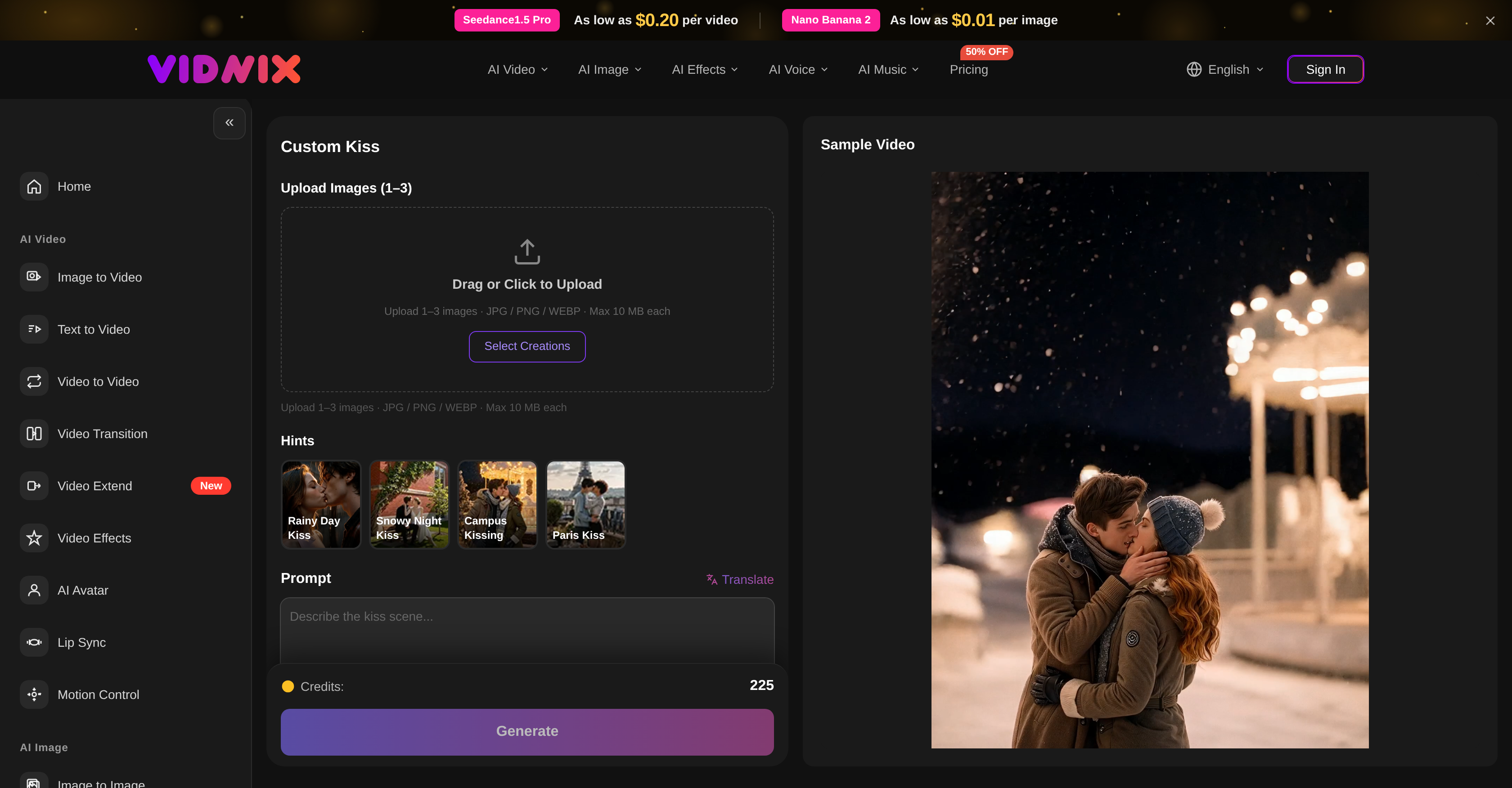
- Drag or click to upload
- Instructions for generating effects
- GUI design for prompt input
- Custom Kiss visual theme
- Generates high-quality videos
- Generates high-quality images
- Multiple edition options
- Bullet time video effect
- 360 Ghost Step effect
- Nezha Transform video effect
- Hip Hop Dance video effect
- Clearly explained pricing
Cons
- Limited image upload count
- No API
- No auto-save functionality
- Limit on file size
- Supports only few image formats
- No real-time editing
- No versioning support
- No collaboration features
- No mobile application
- Requires manual regeneration
Reviews
Rate this tool
Loading reviews...
❓ Frequently Asked Questions
Vidnix AI is an all-in-one AI video and image generation platform that provides several advanced tools for creating high-quality videos using generative AI technologies.
Vidnix AI entails several functions. It allows users to turn their text or images into quality videos, apply unique video effects, extend video lengths, create AI Avatars, and convert images to videos or other images, and text to images. Also, it features AI Voice for text to speech conversion and AI Music for audio enhancement.
Vidnix AI's image to video conversion involves transforming a given image input into a video output. Although the exact mechanism is not specified on their website, it is likely that the platform uses deep learning algorithms to understand the various aspects of the image and generate corresponding motion elements to create a video.
Yes, Vidnix AI indeed supports text to video conversion. Users can input text, and the platform uses AI technology to convert this text into a high-quality video.
Vidnix AI offers numerous video effects which users can apply to their creations. While specific effects are not listed on the website, the AI Video feature does have capabilities for applying various transition effects to videos for a more engaging and dynamic creation.
The 'AI Avatar' feature in Vidnix AI enables the creation of animate personas. It comes with functionality for lip sync and motion control, which gives it the ability to express and move in a realistic manner in created videos.
The AI Image feature in Vidnix AI allows for image-to-image conversion and text-to-image generation. This provides unique opportunities for creating visual content, where users can transform images and texts into different image outputs.
The AI Voice feature in Vidnix AI enables text to speech transformation. This feature can be incredibly useful for transforming written dialogues or scripts into verbal speech, adding a new layer of interactivity to the created content.
The AI Music feature in Vidnix AI is employed for improving the audio quality in the created materials. While detailed functionality is not stated on their website, it can be deduced that it aids users in adding and enhancing audio tracks to their video or image creations.
In Vidnix AI, users can easily upload images using its drag and drop interface. They also have the option to click and manually select images from their device for uploading. It supports 1-3 image(s) per creation.
Yes, Vidnix AI does give users the ability to generate their own prompts if they are not satisfied with the results from the in-built prompts. This offers a greater level of customization and control over the generated effects and end-product.
Yes, Vidnix AI does offer multilingual support, providing accessibility to a wider audience beyond language barriers.
The platform promises cost-effective rates for its services, but the specific pricing details are not provided. A reference to 'Seedance1.5 Pro' at $0.20 per video and 'Nano Banana 2' at $0.01 per image is mentioned.
Yes, Vidnix AI is a single, all-in-one platform that integrates a vast suite of AI technologies to create engaging and personalized visual content such as videos and images.
Though the exact method isn't mentioned on their website, Vidnix AI has an 'Extend Video' function which likely allows you to prolong the length of your video, possibly with additional filler content or stretching the existing content in some way.
The website mentions a feature that converts texts to images. While not specifically explained, this function probably transforms the input text into a visual representation, leveraging AI to understand the context and generate corresponding images.
Yes, Vidnix AI can indeed enhance audio in your created materials. This is largely possible through its 'AI Music' feature that can help in enhancing and fine-tuning audio tracks for the videos or images created.
The maximum size for images that can be uploaded to Vidnix AI is 10 MB each.
Vidnix AI allows users to upload 1-3 images at a time for a single creation.
Vidnix AI has in-built prompts to generate desired effects. If the user isn't satisfied with these results, they have the option to generate again with a new prompt or enter their own customized prompt to guide the AI in achieving their desired output.
Vidnix AI is an all-in-one video and image generation platform that leverages advanced AI technologies to create high-quality visual content. It offers an array of features such as converting text or images into videos, applying video effects, lengthening videos, and more.
Key features of Vidnix AI include AI Video, AI Image, AI Voice, and AI Music. In AI Video, users can convert images or text into videos, apply various transitions, and create AI Avatars with lip sync and motion control functionality. The AI Image feature allows for conversion of images to images and text to images. AI Voice transforms text into speech, while AI Music enhances audio in created materials.
The 'AI Video' feature of Vidnix AI allows users to convert images or text into videos. Users can apply various transitions, create AI Avatars with lip sync and motion control functionality, and further edit their videos using other available tools.
With the 'AI Image' feature in Vidnix AI, users can convert images to images and text to images. This opens up unique opportunities for visual content creation, enabling users to transform current visuals or textual content into engaging image-based content.
The unique functionalities of the AI Avatar in Vidnix AI include lip sync and motion control functionality. This means the AI Avatar can mimic movements and lip sync with specified voice-over or speech inputs, creating a more interactive and real-life visual experience.
The AI Voice feature in Vidnix AI is designed to transform text to speech, providing voice-over or narratives for the media created. The AI Music feature, on the other hand, enables users to enhance audio in their created materials, complementing the visuals with fitting audio accompaniment.
To convert text or images into videos with Vidnix AI, users simply input the desired text or upload their chosen image files to the platform. Using the AI's advanced functionalities, it will transform these inputs into high-quality, engaging videos.
Yes, Vidnix AI can extend the length of your video. This feature allows for longer runtime without loss of content quality or relevance, giving users more flexibility in their content creation process.
With Vidnix AI, you can apply various transition effects to your videos, aiding in smoother visual storytelling and enhancing viewer engagement. The exact range of available effects may vary and can be explored on the platform.
Yes, Vidnix AI allows uploading of multiple images. The supported formats include JPG, PNG, and WEBP. Each image should not exceed the maximum file size of 10 MB.
If unsatisfied with the results generated by Vidnix AI, users have the option to regenerate the output or enter their own text prompts to guide the AI for desired outcomes.
While the specific languages supported by Vidnix AI are not mentioned, it is stated that the platform offers multiple language support, suggesting that it accommodates a wide range of regional and international languages.
Exact details of Vidnix AI's pricing structure are not specified, but it's mentioned the platform intends to deliver cost-effective rates for its services.
Yes, Vidnix AI offers motion control capability, especially in context of its AI Avatar feature. This allows for lifelike animations and movements, elevating the quality and dynamism of the generated content.
The Lip Sync AI feature in Vidnix AI works in tandem with AI Avatar, enabling the avatar to mimic speech or voice-over inputs, lending a lifelike quality and enhancing viewer's experience.
Yes, Vidnix AI has a feature called AI Voice that can convert text to speech. This feature facilitates the creation of voiceovers or narratives for the media generated on the platform.
Yes, Vidnix AI assists in creating customized visual content. It allows for the conversion of text or images into videos as well as images, enabling users to create visual content that aligns with their unique needs and preferences.
The maximum image file size that you can upload on Vidnix AI is 10 MB. The platform accommodates image uploads in formats such as JPG, PNG, and WEBP.
Using Vidnix AI, you can generate a variety of content. This includes videos created from text or images, images created from other images or text, and voiceovers or narratives using text-to-speech. Users can also create AI Avatars with lip sync and motion control functionality.
A wide range of industries can benefit from using Vidnix AI. This includes, but is not limited to, digital marketing, content creation, social media management, education, corporate communications, and any other field relying on engaging and high-quality visual content creation.
Pricing
Pricing model
Paid
Paid options from
$1/unit
Billing frequency
Pay-as-you-go