
Vidnix | AI Text to Video Generator
Overview
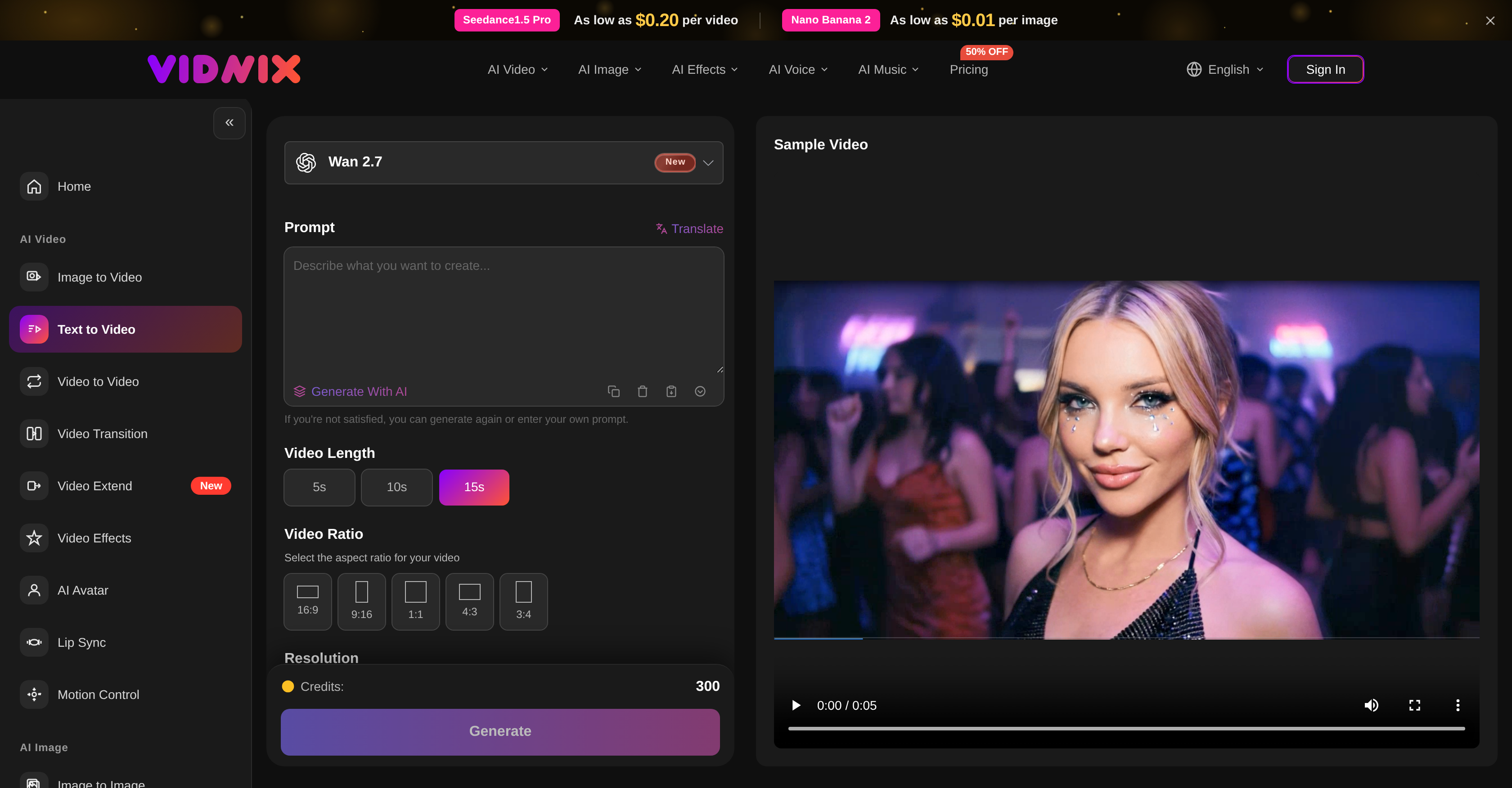
- Launch ad videos and product explainers in minutes by inputting your script or campaign message into the AI video generator.
- Produce engaging social media content for TikTok or YouTube by transforming text prompts into visually compelling short clips.
- Convert lesson plans into educational videos without editing skills, using the intuitive text-to-video interface.
- Generate product-oriented images from text descriptions to complement your video assets with the built-in AI image generator.
- Control video pacing, style, and duration precisely by specifying your preferences before generation.
- Add background audio that matches your video's atmosphere and depth through the AI-driven audio enhancement.
- Preview every generated video before downloading to ensure the output matches your creative vision.
Pros & Cons
Pros
- High-quality video generation
- Transforms text to video
- Transforms image to video
- Multi-aspect video production
- Background audio function
- Generates ad videos
- Generates product explainers
- Generates promotional clips
- Generates short social content
- Product-oriented image creation
- Intuitive interface design
- Preview before download
- Customizable pacing and style
- Visual scene generation from prompts
- Supports wide range of users
- Script to video conversion
- Multiple video effects
- Text-to-video conversion
- Content marketing tool
- Video editing capabilities
- Multimedia production tool
- Video animation tool
- Startup-friendly tool
- Transforms campaign messages to video
- Detailed product description videos
- Enhanced user experience
- Comprehensive online tool
- Supports different video dimensions
- Supports different video durations
- Supports different aspect ratios
- Fast video generation
- Can generate videos from descriptions
- Generates content for social media
- Education technology feature
- Affordable pricing plans
- Multilingual support
- Real people support
- Can regenerate if unsatisfied
- Multiple resolution support
- Can generate sample videos
- Offers suggestion for aspect ratio
- Fast video generation features
- Drag and drop image/video/audio uploads
- Can create videos from audio
- Supports multiple video models
- Prompt translation feature
- Scenario description to video feature
- Motion control feature
Cons
- No offline mode
- Restricted video length
- Limited aspect ratios
- No video to video transformation
- No option for multiple languages
- Cannot upload external audio
- No real human voice support
- Fixed video resolution options
- Dependency on prompts for production
- Lacks advanced video editing tools
Reviews
Rate this tool
Loading reviews...
❓ Frequently Asked Questions
Vidnix AI is a comprehensive online tool powered by artificial intelligence designed to generate high-quality videos from either text or image inputs. It is aimed at fulfilling the needs of a diverse user base including content creators, marketers, educators, startups, and designers.
Main features include turning scripted prompts, detailed product descriptions, and creative ideas into visually engaging videos. It also provides capabilities such as prompt to video conversion which allows users to generate visual scenes from descriptions of characters, settings, motions, camera style, and mood. Vidnix AI also includes a function to add background audio to enhance the depth and atmosphere of the generated videos. Commercially, it's utilised to generate ad videos, product explainers, promotional clips, and short social content from scripts or campaign messages. Furthermore, there's an AI image generator that enables users to develop product-oriented images from text descriptions.
Vidnix AI uses advanced AI algorithms to interpret text or image input and generate a correspondingly themed video. This includes recognizing and understanding script prompts, product descriptions, and creative ideas, which it then translates into a video that aligns with the user's defined pacing and style.
The multiple aspects of video production such as voice, music, image, and video effects are handled by Vidnix AI's advanced AI tools that contribute to the making of a complete user experience. The AI parses the input, generates the required scenes while managing the voiceover, background audio, and visual effects in accordance with the users' preference.
Prompt to video conversion is a strong offering where users can generate visual scenes from simply describing characters, settings, motions, camera style, and mood. This gives users the freedom and versatility to create highly customized, unique videos from text.
Pacing and style customization in Vidnix AI is facilitated by direct user inputs. Users can specify their desired pacing and style while inputting the text or image, enabling the AI to produce a video that best matches these criteria.
Vidnix AI is useful for a number of commercial applications. It can be used to generate ad videos, product explainers, promotional clips, and short social content from scripts or campaign messages. These are ideal for marketing and promotional strategies for businesses ranging from startups to multinational corporations.
Vidnix AI's AI image generator is a tool that lets users create product-oriented images from text descriptions. It applies the principles of AI to understand the specific elements described in the text and uses that understanding to generate an accurately representative image.
Users can straightforwardly input their text in the provided space on the intuitive interface of Vidnix AI. Thereafter, they can select their preferred video dimension and duration parameters.
Yes, Vidnix AI allows users to preview their work after generation. This functionality gives users the opportunity to review the output and make any required adjustments before downloading the completed video.
For various commercial purposes, Vidnix AI can easily become a go-to tool. You just need to input your script or campaign message, select your desired video dimensions and duration, throughout the process, the AI will create a scene that best matches your specified demands.
Vidnix AI's AI video and image generation capabilities make it an excellent tool for content marketing and video editing. By transforming text or image inputs into engaging and visually compelling videos, Vidnix AI allows for the creation of unique, high-quality content ideal for successful marketing campaigns.
Yes, Vidnix AI can be used for effective text-to-video conversion. It translates text inputs into high-quality videos, making it ideal for creating social clips, ads, explainers, product demos, and a wide array of other video content.
Vidnix AI can aid in multimedia production and video animation by turning text or image inputs into full-fledged videos complete with audio, pacing, and visual effects. Whether it's creating educational content or promotional videos, Vidnix AI has the capability to meet varied user needs.
Vidnix AI aids in the generation of the scripted prompts, background audio, and video effects by interpreting the user's input and transforming that into an audio-visual representation. It uses AI to understand the context of the input and match corresponding sounds and visuals.
Yes, Vidnix AI can generate user-focused campaign messages and product descriptions. You just need to input your campaign message or product description, and Vidnix AI’s sophisticated AI machinery will process your input and produce a related video.
The target users of Vidnix AI cover a broad spectrum including content creators, marketers, educators, startups, and designers. This diverse group can benefit from the tool in their own unique ways, be it transforming text into videos, creating video animations, or producing high-quality campaign messages.
Vidnix AI serves as a powerful tool for educators and startups. Educators can use it to convert lesson plans into engaging educational videos, while startups can turn pitch ideas, product descriptions, or landing page copy into AI-generated videos for marketing or investor presentations.
Vidnix AI provides an intuitive and user-friendly experience. Right from the initial input of text to the generation of the final video or image, every step in the process has been designed for seamless use, making it accessible even to users with low technical proficiency.
Yes, Vidnix AI is eminently suitable for creating social media content. Whether it's generating short clips for TikTok or longer videos for YouTube, Vidnix AI fulfills these requirements adeptly, making it a trusted companion for social media creators.
Pricing
Pricing model
Paid
Paid options from
$0.01/unit
Billing frequency
Pay-as-you-go