
Vidverse AI | Reference to Video AI
Keep characters, products, and visual style consistent from first frame to last: upload multiple reference images or video clips that guide the AI video's appearance and motion.
Listing not yet reviewed by our editors · How we check
Overview
- Keep characters, products, and visual style consistent from first frame to last: upload multiple reference images or video clips that guide the AI video's appearance and motion.
- Deliver full five-minute stories in a single generation: Vidverse 4.0 builds richer storylines and Long Video holds precise multi-image referencing, both for videos up to 300 seconds.
- Feed an entire mood board into one clip: Seedance 2.5 accepts up to 30 image references, 10 video references, and 3 audio references for videos up to 30 seconds.
- Shape the sound and rhythm of your video, not just the visuals: Seedance 2.5 and Minimax H3 each take three audio references alongside image and video inputs.
- Get lifelike movement from still references: Wan 2.7 generates more realistic motion effects for natural-looking reference-to-video results.
- Direct your video through conversation instead of a single fixed prompt: Gemini Omni supports conversational video creation.
- Match the engine to each project's length and asset count: nine generation models, including Kling 4.0 multimodal references and Wan 3.0 with up to 20 reference assets, each list their own reference capacity and clip length.
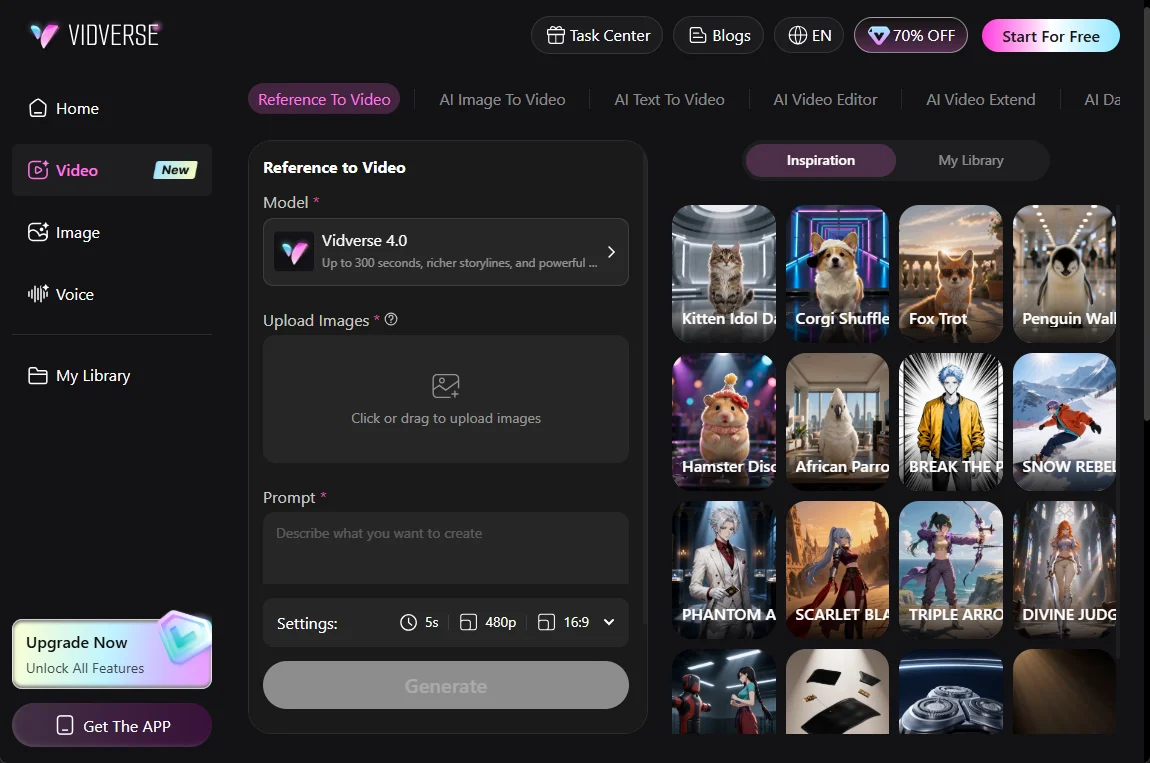
- Go from assets to finished clip in one pass: upload references, write a text prompt, pick a model, adjust settings, and hit Generate.
- Find every past render without hunting through downloads: a built-in Library stores all your generated videos in one place.
Pros & Cons
From the listing; not yet checked by our editors.
Pros
- Combines multiple visual references
- Supports image and video references
- Audio references on select models
- Prompt-guided reference-based generation
- Aims to preserve visual consistency
- Adds dynamic motion to references
- Seedance 2.5: 30 image references
- Seedance 2.5: 10 video references
- Seedance 2.5: three audio references
- 30-second Seedance 2.5 clips
- Kling 4.0: multimodal references
- 30-second Kling 4.0 clips
- Wan 3.0: 20 reference assets
- 30-second Wan 3.0 clips
- Minimax H3: nine image references
- Minimax H3: three video references
- Minimax H3: three audio clips
- 300-second Vidverse 4.0 videos
- Vidverse 4.0: richer storylines
- 300-second Long Video creations
- Long Video: precise multi-image referencing
- Wan 2.7: realistic motion effects
- Gemini Omni: conversational video creation
- Multiple generation models to compare
- Seedance 2.5: three model tiers
- Seedance 2.0: three model tiers
- Drag-and-drop image uploading
- 20,000-character prompt field
- Generated-work library included
Cons
- Reference limits vary by model
- Seedance 2.5 caps clips at 30 seconds
- Kling 4.0 caps clips at 30 seconds
- Wan 3.0 allows 20 reference assets
- Minimax H3 allows nine images
- Minimax H3 allows three videos
- Minimax H3 allows three audio clips
- Long-form models cap clips at 300 seconds
- Reference weighting is undocumented
- Post-generation editing is unspecified
Alternatives to Vidverse AI | Reference to Video AI
Tools that share the most tags with Vidverse AI | Reference to Video AI.
- VidFlux - Image to Video AI
Create professional-grade videos from images without switching between multiple tools using our all-in-one platform with integrated AI models
Paid · from $9/month
$9/month
Not yet checked
- Image to Video AI
Bring static images to life with dynamic motion, transforming JPG, PNG, or WEBP files into engaging videos
Free trial · from $13.90/month
$13.90/month
Not yet checked
- Img2Video AI
Create professional animated videos from any image instantly with AI-powered image to video conversion
Freemium · from $5.99/month
$5.99/month
Not yet checked
- MindVideo
Transform static content into vibrant videos instantly using text prompts or uploaded images
Freemium · from $7.90/month
$7.90/month
Not yet checked
- Grok Imagine
Transform abstract ideas into unique visual concepts instantly with AI image generation based on your text prompts
Freemium · from $30/month
$30/month
Not yet checked
- AIVideoMaker - Free AI Video Maker
Bring static photos to life with motion by simply uploading JPG or PNG images and describing the animation you want
Freemium · from $19.96/month
$19.96/month
Not yet checked
Reviews
Rate this tool
Loading reviews...
Frequently asked questions
How do I create a video with Vidverse Reference to Video AI?
Upload reference images, enter a prompt, choose a generation model, adjust the available settings, and select Generate.
What kinds of images or video clips can I upload as references to Vidverse Reference to Video AI?
You can use multiple reference images or video clips. Supported file formats and specific image or clip requirements are not specified.
Can Vidverse Reference to Video AI use audio clips as references?
Yes. Seedance 2.5 supports up to three audio references, and Minimax H3 supports three audio clips. The information does not specify audio-reference support for every model.
How many reference images, videos, and audio clips can I upload with each Vidverse model?
Seedance 2.5: up to 30 images, 10 videos, and 3 audio references. Wan 3.0: up to 20 reference assets, with the image/video/audio breakdown unspecified. Minimax H3: 9 images, 3 videos, and 3 audio clips. Kling 4.0 has multimodal references, but its limits are unspecified. Counts for the other models are unspecified.
What is the maximum video length for each model in Vidverse Reference to Video AI?
Vidverse 4.0 and Long Video: up to 300 seconds. Seedance 2.5, Kling 4.0, and Wan 3.0: up to 30 seconds. Maximum lengths for Minimax H3, Seedance 2.0, Wan 2.7, and Gemini Omni are not specified.
Which Vidverse model should I choose for a video up to five minutes long?
Vidverse 4.0 and Long Video are both listed for videos up to 300 seconds, or five minutes.
How does Vidverse 4.0 compare with the Long Video model?
Both support videos up to 300 seconds. Vidverse 4.0 is associated with richer storylines; Long Video emphasizes precise referencing of multiple images.
How do Seedance 2.5 and Kling 4.0 differ in Vidverse Reference to Video AI?
Both are listed for clips up to 30 seconds. Seedance 2.5 supports up to 30 image, 10 video, and 3 audio references. Kling 4.0 is described as having upgraded multimodal reference capabilities, but its reference limits are not specified.