Vireel AI | Image to Image Generator
Overview
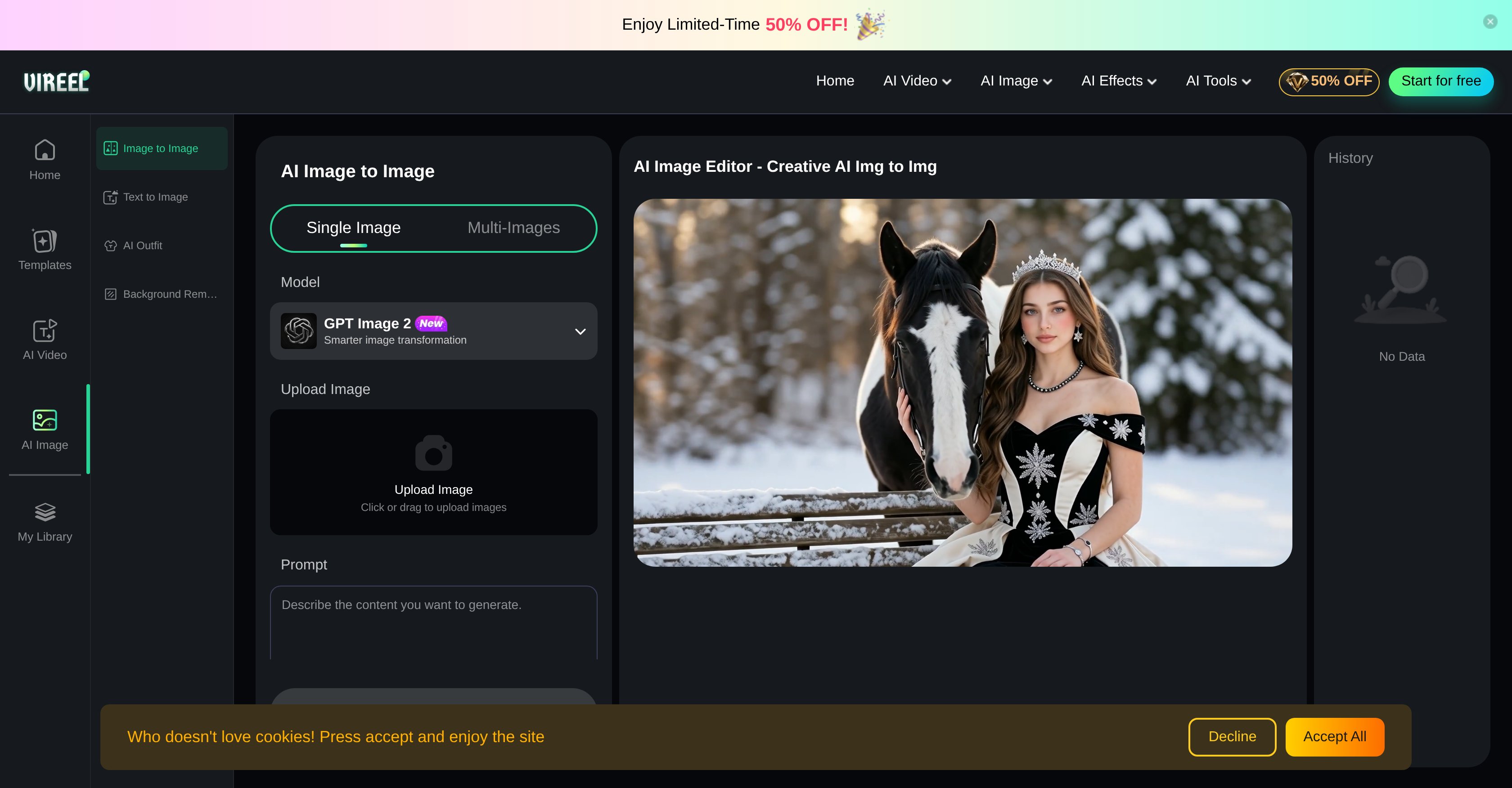
- Achieve professional artistic transformations with zero learning curve using intuitive AI image editing templates and models like Vireel 4.0 and Seedream 4.5
- Generate ultra-realistic, high-detail images from any photo by selecting a preferred AI model that matches your desired level of realism and detail
- Create dynamic videos from still images or text prompts instantly, expanding your content without additional video editing software
- Remove backgrounds or generate outfit visuals in one click with specialized AI tools, streamlining product photography and fashion design workflows
- Explore diverse artistic styles—from hyper-realism and 3D renders to claymation and Ghibli-inspired aesthetics—without switching between multiple apps
- Process single or multiple images simultaneously using multi-image models, saving time on batch edits for consistent visual campaigns
Pros & Cons
Pros
- Online tool
- Transforms images
- Animated image videos
- Text-to-video conversion
- Multitude of templates
- Supports multi-image models
- Optimal image transition
- Supports diverse styles
- Utilizes Vireel 4.0
- Utilizes Google Nano Banana 2
- Uses SeeDream
- Artistic transformations
- Detail and realism
- Vireel 4.0 support
- Seedream 4.5 support
- GPT Image 2 support
- User Friendly Interface
- For novices and professionals
- Single and multiple image transformation
- Various models to choose
- Captivating image modifications
- High-quality generation
- Provides a sense of reality
- Fast generation at low cost
- Bold artistic expression
- Free to use
- Creates digital masterpieces
- Converts sketches to polished art
- Professional workflows
- Single, high-performance interface
- Maintains original image intent
- Completes tasks privately and fast
- Optional Pro membership
- Daily check-ins for extra credits
- Join Discord for extra credits
- Invite friends for extra credits
- Image upload functionality
- Multiple inputs, multiple outputs
- Provides total creative sovereignty
- Protects user privacy
- Supports high-resolution output
- Data encryption
Cons
- No offline version
- No mobile app
- Multiple image models complexity
- Limited image editing styles
- Complexity for novices
- No detailed tool guidance
- No privacy information
- No direct image upload
- Complex multi-image transformation
- Dependent on internet speed
Reviews
Rate this tool
Loading reviews...
❓ Frequently Asked Questions
AI Image to Image is an online artificial intelligence tool used for transforming and editing images. Users can leverage sophisticated models such as Vireel 4.0, Google Nano Banana 2, and SeeDream to produce visually appealing and artistically profound images. The tool provides capabilities such as image to video, text to video, image to image editing, and text to image transformations. It also supports templates and multi-image models. AI Image to Image is free to use, and provides vast creative flexibility, supporting styles from hyper-realism and 3D renders to unique claymation.
AI Image to Image utilizes sophisticated algorithms to animate still images into dynamic videos. However, the exact specifics of how this technology works have not been explicitly detailed on their website.
Yes, AI Image to Image does offer the ability to convert text prompts into engaging and visually stunning videos.
AI Image to Image offers unique image editing functions such as AI-enhanced image to image editing for artistic transformations and AI text to image transformations. Additionally, users can utilize a multitude of templates for creating visually appealing outputs.
Yes, AI Image to Image does support multi-image models. This provision gives users increased versatility and creative freedom in their editing endeavours.
Yes, AI Image to Image has an array of templates available. These can be used by users to enhance their visuals and better realise their creative ideas.
Yes, AI Image to Image does support a wide variety of artistic styles. This includes (but is not limited to) hyper-realism, 3D renders, and distinctive claymation.
The Hyper-Realistic AI Photo Stylizer is a unique feature of AI Image to Image which allows users to apply distinctive, Ghibli-inspired aesthetics to their work, thereby imbuing their images with a touch of realism and charm.
Yes, AI Image to Image is a free-to-use tool. This allows users to access and experience the powerful functionalities of AI Image to Image without any financial obligations.
AI Image to Image leverages several advanced models to generate visuals. These include Vireel 4.0, Google Nano Banana 2, and SeeDream.
Yes, users are able to explore various aesthetics within the robust image editing environment offered by AI Image to Image. This provides a broader range of creative possibilities, enabling users to create unique and desirable visual content.
AI Image to Image ensures optimal transition in image transformation by transcending beyond simple filters. It uses machine learning to analyze and interpret the given input before creating a transformative output. The tool is designed to perform these tasks with a high degree of precision and attention to detail.
AI Image to Image has a sophisticated functionality for animating still images. Using advanced models, it can turn static images into dynamic videos; however, the exact mechanics behind this functionality have not been provided in detail on their website.
Yes, AI Image to Image provides the functionality to transform text prompts into images. By utilizing advanced AI algorithms, it can interpret text and translate it into relevant and dynamic visual content.
Yes, AI Image to Image does provide Ghibli-inspired aesthetics editing features. These can be accessed through the tool's Hyper-Realistic AI Photo Stylizer feature.
AI Image to Image turns images to videos through the use of advanced AI models. The exact technical details of how this process is completed are not extensively detailed on their website. However, the tool utilizes advanced image recognition and transformation technologies to achieve this.
AI Image to Image offers an array of tools and functionalities for creative editing. It supports multi-image models for more varied visual edits and provides a vast array of templates to suit various creative needs. It allows users to transform an image to image, image to video, and text to video. It also houses a unique collection of editing styles, from hyperrealism to claymation.
Yes, with AI Image to Image, users can create artistic transformations. The tool utilizes advanced AI algorithms to interpret the users' input and deliver surprisingly creative and artistically enhanced outputs.
'Creative freedom' in the context of AI Image to Image editing, refers to its inherent design, which aims to give users as much liberty as possible while editing. The tool provides a large number of features, such as support for multi-image models, a array of styles, and the ability to use templates, to ensure users can explore their creativity without constraints.
Yes, AI Image to Image does support the Vireel 4.0 model. This means that users can leverage this advanced model's capabilities for their image transformation and editing needs.
Vireels AI Image Editor is a sophisticated online artificial intelligence tool designed specifically for transforming and editing images. It utilizes machine learning models like Vireel 4.0, Google Nano Banana 2, and SeeDream to provide various functionalities that contribute to creating appealing artistic visuals such as animating still images into dynamic videos, converting text prompts into captivating videos, and initiating diverse image editing techniques.
Vireels AI Image Editor is incredibly intuitive to use. Firstly, you need to upload the image onto the dashboard. Secondly, choose a desired model like Vireel 4.0 or Google's Nano Banana 2. Thirdly, enter your description into the AI Image Editor interface. Finally, leverage the image to image feature to generate striking new visuals in mere seconds.
Vireels AI Image Editor offers a comprehensive suite of capabilities that includes AI-enhanced image to video and text to video conversion. It features unique image editing functions like AI image to image editing for artistic transformations, AI text to image transformations, and AI background removing. The platform also provides a wide range of templates, AI Outfit Generator tool, and supports multi-image models, offering users an expansively creative editing environment.
Yes, Vireels AI Image Editor supports multi-image models. This flexibility allows users to undertake more advanced and creative editing work, enabling them to use multiple images simultaneously for more intricate transformations and modifications.
Animating still images into videos using Vireels AI Image Editor is achieved through its AI-enhanced Image to Video capability. Users simply upload the image they wish to animate, and the AI processes it by utilising its complex machine learning models and transforms the static image into a dynamic, captivating video.
Vireels AI Image Editor has a multitude of unique image editing functions. These include AI-enhanced image to image editing for artistic transformations, AI text to image transformations for unique creations, and an AI Outfit Generator and AI Background Remover. These advanced features allow for unique image transformations, ultra-realistic high-detail images, and creative exploration within the editing environment.
Yes, Vireels AI Image Editor has a feature of converting text prompts into captivating videos. The AI Text to Video feature allows users to communicate their message or narrative more effectively by transforming simple text prompts into stunning, hi-definition video content.
Vireel 4.0 is a specific version of the machine learning model utilized in Vireels AI Image Editor. It's designed to support higher quality image generation and allows for multiple inputs and multiple outputs during the editing process. This ensures a detailed level of image enhancement resulting in ultra-realistic, high-detail images.
Ghibli-inspired aesthetics can be applied to your imageries using Vireels AI Image Editor's Hyper-Realistic AI Photo Stylizer feature. This feature helps to bring a unique charm and creative texture to your work by transforming your images with a specific artistic style inspired by the iconic Studio Ghibli animation style.
Yes, Vireels AI Image Editor does support 3D renders. This capability helps to add depth and dimension to your images, creating a more engaging and immersive visual experience. It expands creative possibilities and allows users to venture beyond traditional 2D image editing.
Vireels AI Image Editor supports a wide range of image transformation styles. Apart from hyper-realism and 3D renders, it offers unique claymation along with numerous other styles, catering to a diverse aesthetic palette to help you bring your creative vision to life.
Vireels AI Image Editor supports various video and image models. Some of the supported image models include GPT Image 2, Vireel 4.0, Vireel 3.0, Nano Banana Pro, Seedream 4.5, and many more. The supported video models include AI Dance Generator, Wan 2.6, and others.
Absolutely, both professionals and novices can utilize Vireels AI Image Editor effectively. The platform has been designed with a user-friendly interface that simplifies complex image editing and transformation processes, making it accessible for users of all proficiency levels to explore innovative image modification.
The AI Outfit Generator tool in Vireels AI Image Editor is an innovative feature that uses artificial intelligence to create outfit visuals. This feature can be highly beneficial for fashion designers, stylists, e-commerce retailers, and anyone in need of creating or experimenting with outfit visuals.
Yes, Vireels AI Image Editor includes an AI Background Remover. This tool uses AI technology to identify the background of an image and seamlessly erase it, helping users to isolate the subject of an image and create detailed cut-out or composite images.
Yes, Vireels AI Image Editor proves its mettle in video editing as well. It offers tools such as AI Video Extender and AI Video Editor for creative and engaging storytelling, allowing users to convert simple text prompts into stunning videos or animate still images into dynamic videos.
The AI Image to Image transformation capability in Vireels AI Image Editor allows the user to transform one image into another using AI technology. By analyzing the structural details of the input image, customized artistic transformations can be applied to create a brand-new image while retaining some specific elements of the original image.
The templates in Vireels AI Image Editor serve to facilitate and streamline image editing and transformation workflow. They provide a broad palette of pre-defined styles and modifications which users can apply to their images. Not only do the templates save time, but they also contribute to generating high-quality, professional-standard visuals.
Vireel's AI Image to Image tool optimizes for creative freedom by enabling users to make the most of the advanced AI functions and diverse editing capabilities for creating stunning visuals. It prioritizes the users' creative vision, giving them the liberty to explore various aesthetics through an immersive and robust image editing environment.
The AI Text to Video feature in Vireels AI Image Editor allows users to transform textual content into engaging video content. This feature reads the text input, analyzes it, and executes AI-driven processes to create a dynamic video that effectively conveys the message or the story the text holds.
Pricing
Pricing model
Free Trial
Paid options from
$3/month
Billing frequency
Monthly