AI Effect.Art
Overview
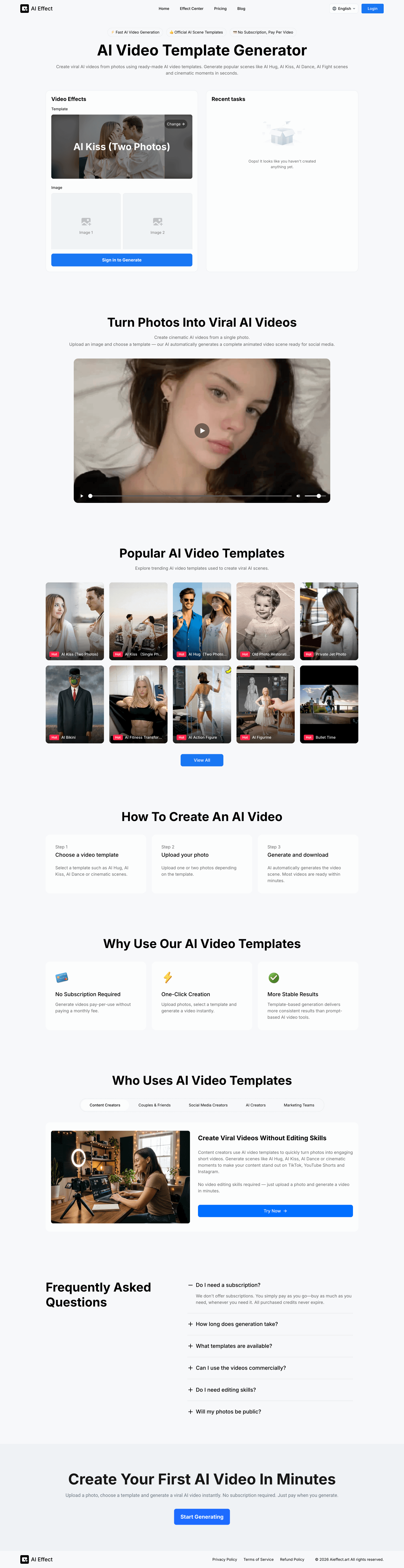
- Generate attention-grabbing social media content in minutes without video editing skills using ready-made AI video templates.
- Produce stable, high-quality 1080P videos for platforms like TikTok and Instagram using a simple three-step template process.
- Pay only for the videos you create with a flexible pay-per-use model, eliminating costly monthly subscriptions.
- Keep your original photos private and secure, with data only shared when you choose to publish the final video.
- Transform product images or personal photos into dynamic marketing assets for commercial use, driving higher audience engagement.
Pros & Cons
Pros
- Popular scene templates
- Easy photo upload
- User-friendly interface
- No video editing skills required
- Pay-per-use model
- No subscriptions needed
- Secure usage
- Output ready for social media
- Diverse template collection
- Works well for individuals and professionals
- Rapid video generation
- One-click video creation
- Private unless shared by user
- Quick upload to template selection
- Effective for content creators
- Utilized by marketing teams
- Beneficial for social media influencers
- Privacy protection
- Consistent results with templates
- Dynamic video from static images
- On-demand service
- Popular themes availability
- Created for Hobbyists
- Improves user engagement
- Creates shareable content
- Transforms photos into videos
- Cognitive image transformation
- Social media video content
- Pictures into short video clips
- Photos to animated videos
- Variety of motion effects
- Cinematic video effects
- Option of single photo video
- Instant video scene generation
Cons
- Limited template options
- Pay-per-use cost accumulative
- Allows only photo uploads
- No prompt-based video generation
- Only generates short videos
- No video editing feature
- Limited resolution options
- Requires specific image types
Reviews
Rate this tool
Loading reviews...
❓ Frequently Asked Questions
AI Effect is an AI-driven tool that specializes in creating animated video scenes from single or multiple photos using ready-made templates. It's designed for the generation of short, catchy AI videos both for social and commercial use.
AI Effect operates by allowing users to upload a photo, select from a variety of ready-made scene templates, and then it uses AI to generate a complete animated video scene from the uploaded photo.
Absolutely, AI Effect does not require any video editing skills. With its user-friendly interface and one-click creation, anyone can easily generate animations without prior editing experience.
AI Effect provides a wide array of popular scene templates, including, but not limited to, AI Hug, AI Kiss, AI Dance, AI Fight, and other cinematic moments.
Yes, users have the option to use multiple photos with AI Effect depending on the selected template.
Yes, AI Effect ensures user data security. Uploaded photos remain private and are not made public unless the user actively chooses to share them.
Yes, AI Effect adopts a pay-per-use model. Users only pay for each video generated, eliminating the need for a recurring monthly subscription.
Yes, videos created with AI Effect can be used for commercial purposes provided they adhere to the platform and model usage policies.
AI Effect aids content creators and social media managers by enabling them to produce attention-grabbing videos quickly, without necessitating video editing skills or experience. It helps to generate visually compelling content that stands out on popular platforms.
AI Effect generated videos are ideal for sharing on various social media platforms including TikTok, YouTube Shorts, and Instagram.
AI Effect adopts a pay-per-use model, meaning you only pay for each video you generate. The specific cost per video is not mentioned on their website.
AI Effect allows users to generate videos up to 1080P quality., ensuring high-resolution outputs.
Most videos generated by AI Effect are ready within a few minutes, depending on the complexity of the chosen template.
Creating a video using AI Effect involves three steps: Choose a template such as AI Hug, AI Kiss, AI Dance or cinematic scenes; Upload one or two photos; and, the AI automatically generates the video scene.
Yes, with AI Effect, users can transform their photos into animated AI videos using the platform's provided templates.
No, AI Effect does not require a monthly subscription. It operates on a pay-per-use model where you only pay for the videos you generate.
Yes, with AI Effect, users have the flexibility to choose their video's duration and resolution.
AI Effect permits uploading JPEG/PNG/JPG/WEBP/BMP images up to 10MB, with a minimum width/height of 300px.
AI Effect is used by a diverse range of individuals and groups including content creators, couples and friends, social media creators, AI enthusiasts, and marketing teams.
Unlike other AI video tools which may require complex prompts or technical knowledge, AI Effect offers more stable results using template-based generation. It has a user-friendly interface, no subscription requirements, offers a faster creation process, and ensures privacy of user data.
AI Effect is an AI-driven tool designed to convert single or multiple photos into animated video scenes using pre-made templates. It's a user-friendly software that requires no video editing skills and offers popular scene templates like AI Hug, AI Kiss, AI Dance, and AI Fight along with other cinematic moments. The AI delivers a complete animated video scene ready for sharing once users upload their photo and select their desired template.
AI Effect generates videos from photos by having users select a preferred template and upload a photo. After the photo is uploaded, the AI automatically and rapidly manufactures an animated video scene ready for sharing on social media platforms. The process requires no video editing skills, making it accessible for users.
AI Effect offers a rich collection of popular video templates for users to choose from. Some of the trending templates include AI Hug, AI Kiss, AI Dance, AI Fight scenes, Old Photo Restoration, Private Jet Photo, AI Bikini, AI Fitness Transformation, AI Action Figure, AI Figurine, and Bullet Time.
Yes, AI Effect is designed to be user-friendly and requires no video editing skills. The process involves selecting a template, uploading a photo and allowing the AI to generate a complete video scene. This makes it accessible to anyone aiming to create engaging videos.
To use the AI Effect Video Template Generator, one would need a photo which they want to animate, an internet connection, and a payment method for the pay-per-use model. No subscription is needed, and no video editing skills are required.
AI Effect operates on a pay-per-use model, where users only pay for each video generation. It eliminates the need for monthly or yearly subscriptions - users are charged only when they generate a video, providing a more flexible and affordable way to create videos.
AI Effect is used in various sectors, including content creation, social media management, marketing, and among AI enthusiasts. It helps these sectors generate eye-catching, dynamic, and engaging videos that capture attention on platforms like TikTok, YouTube Shorts, and Instagram.
AI Effect is suitable for content creators and social media managers as it allows for the rapid generation of vibrant, engaging, and shareable videos using only a single photo. It offers a user-friendly interface and requires no video editing skills - creators can select a template, upload their photo, and have the AI create a complete scene for social media.
Yes, AI Effect is a secure platform for users. The photos uploaded by users remain private and are not released publicly unless the user opts to share them. The tool prioritizes user privacy and ensures data protection.
The video generation process on AI Effect involves selecting a video template, uploading a photo, and letting the AI automatically generate the video scene. The entire process is quick and easy, often having videos ready for use within minutes, making it highly user-friendly.
Marketing teams can benefit from using AI Effect as it allows for quick production of dynamic and engaging visuals for campaigns and social media. Marketing teams can convert product photos or brand images into animated video scenes that can significantly increase audience engagement.
No, there is no subscription required to use AI Effect. It operates on a pay-per-use model, meaning users only pay when they generate a video, thus eliminating the need for any kind of binding subscription.
Video generation on AI Effect takes a matter of minutes. Depending on the selected template, most videos are ready within a short span of time, facilitating swift content creation.
AI Effect allows users to upload JPEG, PNG, JPG, WEBP, BMP images that are up to 10MB in size, with a minimum width/height of 300px. This provides flexibility in terms of the type and size of images that can be used for video generation.
Yes, the videos generated on AI Effect can be used commercially as long as they comply with the platform usage policies and model usage regulations.
AI Effect contributes to user engagement on social media by aiding in the creation of dynamic, eye-catching videos from still images. These videos can be used to capture attention, generate interest, promote interaction, and drive engagement on social media platforms.
AI Effect bases its video generation on AI principles. The AI interprets the photo uploaded by the user, applies the chosen template, and converts the still image into a video scene. This process is automatic and does not require any editing skills from the user.
Yes, AI Effect ensures the privacy of uploaded photos. Any photo uploaded by a user remains private and is not made publicly accessible unless the user decides to share the video generated from that photo.
While AI Effect doesn't support complete user customization in terms of creating templates, the platform offers a variety of pre-made templates that can generate diverse types of videos, allowing for a range of unique video outputs.
Pricing
Pricing model
Paid
Paid options from
$5/unit
Billing frequency
Pay-as-you-go
Refund policy
View Policy