AI Product Photography.app
Overview
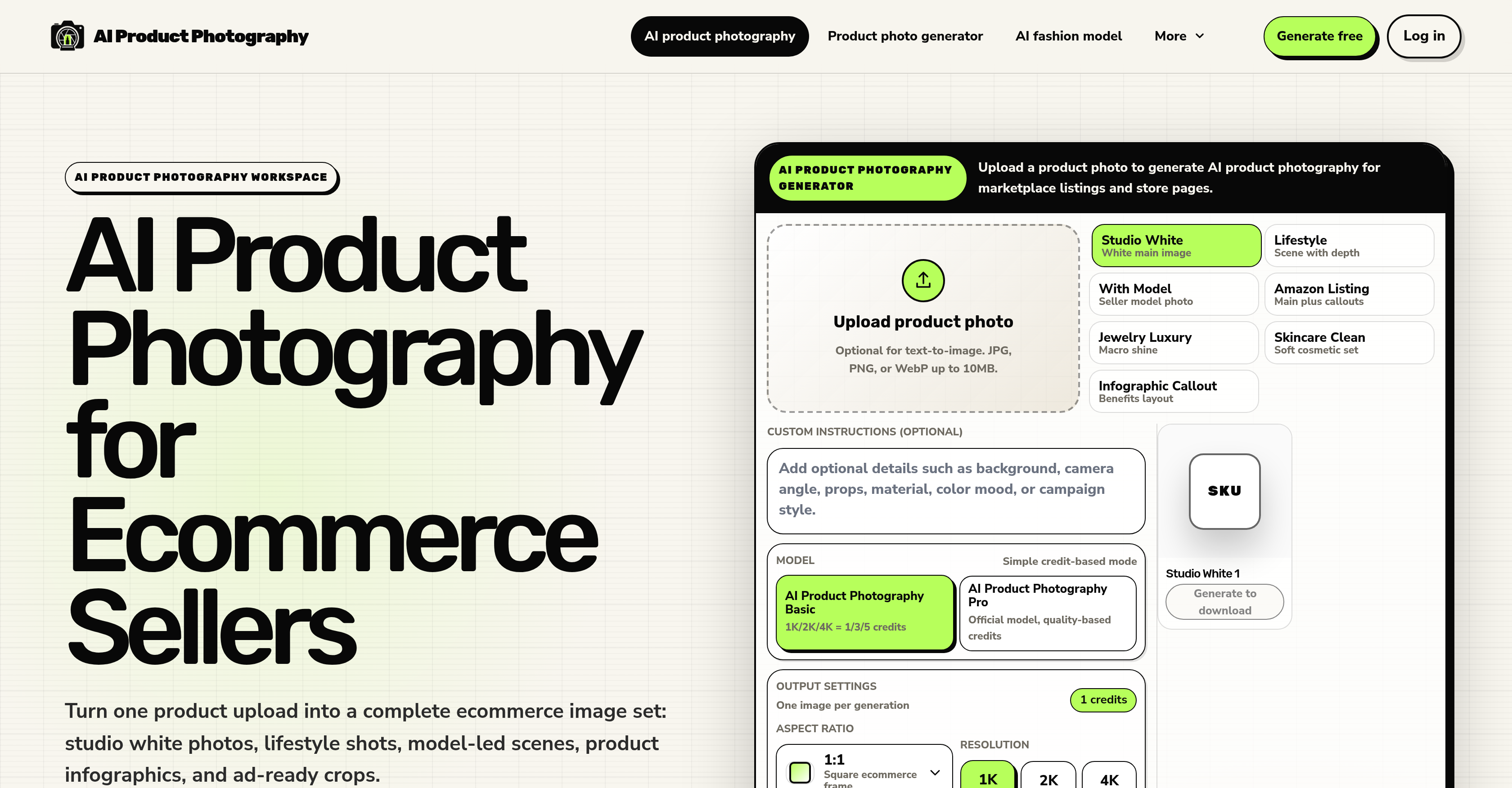
- Replace multiple physical shoots with a full set of ecommerce images—white main images, lifestyle scenes, model-led shots, infographics, and ad-ready crops—all generated from a single product upload
- Scale your catalog effortlessly by starting with single-image previews and expanding into repeatable SKU sets for large ecommerce catalogs
- Maintain a cohesive brand presentation across SKUs, Shopify collections, and seasonal campaigns with consistent lighting, framing, color, and crop behavior
- Protect product accuracy before publishing by reviewing critical details like logos, labels, small text, jewelry details, reflective surfaces, and packaging shape
- Generate diverse image types in one workflow—studio white, lifestyle, infographics, and marketplace crops—without needing any design skills
- Produce images in different sizes and aspect ratios tailored for specific platforms, from Amazon listing sets to ad campaigns
Pros & Cons
Pros
- Transforms single product upload
- Generates varied ecommerce images
- Creates studio white photos
- Generates lifestyle shots
- Generates product infographics
- Produces advertisement-ready crops
- Includes fidelity check feature
- Supports batch catalog workflows
- Maintains consistent lighting
- Ensures consistent framing
- Offers consistent color
- Maintains consistent crop behavior
- Ideal for Shopify collections
- Great for seasonal campaigns
- Designed for ecommerce
- No design skills needed
- Generates images from single upload
- Creates diverse image set
- Supports large SKU sets
- Generates model-hosted scenes
- Review before publishing option
- Scalable for larger catalogues
- Generated images ready for download
- Features workflow-first design
- Offers single-image previews
- Customizable image scene choice
- Optional text-to-image
- Supports JPG, PNG, WebP
- Offers credible model photos
- Supports image resolution choice
- Built for ecommerce output sets
- Generates Amazon-style infographics
- Maintains product fidelity
- Generates Shopify product visuals
- Suits social ad crops
- Seller-first alternative approach
- Replaces routine studio shoots
- Time-efficient approach
- Efficient product image creation
- Self-contained image generation process
- FAQ section for guidance
- Fidelity check for reflective materials
- Generates macro shine visuals
- Seller model photos available
- Benefits layout for infographics
- Studio white templates available
- Supports high-resolution images
- Credits system for images
Cons
- No API for integration
- Limited to ecommerce imagery
- Inconsistent model-led scene results
- Hard to control output
- Reflection handling inconsistent
- Limited file formats supported
- No design customizability
- Lacks broad photo editing
- Does not support video
- Difficult to scale content
Reviews
Rate this tool
Loading reviews...
❓ Frequently Asked Questions
AI Product Photography is a tool that uses AI technology to convert a single product upload into a comprehensive set of ecommerce images. It's useful for ecommerce sellers who want to showcase their products in different settings without conducting multiple physical shoots.
AI Product Photography uses AI technology to create manifold ecommerce images such as studio white photos, lifestyle shots, product infographics, and ad-ready crops from a single product upload. The images are rendered based on a wide variety of scenes and contexts involving the product.
Yes, AI Product Photography has the capability to generate lifestyle shots complete with model-led scenes. This allows ecommerce sellers to depict how a product might look or be used in real-world scenarios, enhancing the relatability of the product for potential customers.
'Product fidelity' in the context of AI Product Photography refers to the preservation and accurate depiction of key product details in the artificially generated images. Such details could include logos, labels, small texts, jewelry details, reflective surfaces, and the packaging shape. This helps ensure that the AI-generated images accurately represent the products.
AI Product Photography supports batch catalog workflows by allowing the processing of multiple product images simultaneously. This feature ensures consistent lighting, framing, color, and crop behavior across all the products in the batch, which is ideal for large product catalogs.
AI Product Photography provides specially designed workflows for Shopify collections and seasonal campaigns, maintaining consistent image attributes such as lighting, framing, color, and cropping. It enables sellers to generate diverse images including white main images, lifestyle photos, size visuals, and ad crops, all in a single workflow, which can be beneficial for managing large product collections and seasonal campaigns.
AI Product Photography can produce a diverse range of images including studio white photos, lifestyle shots, product infographics, and advertisement-ready crops. From a single product upload, it can create multiple images that can be used in varied ecommerce contexts.
AI Product Photography differs from generic background generators by focusing primarily on ecommerce image production, providing an array of images that span different ecommerce scenarios. It offers a seller-first alternative, with workflows designed around the seller's needs instead of simply changing the image's background.
No, you do not need design skills to use AI Product Photography. It is designed to produce image candidates ready for review and download from a single product upload. This user-friendly interface allows anyone to generate high-quality ecommerce images, regardless of their design background or experience.
AI Product Photography transforms a single product upload into a varied set of ecommerce images through AI technology. The product image is used as a reference for AI to generate several other images, including studio white photos, lifestyle scenes led by models, product infographics, and ad-ready crops.
Yes, AI Product Photography maintains consistent lighting, framing, color, and cropping across images. These consistent image attributes are key for maintaining a cohesive look and feel across a batch of images or an ecommerce catalog.
To review and download images from AI Product Photography, you upload a product image and then generate various types of images. Once the image candidates are produced by the tool, you can review product fidelity and, if satisfied, proceed to download your generated images.
Yes, AI Product Photography can generate product infographics. These can be especially useful for communicating detailed product features or instructions to customers in a visually appealing and concise way.
AI product Photography pays special attention to product fidelity. It ensures accurate representation of details like logos, jewelry aspects, and small text in images. Sellers have the opportunity to review these aspects in the generated images before publishing.
Yes, AI Product Photography has the capability to produce advertisement-ready crops. This feature enables sellers to produce images that are immediately suitable for use in promotional materials and advertising campaigns.
AI Product Photography can significantly benefit ecommerce sellers by allowing them to convert a single product image into a complete set of ecommerce images. It eliminates the need for multiple physical shoots and allows sellers to review product fidelity before publishing images. Furthermore, it provides support for Shopify collections and seasonal campaigns, maintaining consistent lighting, framing, color, and cropping across a wide range of images.
Yes, AI Product Photography can generate images with different sizes and aspect ratios. Sellers can choose their preferences for each batch of images, to ensure the generated images meet their different needs and requirements.
Yes, AI Product Photography can replace the need for multiple physical shoots. By using a single product upload, it can generate a variety of ecommerce images, reducing the time and resources typically required for numerous separate photo shoots.
AI Product Photography is highly efficient for managing Shopify collections and seasonal campaigns. Its batch catalog workflow feature maintains consistent image attributes, allowing sellers to readily update their online collections with images that maintain a uniform aesthetic. Additionally, its ability to generate varied imagery in one workflow, including lifestyle photos and ad crops, is beneficial for seasonal campaigns.
AI Product Photography is designed specifically around ecommerce image production, focusing on creating a wide variety of images that are directly suitable for ecommerce use. Unlike broad photo editing tools, it focuses on generating multiple types of product images from a single product upload, with tailored workflows based on the needs of ecommerce sellers.
AI Product Photography transforms a single product upload into various ecommerce images through the application of its generative AI. Users simply upload a product photo where it's processed and transformed through AI technology into several different ecommerce-ready images. These images include white main images, lifestyle shots, product info graphics, and ad-ready crops, giving ecommerce sellers a diverse array of images to work with.
AI Product Photography can generate a variety of photo types. These include white main images, lifestyle shots that contain a model for perspective, product infographics, and ad-ready crops. It can also generate specialized shots that highlight jewelry details and demonstrate size visuals.
AI Product Photography is beneficial to ecommerce sellers keen on diversifying their product visualization without needing to conduct multiple physical shoots. It especially proves beneficial for users that need to present visual consistency across large catalogues like SKUs, or Shopify collections.
AI Product Photography provides a product fidelity check. Users have the option to review product details like logos, labels, small text, jewelry details, reflective surfaces, and overall packaging shape before publishing. This allows review and checks to ensure accuracy and satisfactory transformation.
Yes, AI Product Photography is perfectly suited to be used with Shopify collections. It is able to maintain consistent lighting, framing, color, and crop behavior across diverse products, greatly aligning with the needs of Shopify collections.
AI Product Photography ensures consistent lighting, color, and framing across different products through its AI technology. The AI has been trained with these consistency parameters in mind to ensure it applies consistent transformations regardless of the diversity of product uploads. Thus, results maintain similar lighting conditions, framing, and color behavior.
AI Product Photography sets itself apart by focusing on ecommerce image production as opposed to broad photo editing. It is tailored around the seller's needs, emphasizing efficient workflows, product fidelity check, consistency across images and the generation of diverse image styles including white main images, lifestyle photos and ad-ready crops.
AI Product Photography supports batch catalog workflows by allowing users to begin with single-image previews and then scale into repeatable SKU sets for larger ecommerce catalogs. This makes it efficient for working on large-scale projects in an organized and time-saving manner.
Yes, AI Product Photography can indeed generate images for seasonal campaigns. It’s designed to maintain consistent note of lighting, framing, color and crop behaviour across products. So it is ideal for usage in thematic collections like seasonal campaigns.
AI Product Photography handles product details like logos, small text, and reflective surfaces by affording users the option to review these aspects in a product fidelity check before publishing. This ensures that intricate product details are preserved, clearly visible and accurately represented.
The process of using AI Product Photography is straightforward. Users upload a product photo, select a desired image scene type such as studio images, lifestyle photos, model-led shots, infographics, or marketplace crops. The AI generates a selection of images in line with the scene type chosen which users review and download as they please.
Yes, in the process of using AI Product Photography, users are able to preview the generated selection of images before they decide to download them. This allows users to ensure they are satisfied with the image transforms before finalizing their choices.
Yes, among the diversity of image types AI Product Photography generates, it is capable of creating ad-ready crops. These are essentially images designed in a way that they are ready to be directly used for ad campaigns.
AI Product Photography can create a variety of scenes. These include studio white photos, lifestyle scenes with depth and models, and different kinds of subject-specific shots, such as jewelry details, skincare sets, and an Amazon listing image set.
By applying its learned generative AI consistent rules, AI Product Photography ensures consistent crop behavior across different images. It delivers reliable visuals across different SKUs, Shopify collections, and seasonal campaigns, thus maintaining a consistent brand visual communication.
Yes, one type of image AI Product Photography can generate are infographics. These visually engaging images are particularly effective for showcasing products' features, specifications, or other data-driven information quickly and clearly.
AI Product Photography provides value to ecommerce sellers in different ways. It simplifies the image generation process into an efficient workflow saving resources and time. Sellers can thereby create a varied set of product images without the need for multiple shoots. Importantly, it helps sellers maintain consistent brand presentation across SKUs and seasonal campaigns, and insures product fidelity.
AI Product Photography is designed to be user-friendly for those new to AI tools. The user interface is intuitive and the process does not require any design skills or deep knowledge of AI. The ease of save, upload, and download make the AI Product Photography a practical tool even for beginners.
Pricing
Pricing model
Free Trial
Paid options from
$19.99/month
Billing frequency
Monthly