Overview
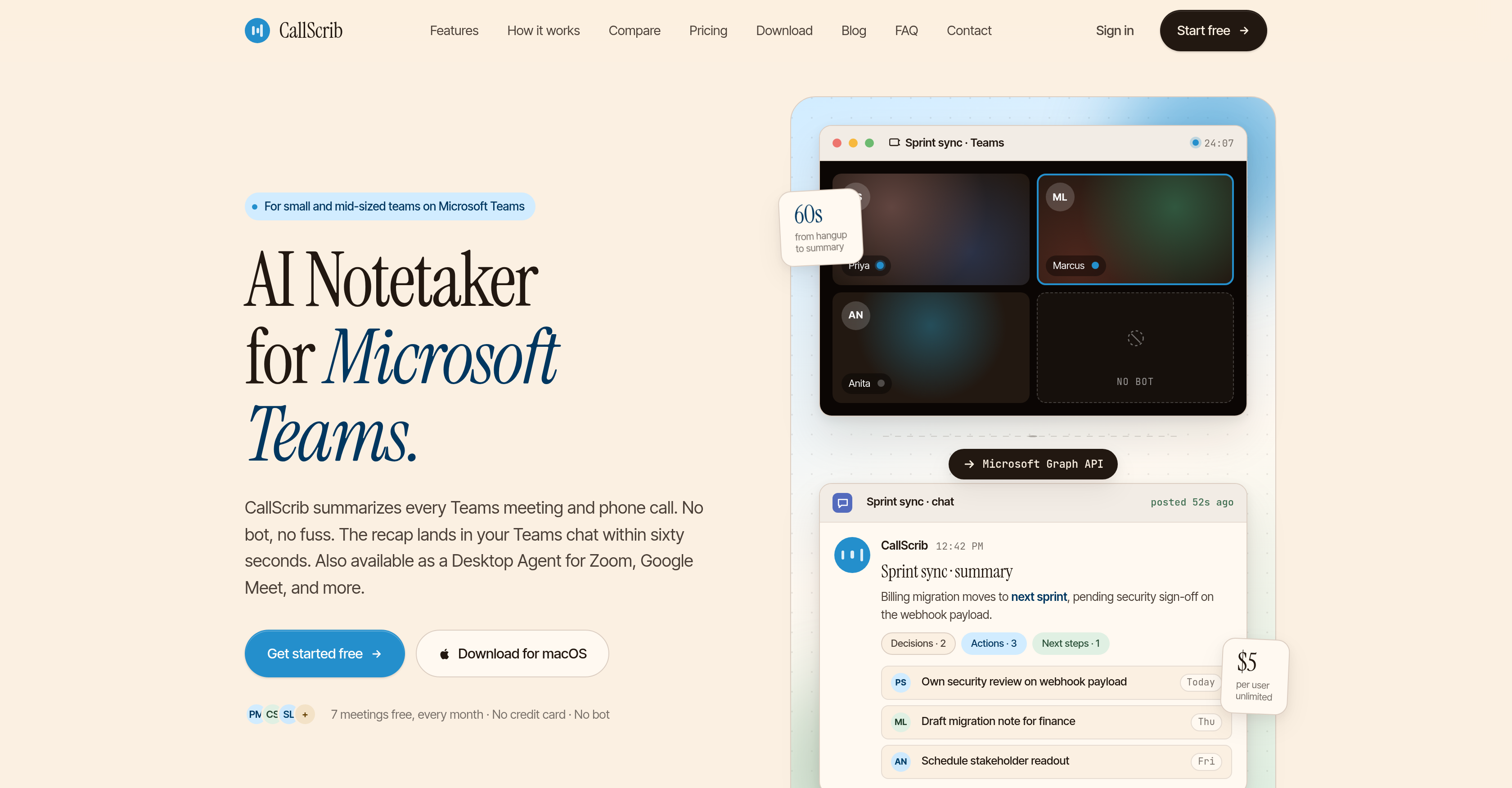
- Capture every key decision and action item instantly with structured AI meeting summaries delivered to your Teams chat within 60 seconds of a call ending.
- Eliminate the need for bots in your meetings by using Microsoft Graph API to read transcripts after the call, ensuring zero intrusion and no lobby admission.
- Search through every past conversation in a searchable archive of all meetings, making it easy to retrieve decisions and action items for audits or refresher reviews.
- Customize summaries by language for each user across 20+ languages, so every team member receives notes in their preferred language without extra steps.
- Scale note-taking across the entire organization with a one-time admin setup that covers all users, requiring no changes to how teams run their normal meetings.
- Automate follow-up workflows with pre-built and custom AI Recipes that route action items to assignees and sync directly with CRM platforms for premium users.
- Get AI summaries for any browser-based meeting on Zoom, Google Meet, Webex, or Slack Huddles using a lightweight Desktop Agent that runs in the menu bar or system tray.
- Protect sensitive data with GDPR-compliant, zero-retention API processing that ensures summaries are never used for AI training and all data stays in US-East region.
Pros & Cons
Pros
- Invisible to meeting participants
- Microsoft Graph API integration
- Summaries within 60 seconds
- Posts directly in Teams chat
- No email digests
- No separate dashboards
- No stored recordings
- Supports video meetings and calls
- Desktop Agent for macOS, Windows
- Compatible with Zoom, Google Meet, Webex, and more
- Free tier available
- Affordable pricing
- Chat Q&A with transcripts
- Language configurable per user
- Custom summary templates
- Searchable meeting archive
- Phone call summaries (PSTN)
- GDPR-compliant
- Privacy-focused
- Zero-retention API
- User-tailored language
- Structured summaries
- No disruption to workflow
- One-time setup
- Useful for various team roles
- GDPR-compliant
- Private by default
- Zero-retention API
- 20+ language support
- No bot in meetings
- Teams chat delivery
- 5-minute setup
- Language per user settings
- Works for Teams Phone calls
- Half the price of competitors
- Action item tracking
- Search across all conversations
- CRM auto-sync
- Custom branding
- Shared team workspace
- Bulk export & archiving
- Dedicated onboarding session
- SSO, SCIM, audit logs
- No bots join meetings
- Works for PSTN phone calls
- Compatible with any meeting platform
- Your language, your team's voice
- Structured summaries over transcripts
- No disruption to meeting appearance
- Private data never used for training
- Desktop Agent for individual use
- Processing complies with GDPR
Cons
- Microsoft Teams dependent
- Limited free plan
- Not real-time transcriptions
- Microsoft Graph API reliance
- Late delivery of summaries
- Only available on desktop apps
- No presence in meetings
- Summarizes post call only
Reviews
Rate this tool
Loading reviews...
❓ Frequently Asked Questions
CallScrib is an AI Notetaker tool designed specifically for Microsoft Teams. It provides AI meeting summaries of Teams video meetings, scheduled phone calls, or PSTN phone calls, without any intrusion. It comes with a feature to highlight decisions, action items, and next steps in the summaries, supports multiple languages, maintains rigorous data privacy and security measures, and offers a simple one-time setup. Additionally, CallScrib is available as a Desktop Agent for platforms like Zoom and Google Meet.
CallScrib works with Microsoft Teams by operating through the Microsoft Graph API after the call ends. It reads Teams transcripts and provides a structured summary in the Teams chat within sixty seconds. No bots are involved in the process, ensuring an uninterrupted meeting experience.
No, CallScrib does not intrude in video meetings or phone calls. It is completely invisible during calls and does not involve any bots in the process. It quietly reads the Teams transcripts through the Microsoft Graph API after your call or meeting ends, without causing a distraction.
CallScrib creates meeting summaries by reading the transcript of Team video meetings, scheduled phone calls, or PSTN phone calls through the Microsoft Graph API. Once the call ends, it analyses the transcript and automatically generates a structured summary within a minute.
A CallScrib summary includes a structured transcript highlighting the core aspects of the call or meeting. This includes the decisions made, action items identified, and the next steps outlined during the call or meeting. These summaries are not just a dump of the transcript but contain insightfully structured data.
CallScrib supports 20+ languages including English, Spanish, French, German, Japanese, Mandarin, Arabic, and many more. Each user can pick their preferred language in the Settings. The summaries can be generated in the user's chosen language.
CallScrib ensures data privacy and security by maintaining stringent measures. It is GDPR-compliant and maintains US-East data residency. Furthermore, it uses a zero-retention API for every summary, ensuring data is neither used to train the AI nor kept after processing. They also have SOC 2 certification in progress.
Yes, CallScrib can be used with other platforms like Zoom and Google Meet. It is available as a Desktop Agent for these platforms, where it detects and provides summaries for meetings on any platform without requiring IT admin approval.
CallScrib is designed for anyone who spends considerable time in meetings and calls. Specific user groups include sales teams, project managers, customer success teams, business leaders, and anyone who desires an efficient method to record and recall important discussion points from their meetings on Microsoft Teams.
CallScrib can be set up easily with a one-time administrative setup. The admin installs CallScrib and enables transcription to cover every user in the organization. There's also a Cloud or Desktop Agent option for individual setup.
CallScrib generates a summary after a meeting in less than sixty seconds from the time of hanging up.
Yes, CallScrib helps in tracking action items. In its meeting or call summaries, it specifically highlights the action items decided upon during the meeting.
Yes, CallScrib analyzes transcripts. Through the Microsoft Graph API, it reads the transcripts of Microsoft Teams meetings or calls, and then generates a structured summary.
The Desktop Agent feature of CallScrib is a lightweight app that runs in the menu bar (for macOS) or system tray (for Windows). It auto-detects meetings on any platform such as Google Meet, Zoom, Teams, and more, delivering AI summaries without requiring IT admin approval.
CallScrib enhances productivity by providing structured summaries of meetings or calls within a minute of their conclusion. This allows users to quickly review key decisions, action items, and next steps rather than going through long, word-for-word transcripts. This summarization allows efficient use of time and speedy execution of action points.
CallScrib is considered invisible during calls because it does not join the calls or meetings like bots do. It uses the Microsoft Graph API to read the already-generated Teams transcript after the call ends, so participants see nothing and there is no bot to admit from the lobby.
Yes, CallScrib supports PSTN phone calls. It is one of the few Teams apps that provides summaries for scheduled video meetings and PSTN phone calls automatically.
CallScrib is different from other AI notetaker tools in several ways. Its unique selling points include its invisibility during calls, rapid generation of structured summaries immediately after meetings, no bot intrusions, support for PSTN phone calls, and availability as a Desktop Agent for other platforms like Zoom and Google Meet.
Yes, CallScrib supports multiple languages. It can generate summaries in over 20 languages including English, Spanish, French, German, Japanese, Mandarin, Arabic among others. Users can choose their preferred language in the settings.
Yes, CallScrib utilises Microsoft Graph API in its operations. It reads Teams transcripts through the Microsoft Graph API, which is performed after a call or meeting ends.
Key features of CallScrib include: Microsoft Graph API integration, Teams Phone call summaries, Recipes for pre-built and custom AI workflows, Q&A chat with transcripts, support for over 20 languages with user configuration, custom summary templates, and a searchable archive of all meetings. It can be used across devices with macOS and Windows desktop apps.
CallScrib delivers meeting summaries immediately within 60 seconds of a meeting ending.
CallScrib has a free tier for up to 7 meetings per month. The Pro plan costs $5/user/month for unlimited meetings. In addition, there is the Business plan, priced at $10/user/month, that includes added features like CRM auto-sync, dedicated onboarding session, and custom branding on recaps.
Yes, CallScrib can summarize both video meetings and phone calls on Microsoft Teams. It uses the Microsoft Graph API to read the transcripts of both scheduled video meetings and Teams Phone (PSTN) calls.
Yes, CallScrib supports more than 20 languages including English, Spanish, French, German, Japanese, Mandarin, Arabic and more. Users can set their preferred summary language in the settings.
Yes, apart from its native integration with Microsoft Teams, CallScrib can be used with other platforms like Zoom, Google Meet, Webex, and Slack Huddles via the Desktop Agent feature. It extends coverage to any browser-based meeting.
The Microsoft Graph API native feature in CallScrib allows the tool to read transcripts of Microsoft Teams meetings after they end, without having a bot present in the meeting. This makes CallScrib unobtrusive compared to other solutions that typically require a bot to join the meeting.
Recipes in CallScrib refers to pre-built and customizable AI workflows. Although the specifics aren't explicitly detailed, these could potentially involve automated processes for analyzing and organizing meeting content into structured summaries.
Yes, the free version of CallScrib has a limit of 7 meetings per month.
CallScrib generates summaries using the Mistral Small 4 via DeepInfra. It reads the meeting or call transcripts through the Microsoft Graph API after it concludes, converts them into structured summaries highlighting key decisions, action items, and next steps. This process is guided by artificial intelligence and the platform ensures zero-retention API for every summary.
The Desktop Agent feature in CallScrib is a lightweight application for macOS and Windows that automatically detects and delivers AI summaries for meetings on any platform - including Teams, Zoom, Google Meet and others - without requiring IT admin approval.
CallScrib aligns with GDPR compliance by ensuring that user data is stored within the US-East region and is never used for AI training. It employs a zero-retention API strategy for every summary, regardless of free or paid subscription plans.
CallScrib is secure and private by design. It follows GDPR compliance guidelines, provides US-East data residency, and uses a zero-retention API for every summary ensuring no data is used for AI training. The Desktop Agent processes audio locally during the meeting and SOC 2 certification is in progress, enhancing security.
Unlike typical bot-based notetakers that join meetings as visible participants and may be considered intrusive, CallScrib uses the Microsoft Graph API to read transcripts and generate summaries after the meeting ends. This makes CallScrib invisible to participants and eliminates the need to admit anything from the lobby.
CallScrib is highly beneficial for sales teams and project managers as it provides structured and easily digestible summaries of their meetings, highlighting key decisions, action items, and next steps. This saves time on post-meeting reporting and ensures important points are not missed. Also, as the summaries appear in the Teams chat, no additional steps are needed for sharing or accessing them.
Yes, CallScrib provides a searchable archive of every meeting, making it easy for users to retrieve and review past discussions. This feature supports better record-keeping and accountability, especially beneficial for auditing purposes or refresher overviews.
Yes, CallScrib offers customizable elements. Users have the option to create custom summary templates and can choose their preferred summary language within the settings. Premium users can route action items to the assignees and sync the tool directly with the CRM platforms.
The Q&A chat with transcripts feature in CallScrib allows users to engage with the summarized meeting transcripts in a question-and-answer format, though the exact implementation details are not made clear on their website.
Yes, CallScrib allows for each user to configure the language settings per their preference. This means summaries can be produced in various languages to accommodate a diverse user base and their respective language needs.
Pricing
Pricing model
Freemium
Paid options from
$5/month
Billing frequency
Monthly